
README file from
GithubHTML Tables
Enhanced table support for Obsidian with advanced features like table headers, cell merging, and more.
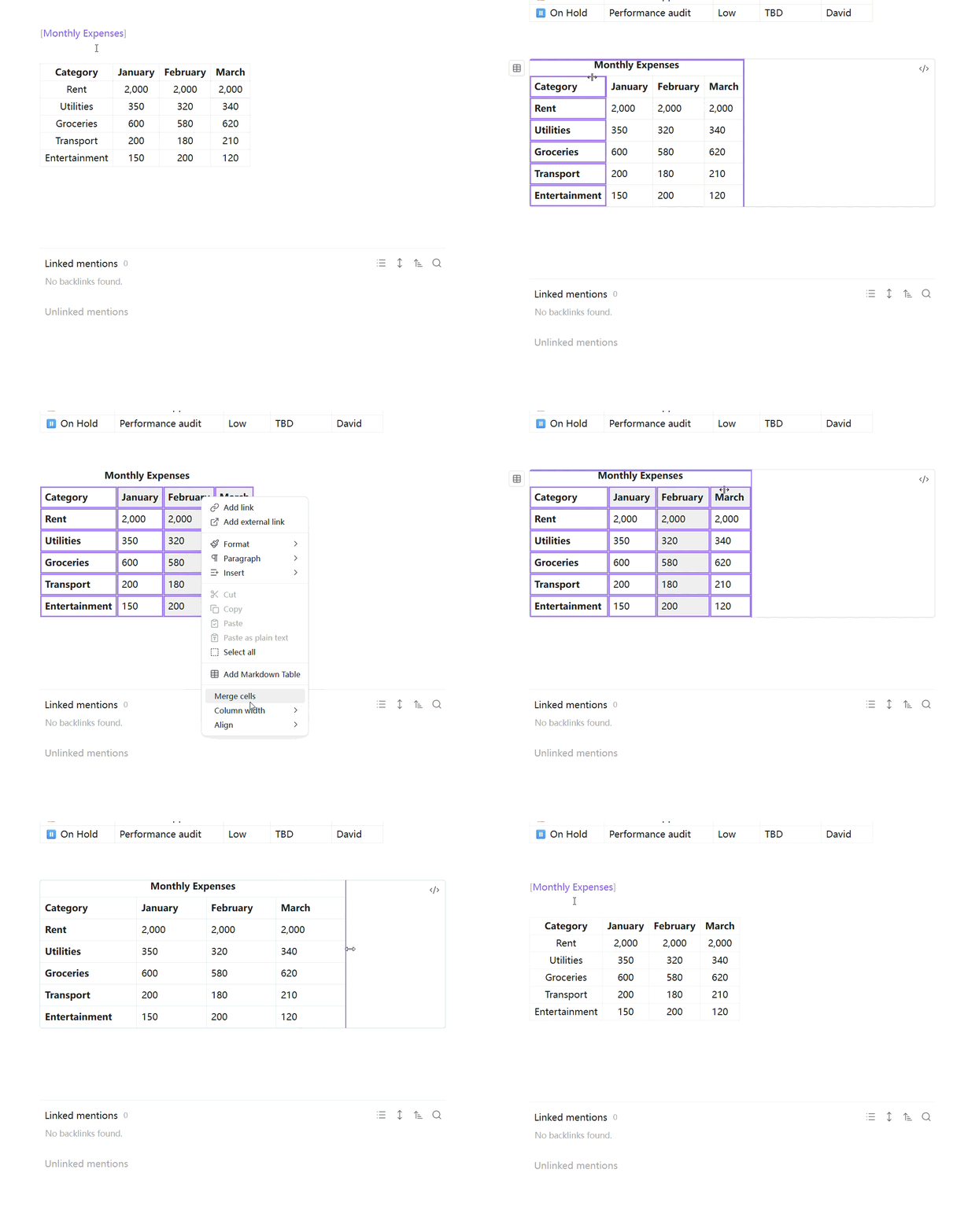
Features
- Table Headers: Support for header rows and header columns
- Cell Merging: Merge cells horizontally and vertically
- Column Resizing: Drag to resize columns, auto-fit, and equalize column widths
- Table Captions: Add captions above tables
- Formula Support: Basic formula support in table cells
- Multiline Cells: Support for newlines within cells
- Alignment Options: Horizontal and vertical alignment for cells
- Context Menu: Right-click context menu for table operations
- Preview Mode Support: All features work in Obsidian's preview mode
Installation
- Download the latest release from GitHub
- Copy
main.js,manifest.json, andstyles.cssto your vault:VaultFolder/.obsidian/plugins/html-tables/ - Enable the plugin in Settings → Community plugins
Usage
Basic Usage
The plugin automatically enhances tables in preview mode. Simply create a standard markdown table:
| Header 1 | Header 2 | Header 3 |
|----------|----------|----------|
| Cell 1   | Cell 2   | Cell 3   |
| Cell 4   | Cell 5   | Cell 6   |
Table Captions
Add a caption by placing bracket text in a paragraph before your table:
[My Table Caption]

| Header 1 | Header 2 |
|----------|----------|
| Cell 1   | Cell 2   |
Floating Button
Hover over any table to reveal a floating action button. Click it to access:
- Convert between Markdown and HTML format
- Toggle Header Row
- Toggle Header Column
- Add Caption
- Auto-fit / Equalize Column Width
Context Menu
Right-click on any table to access:
- Merge Cells
- Unmerge Cells
- Auto-fit / Equalize Column Width
- Horizontal / Vertical Alignment
Column Resizing
- Drag to resize: Hover over the right edge of a header cell and drag to resize
- Double-click to auto-fit: Double-click the resize handle to auto-fit the column width
- Equal column widths: Use the context menu to make all columns equal width
Formula Support
Use formulas in table cells by starting with =:
| Value 1 | Value 2 | Sum |
|---------|---------|-----|
| 10      | 20      | =10+20 |
Multiline Cells
Use \n for newlines within cells:
| Description |
|-------------|
| Line 1\nLine 2 |
Settings
- Enable advanced tables: Enable/disable all advanced features
- Enable header row: Automatically format the first row as a header
- Enable header column: Automatically format the first column as a header
- Enable cell merging: Allow merging cells in tables
- Enable formula support: Support formulas in table cells (starting with =)
- Enable newline in cells: Support newlines in table cells using \n
- Enable table caption: Support table captions above the table
- Default horizontal alignment: Default horizontal alignment for table cells
- Default vertical alignment: Default vertical alignment for table cells
Examples
Complete Example
[Quarterly Sales Report]

| Product | Q1 | Q2 | Q3 | Q4 | Total |
|---------|----|----|----|----|-------|
| Widget A | 100 | 150 | 200 | 250 | =100+150+200+250 |
| Widget B | 80 | 120 | 160 | 200 | =80+120+160+200 |
| Widget C | 50 | 75 | 100 | 125 | =50+75+100+125 |
Table with Multiline Cells
| Feature | Description |
|---------|-------------|
| Header Rows | Automatically format the first row as a header\nwith bold text and centered alignment |
| Header Columns | Automatically format the first column as a header\nwith bold text and centered alignment |
Table with Alignment
| Left Aligned | Center Aligned | Right Aligned |
|:-------------|:--------------:|--------------:|
| Text | Text | Text |
| More text | More text | More text |
Development
- Clone this repository
- Run
bun installto install dependencies - Run
bun run devto start development with hot reload - Run
bun run buildto build for production
Contributing
Contributions are welcome! Please feel free to submit a Pull Request.
License
BSD-0-Clause License