
README file from
GithubHomePulse
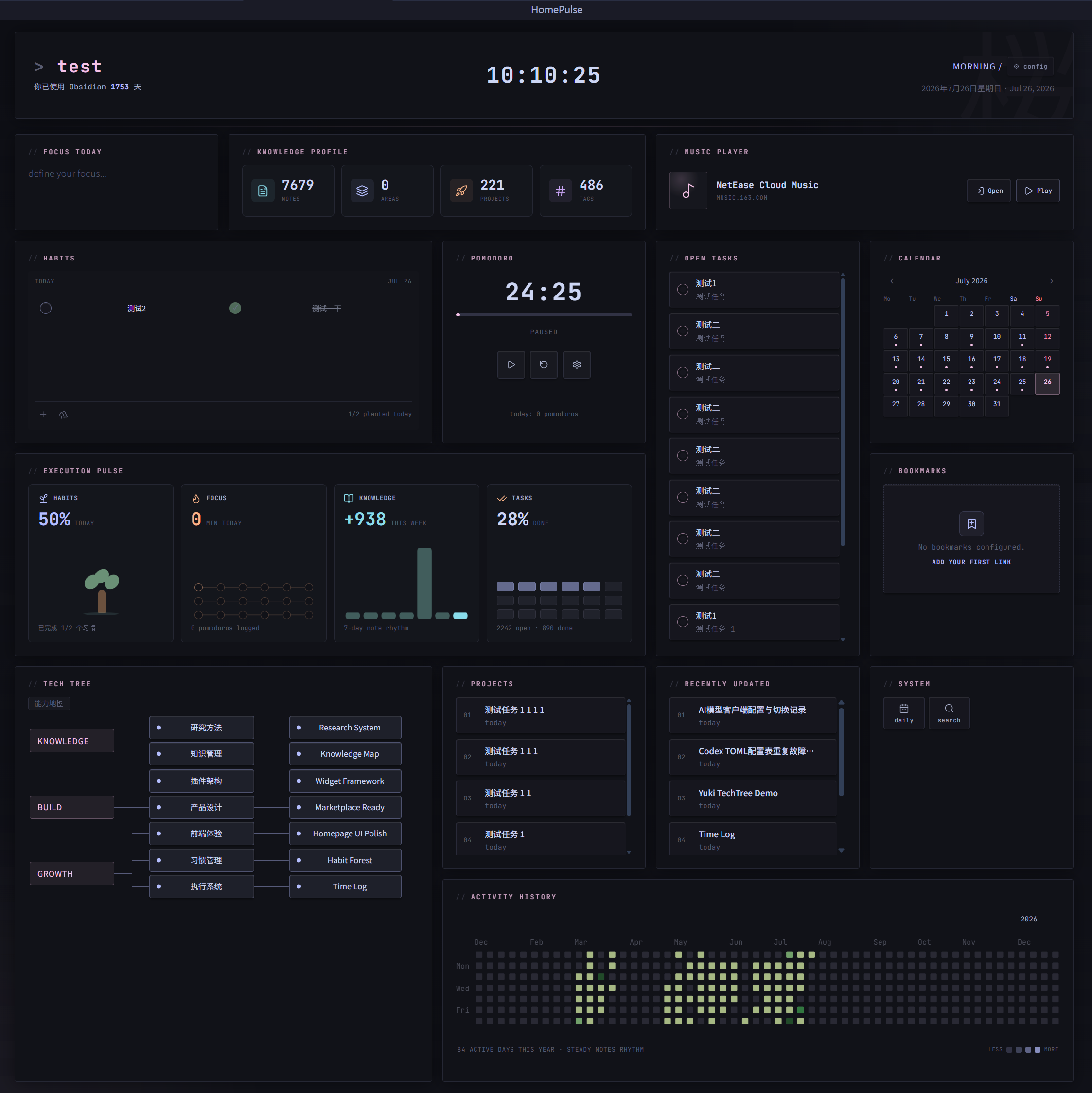
Turn your Obsidian homepage into a chain: Direction → Action → Investment → Accumulation → Capability.
It helps you see: what is moving forward, where your time is going, and which projects and capabilities are taking shape.
It connects your notes, tasks, focus time, and capability map, so the first thing you see when you open Obsidian is what actually matters.
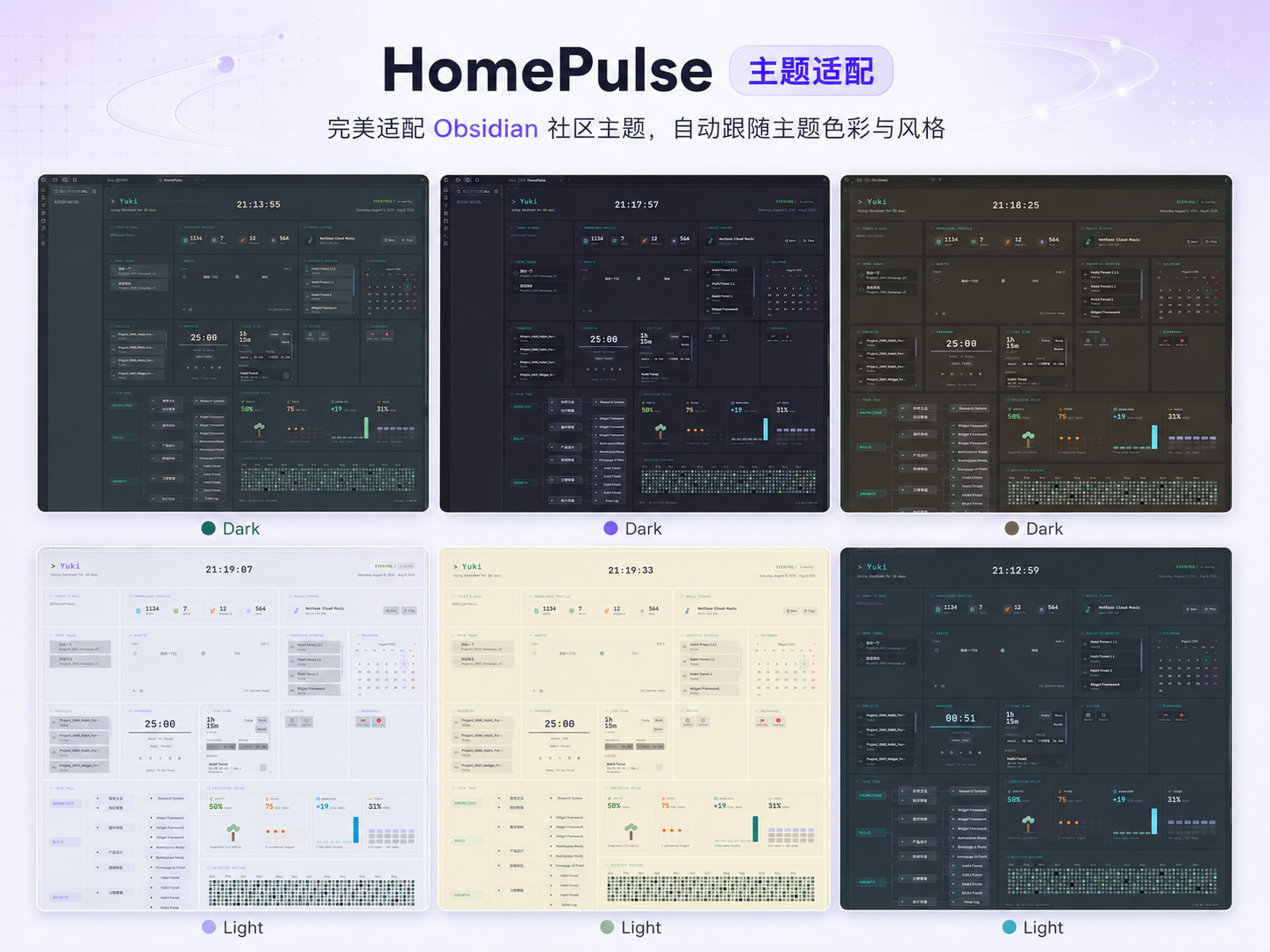
Theme support
HomePulse supports both dark and light Obsidian themes. It follows the theme background, text hierarchy, and accent color, while still allowing an optional custom accent color. The preview below shows the homepage across multiple dark and light themes.
Main Features
- First-run setup wizard: Configure the homepage name, project folder, Area folder, and default widgets on first launch — get up and running in minutes.
- Homepage view: Use a dedicated Obsidian view that can be pinned as a homepage tab and opened automatically on startup.
- Local first: Core data comes from local Markdown, frontmatter, task checkboxes, file modification times, and the plugin data file. Nothing is uploaded anywhere.
- Editable grid layout: Drag, resize, and arrange widgets in multiple columns. The layout compacts automatically for narrower screens while editing retains the configured column count.
- English and Chinese UI: Switch between English and Simplified Chinese in HomePulse settings. The homepage, widgets, modals, settings pages, and first-run wizard update immediately.
- Theme-aware surfaces: Supports both dark and light Obsidian themes, following their background and accent colors by default, with an optional custom accent color.
The homepage editing toolbar includes:
- Header settings: Configure the username, signature, homepage lock, Obsidian start date, and theme accent color
- Add widget: Add widgets
- Manage layouts: Save, load, and delete named layouts, set their column counts, and switch between device or usage scenarios
Widgets
| Widget | Description |
|---|---|
| Today's goal | Daily focus input — write one thing you want to move forward at the start of the day |
| Projects | Active projects from configured folders, tags, and filename prefixes |
| Tasks | Tasks aggregated from Markdown checkboxes |
| Calendar | Built-in calendar view |
| Habits | Habit tracking with streak display |
| Pomodoro | Pomodoro timer that attributes focus time to a Project, Area, Task Pool, or Quick target and stores it in the local TimeLog |
| Music Player | Opens a configured music service login or playback page |
| Bookmarks | Quick bookmarks using label|url entries or direct URL lines |
| System | Commands and Daily Note shortcuts |
| Activity History | Activity heatmap based on vault file modification times |
| Tech Tree | Capability map auto-generated from Value → Area → Project relationships, with no separate metadata file to maintain |
| Execution Pulse | Recent execution status across habits, Focus, knowledge growth, and tasks |
| Knowledge Profile | Overview of notes, Areas, projects, tags, and other knowledge assets |
| Recent Notes | Recently updated notes |
Installation
From Obsidian Community Plugins
- Open Obsidian → Settings → Community plugins
- Search for HomePulse
- Install and enable it
Manual Installation
Place the plugin files in:
.obsidian/plugins/homepulse/
Then enable HomePulse under Settings → Community plugins.
Time Flow
HomePulse includes a local TimeLog layer that does not depend on external services.
- Completed Pomodoro focus time can be attributed to a Project, Area, Task Pool, or Quick target.
- Time can be entered manually from the Pomodoro widget.
- Recent TimeLog entries can be reviewed and deleted.
- When TimeLog data exists, Execution Pulse uses aggregated time for its Focus metric.
- Activity History remains a file-activity heatmap and does not manage TimeLog records.
Dependencies and Privacy
HomePulse does not require other Obsidian community plugins. Dashboard data is read primarily from local Markdown files, frontmatter, task checkboxes, and file modification times.
| Plugin | Requirement | When it is used |
|---|---|---|
| Daily Notes | Optional core plugin | Needed only when a System item uses the daily-note action; without it, only that button is unavailable. |
| QuickAdd | Optional community plugin | Needed only when a System widget button is configured to run a QuickAdd command. |
| cMenu | Not required | HomePulse does not depend on cMenu. |
Configuration
Path Configuration
The Project folder and Area folder from the first-run setup wizard are used as global defaults.
- Projects, Tasks, Knowledge Profile, and Pomodoro project targets inherit the setup Project folder when their widget-level folder setting is left blank.
- Tech Tree inherits the global Area / Project settings when its widget-level paths are left blank.
- Paths can be vault-relative, such as
Projects, or absolute paths inside the current vault, such asD:/Vault/Projects. - The Task Pool file also supports either a vault-relative path or an absolute file path inside the current vault.
Tech Tree Metadata
Area notes are discovered from the configured Area folder. Notes with a value/* tag are included in the capability map; type: area is optional:
tags:
  - value/understanding-the-world
Projects link to Areas through frontmatter:
area:
  - "[[20_Areas/Area_Learning|Learning]]"
tags: [type/project, status/ing]
Daily notes, task files, and single-output notes are excluded from the capability map.
Time Flow Targets
- Project targets come from project notes and use the project title as a stable target id.
- If a project note links to an Area in frontmatter, its time records can be aggregated into that Area.
- Area targets come from Area notes.
- Task Pool targets point to a configured Markdown file and provide loose task-pool context rather than tracking individual checkboxes.
- Quick targets can be entered directly for time that does not belong to a known Project, Area, or Task Pool.
Development
npm install
npm run dev        # watch + dev build
npm run check      # type-check
npm run smoke      # smoke test
npm run build      # production build
Credits
- Visual design inspired by Dashboard-Komorebi.css (Komorebi / Catppuccin style) by InlitX. See UI Credits for full attribution.
Roadmap
- Draggable, resizable grid layout
- Widget system (Focus, Projects, Tasks, Calendar, Habits, Pomodoro, Music Player, Bookmarks, System, Activity History, Tech Tree, Execution Pulse, Knowledge Profile, Recent Notes)
- First-run setup wizard
- Time Flow MVP with Pomodoro attribution, manual entries, and local log deletion
- Custom theme colors
- Obsidian dark / light theme background and accent adaptation
- Full English and Chinese interface switching, with English as the default
- Enhanced widget configuration
- Capability Growth based on aggregated time records
License
MIT License. See LICENSE.