
README file from
GithubEnglish | 中文
Hide Empty Headings
Automatically hide headings that have no content below them in Obsidian's reading mode.
自动隐藏 Obsidian 阅读模式下没有内容的标题。
Features / 功能
- Auto-hide: Headings with no content beneath them are hidden in reading mode
- Live update: Triggers automatically when switching between notes
- Zero config: Works out of the box, no settings needed
- 自动隐藏阅读模式下无内容的标题
- 切换笔记时自动触发
- 安装启用即用,无需配置
Installation / 安装
From Obsidian Community Plugins (Recommended / 推荐)
- Open Obsidian Settings → Community Plugins → Browse
- Search for "Hide Empty Headings"
- Click Install → Enable
Manual / 手动安装
- Download the latest release from GitHub Releases
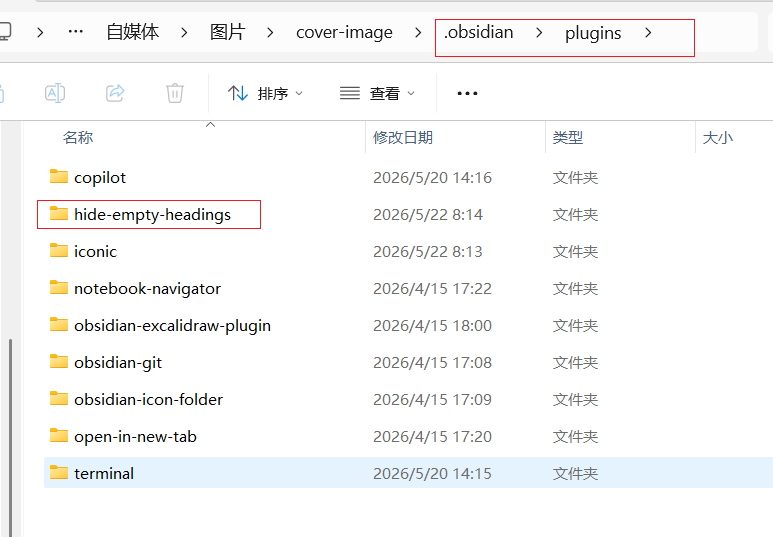
- Extract to
.obsidian/plugins/hide-empty-headings/ - Enable the plugin in Obsidian Settings → Community Plugins
- 从 GitHub Releases 下载最新版本
- 解压到
.obsidian/plugins/hide-empty-headings/ - 在 Obsidian 设置 → 第三方插件 中启用
Usage / 使用
No configuration required. After enabling the plugin, simply open any note in reading mode — empty headings will be hidden automatically.
安装启用后无需配置,打开任意笔记阅读模式即自动生效。
How it works / 原理
The plugin checks each heading in reading mode: if the heading has no content (text, images, or other elements) between it and the next heading, it gets hidden.
插件检测阅读模式下每个标题:如果该标题到下一个标题之间没有内容(文字、图片等元素),则自动隐藏该标题。
Author / 作者
醒醒 — Full-stack programmer, independent developer.
📧 Contact / 联系:[email protected]