
README file from
GithubHabits — habit tracker for Obsidian
Build streaks. Log daily habits. Watch your progress with charts, heatmaps, and printable reports — all stored as plain Markdown notes in your vault.




✨ Features at a glance
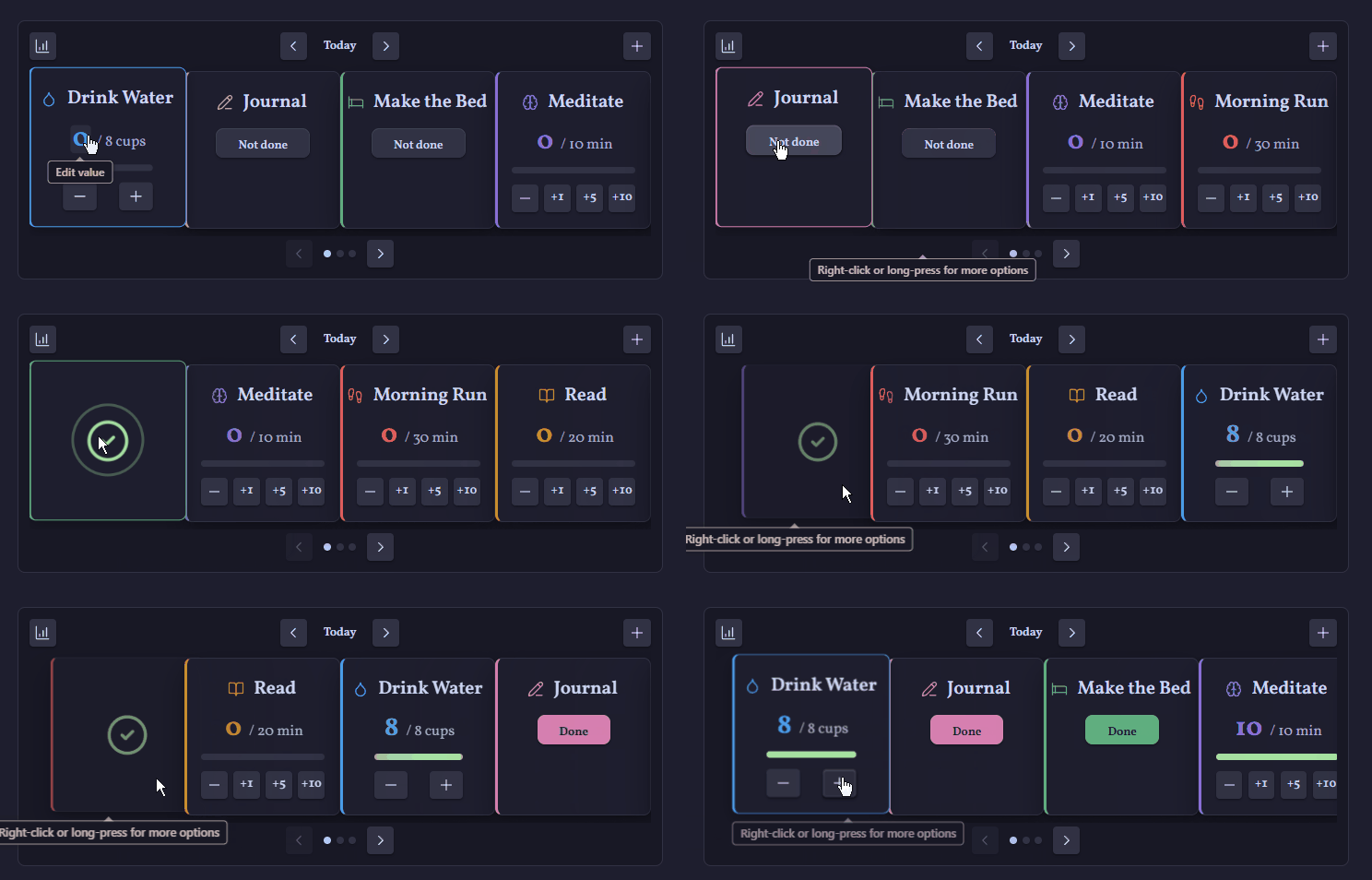
- 🎠 Carousel dashboard — log your habits from any note with a
habitscode block, with satisfying completion animations - ✅ Four habit types — done/not-done, counted (8 cups of water, or 1.5 litres in 0.25 steps), timed (30 minutes of exercise, with +1/+5/+10 quick buttons), and note (write in a per-day note)
- 🗓️ Flexible schedules — daily, weekly on one or several weekdays (Mon/Wed/Fri), monthly, or every N days (alternate-day medication); non-daily habits appear only on their due day, and streaks count due days, not calendar days
- 🔥 Streaks and statistics — current and best streaks, completion rates, perfect days, weekly and monthly goals, per-habit heatmaps over the week, month, or any custom date range
- 📊 Charts on every habit page — 30-day activity and 12-week trend charts rendered in your theme's colours
- 📋 Habits overview table — a
habits-tablecode block lists every active habit with its schedule and completed/due counts for the current week and the last three months - 📄 Printable PDF reports — pick your metrics, date range, and layout with a live A4 preview
- 🎯 At least or at most — build a habit by reaching a target (at least 1.5 litres of water), or break one by staying within a limit (at most 2 coffees, or no smoking at all), with quiet streaks for every clean day
- 📝 Note habits (experimental) — a Write/Open card backed by a per-day note, completed by a character count, a flexible checklist requirement, or both, with a fail keyword to flag a deliberate slip and Templater support for the note it creates
- ✨ AI summaries (experimental) — on-demand feedback and advice on your stats, on screen and in PDF reports, using your own AI service (including free and fully local options)
- 🔔 Reschedule missed habits (experimental) — a badged notification button surfaces missed due days so you can move one onto a different day, past or future, without ever risking a double entry
- 📌 Sidebar quick-log panel — check off today's habits from anywhere, sized for narrow panes
- ⏸️ Pause without penalty — ill or travelling? Paused days never break streaks or drag down your stats
- 🚫 Fail, skip or snooze for the day — already know a habit isn't happening today? Close it out and get it off your list, so you can focus on the rest
- 💬 Per-day comments with tags and links — flip any card over to jot down why a day went the way it did, with
#tagand[[note]]autocomplete; comments live in the note body, so Obsidian indexes them against the day they belong to - 📅 Daily-note aware — a dashboard inside
2026-07-01.mdshows that day's habits automatically - 📱 Mobile friendly — responsive cards, long-press menus, and a configurable mobile layout
- 🌍 In your language — available in English, Spanish, French, German, Japanese, Korean, and Simplified Chinese
- 🎨 Theme native — every colour comes from your theme; custom accents and icons per habit
📥 Installation
Habits is available in the community plugin browser: open Settings → Community plugins → Browse, search for "Habits", then install and enable. (BRAT and manual installation from the release assets work too.)
🚀 Quick start
-
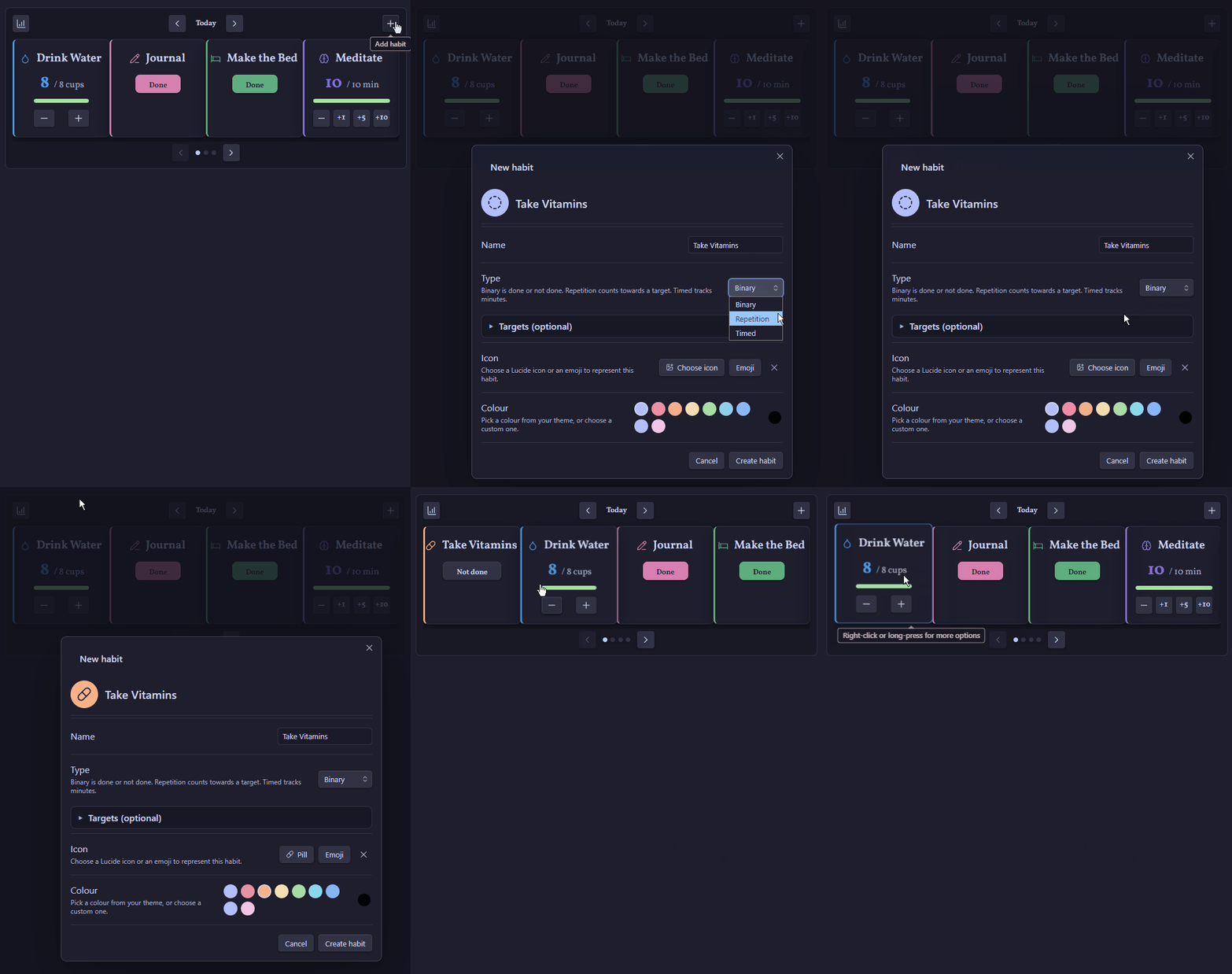
Run the command Habits: Create habit and define your first habit.
-
Run Habits: Insert dashboard in any note (your homepage, or your daily-note template) to place the tracker:
```habits ``` -
Log your progress from the dashboard, or open the sidebar panel (ribbon icon or Habits: Open panel) to tick things off as you go.
📓 Your data stays yours
Each habit is a single Markdown note in a folder of your choice (default: Habits). The frontmatter defines the habit and stores one value per day, and any comments you write sit in the note body — readable, portable, and future-proof:
---
habit: true
type: repetition
target: 8
unit: cups
icon: droplet
color: "#7c6cff"
startDate: 2026-07-01
weeklyTarget: 5
records:
  2026-07-01: 5
pauses:
  - start: 2026-06-10
    end: 2026-06-14
---

%%habits-log%%
- **2026-07-01** — Managed all eight glasses before lunch! #hydration
%%/habits-log%%
No databases, no external services — delete the plugin and your history is still right there in your notes.
🗓️ Daily, weekly, monthly, and every-N-days habits
Every habit has a frequency, chosen when you create or edit it:
- Daily — due every day (the default).
- Weekly — due on the weekdays you pick, one or several (a gym habit on Mon/Wed/Fri is one habit, one streak). The card only appears on those days. A single day is stored as
weekday: 5in frontmatter; several days asweekdays: [1, 3, 5](JavaScriptgetDaynumbers,0= Sunday). - Monthly — due once a month on the day you pick. Months shorter than the chosen day fall due on their last day, so the 31st always lands on the final day of the month (28th or 29th in February, 30th in April, and so on) — you never miss a month.
- Every N days — due every N days counted from the habit's start date, so an alternate-day schedule (N = 2) stays put even when you miss a day — just like a prescription. Stored as
frequency: intervalwithintervalDays: 2in frontmatter; hand-written notes without astartDateanchor on their earliest record instead. - Weekly (any day) / Monthly (any day) — a target number of times per week or month, whichever days you like — kayaking once a week, cleaning the room twice a week, no fixed day required. Unlike the other frequencies the card shows up every day so you can log it whenever it happens; it keeps reading "done" for the rest of the period once the quota is met, however it was split across days. Streaks count consecutive weeks or months where the quota was reached, not days. Stored as
frequency: flexibleWeeklyorflexibleMonthly, withtargetholding the "how many times." Has no planned time of day (it doesn't fit "sometime this week") and isn't offered for note habits.
Any daily, weekly, monthly, or every-N-days habit can also carry one or more optional times of day (time: "21:00" in frontmatter for one, times: ["13:30", "21:30"] for several — the modal has a time picker with an add button). They are purely informational — shown on the habit's card next to the schedule (e.g. "Every other day · 9:00 PM", or "1:30 PM, 9:30 PM" for twice-daily medication) — and never affect when a habit is due. Pair several times with a counted habit (target: 2) to track a twice-a-day routine as one habit.
Non-daily cards surface only on their due dates in both the dashboard and the sidebar panel (the flexible "any day" frequencies are the exception — they show every day), so your list stays focused on what's actually due. Their streaks and stats count due periods, not calendar days: a Sunday-only habit's streak is the number of consecutive weeks you completed it, a Mon/Wed/Fri habit's is consecutive due days, a monthly habit's is consecutive months, and a "twice a week, any day" habit's is consecutive weeks its quota was met. Days a habit isn't due don't count against its completion rate. To log a due date you missed, use the dashboard's date arrows to step back to it — or, with Reschedule missed habits turned on, see Rescheduling missed habits below.
The charts on a non-daily habit's page adapt too: instead of a 30-day grid, the activity chart plots each recent due date (labelled with the date it lands on), and a rolling completion-rate line shows the trend across periods. The summary tiles relabel accordingly — "Weeks completed" or "Months completed" rather than "Days completed".
🎯 At least or at most
Every habit except note habits has a Goal, chosen when you create or edit it:
- At least (reach a target): the default, for habits you're building. Drink at least 1.5 litres of water, read 20 pages, exercise for 30 minutes.
- At most (stay within a limit): for habits you're cutting down or quitting. At most 2 hours of gaming, no more than 2 coffees, or no smoking at all (a limit of 0). Reaching the limit exactly still counts as within it, and an unlogged due day or period is clean.
- Done/not-done limit habits get two buttons: Clean and Slipped. An unlogged day already counts as clean — silence is success.
- Counted and timed limit habits log consumption against the limit; the progress bar fills toward the limit and turns red past it.
- Streaks count consecutive days within the limit, and only from the habit's start date — the years before you started quitting don't inflate anything.
Limit habits have the same Frequency options as target habits. Daily, weekly on selected weekdays, monthly on a selected date, and every N days apply the limit separately on each due day. Weekly (any day) and Monthly (any day) apply the limit to the cumulative total across the calendar week (Monday–Sunday) or month. For example, a timed habit with a weekly limit of 120 allows at most 120 minutes across the week. You can keep logging after exceeding the limit; edit or subtract records on the day they occurred to correct them. Binary limits always allow zero slips, including in cumulative modes. Existing habits remain daily unless you change their frequency.
Decimal amounts
Counted habits accept decimals, so a target can be 1.5 litres and you can log 0.75. Set a Step size to choose how much each + and − press changes the value: 0.25 for litres, 0.5 for kilometres, or the default 1. You can also click the value on a card or panel row and type any amount. In frontmatter:
type: repetition
target: 1.5
unit: litres
step: 0.25
Timed habits stay in whole minutes.
🎠 The dashboard
Cards for each habit sit in a swipeable carousel. Completing a habit plays a celebration animation and the card glides to the back of the queue, keeping what's left front and centre (prefer it quiet? turn off Completion animations in settings). Click a card's name to open its note; right-click (or long-press on mobile) for editing, pausing, stopping, or removing.
Embedded in a daily note? The dashboard follows that note's date, so browsing yesterday's note shows yesterday's habits. The dashboard also live-updates whenever your habit notes or settings change — even from another pane or device sync.
Every card also has a comment flap along its bottom edge. Click it and the card flips over to a per-day comment box — perfect for noting why a habit was missed (or smashed). Days with a comment show an accent-tinted speech bubble, and comments follow the selected date, so each day keeps its own note. See comments for tags and links.
📌 The sidebar panel
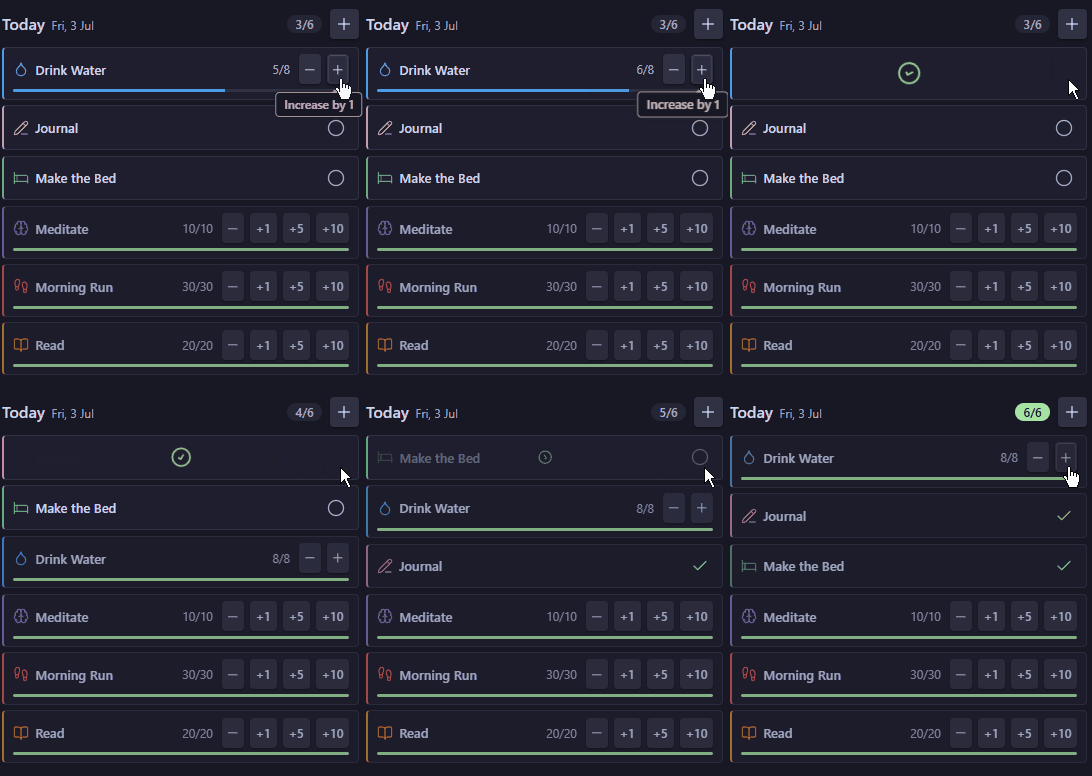
Open the panel from the ribbon icon or the Open panel command to log today's habits from anywhere: one compact row per habit with tap-to-check toggles, steppers, and slim progress bars, plus a running done/total count for the day. Right-click (or long-press) a row for the same edit/pause options as a dashboard card.
💬 Comments, tags, and links
Flip a card over and the back is a full note-taking surface for that day. Type # and your vault's tags are suggested; type [[ and your notes are. Both are real Obsidian objects once saved — a tag opens a search filtered to it, a link opens the note (⌘/Ctrl-click for a new pane) and shows a hover preview, and links to notes that don't exist yet are greyed out just as they are anywhere else.
Legs felt heavy but got it done #fitness — following [[Marathon Plan]] week 4
Comments are stored as a list in the habit note's body, inside a pair of %%habits-log%% markers that stay invisible in reading view:
%%habits-log%%
- **2026-08-06** — Long run, felt strong #fitness
- **2026-08-05** — Skipped, bad night's sleep #recovery
%%/habits-log%%
This is what makes the tags and links per day rather than per habit. Obsidian only indexes tags from a note's body and its tags property — never from a nested frontmatter value — so storing each comment on its own line means searching #fitness lands you on the day, and [[Marathon Plan]]'s backlinks pane shows the dated line with its context. It also means you can edit a comment straight in the note and the card picks up the change.
Upgrading from an earlier version? Nothing to do. Comments still in frontmatter are read as before, and a note moves its comments into the body the next time you edit one of them. To convert everything in one go, run Move day comments into note bodies.
📈 Stats and reports
The chart button opens the stats view: completion summary tiles, streaks, perfect days, goal progress, and a heatmap per habit. Three tabs pick the period — Weekly and Monthly (rolling or calendar), plus Custom with from/to date pickers for any range up to a year.
Heatmaps are honest about when a habit began: days before its start date render as neutral dotted cells (they count neither for nor against you), and the first tracked day is marked with a small play icon — hover it to see the start date.
Tracking a lot of habits? Turn on Stats page carousel in settings to split the per-habit rows into pages you can flip through instead of one long list.
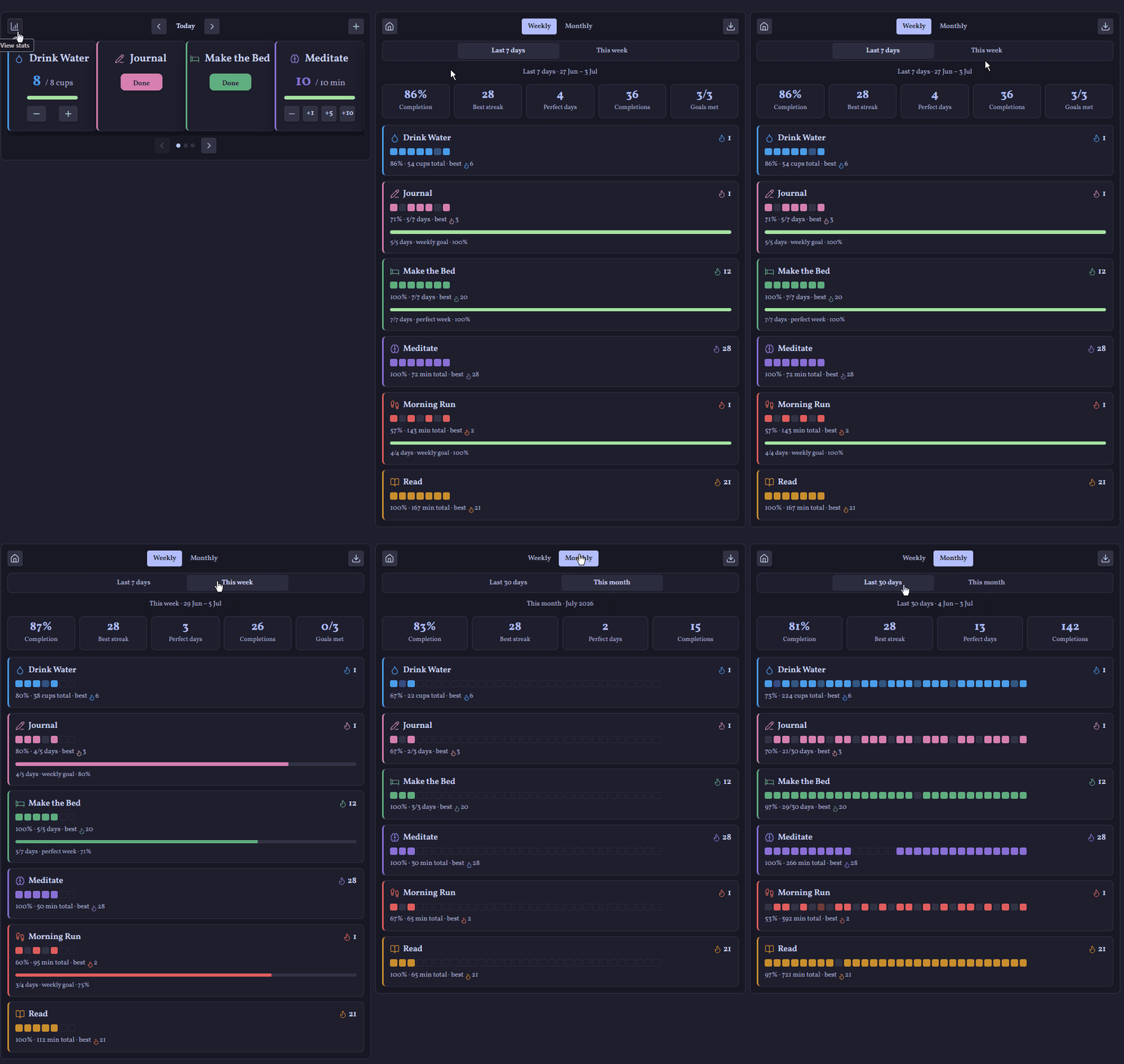
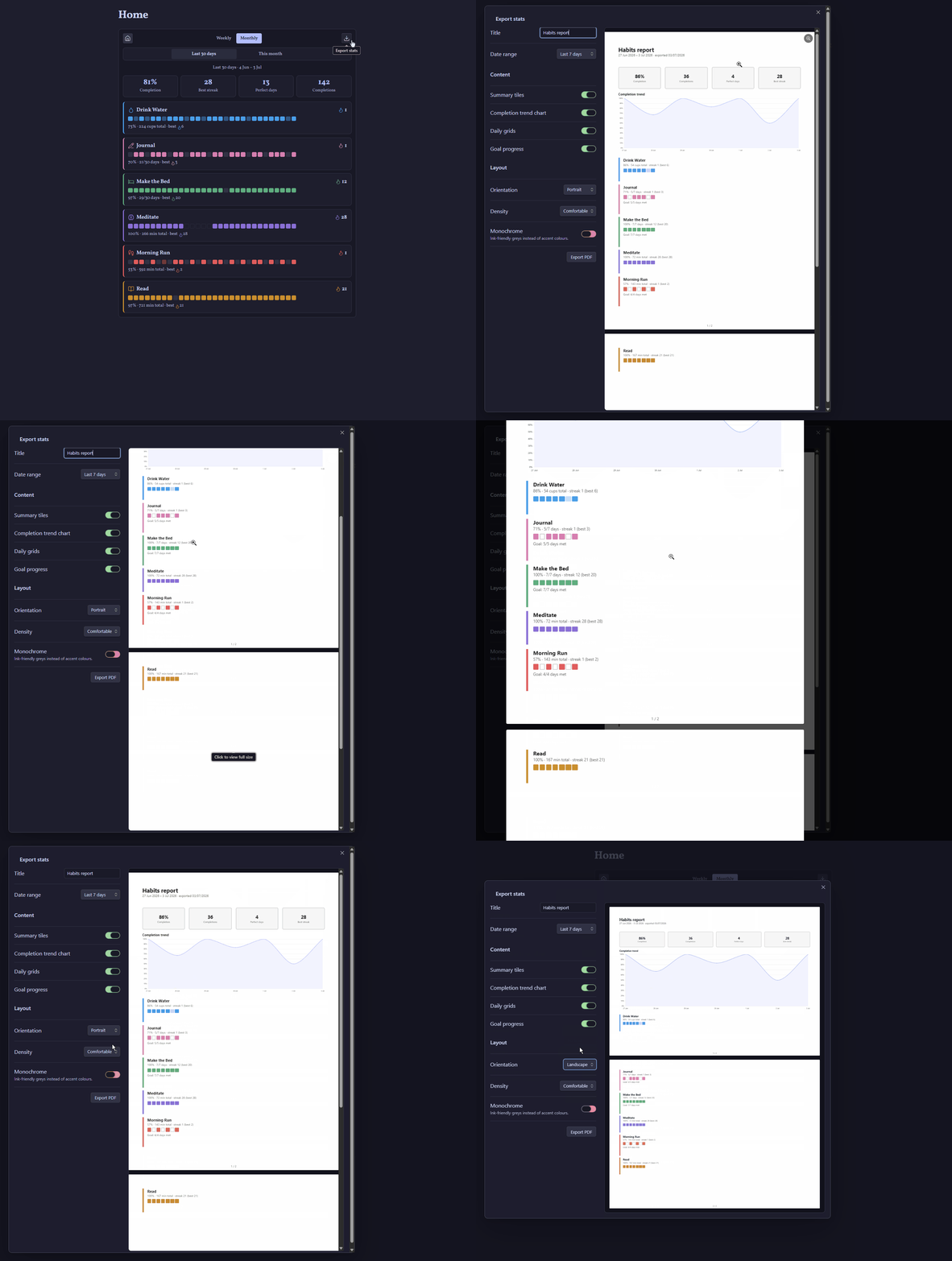
From there, the download button opens the PDF export dialog:
- Metrics — summary tiles, completion trend chart, daily grids, goal progress, comments — plus an AI summary if you've enabled that feature
- Range — this week, last 7 days, this month, last 30 days, or any custom range up to 92 days
- Layout — portrait or landscape, comfortable or compact, monochrome for ink-friendly printing
- Live preview — a to-scale A4 preview updates as you tweak; click it to inspect at full size. What you see is exactly what prints.
Compact habit logger
Choose Settings → Habits → Dashboard layout → Compact list for a full-width list with one coloured row per habit. Existing habits blocks switch immediately; the default carousel layout is unchanged. Add a dashboard using Insert dashboard or an empty block:
The header offers statistics, previous/next day navigation, and habit creation. Click the date label to return to today. Habit names open their backing notes. Binary habits have a round toggle; counted habits use −/+ steps of their Step size (1 by default, or a decimal such as 0.25) and timed habits use steps of 5 minutes. Values include the habit's unit. Flexible weekly/monthly habits show the cumulative total through the selected day, while the buttons change only that day's record. A decrement cannot remove records from other days.
Right-click a habit row (or long-press on mobile) to fail, skip or snooze it for the day, open its note, edit it, pause/resume tracking, stop tracking, or remove it. Habits you fail, skip or snooze leave the list and appear under a "hidden for today" link with an Undo button, just like the card dashboard. Stopping and removing a habit require the same confirmation as the card dashboard.
The view follows the dashboard's sort and group settings, keeps rows in place while logging, and respects schedules, start dates, pauses, limit goals, and the daily-note date setting. Note habits offer an open/create note button rather than manual counters. Changes from other panes and sync refresh the view automatically.
📋 The habits table
Drop a habits-table code block into any note (there's an Insert habits table command) for a compact overview of every active habit:
| Habit | Schedule | Today | This week | Aug | Jul | Jun |
|---|---|---|---|---|---|---|
| Take medicine | Every other day · 9:00 PM | ✅ Done | 3/3 | 4/5 | 15/15 | 14/16 |
| Gym | Every Mon, Wed, Fri · 6:30 AM | ◯ Not done | 2/2 | 4/4 | 13/13 | 12/13 |
Each count is completed due days / elapsed due days for the period — the current calendar week (Monday-first, like the stats view) and the current plus two previous calendar months. Only due days count: a Tuesday-only habit shows 4/4 in a four-Tuesday month, paused days are excluded, and periods before a habit existed show –. The Today column logs the day without leaving the table: a Done/Not done pill for binary habits (a slip toggle for limit habits), a compact stepper for counted and timed ones, and for note habits a button that opens (or creates) today's note — note habits are always completed by the note's own content, never by a value set here. Habits not due today show a dash. Rows are grouped like the dashboard and ordered by planned time within each group, so the table reads as your day's timeline — or turn off Group the habits table in settings for one flat time-ordered list. When Reschedule missed habits is on, a habit moved onto today gets a small calendar glyph next to its name, matching the dashboard and panel. The table live-updates as habit notes change.
⏰ Reminders
Habits with planned times can feed the community Reminder plugin. Turn on Write reminders for due habits in settings and the plugin maintains a small marked block — in today's daily note, or in one fixed note of your choosing — with one checklist line per planned time of every habit due that day:
- [ ] Physiotherapy (@2026-08-10 13:30)
- [x] Take medicine (@2026-08-10 21:00)
That's exactly the format the Reminder plugin scans, so each line becomes a real notification at its time. The sync runs both ways, and ticking a line is logging — check a reminder off in the note or from its notification and the habit's record, streaks, and counts update everywhere. Unticking un-logs it again.
A tick records the share of the day's goal that line represents, so you never have to open the dashboard to finish the job:
- Done/not-done habits are complete once every line is ticked. With several times, a partial tick is kept visually until then.
- Counted and timed habits log their target. Ticking off a 15-minute meditation writes 15 minutes; ticking off 8 cups of water writes 8. Where a habit has several planned times the goal is split between them — two of four ticks on a 30-minute habit records 15.
- A larger value logged in the dashboard survives while every line stays ticked, so reading for 40 minutes against a 20-minute target is never quietly rounded back down.
The block regenerates itself at midnight for the new day; days where nothing is due add nothing to the note. To pick where the block sits, plant the two marker lines (%% habits-reminders start %% / %% habits-reminders end %%) in your daily-note template — the plugin fills them in place and only appends to the end of notes that have no markers. Habits without planned times are simply left out — nothing changes unless you opt in.
📊 Habit pages
Every habit note can chart its own history with a habit-metrics code block (new habit notes include one automatically):
```habit-metrics
```
Streak tiles, an activity chart with target line, and a completion-rate trend — all in your theme's colours. Two extra tabs sit alongside the charts: Month for a calendar-style heatmap of the current month, and History for a GitHub-style heatmap spanning the last 6 months — both coloured in the habit's own accent. Days the habit isn't due (weekends for a weekday-only habit, most of the month for a monthly one) show as a faint "not due" cell rather than a false miss. The chosen tab is saved back onto the block, so it reopens the same way next time.
The block also works in any note: name a habit and its metrics render right there — perfect for journal entries, weekly reviews, or project pages. As you type after habits:, your habits are suggested automatically. The Insert habit metrics command writes out every field for you:
```habit-metrics
habits: Journal
view: charts
range: 12w
```
| Field | What it does |
|---|---|
habits: |
The habit to show, or several separated by commas to compare them. Leave it empty inside a habit note to show that note's own habit. (habit: still works too.) |
view: |
The tab a single habit opens on: charts, month or history. Saved automatically when you switch tabs. |
range: |
The timeframe when comparing habits: 4w, 12w (the default), 6m, 1y, or your own dates such as 2026-01-01 to 2026-03-31. Saved automatically when you pick one. |
Comparing habits
List several habits, separated by commas, to see how they develop together:
```habit-metrics
habits: Exercise, Meditate, Journal
```
At the top, choose the timeframe: 4 weeks, 12 weeks, 6 months, 1 year, or Custom to pick your own start and end dates. Everything below follows it:
- Table: each habit's current streak, best streak, and completion rate over the timeframe.
- Completion rate chart: one line per habit, so you can see whether habits rise and fall together. It plots a point per week, or per month for timeframes longer than a year. Weeks where a habit wasn't due, was paused or hadn't started yet are skipped rather than counted as 0%.
- Activity grid: one row per habit. Days where habits were done (or missed) together line up in the same column. Timeframes longer than about 3 months show a cell per week instead, shaded by that week's completion rate.
Each habit keeps its own colour; habits without one, or sharing one, get a distinct theme colour. Suggestions work for every name in the list, and habits already listed aren't suggested again. view: only applies to a single habit, and range: only to comparisons.
🔥 Whole-vault heatmap
Drop a habits-heatmap block on your homepage or daily note for one heatmap of every habit's combined completion — a day fades in as more of that day's habits get done, and lands fully opaque the moment it's a perfect day:
```habits-heatmap
```
Three tabs: This month (a calendar-style grid), Past 6 months and This year (GitHub-style week grids). Paused and not-yet-started habits are excluded the same way they are everywhere else, so a day only ever gets marked down for habits that were actually due. Add group: <name> to scope it to one group instead of every habit:
```habits-heatmap
group: Health
```
⏸️ Pausing and stopping
- Pause a habit when life gets in the way. Paused days are skipped entirely: streaks survive, completion rates ignore them, and the card waits dimmed at the back of the carousel until you resume.
- Stop tracking a habit you've outgrown. It leaves the dashboard and stats but keeps its note and full history, with a one-click resume in its metrics view.
- Remove deletes the habit's note (to your trash) — the only destructive action, and it asks first.
🚫 Fail, skip or snooze for the day
Sometimes you know in the morning that a habit isn't happening today: the weather is terrible, so no run. Rather than leaving it on your list all day, right-click its card (or long-press on mobile) and close it out:
- Fail for today: the day counts as a miss, exactly as if you hadn't done it. It's a miss even for a limit habit, and even if you'd already logged something. Failing a habit you've already reached the target for isn't offered.
- Skip for today: the day is set aside like a one-day pause, so it never counts for or against the habit and your streak survives. Unlike Pause, it ends on its own.
- Snooze…: hide the habit for 30 minutes, 1 hour, 3 hours, or until a time you pick. It comes back by itself, and snoozing never affects your stats. Handy when you don't know yet whether you'll run in the morning or the evening.
The habit leaves today's dashboard (card or compact layout) and sidebar panel. Underneath the list, a small "2 hidden for today" link expands to show what you closed, each with an Undo button. In the habits table the row stays, because its weekly and monthly counts are still useful, and the Today cell shows "Failed", "Skipped" or "Snoozed until…" instead. Click it to undo, or right-click the Today cell for the same Fail, Skip and Snooze options.
You can also fail or skip a different day: step the dashboard back (or forward) to it and use the same menu. Snooze is for today only.
Failed and skipped days are stored in the habit note's frontmatter, so they sync and stay with your history:
failed:
  - 2026-10-20
skipped:
  - 2026-10-22
A few details:
- Flexible habits ("2× a week, any day"): failing or skipping just takes the card off that day. One day can't fail a weekly quota, so the week is still judged on its total.
- A failed day isn't offered under Reschedule missed habits, since you decided it on purpose. A skipped day can't be missed in the first place.
- No reminder line is written for a habit that's failed for the day.
- On a habit's metrics heatmaps, a skipped day is drawn like a paused one, and a failed day as a miss, with "Skipped" or "Failed" in the tooltip.
- Snoozes are kept in the plugin's settings rather than the note, because they're short-lived.
🧪 Experimental features
Some features ship behind opt-in toggles under Settings → Habits → Experimental while they're being tested. They're off by default, and turning one off only hides it from menus — anything you created with it keeps working and keeps its meaning.
📝 Note habits
Track a habit by writing, not by tapping a button — journals, morning pages, work logs, anything that lives in a note. A note habit's card shows a Write button that creates that day's note and, once it exists, an Open button to jump back into it.
- Where notes live: a folder you choose (or a dedicated subfolder named after the habit, if you leave it blank), with a filename built from a Moment.js format (
YYYY-MM-DDby default —/in the format files notes into date subfolders, e.g.YYYY/MM-DD). - Templater: pick a template note and, if the Templater plugin is installed, it's expanded the same way Templater's own "new note from template" command would — dynamic dates, prompts, and all. Without Templater the template is copied as plain text instead.
- Completion, your choice per habit:
- Character count — done once the note (frontmatter aside) reaches a length you set.
- Checklist requirement — either every
- [ ]task ticked, or just some of them: set a minimum count so a list of alternatives (e.g. "Cardio" / "Weights" / "Rest day") completes the habit the moment any one of them is checked, without needing the rest. - Both — require the character count and the checklist requirement together.
- Fail keyword: name a word (e.g. "Slipped") and add it as a checklist item of its own; ticking that box forces the day to fail no matter what else is checked or written — a deliberate "I broke it today" flag on an otherwise flexible checklist.
- The card's progress updates on its own as you write — no need to reopen the dashboard. Streaks, weekly/monthly targets, the habits table, and PDF export all work the same as any other habit.
🔔 Rescheduling missed habits
Life happens — a bell button appears on the dashboard (bottom-right) and the sidebar panel header whenever a habit has an open, unlogged due day behind it, badged with how many. Click it to review them and move one onto a different day, instead of digging through the date-nav to fix it by hand.
- Pick a missed habit from the review list and choose a new day for it — past or future. The picker won't let you land on a day that habit is already due on its own, or one already claimed by another reschedule, so there's no way to create a double entry.
- The day it moves to takes over that due instance entirely: it counts toward streaks and stats there instead, and shows a small "Rescheduled from…" badge on its card so it's clear why it showed up. Its habit page marks the same day too — a ring around the cell on the Month/History heatmaps and a ring around the bar on the charts, both noted in the tooltip.
- Once moved, the original day quietly stops being due — it doesn't show up as a miss again.
- Not offered for limit habits (silence already means clean, so there's no "miss" to move), flexible weekly/monthly habits (already loggable on any day), or note habits (their value comes from the note itself, not a manually set one).
Still finding its shape — the frontmatter it writes (a reschedules list on the habit note) may change before this graduates out of experimental.
✨ AI summaries
An optional, bring-your-own-key coach: press Generate summary on any stats tab to get a short, plain-language review of your period — what's going well, what's slipping, and one or two concrete suggestions. The same summary can be added to PDF reports via a per-export toggle in the export dialog.
Works with any OpenAI-compatible service: OpenAI, OpenRouter, Groq, Google AI Studio, or fully local servers like Ollama and LM Studio (leave the API key blank for those). Configure the base URL, key, and model under the experimental toggle.
Privacy, by design:
- Nothing is ever sent automatically — only when you press the generate button (or opt in per export).
- Only aggregate stats are sent: habit names, rates, streaks, totals. Never your per-day records or comments.
- Your API key is stored locally in this vault's plugin data and sent only to the endpoint you configured.
- Summaries are cached, so revisiting a tab never repeats a request.
⌨️ Commands
| Command | Action |
|---|---|
| Create habit | Open the new-habit dialog |
| Insert dashboard | Insert a habits code block at the cursor |
| Insert habit metrics | Insert a habit-metrics code block at the cursor |
| Insert habits table | Insert a habits-table code block at the cursor |
| Insert habits heatmap | Insert a habits-heatmap code block at the cursor |
| Open panel | Open the sidebar quick-log panel |
| Move day comments into note bodies | Convert any comments still held in frontmatter in one pass |
⚙️ Settings
| Setting | Default | Description |
|---|---|---|
| Habits folder | Habits |
Where habit notes live (with folder autocomplete) |
| Follow daily note date | On | Dashboards in daily notes open on that note's date |
| Daily note date format | YYYY-MM-DD |
Moment.js format used to read the date from a daily note's name (e.g. YYYYMMDD) |
| Cards per view | 4 | Carousel cards shown at once on wide screens (1–4) |
| Cards per view on mobile | 2 | Carousel cards on phone-sized screens (1–2) |
| Comments on cards | On | Show the comment flap on dashboard cards |
| Completion animations | On | Celebration animations when logging; off logs instantly and quietly |
| Sort habits by | Name | Card order — including Planned time, which follows the day's timeline |
| Group the habits table | On | Group habits-table rows by habit group; off gives one flat time-ordered list |
| Stats page carousel | Off | Split the stats page's habit rows into flippable pages |
| Stats rows per page | 4 | Habits per stats page when the carousel is on (1–8) |
| Write reminders for due habits | Off | Maintain Reminder-plugin checklist lines for habits with planned times |
| Where to write reminders | Daily note | Today's daily note, or one fixed note |
| Reminder note path | Habit reminders.md |
Vault path used when writing to a fixed note |
| AI summaries | Off | (Experimental) AI feedback on stats tabs and PDF reports |
🛠️ Development
npm install     # install dependencies
npm run dev     # build and watch during development
npm run build   # type-check and produce a production build
npm run lint    # check against the official Obsidian plugin guidelines
npm run release # bump patch version, tag, and push (CI drafts the release)