
README file from
GithubGraph Type to Search
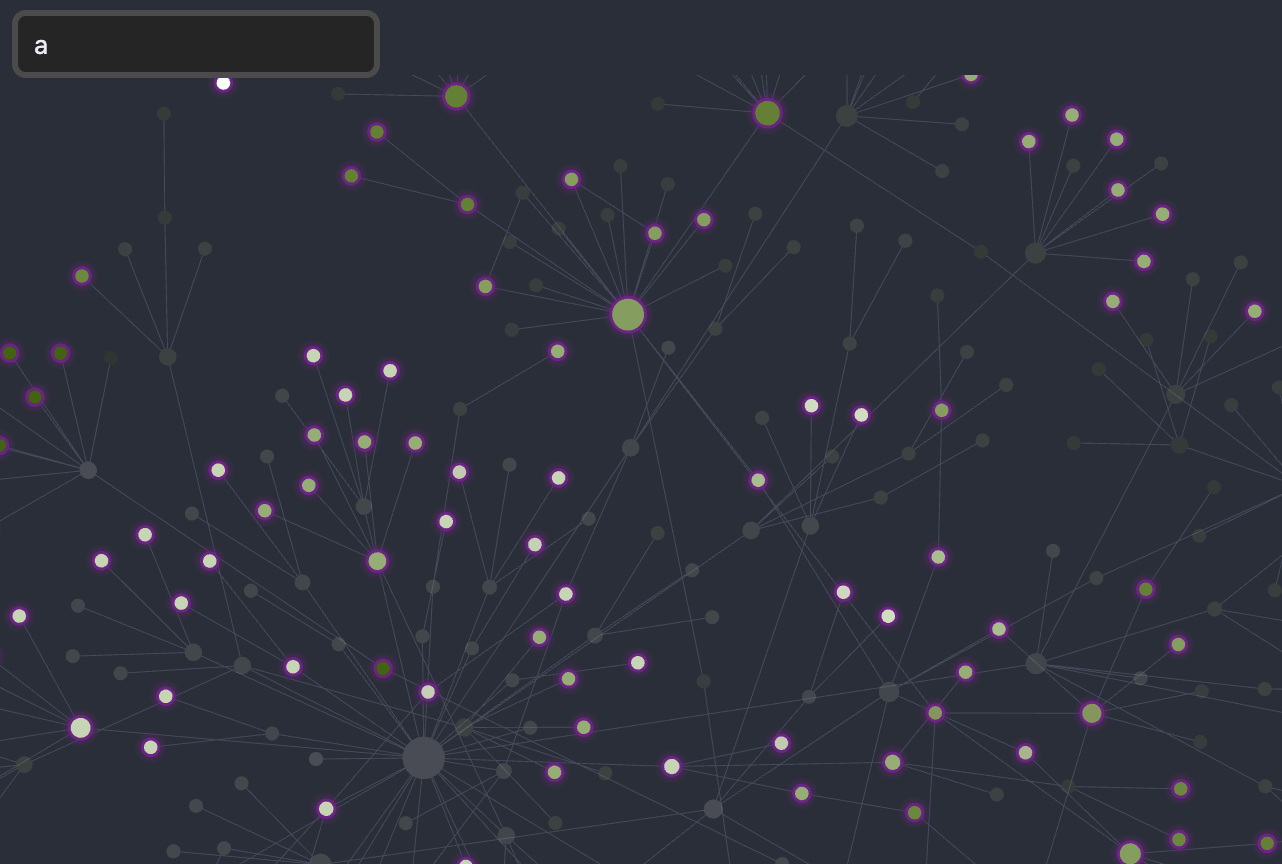
An Obsidian plugin that brings type-ahead search to the graph view. Just start typing while the graph is focused — no need to press Cmd/Ctrl+F or click into a search box first. Matching nodes get a highlight ring, and by default the whole graph stays on screen so you keep the surrounding context (you can switch to filtering instead).
Why this plugin exists
Obsidian's built-in graph search filters live as you type, but only after you focus its search box. This plugin removes that step and adds a visible ring around matching nodes so they stand out at a glance — optionally without hiding the rest of the graph, when you want to keep the surrounding context.
How it works
While a graph (or local graph) pane is active, the plugin shows a small bar pinned to the top-left and keeps it focused for you. Just start typing — anything you enter (including IME composition for Hangul / CJK, Backspace, and text selection) goes natively into the bar.
As the query changes, the plugin draws a soft glow ring around every node whose title contains the query (optionally pulsing), enlarges their titles if you like, and dims the non-matching nodes so the matches pop — a spotlight effect. The ring is drawn into the graph's own renderer (the same approach as the Graph Unread Highlight plugin), so it tracks pan, zoom and the simulation automatically and sits just outside each node.
By default the entire graph stays on screen and only the matches are ringed, so you keep the surrounding context. Turn off Keep all nodes visible to instead push the query into the graph's built-in search, hiding non-matching nodes (the surviving matches keep their ring).
Using a real, focused, visible input is what makes Korean and other IME input compose correctly: you can't redirect a composition that began while another element had focus, and a hidden host would draw the composition caret at its off-screen corner instead of where the text is. After you pan or click in the graph, focus is handed back to the bar on pointer-up so the next keystroke goes straight into the query.
To clear the query, press Esc or click the × button at the right edge of the bar. By default Cmd/Ctrl+F is also intercepted while a graph pane is active so it focuses this bar instead of opening Obsidian's native search (this can be turned off in settings).
Settings
- Ring color — color of the highlight ring (color picker; defaults to a vivid pink).
- Ring gap — how far the ring sits outside the node.
- Ring thickness — width of the ring stroke.
- Highlighted label size — size multiplier for matching node titles (1.0 = no change).
- Soft glow — draw the ring as a layered glow instead of a crisp stroke (on by default).
- Pulse — gently animate the ring so matches breathe (on by default).
- Dim non-matches — fade non-matching nodes so the matches stand out, spotlight-style (on by default).
- Dim strength — opacity of the dimmed non-matching nodes.
- Keep all nodes visible — don't hide non-matching nodes; keep the whole graph and only ring the matches (on by default). Turn off to filter the graph as you type instead.
- Intercept Cmd/Ctrl+F — while a graph pane is active, capture
Cmd/Ctrl+Fto focus this bar instead of opening Obsidian's native search (on by default). - Enable in local graph — also show the bar and highlight in the local graph pane (on by default).
Notes
This plugin draws into the graph view's internal renderer (PIXI) and uses its internal search component, neither of which is part of the public plugin API; they may change in future Obsidian versions. It is desktop-only.