
README file from
GithubGradient Text
An Obsidian plugin that paints your notes with gradient colors — headings, bold, italic, wikilinks, external links, and even normal text — using curated preset palettes or a full custom color picker.
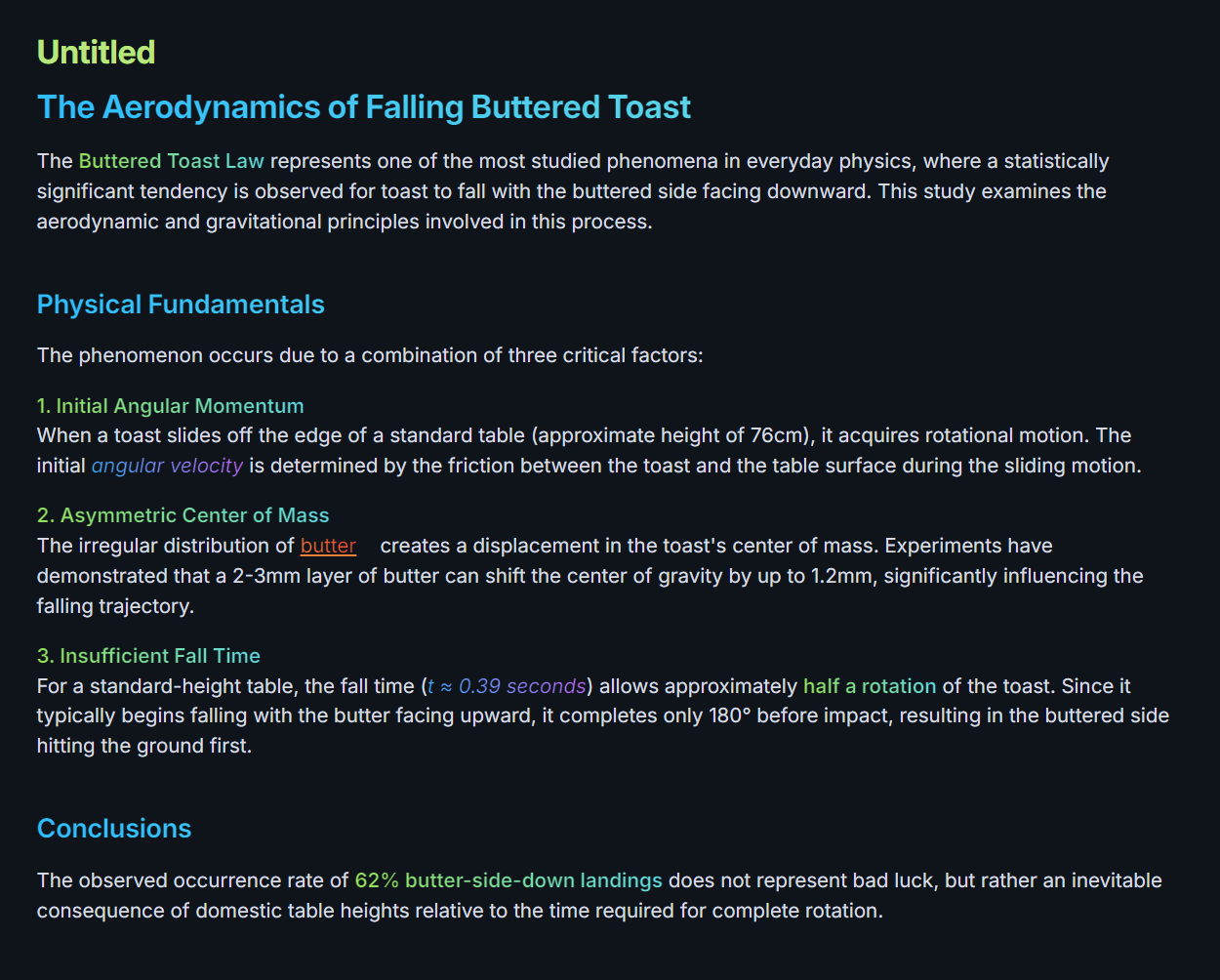
Features
- Per-element gradients. Independent control for headings, bold, italic, wikilinks, external links, and normal text.
- Five preset palettes — Green Snake, Midnight Green, Inferno, Underwater, Mystic Purple.
- Full custom color picker with HEX / RGB / HSL inputs, two- or three-stop gradients, and a draggable saturation/hue canvas.
- "None" disables per element so you can keep gradients on headings while leaving body text plain.
- Global on/off toggle plus command palette entries (
Disable all gradients,Enable all gradients,Toggle all gradients,Toggle normal text gradient). - Theme-safe. When disabled, text falls back to your theme's native colors (heading color, link color, etc).
- Works in both Reading view and Live Preview.
Settings
Each element row has:
- A dropdown to pick a preset,
Custom, orNone. - Three color dots (visible only in
Custommode) — click any to open the color picker. Right-click the middle dot to remove the optional middle color and use a two-stop gradient instead. - A reset button (↺) to restore default colors.
- A live preview label on the right so you can see the effect without leaving Settings.
Installation
From the Obsidian Community Plugins (once approved)
- Open Settings → Community plugins.
- Click Browse, search for Gradient Text.
- Install and Enable.
Manual installation
- Download
main.js,manifest.json, andstyles.cssfrom the latest release. - Drop them into
<your-vault>/.obsidian/plugins/gradient-text/. - Reload Obsidian and enable the plugin in Settings → Community plugins.
Commands
| Command | What it does |
|---|---|
Gradient Text: Disable all gradients |
Turns every gradient off (theme defaults take over). |
Gradient Text: Enable all gradients |
Restores all gradients. |
Gradient Text: Toggle all gradients on / off |
Flips the global switch. |
Gradient Text: Toggle normal text gradient |
Quickly turns the body-text gradient on or off. |
Tips
- Gradients on normal text are opt-in (off by default) because they affect every paragraph in the editor.
- Use Custom with a middle color for sharper highlights (e.g. orange → white → red).
- Set an element to None if your theme already styles it nicely and you just want to leave it alone.