
README file from
GithubGotSaeng OS
GotSaeng OS 生
Compile your scattered Markdown notes into model-ready context packs — local-first, no telemetry, no cloud.
Reclaim your scattered life. 흩어진 생을 다시 손에 쥐다.



Quick Start
Requires Node.js 20 or newer. No install needed.
npx -y @gotsaeng/[email protected] compile <vault> --output <dir> --project "<name>"
Both --output and --project are required flags. Copy-paste example using the included sample vault:
npx -y @gotsaeng/[email protected] compile ./examples/sample-vault --output ./out --project "GotSaeng OS"
This writes 15 artifacts to ./out/ including PROJECT_CONTEXT.md, MEMORY_SNAPSHOT.md,
DECISION_LOG.md, MEMORY_DIFF.md, COMPILE_REPORT.json, and more.
See it in action
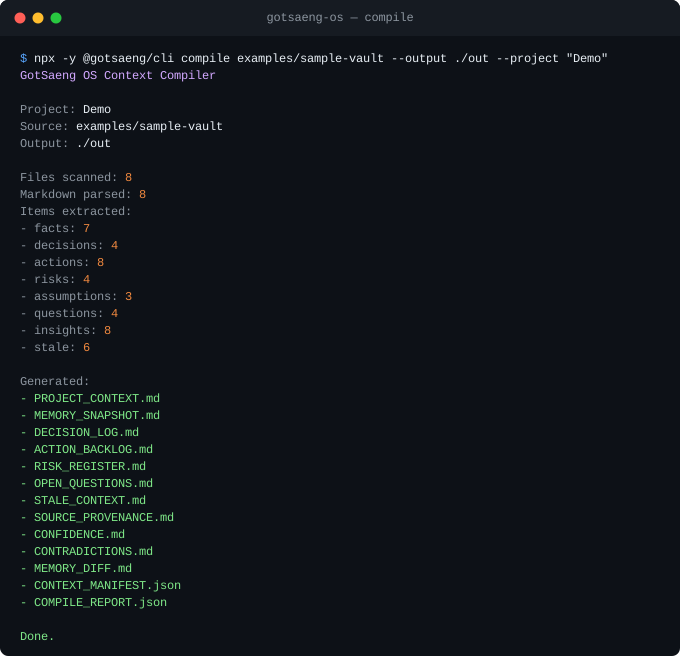
See examples/README.md for the full sample vault walkthrough and expected output.
What GotSaeng OS Does
| Capability | What it does |
|---|---|
| Vault scanning | Recursively scans a local Markdown vault |
| Note classification | Classifies notes into project, decision, research, weekly review, chat export, and template types |
| Extraction | Extracts facts, decisions, actions, risks, assumptions, questions, insights, and stale context |
| Context pack output | Writes auditable Markdown + JSON artifacts with source coverage stats |
| Memory diff | Deterministic local diff comparing previous and current compile manifests |
| Provenance scoring | Scores extracted items from local metadata — a heuristic for triage, not semantic verification |
| Confidence scoring | Scores extraction reliability from deterministic local signals only |
| Contradiction candidates | Surfaces candidate cues for human review — a review queue, not a semantic engine |
| Obsidian adapter | Desktop-only plugin with Report Hub view, hidden output folder, and vault commands |
| CLI | Published as @gotsaeng/cli — no global install required via npx |
| MCP server | @gotsaeng/mcp — stdio server exposing 5 tools to MCP clients, published on npm |
- Scans a local Markdown vault.
- Parses YAML frontmatter with
gray-matter. - Classifies notes into project, decision, research, weekly review, chat export, template, and unknown types.
- Extracts explicit facts, decisions, actions, risks, assumptions, questions, and insights.
- Extracts plain Obsidian task lists and common section patterns such as
Summary,Key Points,Open Questions,Contradictions / Uncertainty, and source metadata. - Detects stale context from
updateddates and open actions. - Writes Markdown and JSON context-pack output with extraction and source coverage stats.
- Adds a desktop-only Obsidian adapter scaffold that calls the same core compiler.
- Adds Obsidian commands for context-pack compilation, weekly review context, LLM handoff export, and vault validation.
- Adds a plugin-specific
REPORT_HUB.mdwith Obsidian wikilinks back to source notes. - Adds an Obsidian Report Hub view with command buttons, report shortcuts, latest compile metrics, and a ribbon icon.
- Lets the Report Hub view preview generated Markdown and JSON output files even when the output folder is hidden from Obsidian's file explorer.
- Adds an Obsidian setting for hidden, visible, or custom output folder placement.
- Writes
CONTEXT_MANIFEST.jsonas a local item manifest for deterministic memory diffs. - Writes
MEMORY_DIFF.mdby comparing the previous compile manifest against the current compile. - Surfaces newly added, changed, newly stale, and resolved context without calling any AI service.
- Adds deterministic source provenance scoring for extracted items.
- Writes
SOURCE_PROVENANCE.mdwith strong/weak provenance items and scoring warnings. - Records aggregate
provenanceStatsinCOMPILE_REPORT.json. - Writes
CONFIDENCE.mdwith deterministic extraction-confidence scoring and warnings. - Records aggregate
confidenceStatsinCOMPILE_REPORT.json. - Writes
CONTRADICTIONS.mdwith deterministic contradiction, conflict, and uncertainty candidates for human review. - Records aggregate
contradictionStatsinCOMPILE_REPORT.json. - Writes
ENGINEERING_OPS.md, a release-gate snapshot that collects quality, warning, provenance, confidence, and contradiction summaries in one place. - Writes
TEAM_MEMORY.md, a team-facing handoff with the current objective, active work, decisions, risks, open questions, and review queues. - Groups memory-diff details by source note so changed context is easier to review.
- Calibrates source provenance scoring into strong, moderate, and weak buckets with a visible calibration version.
- Adds source-note buttons inside the Obsidian Report Hub preview so generated reports can jump back to original vault notes even when output lives in a hidden folder.
- Infers the current objective from project notes or high-priority open actions.
- Groups decisions, risks, and questions by source for faster review.
- Adds warning triage to Markdown and JSON reports.
- Produces a cleaner high-signal weekly review surface in the Obsidian adapter.
- Adds a Backlinks section to the Obsidian Report Hub view: aggregates source-note references
across every generated Markdown report (not just the one being previewed; JSON artifacts like
CONTEXT_MANIFEST.jsonandCOMPILE_REPORT.jsonare not scanned), grouped by note and ranked by total reference count. - Adds
Switch Output Folder to Hidden/Switch Output Folder to Visiblecommands so the managed output folder can be moved without opening plugin settings. - Tags each extracted item with a typed
confidenceSourcefield recording how it was extracted (explicit marker, task list, section pattern, or heading inference), so the explicit-marker register-cap exemption is a type-checked field instead of a string match. - Makes the extraction cap (
perHeading) and, separately, the export-time register caps (register,insights) configurable viaCompileOptions.caps/writeContextPack(fsAdapter, pack, outputDir, caps), defaulting to the same 12/200/120 bounds as before. - Splits the Context Pack Files grid's Core Reports group into Core Reports and a Governance subgroup so no group exceeds about 7 items, and adds a filter field above the grid to narrow buttons by name.
- Gives in-flight command buttons a relabeled,
aria-busystate instead of only disabling them, and lets the command-failure banner be dismissed on its own, with an action name and timestamp shown alongside the error. - Adds
aria-pressedto selected artifact buttons, an accessible title and initial focus to the output-folder confirmation dialog, androle="group"/aria-labelledbyon each artifact grid section.
What GotSaeng OS Does Not Do
GotSaeng OS does not include SaaS, cloud sync, auth, payments, vector databases, RAG, LLM API calls, OpenAI/Anthropic/Gemini SDKs, autonomous research, a browser extension, a mobile app, or a rich Obsidian-native management UI.
Autonomous research is a long-term research direction, not a current capability. Provenance, confidence, and contradiction candidate scoring are deterministic metadata heuristics, not semantic fact verification.
Naming
GotSaeng OS has two meanings. First, it references the Korean internet phrase 갓생, sometimes translated as "God Life," meaning an intentional, disciplined, high-agency life. Second, it reinterprets the phrase as Got 生, where 生 means life. In this sense, GotSaeng means reclaiming life: taking back scattered time, thoughts, memory, attention, and execution.
GotSaeng OS is ADHD-aware, not ADHD-limited. It is designed for anyone managing fragmented attention, scattered notes, long-running goals, unfinished tasks, research trails, technical decisions, and execution logs.
Why This Exists
LLMs are useful, but long-running work still loses context. Notes live in one place, chat exports in another, decisions in a third, and execution logs are often forgotten. GotSaeng OS starts with a small, local-first compiler that turns scattered Markdown context into a portable handoff pack for humans and AI tools.
CLI Commands
gotsaeng compile <vaultPath> --output <outputDir> --project <projectName> --stale-days 90
gotsaeng validate <vaultPath>
gotsaeng validate <vaultPath> --strict
gotsaeng doctor
validate defaults to compatibility mode for real Obsidian vaults. Unsupported custom note types
such as wiki, source, or reflection, and template date placeholders are reported as warnings.
Use --strict when you want canonical GotSaeng OS schema enforcement to fail on those fields.
High-volume Markdown sections may be capped in rendered files with an omission notice. Full totals
are still recorded in COMPILE_REPORT.json.
Machine-readable output
Both compile and validate accept --json to print a schema-versioned JSON document on stdout
instead of the text summary (errors go to stderr as JSON too):
gotsaeng compile <vaultPath> --output <outputDir> --project <projectName> --json
gotsaeng validate <vaultPath> --json
{
  "schemaVersion": 1,
  "command": "compile",
  "project": "GotSaeng OS",
  "source": "<vaultPath>",
  "output": "<outputDir>",
  "itemCounts": { "facts": 4, "decisions": 2 },
  "report": { "filesScanned": 12, "generatedFiles": ["PROJECT_CONTEXT.md", "..."] }
}
Every compile also writes ARTIFACT_INDEX.json to the output directory alongside the other
generated files: a name/byte-size/sha256/description entry for every other generated artifact, so
downstream tools can verify file integrity without re-reading full contents.
MCP Server
@gotsaeng/mcp exposes GotSaeng OS as a stdio Model Context Protocol
server, so MCP clients (Claude Code, Codex, Cursor) can call validate_vault, compile_context_pack,
list_context_artifacts, read_context_artifact, and prepare_ai_handoff as structured tools. The
vault and output roots are fixed at launch via CLI flags — tools never accept arbitrary absolute paths.
@gotsaeng/[email protected] is the real npm release and holds the latest dist-tag. A one-time
bootstrap placeholder (0.0.1, tagged bootstrap) was published earlier only to set up npm
Trusted Publisher; it is not latest and should not be used. See docs/mcp.md for details and
for running from source.
npx -y @gotsaeng/[email protected] --vault <vaultPath> --output <outputDir> --project "<projectName>"
Add it to your client's MCP config, for example Claude Code (.mcp.json) or Codex/Cursor's equivalent:
{
  "mcpServers": {
    "gotsaeng": {
      "command": "npx",
      "args": [
        "-y",
        "@gotsaeng/[email protected]",
        "--vault",
        "<vaultPath>",
        "--output",
        "<outputDir>",
        "--project",
        "<projectName>"
      ]
    }
  }
}
Obsidian Adapter
GotSaeng OS includes a desktop-only Obsidian adapter in apps/obsidian-plugin. It is a thin wrapper over
packages/core, not a separate compiler.
Build it locally:
pnpm --filter @gotsaeng/obsidian-plugin build
For local manual testing, copy the built files into an Obsidian vault plugin folder:
mkdir -p "/path/to/vault/.obsidian/plugins/gotsaeng-os"
cp apps/obsidian-plugin/dist/main.js \
  apps/obsidian-plugin/dist/manifest.json \
  apps/obsidian-plugin/dist/styles.css \
  "/path/to/vault/.obsidian/plugins/gotsaeng-os/"
Then enable GotSaeng OS in Obsidian community plugin settings. If you instead downloaded a built release from GitHub Releases, see Verifying a Downloaded Release Build to confirm the assets were produced by this repo's release workflow before installing them. The adapter adds commands:
- Compile Context Pack
- Generate Weekly Review
- Export LLM Handoff
- Validate Vault Schema
- Open Report Hub
- Switch Output Folder to Hidden
- Switch Output Folder to Visible
The default output folder is .gotsaeng/context-pack inside the current vault. That hidden folder
keeps generated files out of the normal note tree, but the Report Hub view can preview every output
artifact directly. In plugin settings, switch output visibility to Visible vault folder to write
generated files under Gotsaeng/Context Pack instead. Generated plugin output is ignored by the
core scanner to avoid recursively compiling prior reports.
The adapter also writes REPORT_HUB.md, which is intentionally Obsidian-oriented. It keeps source
paths as wikilinks so you can jump from generated context back to the notes that produced it.
The weekly review output is intentionally shorter than the full context pack and emphasizes current
objective, high-priority actions, top questions, top risks, stale context, and warning triage.
The memory diff output is deterministic and local-only. It compares the previous
CONTEXT_MANIFEST.json in the output folder with the current compile and reports newly added,
changed, newly stale, and resolved context.
The source provenance output scores extracted items from local metadata such as updated, note
type, tags, source status, item status, and priority. It is meant to triage context quality, not to
prove whether a claim is true.
The confidence output scores extraction reliability from deterministic local signals such as
explicit markers, task-list extraction, section patterns, note type, update metadata, item status,
and priority. It does not verify claims semantically.
The contradictions output surfaces deterministic candidate cues from explicit markers, headings,
and contradiction-related language. It is a review queue, not a semantic contradiction engine.
The live Report Hub preview extracts source-note references from Markdown and JSON artifacts and
shows vault-note buttons above the preview. This keeps .gotsaeng/context-pack hidden while still
making compiled context auditable from inside Obsidian. Below the preview, a Backlinks section
aggregates source-note references across every generated report, grouped by note and ranked by
total reference count, so you can see which reports cite a given note without opening each one.
Develop from Source
Requires Node.js 20 or newer and pnpm.
pnpm install
pnpm --filter @gotsaeng/cli dev compile ./examples/sample-vault --output ./dist/context-pack --project "GotSaeng OS"
Other dev commands:
pnpm --filter @gotsaeng/cli dev doctor
pnpm --filter @gotsaeng/cli dev validate ./examples/sample-vault
pnpm --filter @gotsaeng/cli dev validate ./examples/sample-vault --strict
Architecture
Markdown Vault
-> Scanner
-> Parser
-> Classifier
-> Extractor
-> Stale Detector
-> Source Provenance Scorer
-> Confidence Scorer
-> Contradiction Candidate Detector
-> Context Compiler
-> Markdown/JSON Exporters
-> Local Manifest + Memory Diff
-> CLI and Obsidian adapter
packages/coreowns parsing, classification, extraction, stale detection, source provenance, confidence scoring, contradiction candidate detection, compilation, manifest/memory diff, and export logic.packages/cliowns command parsing, console output, exit codes, and user-facing terminal errors.apps/obsidian-pluginowns the desktop-only Obsidian adapter shell and delegates compilation topackages/core.
Product Principles
- Human-in-the-loop by default.
- Local-first memory.
- Context over automation.
- Reactive before autonomous.
- Portable life context.
- Compiler, not chatbot.
- Framework before plugin.
Sample Vault
examples/sample-vault demonstrates polished public demo notes for GotSaeng OS positioning,
architecture decisions, weekly review recovery, chat capture, and LLM context engineering
research. The sample includes every core extraction marker:
factdecisionactiontodoriskassumptionquestioninsight
Roadmap
See ROADMAP.md and docs/plugin-roadmap.md for shipped milestones and what's under consideration next.
Contributing
Use pnpm and Node.js 20 or newer.
pnpm typecheck
pnpm test
pnpm build
pnpm lint
See CONTRIBUTING.md.
Security and Privacy
GotSaeng OS is local-only. It does not include telemetry, hidden network calls, credential collection, API key handling, cloud sync, remote execution, or LLM API calls. Generated output stays local in the output directory you choose.
See SECURITY.md.
License
MIT. See LICENSE.