
README file from
GithubGoogle Calendar Sync by mcaay
Idea:
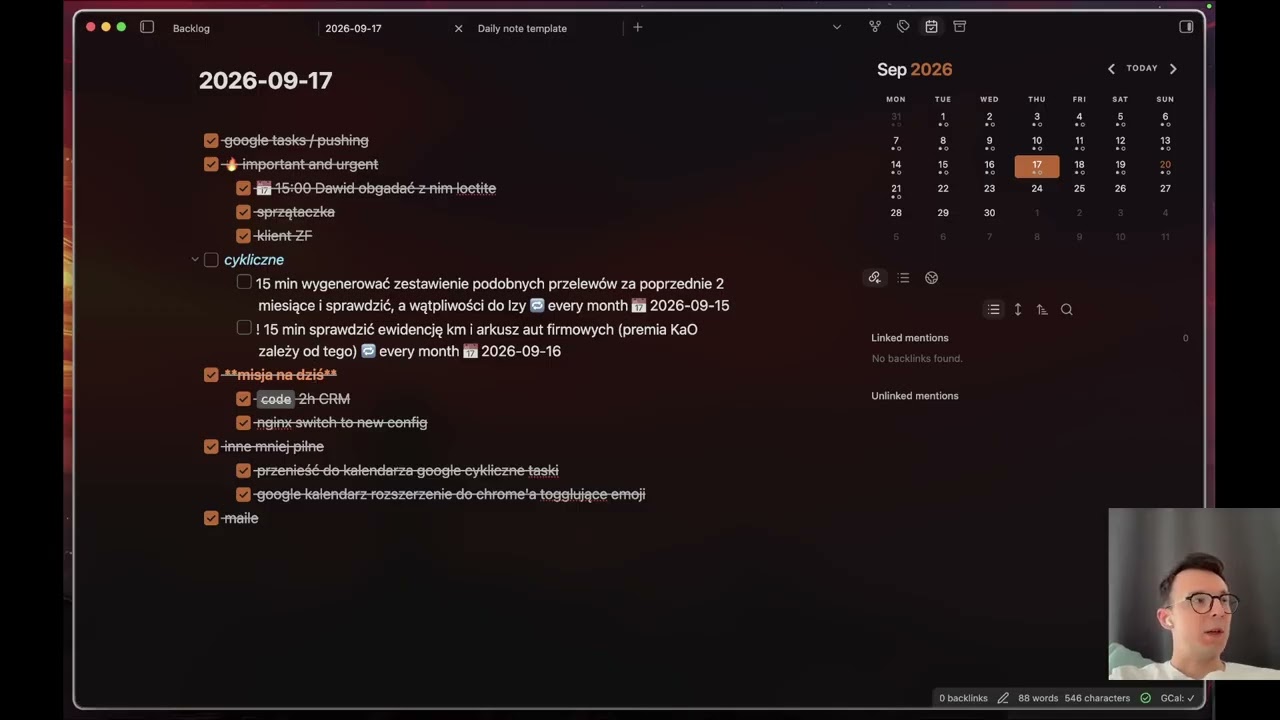
- events and tasks from Google appear as normal markdown in your daily notes
- which means you can use normal keyboard navigation, including vim mode, to manage those tasks and you can even toggle the "done" status, which will sync it to google
Why:
- google handles recurring tasks very well, so it's good to schedule them there
- google also handles meetings and events very well, it's easy to invite someone to a meeting if you just have his email address
- it's nice to see everything in obsidian rather than checking 2 separate places every day
Update since the video was published:
- now the plugin works on mobile too
Security:
- the plugin connects directly to Google, with no telemetry - data only travels between your obsidian and Google, there is no 3rd place that would see anything
- credentials use Obsidian SecretStorage
- personally I don't trust random plugins from the internet (like this one) strongly enough to connect my google account to it, unless it is open source and I have used my AI agent to run a security audit on it, therefore if you're like me, I advise you to give this github repo to your AI for security audit
- afterwards obsidian doesn't update community plugins automatically, so this is good
- if at any point in the future you will want to update, you can run a security audit again
- in the
reviewsfolder you can find security audits I performed, sorted by date, with the model clearly marked and a TLDR section at the top in the newest audits
Video walkthrough - first 6 minutes is a TLDR section, then I'm rambling for 15 more minutes.
Obsidian Sync caveat:
- if you use it, I advise to set "Conflict resolution" setting to "Create conflict file"
- this is not even related to this plugin, but several times I found the "Automatically merge" option to result in my phone's daily note overwriting the changes on my laptop without warning
Install
Requires Obsidian 1.13+. Runs on macOS, Windows and Linux, and on iPhone (verified on a physical iPhone; Android is untested). Connect your phone through Obsidian Sync.
- In Obsidian, open Settings → Community plugins → Browse, search for Google Calendar Sync by mcaay, then select Install and Enable.
- Connect Google. You currently need your own Google Cloud OAuth client; the guide covers setup and choosing calendars and task lists.
- Add this to your daily-note template. If it already has properties, add
google-daily: trueto those.
---
google-daily: true
---

- [ ] google events <!-- gdn:events -->
- [ ] recurring <!-- gdn:recurring -->
- [ ] google tasks <!-- gdn:tasks -->
Use YYYY-MM-DD filenames. Rename or move the three headings wherever you want; keep their comments. Only checkbox rows directly under google tasks become Google Tasks; other lines there stay in your note. Other date formats and template options.
Limits
- Google Tasks' API exposes dates, but no reminder times or recurrence controls. A typed
📅 13:00stays in the title. Deleting an entire repeating task series cannot be guaranteed. - Undo after the 5-second window recreates a Google Task without its recurrence or reminder time. It cannot restore a deleted Calendar event.
- Only edits made in Obsidian's editor reach Google. A change that arrives through other means, e.g. Obsidian Sync to another device, does not trigger a second push to Google. So in other words the device where you made the change pushes the change to Google. The second device with Obsidian gets the change via Obsidian Sync and doesn't push to Google. This way the syncing stays sane and good.
- Deleting a meeting you organize cancels it for all guests, and Google emails them the cancellation.
- If Google's answer to a new task is lost, the plugin searches for the task before sending it again. Rarely, this still leaves a duplicate, which shows in the note.
Review
The code was reviewed by Opus 5.5, Fable 5.1 and GPT 6 Astra, and the fixes were implemented by Opus 5.5. You can read the reviews, the remarks on them and the fix plan in the reviews folder.
Keyboard and sync details · Privacy · Development · MIT license