
README file from
GithubGame Shelf
Find a game. Make a note. Remember why you played it.
Game Shelf brings game discovery, a local backlog, and personal play journals to Obsidian. It creates ordinary Markdown notes using Games Never Die for Japanese game data or IGDB for English game data. IGDB requires your own Twitch application Client ID and Client Secret. No plugin server, Python installation, Dataview, or other plugin is required. Manual notes work offline.
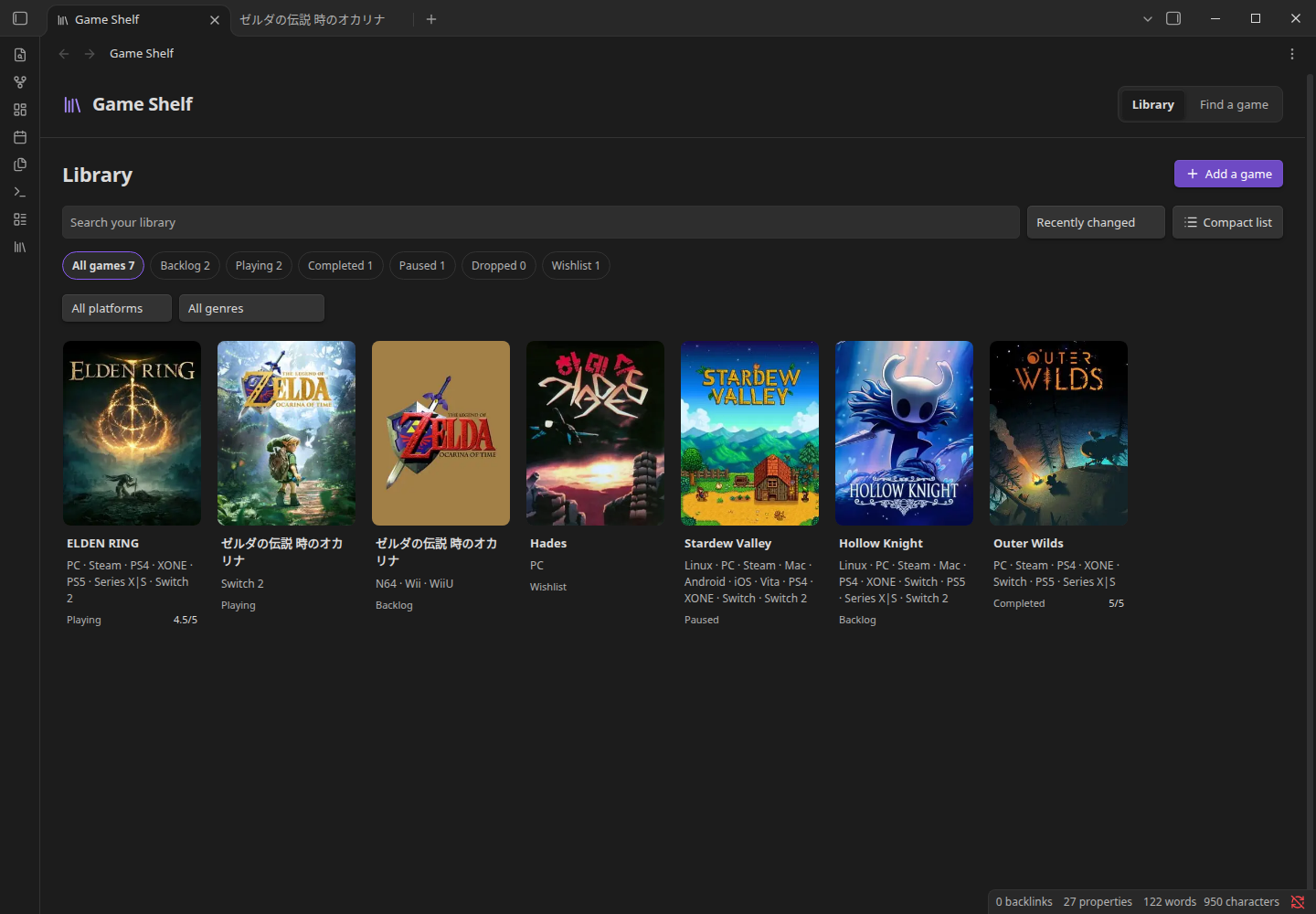
A library and a place to write
- Find the right edition. Japanese/English search and direct game URLs, with covers, dates and platform labels before you create anything.
- Choose your information. Basic metadata, ratings, store links, overview, articles, media, and optional Steam data. Overviews and articles are off by default because they can contain spoilers.
- Keep your collection local. Cover grid or compact list, local search, platform/genre filters, play statuses, ownership and a personal 0–5 rating.
- Keep a play journal. Dated entries and optional session minutes go into the note itself. The total is a normal property. Freeform writing belongs in the same file, alongside links, guides, screenshots and anything else you keep.
- Refresh with a review. Compare incoming source properties with the current note. User-edited values are unselected. Updates preserve your body, status, rating, journal, custom properties and YAML comments.
- Bring your own structure. Vault folders, filename templates, Markdown templates, property names and status identifiers are configurable.
- Work offline. Manual notes, library filters, personal metadata and journals need no network. Covers can be saved inside your vault.
The interface follows your Obsidian theme and supports English and Japanese, keyboard operation and narrow panes. There are no default hotkeys. Choose the language of generated note text separately from the interface. Automatic source selection uses Games Never Die for Japanese notes and IGDB for English notes. Existing notes retain their original source and text; new play-log entries follow the current global note language setting. With automatic language settings, Obsidian languages other than Japanese fall back to English for both the interface and new notes.
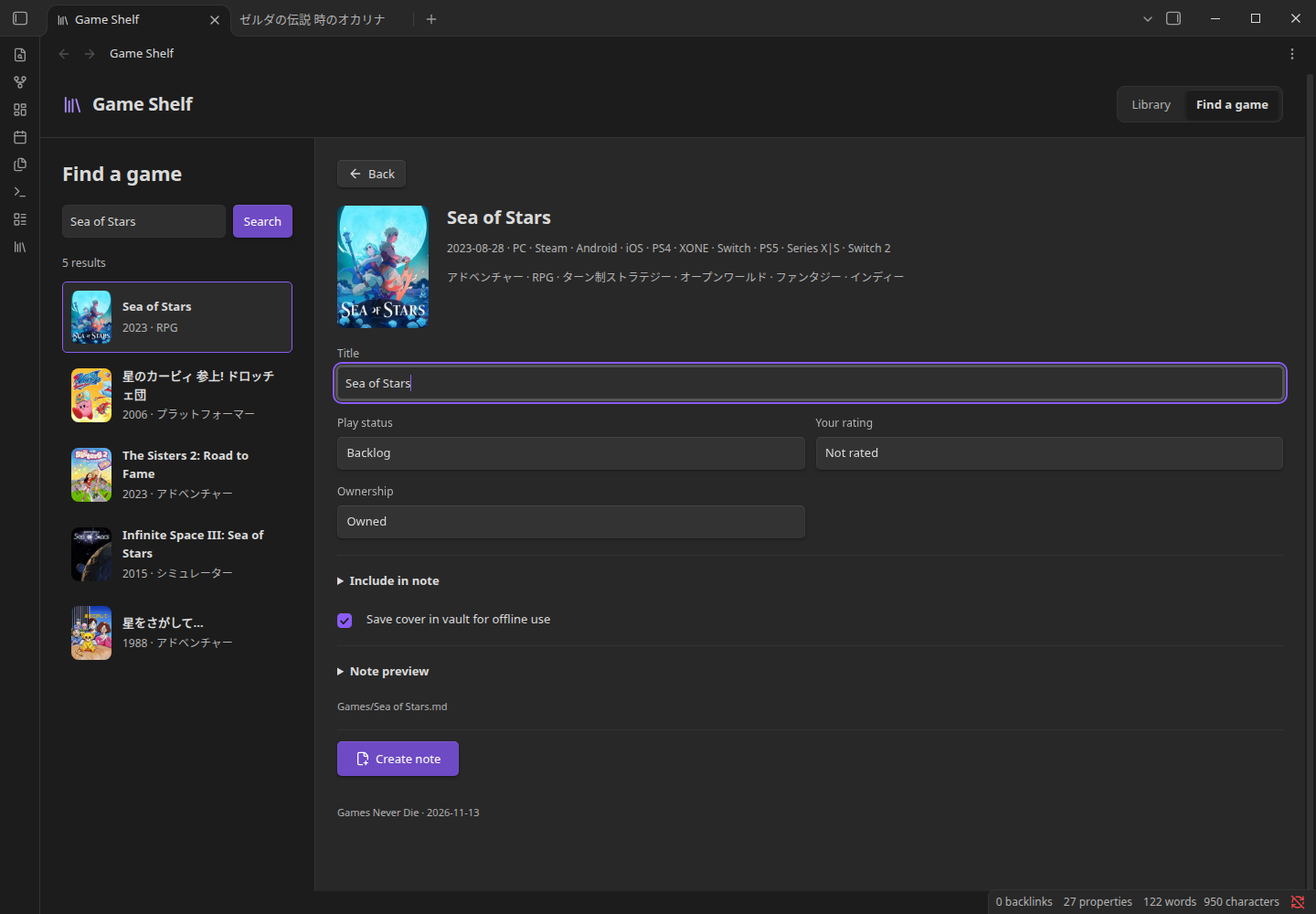
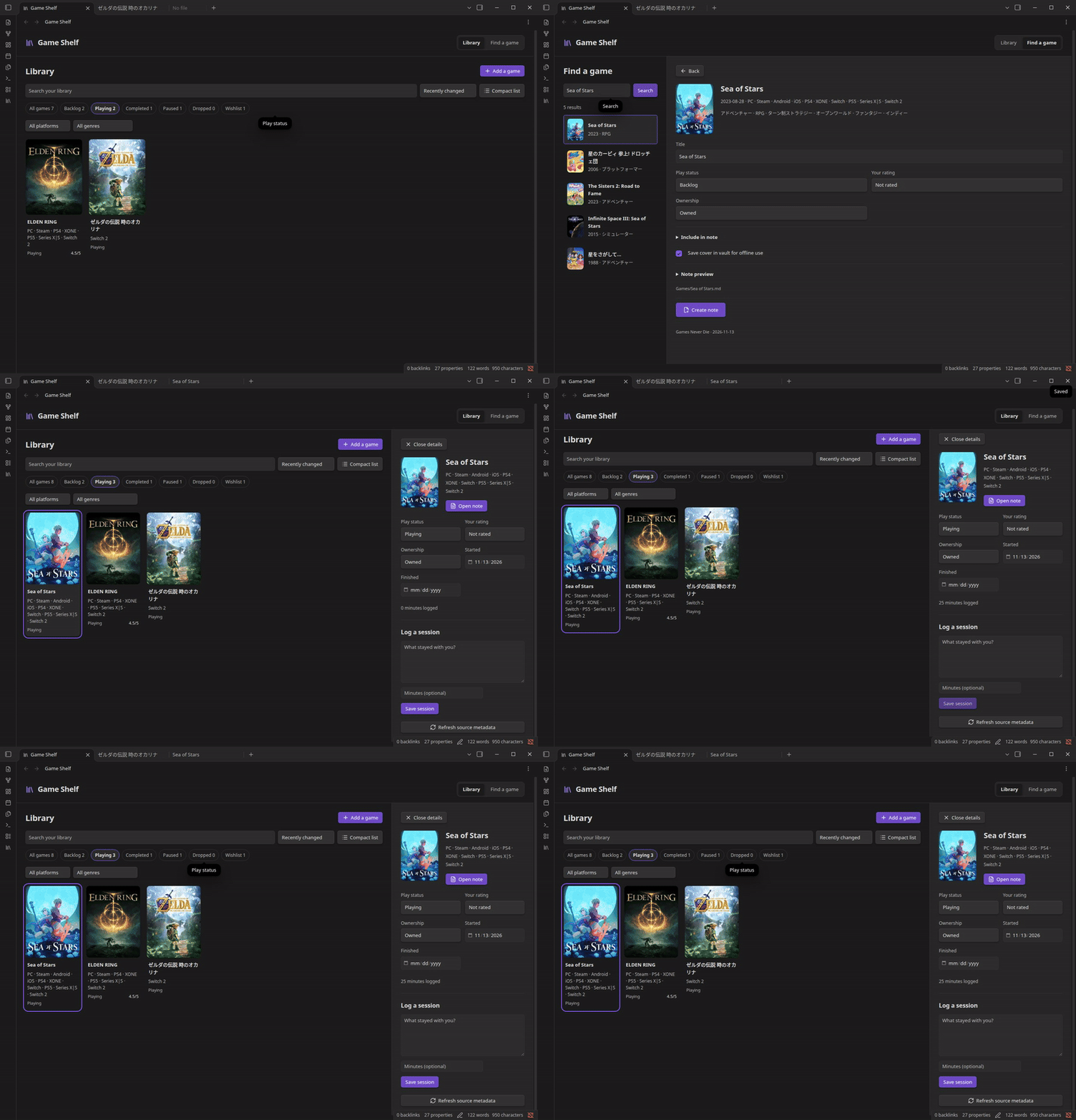
Demo
The recording below is the real plugin running in an isolated Obsidian vault, not a browser mockup. Library content uses live game lookups; personal notes are demonstration text.
Install
- In Obsidian, open Settings → Community plugins.
- If prompted, select Turn on community plugins.
- Select Browse, search for Game Shelf, and open its listing.
- Select Install, then Enable.
- Download
main.js,manifest.jsonandstyles.cssfrom the latest release. - Create
<your vault>/<your config folder>/plugins/game-shelf/and put the three files there. The config folder is normally.obsidian; custom config folders also work. - Reload Obsidian and enable Game Shelf in Community plugins.
Start with one game
- Open Game Shelf from the ribbon or run Game Shelf: Find and add a game.
- Choose your new-note language in Game Shelf settings. For English game data, select Set up IGDB credentials and follow the guide, or use the written setup instructions.
- Search a title or paste a game URL from your selected source. Online search is enabled by default; you can turn it off in settings.
- Check the date/platform and choose your play status and optional rating.
- Choose which source information to include, and whether to save the cover offline. Open Note preview if you want to inspect the template.
- Select Create note. The note opens in Obsidian; its ordinary Markdown remains useful if you disable or remove Game Shelf.
Games Never Die supplies Japanese metadata; IGDB supplies its original game data, generally in English. Neither source guarantees a translated name or description for every game. Imported text is not machine-translated. The note preview shows what will be saved. Choosing a source whose data language differs from your note language displays a notice; failed English lookups never silently switch to Japanese. GND articles and its optional Steam statistics are not available from IGDB.
Already added? The existing note is offered instead of being overwritten. Different source editions have different IDs; colliding filenames get a year/platform suffix. Manual entries also never overwrite an existing file. IDs are source-specific. An IGDB record and a GND record are not automatically merged even when their titles match; remakes, editions and ports may differ.
Organize and remember
In Library, filter by play status, platform or genre. Search is local. Switch between covers and a compact list, or sort by title, recent changes or your rating. Choose a game to edit status, ownership, rating and dates, or open its note.
Log a session writes a dated entry under the play-log marker and adds the
optional minutes to playtime_minutes. Prior entries and freeform writing are
preserved. Draft text survives switching games in that shelf view; select
Save session to persist it. Unsaved drafts are not guaranteed after closing
the view or restarting Obsidian.
The default template contains <!-- game-shelf:journal -->. Keep this line if
you want the session form to find the play log. Removing it does not remove any
writing; the form asks you to restore the marker before saving a new entry.
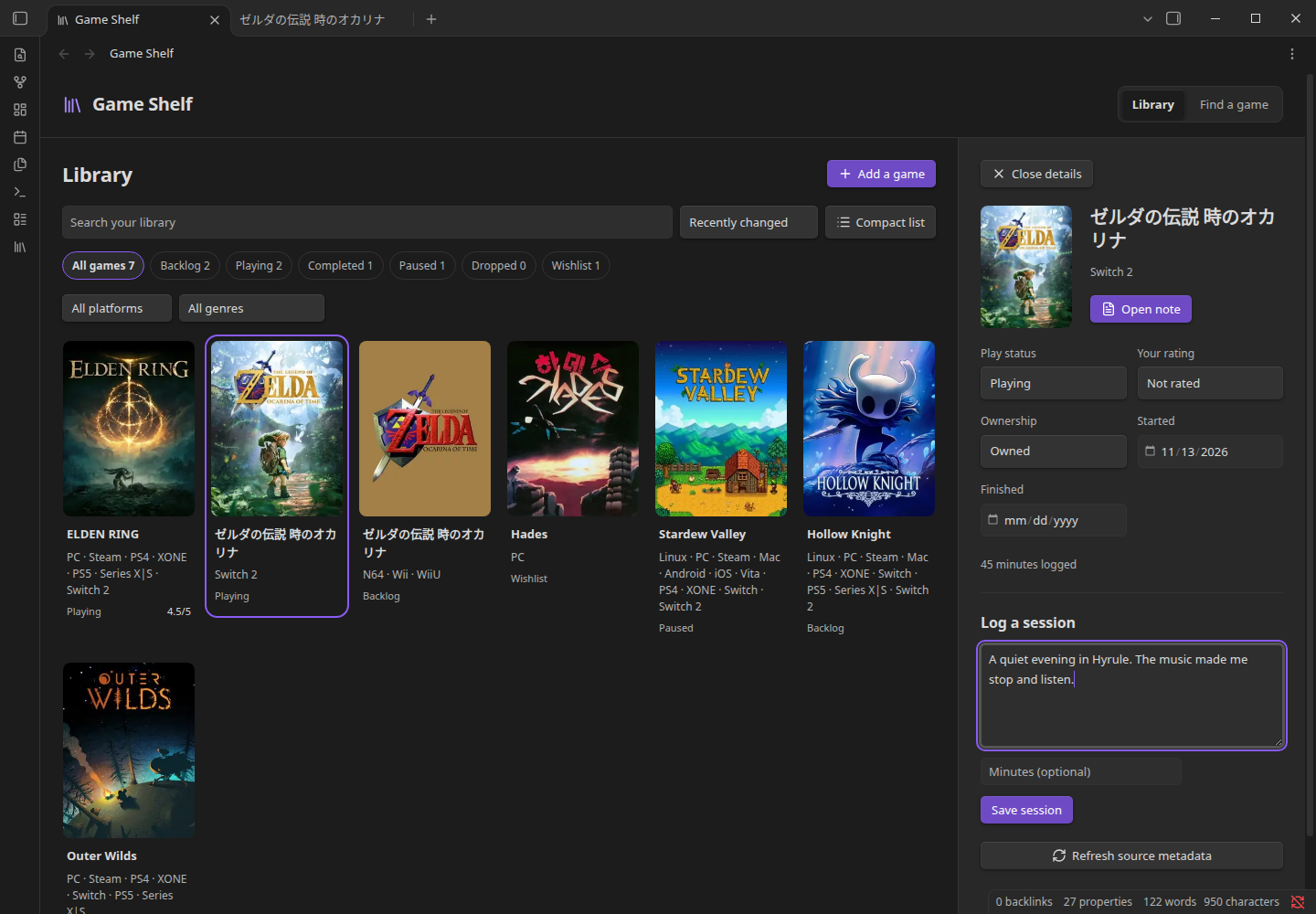
Source refresh is separate from your writing
Choose Refresh source metadata from a saved game's detail panel. Review each changed property before applying it:
- A value matching the last import is selected by default.
- A value edited in the note is marked as a conflict and left unselected.
- Without import history, nonempty existing values are treated as conflicts.
- Personal status/rating/ownership/dates and the note body are never source refresh targets. Selected fields are checked again when saving, so a note edited after the preview is not silently overwritten.
Refresh updates properties, not the overview/article/media body produced at creation. This protects edited prose and links. Newer source details remain available from the source-page link or a new preview.
Templates and properties
Settings are searchable in current Obsidian. English online lookups require IGDB credential setup; local writing and Japanese GND lookups do not.
| Setting | Default / supported values |
|---|---|
| Notes folder | Games |
| Interface language | Match Obsidian, English, Japanese |
| New-note language | Match interface, English, Japanese |
| Game data source | Automatic by note language, Games Never Die, IGDB |
| IGDB Client ID | Your public Twitch application ID |
| IGDB Client Secret | A reference selected with Obsidian SecretStorage |
| Local cover folder | Games/Attachments |
| Filename | {{title}}; also {{year}}, {{platform}}, {{slug}} |
| Note template | {{title}}, {{cover}}, {{source}}, {{notes_heading}}, {{journal_heading}}, {{journal_marker}} |
| Personal status | backlog, playing, completed, paused, dropped, wishlist; add your own identifiers |
| Personal rating | Optional number from 0 to 5, in half-point steps in the UI |
| Property names | Optional JSON, e.g. {"rating":"my_score","status":"play_status"} |
Templates are plain Markdown with single-pass substitutions. Game Shelf does not evaluate scripts or invoke Templater. Provider text is escaped when inserted into a note. Your own template remains your responsibility if another plugin processes it as code.
New installations include screenshots and trailers by default. Screenshots appear as images separated by blank lines; trailers remain links. You can turn them off under Include in note. Saved field selections and custom templates are preserved. Save cover in vault for offline use saves only the cover; screenshots use remote images with either cover setting and require a network connection. Existing note bodies are not rewritten.
Property mappings apply to new notes. Existing notes keep the names used when they were created; the plugin remembers their profiles in its local data. It does not silently rename properties across your vault. Keep the plugin data with your vault if you use custom profiles across devices.
Notes have readable properties such as title, platforms, genres,
release_date, developers, status, ownership, rating, cover, started,
finished and playtime_minutes. Source scores use igdb_score and
steam_positive_pct, separate from your personal rating. Source identity and
timestamps are included for duplicate detection and provenance. The
game-shelf-note CSS class keeps the generated cover compact; remove that class
from a note if you prefer your theme's default image sizing.
No dashboard dependency is required. These properties also remain available to Obsidian Bases, Dataview, searches and your own scripts.
Privacy, networking and upstream limits
Game Shelf sends no vault text, personal ratings, play logs or telemetry to a service. Online search is enabled by default and can be disabled in settings. There is no background crawling, scheduled refresh, account sync, self-updater, advertising or analytics.
The local library lists Markdown file paths across the vault and checks Obsidian's cached frontmatter for Game Shelf identities. This keeps game notes discoverable after you move or rename them, including outside the creation folder. Indexing does not read note bodies; only recognized game notes enter the library. The index stays in memory and is updated by vault events. File paths and cached properties are not sent to the game provider.
Online use allows searches, game lookups, connection tests and remote artwork previews:
| Destination | Purpose |
|---|---|
gamesneverdie.com |
Search terms, game pages and optional /api/steam lookups |
media.gamesneverdie.com |
Cover previews, screenshot images and optional local cover downloads |
id.twitch.tv |
Exchange your IGDB application credentials for an access token |
api.igdb.com |
English game searches, details and explicit connection tests |
images.igdb.com |
IGDB cover previews, screenshots and optional local cover downloads |
The note can contain external store, article and YouTube links and embedded screenshot images. Remote screenshots load when the note is rendered. Game Shelf does not open those pages or fetch article bodies automatically. Remote cover previews can load when shown. Library covers saved in the vault are local; turn online search off to suppress remote-cover fallbacks.
GND requests are spaced by at least one second, deduplicated in flight and cached in memory for the plugin session (games: 24h; search: 1h; Steam: 5min). Caches are bounded and can be cleared in settings. HTTP failures are explicit and not automatically retried. The network timeout is 20 seconds; cover downloads are limited to 3 MiB and supported image signatures are verified before saving. IGDB requests are serialized at least 250 ms apart. Responses are cached in memory (games: 24h; searches: 1h), with bounded caches and concurrent-request deduplication. An expired token is renewed; one 401 response triggers one reauthentication attempt. Rate limits and other failures are not automatically retried. Tokens are held only in memory and never saved in notes or plugin data.
The Client ID is public and saved in plugin settings. The Client Secret is read from Obsidian SecretStorage; plugin settings save only its reference, not its value. SecretStorage is scoped to the vault and is not an assurance of encrypted storage. Protect your devices and backups. Synced settings may contain a secret reference without the secret; configure it on each device when necessary.
The global Note language setting controls headings in new notes and newly
added play-log entries in any note. Notes need no individual language setting.
Existing prose and old entries are not translated or rewritten. Previously
saved note_language properties are ignored and left intact.
The site's disclaimer asks users to refrain from automated bulk extraction; its robots.txt excludes search and API paths from crawling. This plugin is for individual, user-initiated lookups and offers no bulk crawler or automatic pagination. Rate limits and caching do not grant permission for bulk collection. The unofficial, unversioned source may change or stop working; existing notes and offline features remain local.
Plugin settings, property-name profiles and import baselines are stored through Obsidian's plugin data API inside your vault configuration folder. Game Shelf does not access files outside the vault. The bundled YAML parser is used to preserve comments while atomically updating properties and journal text.
Compatibility and verification
Requires Obsidian 1.13.7+. The plugin uses browser-safe APIs and declares mobile compatibility; actual native desktop tests and narrow-pane checks are recorded in verification. Native iOS/Android execution is reported separately and must not be inferred from desktop viewport tests.
Offline tests cover parsing, input validation, templates, script-safe source text, cache behavior and conflict handling. Native acceptance checks create and read real notes through Obsidian, inspect its own metadata cache, decode saved covers, test duplicate/edition handling and protect concurrent edits.
User research and the decisions it informed: 17 first-person threads and issues. This was a qualitative scan, not a representative survey or usability study of this plugin.
Development
Node.js 24 and npm:
npm ci
npm run check
The bundled release consists of main.js, manifest.json and styles.css.
No Node.js process or additional software is needed by plugin users.
Linux native test harness:
OBSIDIAN_BINARY=/path/to/extracted/AppRun node e2e/launch.mjs start
node e2e/acceptance.mjs --live
node e2e/launch.mjs stop
The harness uses a dedicated test vault/profile and stops only its own process
group. --live explicitly opts into the upstream search checks; see the test
script's fixture prerequisites. Do not point it at a personal vault.
For the mobile layout regression suite, run node e2e/mobile.mjs while the
isolated harness is running. It checks English/Japanese layouts, synthesized
touch input and saved journal content at phone/tablet sizes. It uses fixture
search responses and desktop Chromium, not native iOS/Android.
License and attribution
MIT; see LICENSE and third-party notices. The Games Never Die adapter derives from our MIT-licensed gamesneverdie-client. Other plugins were researched as references; their code was not copied.
This is an independent community plugin, not an official Obsidian, Nintendo, IGDB, Steam or Games Never Die product. Game artwork and source text belong to their respective rights holders. Screenshots show real application behavior and do not license the underlying game art for other uses.