
README file from
GithubFull Block Embed




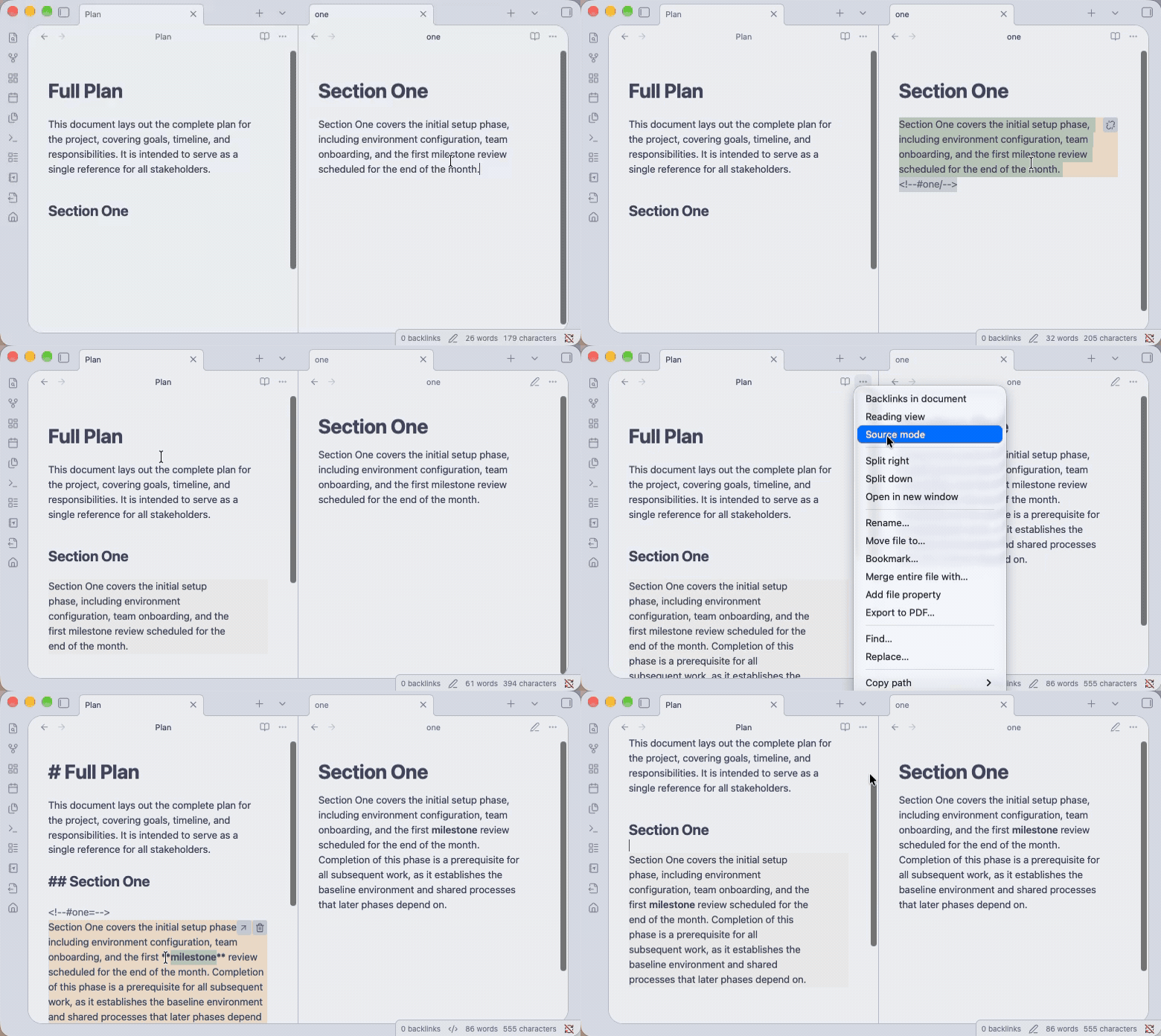
Embed the full Markdown of a source block in other Obsidian notes and keep every copy synchronized. Each reference contains ordinary Markdown so notes remain complete and readable in other editors, renderers, scripts, and LLM workflows.
Why?
Embedded blocks are useful outside of Obsidian if notes are self-contained.
Obsidian's native block embeds are links, and other embed plugins use similar strings. Other tools generally render these as text because they cannot resolve the blocks.
# Example: Obsidian's native block embed

![[folder/file^block-id]]
This plugin places the full Markdown of a source block between invisible HTML comment markers in every referencing note. Each note is self-contained and synchronized by Obsidian.
This is useful when a note is used outside of Obsidian, like with an LLM: a longer note contains the referenced text directly, while source notes can still be indexed separately to feed focused context relevant to the current operation. See an example.
Install
-
From Community plugins
- Open
Settings → Community pluginsand clickBrowse - Search for
Full Block Embed - Click
InstallandEnable
- Open
-
From source
-
Clone this repository:
git clone https://github.com/troncali/full-block-embed.git -
Run
npm installandnpm run build -
Copy the generated
main.js,manifest.jsonandstyles.cssinto<vault-path>/.obsidian/plugins/full-block-embed/ -
Open
Settings → Community plugins -
Click the refresh button, then enable Full Block Embed
-
Use
This plugin adds the following actions to the command palette (Cmd/Ctrl+P) and the editor's context (right-click) menu. Set hotkeys for each command in Settings for faster use.
| Command | What it does |
|---|---|
| Create shared block | Prompts for a block name and wraps the selected text with a source block marker. |
| Insert shared block reference | Lists source blocks and inserts the selected reference block at the cursor, filled with a complete Markdown copy. |
| Open shared block source | Opens the source note with the source block selected. Ctrl/Cmd-clicking a reference block or pressing its arrow button triggers this command. To trigger the command by hotkey or palette, the cursor must be inside the reference block. |
| Delete current shared block reference | Removes the reference block, including its marker lines and copied Markdown. Pressing the block's trash button triggers this command. To trigger the command by hotkey or palette, the cursor must be inside the reference block. |
| Convert current shared source to normal text | After confirmation, removes related markers from all notes while leaving the copied Markdown in place. Pressing the block's unlink button will trigger this command. To trigger the command by hotkey or palette, the cursor must be inside the source block. |
| Open first shared block sync issue | Opens the first malformed marker or synchronization conflict at its source line. |
| Synchronize shared blocks now | Explicitly rebuilds the vault index and synchronizes every shared block. Normal editing does not require this command. |
Editing & Rendering
Block rendering and functionality depend on context.
-
Reading mode — blocks render as normal Markdown.
-
Live Preview mode — blocks render in the normal live-edit manner but do not show marker lines.
-
Source mode — all blocks appear in normal source-edit form, including marker lines.
When focused for editing, reference blocks are replaced with an embedded Obsidian editor scoped to the source block. Editing the content of a source or reference block updates all related blocks.
All blocks highlight on hover. Reference blocks also reveal buttons to open the source or delete the reference. Source blocks reveal a button to convert it and all references to normal text.
Block Structure
Blocks are delimited by single-line HTML comment markers that only show in source view. Markers must be on their own lines and be comprised of the components below without internal spaces. Up to three leading spaces are accepted as standard Markdown indentation. Malformed markers or unclosed blocks are reported as errors.
| Marker Component | Explanation |
|---|---|
<!--#example |
Begins a marker for a block named example |
+ or = or / |
Declares the marker type: + to begin a source block, = to begin a reference block, and / to close either block type |
--> |
Closes the marker |
Below are examples of how blocks appear in Source mode.
# Source Block

<!--#company-acme-summary+-->

Acme makes industrial widgets.

<!--#company-acme-summary/-->
# Reference Block

<!--#company-acme-summary=-->

Acme makes industrial widgets.

<!--#company-acme-summary/-->
Example
A full plan is good for user review and an LLM in some contexts, but only some sections of the plan may be useful for an LLM in other contexts.
-
Split the plan's sections into individual notes
├── sections/ │ ├── one.md │ ├── two.md │ └── three.md ├── plan.md └── index.md -
Create source blocks in each section note.
# One <!--#one+--> Acme makes industrial widgets. <!--#one/--> -
Build the full plan using reference blocks where relevant.
# Full Plan Description of the full plan. ## One <!--#one=--> Acme makes industrial widgets. <!--#one/--> -
Create an index so that LLMs can selectively read only relevant sections.
# Index

Read only the linked files below that are relevant to the request.

- [auth, jwt, oauth, sessions, security](./sections/one.md)
- [database, prisma, sql, migrations](./sections/two.md)
- [ui, tailwind, design components](./sections/three.md)
Implementation Details
-
Privacy & Compatibility – all processing occurs locally. The plugin uses Obsidian Vault and Editor APIs instead of filesystem access, so it works on desktop and mobile.
-
Block processing – blocks synchronize when a note is opened or edited in Obsidian. No vault-wide scan occurs unless manually triggered. Markers inside fenced code blocks (```) are treated as examples, not embedded blocks.
-
Cache – the plugin maintains a cache of metadata in
data.jsonthat is written when synchronization occurs. The cache contains an index of block-bearing note paths, modification times, block names, and a hash of the last synchronized content for each block. -
Nested Blocks – blocks may be nested. Nested children synchronize before parents. When a parent source block contains child source blocks, the child source markers change from
+to=when copied to reference blocks. -
Conflict Behavior – The plugin never chooses a winner for divergent copies and raises an error for circular nesting, malformed or unclosed markers, duplicate sources, and missing sources. A conflict or error pauses writes and shows a notice. Issues can be opened with the command
Open first shared block sync issue. If every copy is later made identical, that content becomes the new synchronization baseline automatically and clears the conflict. -
Editing Outside Obsidian – blocks synchronize when a note is opened in Obsidian, or a vault-wide sync can be manually triggered. Conflicting copies raise warnings without overwriting. Newly inserted reference blocks are hydrated from the source block.
-
Disabling Plugin – Markdown remains in the state it was at the time of the last synchronization.
Development
Code Contributions
Fork the repository, create a branch, and open a pull request. Before submitting, please ensure npm run test and npm run build pass.
Local Development
- Clone the repository and run
npm i. - Run
npm run devto rebuild on changes to.tsfiles. - Follow the
Install from sourceinstructions to add our modified plugin files to Obsidian. - Toggle the plugin off and on to test updates in Obsidian.
Scripts
npm run build   # type-check and build production bundle
npm run check   # run lint and test scripts
npm run dev     # build in watch mode
npm run lint    # check syntax errors, bugs, and stylistic
npm run tag     # add tag based on package.json version
npm run test    # unit test for the parsing and cache logic
npm run version # increment the plugin version
Release
- If applicable, update
minAppVersioninmanifest.jsonto the minimum Obsidian version the plugin requires. - Run
npm version [patch | minor | major] - Run
npm run versionto updatemanifest.jsonandversions.json. - Update
CHANGELOG.mdwith notes for the version. - Commit changes and run
npm run tag. - Push to origin:
git push origin main --tags.
License & Provenance
Full Block Embed is © 2026 Matt Troncali and released under the MIT License. It incorporates ideas and adapted implementation work from Sync Embeds and Shared Blocks, both MIT-licensed. Their copyright notices are preserved in THIRD_PARTY_NOTICES.md.