
README file from
GithubFolder Sort
Folder Sort is an Obsidian plugin that adds folder sorting to the native File explorer sort menu.
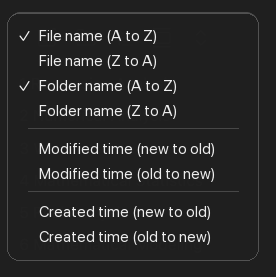
It adds two options directly under Obsidian's file-name sort options:
- Folder name (a to z)
- Folder name (z to a)
Folder Sort only reorders folders. Files use Obsidian's built-in file sorting behavior. You can place folders first or last.
Features
- Sort folders A-Z or Z-A at every File explorer tree level.
- Keep Obsidian's file sorting untouched.
- Use natural, case-insensitive sorting, so
2 Foldersorts before10 Folder. - Persist the folder sort direction per vault.
- Configure Folder placement as
Folders firstorFolders last. - Use
Folders firstas the default placement. - Pin folders above other folders with a purple pin marker, or hide folders from the File explorer.
- Use the existing File explorer sort menu and command palette commands for sorting.
- Load on desktop and mobile.
Usage
Open the File explorer sort menu and choose either Folder name (a to z) or Folder name (z to a).
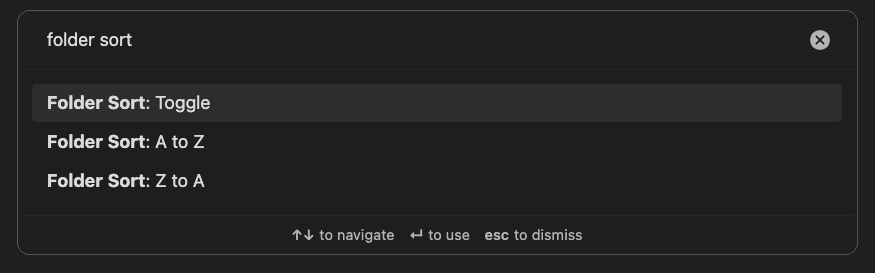
You can also run these commands from the command palette:
- Folder Sort: A to z
- Folder Sort: Z to a
- Folder Sort: Toggle
The default direction is A-Z.
Use Settings > Community plugins > Folder Sort to choose the Folder placement mode. The default is Folders first:
Folders first: move sorted folders above files.Folders last: move sorted folders below files.
The Hidden folders panel shows all manually hidden folders. Select Unhide beside one folder, or Unhide all folders to restore all hidden folders. The Folder Sort: Show hidden folders command also restores all hidden folders.
Right-click a folder in the File explorer and use Pin folder or Hide folder below Move folder to....
Pinned folders stay above other folders and show a purple pin marker on the right. Pinned and hidden folder choices follow folder renames and moves.