
README file from
GithubPixel Habits
Turn a folder of notes into a retro 16-bit RPG habit tracker for Obsidian — a checklist, a day planner, and a stats screen.
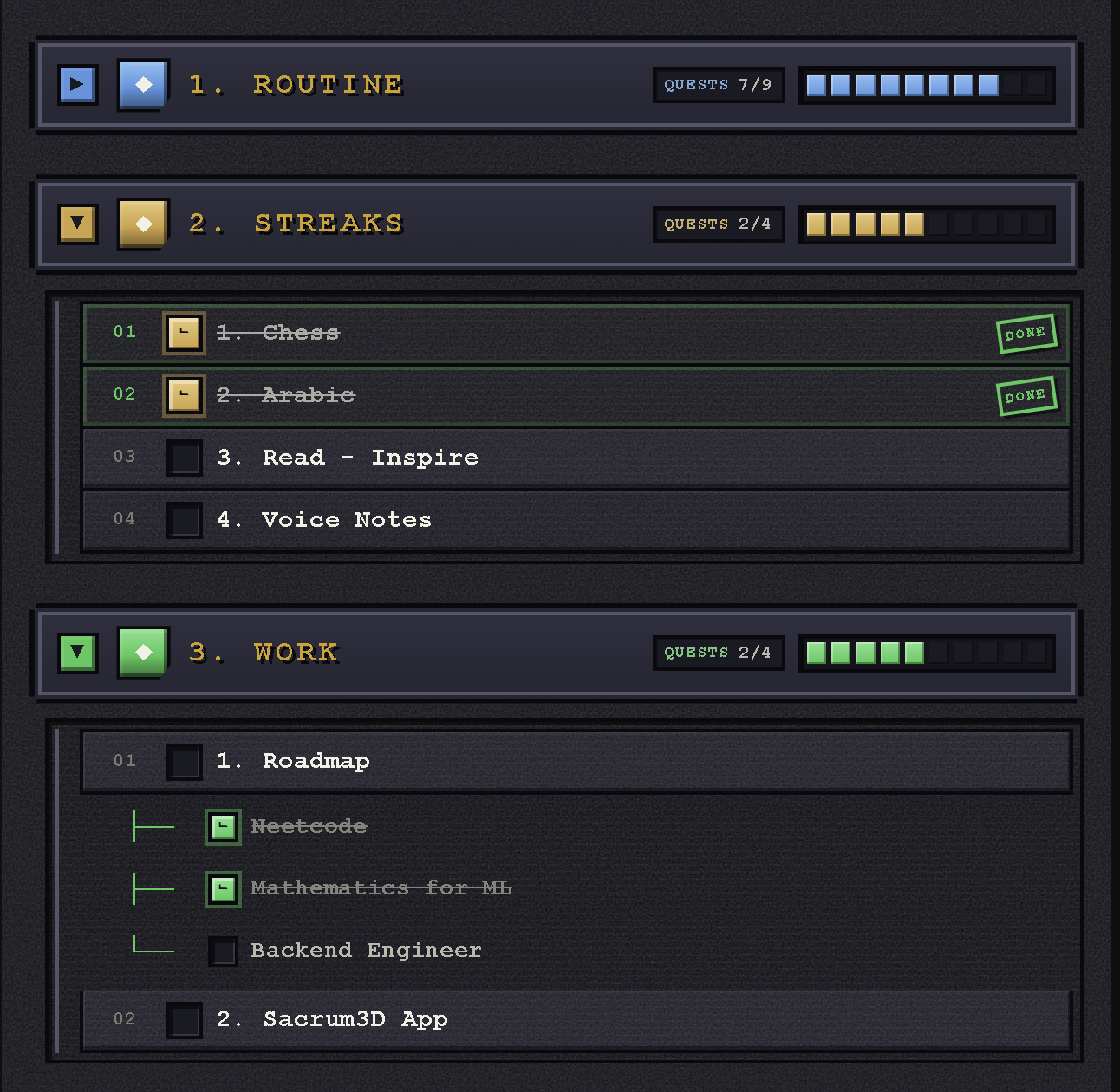
Habits
Every note in your routines folder becomes a checkbox, grouped into colour-coded sections. Ticking one writes today's date into that note, so your history lives in your vault as plain frontmatter.
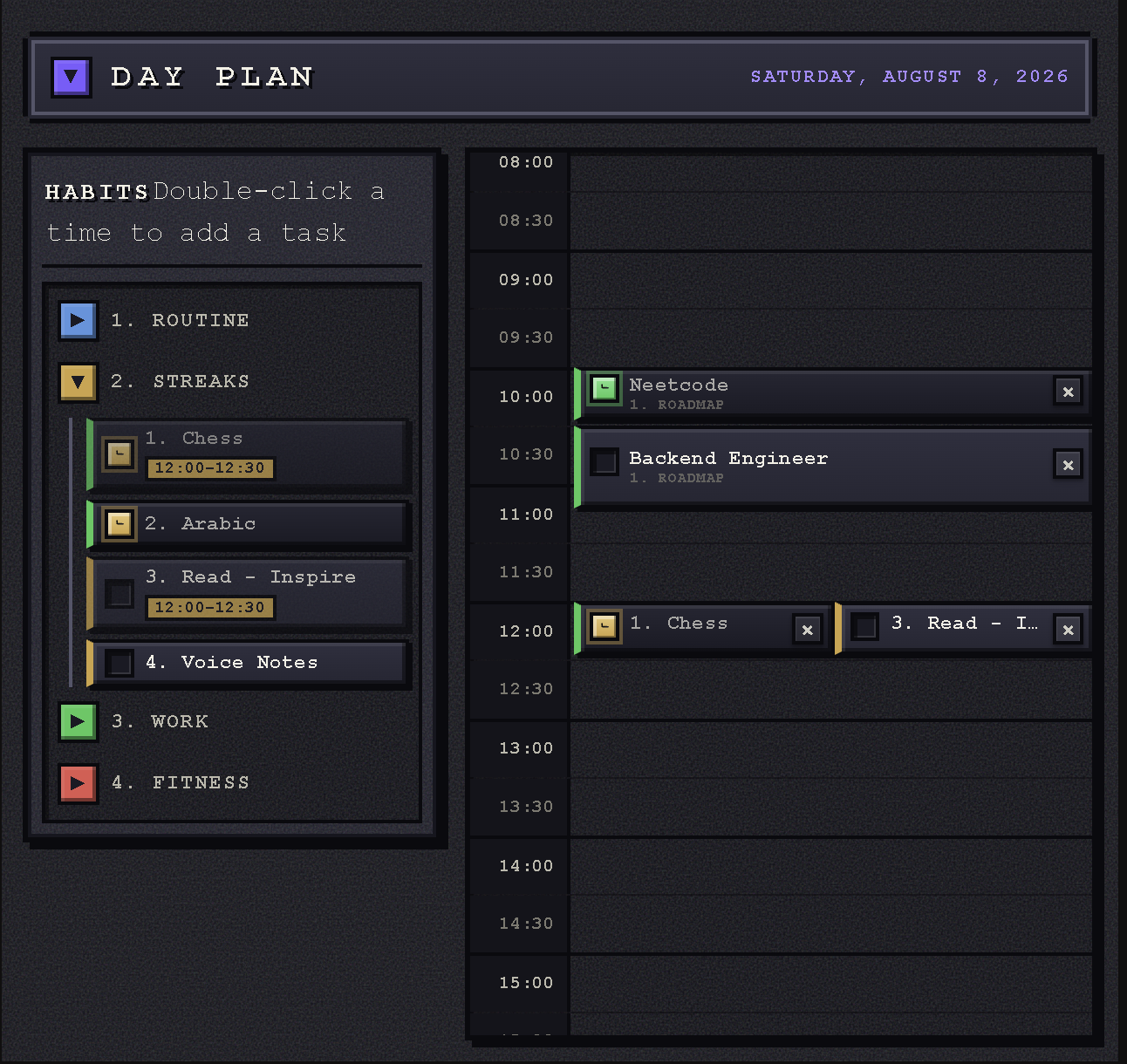
Day plan
Drag habits from the tray into the day, stretch them to however long they really take, and check them off in place. Double-click an empty slot for a one-off task that isn't part of your routines.
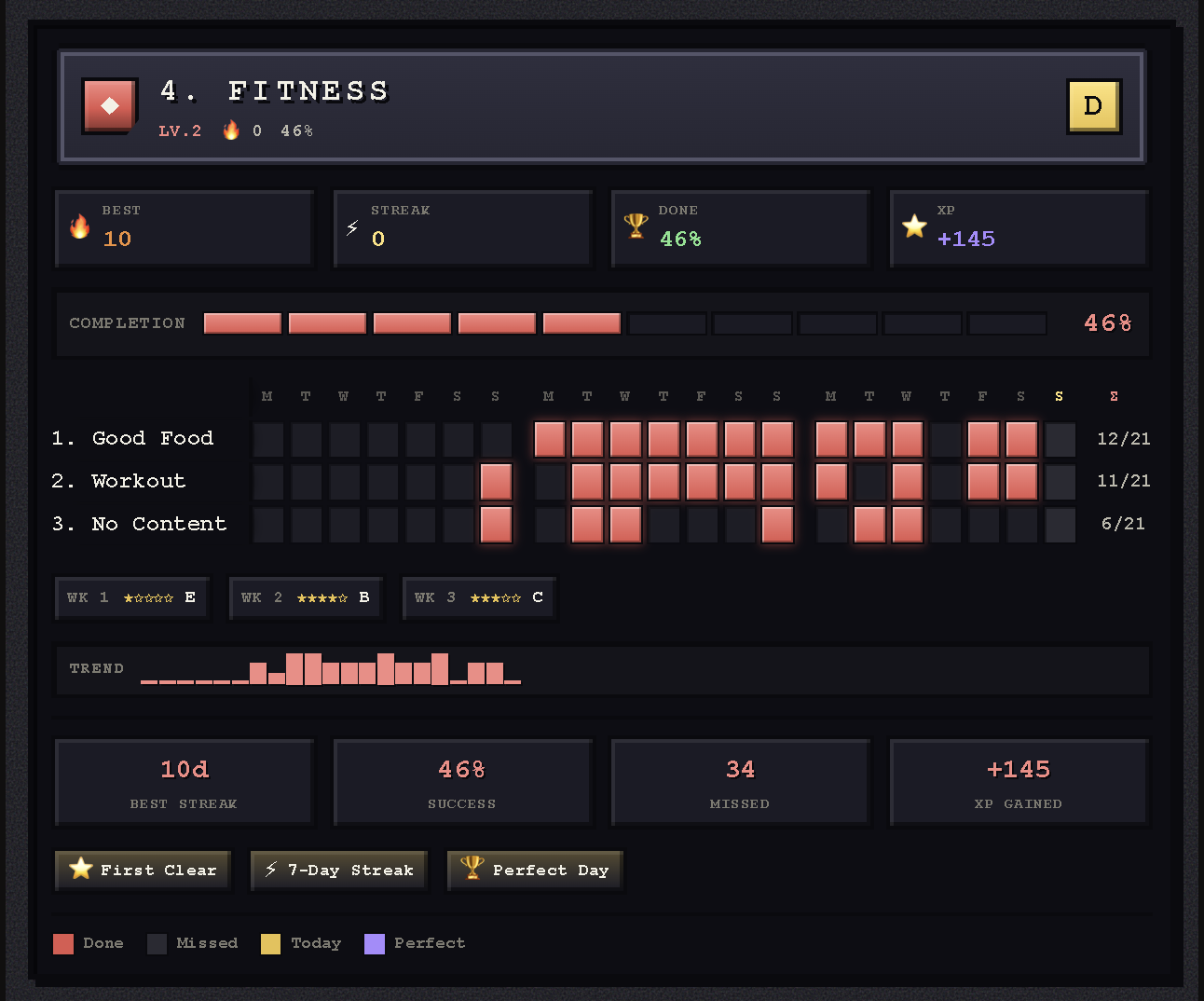
Stats
A JRPG character screen for your consistency: levels, ranks, XP, achievements, and a heatmap where streaks join into a single bar labelled with its length.
Quick start
- Install the plugin (see Installation) and put your habit notes in a
Routinesfolder. - Add any of these code blocks to your daily note — there's an Insert… command for each:
```routines
```

```pixel-calendar
```

```routine-stats
```
All three stay in sync as you click, and everything is stored in your notes' frontmatter.
Reference
Everything below is optional detail — the plugin works out of the box.
How it works
Point the plugin at a root folder (default: Routines). Each subfolder becomes a collapsible section, and each note inside becomes a checklist item:
Routines/
├── Fitness/
│   ├── Gym.md
│   └── Protein goal.md
└── Work/
    └── Inbox zero.md
Add a code block to your daily note (or use the Insert routines checklist block command):
```routines
```
This renders a collapsible Habits checklist with Fitness and Work sections. When you check Gym in a daily note dated 2026-06-25, that date is appended to the entries frontmatter property of Fitness/Gym.md:
---
entries:
  - 2026-06-25
---
Unchecking removes the date. Checked items are shown with a strikethrough.
Subtasks
A routine note can break a habit into subtasks by adding a subtasks list to its frontmatter:
---
subtasks:
  - Warm up
  - Main set
  - Cool down
---
Each subtask renders as a nested checkbox under the habit, connected with pixel tree connectors (├── / └──). The parent and its subtasks stay in sync both ways:
- Checking every subtask automatically checks the parent and logs the daily note's date into
entries. - Unchecking any subtask automatically unchecks the parent and removes that date.
- Checking or unchecking the parent toggles all subtasks at once.
- If a note already has
entriesdates from before it had subtasks, those dates are automatically backfilled into every subtask on render, so the parent stays consistent.
Per-subtask completion is stored in a plugin-managed subtaskEntries property so it survives reloads:
---
subtasks:
  - Warm up
  - Main set
subtaskEntries:
  Warm up:
    - 2026-06-25
  Main set:
    - 2026-06-25
entries:
  - 2026-06-25
---
Notes without a subtasks property behave exactly as before — a single checkbox.
Pixel calendar
Plan your day by adding a pixel-calendar code block to your daily note (or use the Insert pixel calendar block command):
```pixel-calendar
```
This renders a single-day planner titled Day Plan for the daily note's date, with 48 half-hour slots covering 24 hours. Every habit — and its subtasks — appears in a side tray:
- Drag a habit or subtask from the tray into any time slot to schedule it. The plan is saved to the daily note's
pixelCalendarPlanfrontmatter property, so it persists across reloads. - Double-click an empty time slot to add a one-off task for that day — something that isn't one of your routines (see below).
- Stretch anything you've scheduled: drag the bottom edge of a block to make it span more time (30 minutes at a time).
- Check any item — right inside its slot or straight from the side tray — this writes to
entries/subtaskEntriesexactly like the checklist (subtask/parent stay in sync), and both the tray and slot reflect the completion. - Remove a scheduled item with the
×button on its slot chip. - Collapse the whole planner by clicking the Day Plan header, just like the checklist's top-level Habits toggle.
- The side tray's folder sections are an accordion — opening one section collapses the others, so at most one is expanded at a time.
- The row for the current half-hour is highlighted so you can see where you are in the day.
- Each chip — and its checkbox — is tinted with its habit's section color, matching the checklist.
---
pixelCalendarPlan:
  "07:00":
    - Routines/Fitness/Gym.md
  "07:30":
    - "Routines/Fitness/Gym.md::Cool down"
---
Durations
Every scheduled block starts as one 30-minute slot, but a habit rarely fits neatly into half an hour:
- Drag the bottom edge of a block to stretch it over as many rows as you need. Durations snap to whole 30-minute slots, and a block can never be made shorter than one slot.
- Moving a block to another slot keeps its duration.
- Two blocks sharing the same time sit side by side. A third one wraps onto a new line and the time slot grows taller to fit it — long blocks keep running unbroken down the side.
- The side tray shows each scheduled habit's full time range.
Anything other than a plain 30-minute slot is saved to the daily note's pixelCalendarTimes property:
---
pixelCalendarTimes:
  Routines/Fitness/Gym.md:
    start: "07:10"
    end: "09:05"
---
One-off tasks
Not everything is a routine. Double-click any empty time slot to type a task just for that day — no note is created and nothing is added to your routines folder:
- Press Enter to add it, Escape to cancel.
- Check it off like any other chip, drag it to another slot, or double-click it to rename.
- The
×button (or dragging it back to the tray) deletes it.
One-off tasks are stored in the daily note's pixelCalendarTasks property and referenced from the plan with a custom: prefix:
---
pixelCalendarPlan:
  "09:30":
    - custom:m3k9f2-a1b2
pixelCalendarTasks:
  m3k9f2-a1b2:
    title: Call the plumber
    done: true
---
Live sync between blocks
The checklist, the pixel calendar, and the stats board stay in sync as you click. Checking a habit in the calendar instantly ticks it in the Habits checklist (updating its progress bars), and vice versa — no page refresh, no reopening the note.
Stats board
Add a stats screen to any note with the routine-stats code block (or use the Insert routine stats board command):
```routine-stats
```
This renders a retro RPG character-stats screen with one board per folder/section, showing the last 21 days:
- Header — category banner, section title, level (
LV.n), current streak, and a rank badge (S/A/B/C/D/E). - Quick stats — best streak, current streak, completion %, and earned XP.
- Completion HUD — a block-based HP/XP-style progress bar.
- Heatmap — routines × days grid; completed days are filled in the section's color, grouped by week with per-row totals. Consecutive completed days are joined into a single bar, and the last day of each run is stamped with the streak length.
- Weekly milestones — star ratings and rank per week, with a special Perfect Week state.
- Trend — a pixel sparkline of daily completions.
- Lifetime stats — best streak, success rate, missed days, and XP gained.
- Achievements — collectible pixel badges (First Clear, 7-Day Streak, Perfect Day, Perfect Week, 100% Complete).
Click any cell in the heatmap to add or remove a completion for that routine on that day — it writes to the same entries (and fans out to subtasks) exactly like the checklist, and the board updates live.
Settings
- Routines folder — vault-relative path to the root folder (default:
Routines) - Entries property — frontmatter property updated when an item is checked (default:
entries) - Stored date format — Moment format used for the date written into
entries(default:YYYY-MM-DD) - Subtasks property — frontmatter property that lists a note's subtasks (default:
subtasks) - Subtask entries property — frontmatter property where per-subtask completion dates are stored (default:
subtaskEntries) - Pixel calendar property — frontmatter property in the daily note where the pixel calendar plan is stored (default:
pixelCalendarPlan) - Pixel calendar tasks property — frontmatter property in the daily note where one-off calendar tasks are stored (default:
pixelCalendarTasks) - Pixel calendar times property — frontmatter property in the daily note where custom start/finish times are stored (default:
pixelCalendarTimes)
Installation
From the Community Plugins browser
Once accepted: Settings → Community plugins → Browse → search for "Pixel Habits".
Manual
- Download
main.js,manifest.json, andstyles.cssfrom the latest release. - Copy them into
<vault>/.obsidian/plugins/folder-routines/. - Reload Obsidian and enable the plugin under Settings → Community plugins.