
README file from
GithubFolder Graph View
Let your folder structure be your view graph view!
This is an Obsidian plugin
This plugin, once enabled, will modify your existing obsidian graph view to add named nodes for the parent folders of every node and links between them creating a tree structure.
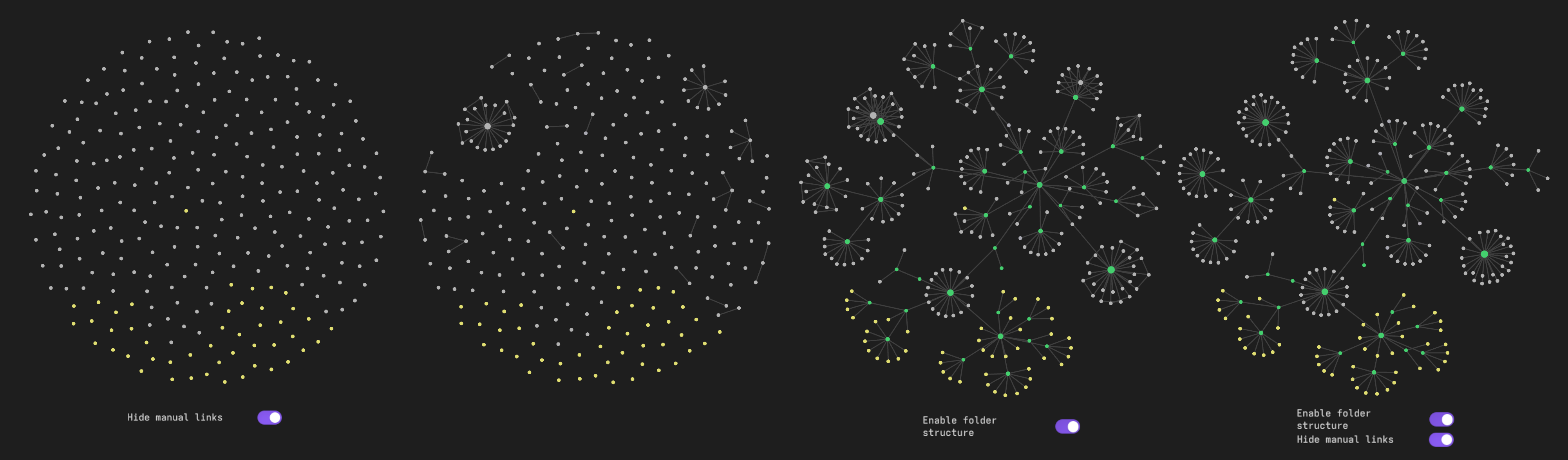
Important settings
Existing files only should be turned on, otherwise, inexistent files (typically broken links) will not be attached to file containing the link, but to the root folder (or will float around if hide root folder node is disabled). This is less of an issue if hide manual links is disabled since they will be attached to their original origin.
Enable Orphans in the side bar, otherwise, only nodes that would already be displayed in the graph without the plugin will be in the folder tree.
Attachements can be enabled, however if they are stored in a standalone folder, it is recommended to enable hide manual links to prevent them from beeing attached to both the parent folder and the file in which they are linked from.
It is also possible to only hide certain file types (typically images) by enabling Hiden Nodes by strings and adding one or more file extensions separated by spaces.
Manual installation
- Download the three files
main.js,styles.cssandmanifest.jsonfrom the lastest release under the repo releases tab, - Add them to a folder in your vault plugins folder (eg.
/path/to/your/vault/.obsidian/plugins/),
or
- Clone the repository in your vault plugin folder
- run
npm installandnpm run build
Then enable the plugin under Settings>Community plugins>Installed plugins
Credits
Initially based on https://github.com/ratibus11/folders2graph, which is inspired by https://github.com/drPilman/obsidian-graph-nested-tags apparently also inspired by https://github.com/ratibus11/folders2graph?