
README file from
GithubFolder Children
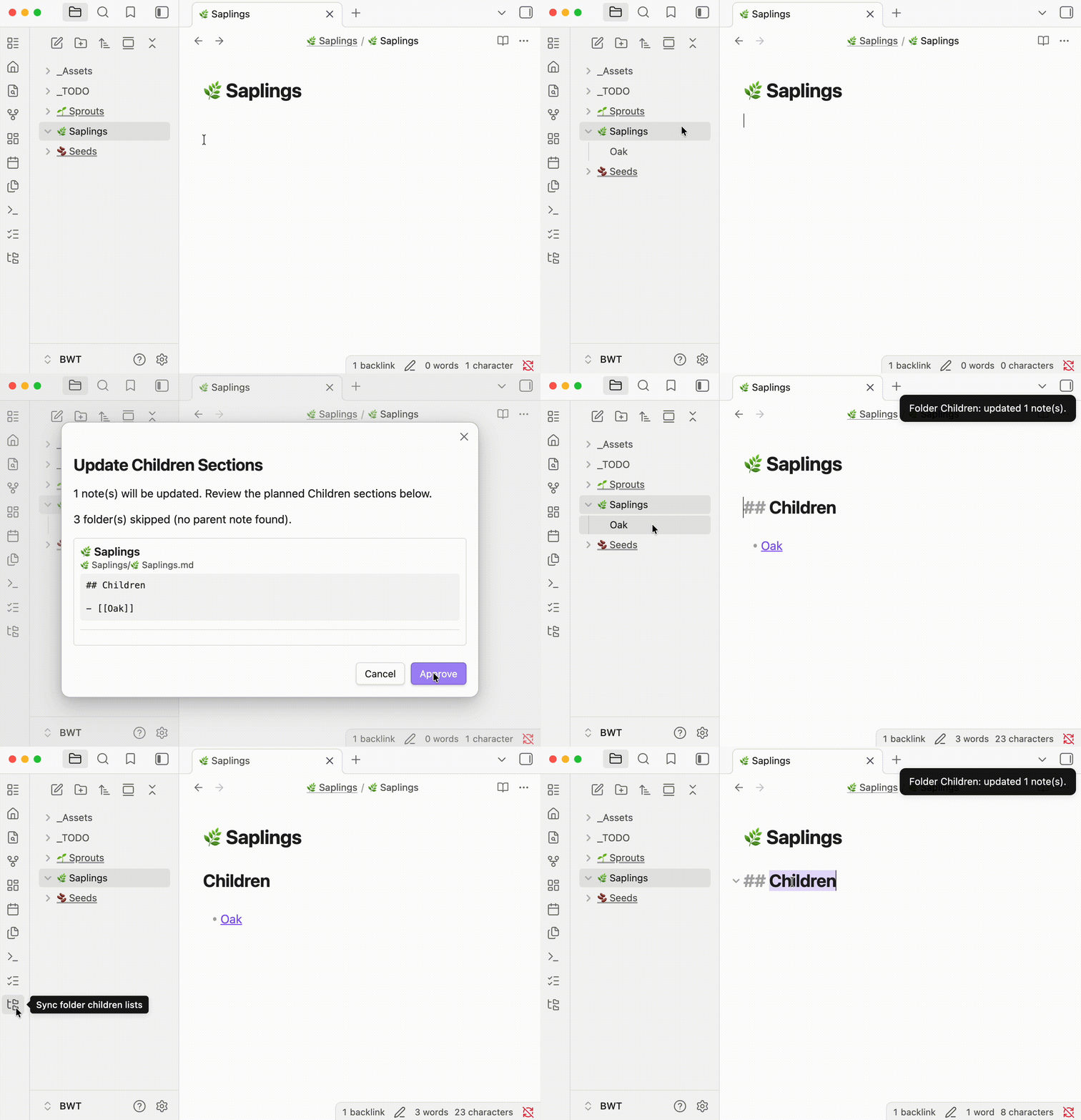
Sync each folder's direct children into a collapsible Children section on its folder note.
Requires Folder Notes. Install Folder Notes first.
Install
Open in Obsidian or search for Folder Children under Settings → Community plugins → Browse.
Usage
- Run Sync folder children lists (command palette or folder-tree ribbon icon).
- Review the preview.
- Click Approve.
For each folder with a folder note, direct child notes and subfolders are listed alphabetically in a callout:
> [!abstract]- Children
> - [[Note]]
> - [[Subfolder/Subfolder]]
Subfolders link to their folder note when one exists. Folders without a folder note are skipped. Hidden files, .obsidian, and the folder note itself are never listed.
Folder notes
Parent notes are resolved the same way as Folder Notes:
Folder/Folder.md— inside the folderFolder.md— sibling of the folder
Development
npm install
npm run build
License
MIT — see LICENSE.