
README file from
GithubFocus First




Stop guessing what to work on next. Focus First automatically sorts your Obsidian tasks into an Eisenhower or Value/Effort matrix, so the next right action is always obvious.
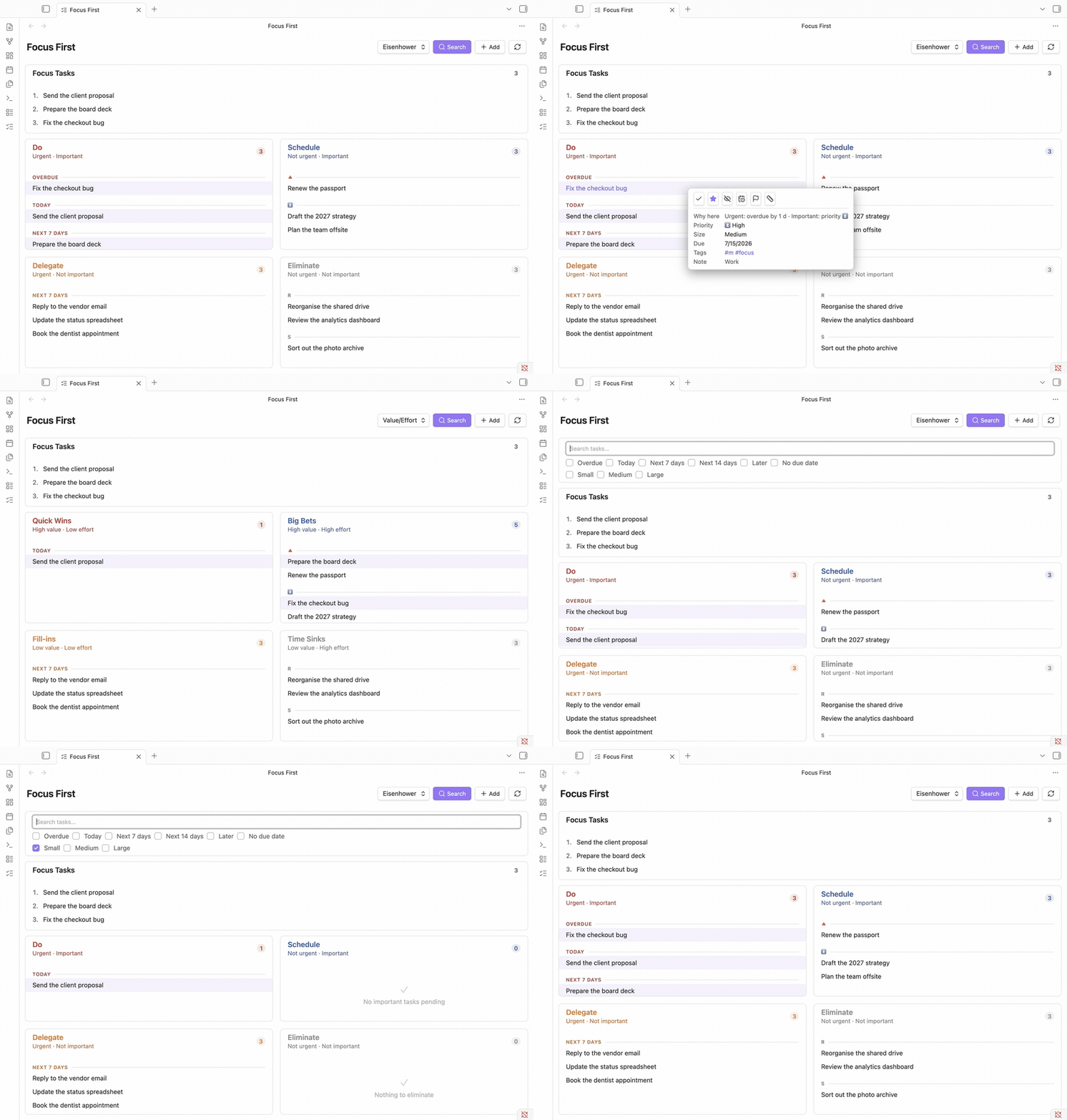
It reads standard checkbox tasks from your vault (compatible with the Tasks plugin format - due dates, priorities, tags) and places each one automatically:
| Urgent | Not urgent | |
|---|---|---|
| Important | Do - handle now | Schedule - plan for later |
| Not important | Delegate - hand off if possible | Eliminate - reconsider or drop |
No manual sorting needed - pin any task to a quadrant with one click, marked with a visible badge, and reset it just as easily.
📖 Full guides, concepts, and reference: Focus First documentation
Features
- Automatic Eisenhower classification - tasks sorted by urgency (due date) and importance (priority), with no setup.
- Two matrices in one view - switch between Eisenhower and Value/Effort, or drag a task between quadrants to re-classify it.
- Triage view - a separate list of every task no matrix has judged yet, so nothing gets lost in "Eliminate"; place each with one click from a hover picker.
- Focus / today plan - an ordered, numbered
#focusshortlist for daily-planning methods like Eat the Frog, Ivy Lee, and MITs. - Task size & quick wins - tag sizes (
#s/#m/#l) and filter the matrix to short tasks. - Details on demand - hover (desktop) or tap (mobile) a task for its "why here" reason, metadata, and one-click actions, each with a brief Undo.
- Capture & embed - quick-add, hide/snooze, search & filters, and embeddable task lists. Works on desktop and mobile, in English and German.
→ See the full feature overview and guides in the documentation.
Documentation
The complete guides live at christian-luger-at.github.io/obsidian-focus-first:
- Prioritization methods - the why behind Eisenhower, Value/Effort, Eat the Frog, Ivy Lee, and MITs
- Getting started
- How tasks are classified
- The two matrices
- Triaging unclassified tasks
- Focus, size & filters
- Embedding tasks in a note
- Settings
Installing the plugin
From the Community Plugins browser (once published)
- Open Settings → Community plugins in Obsidian.
- Disable Safe mode if needed, then click Browse.
- Search for "Focus First" and click Install, then Enable.
Manual installation
- Download
main.js,styles.css, andmanifest.jsonfrom the latest release. - Copy them into
<YourVault>/.obsidian/plugins/focus-first/. - Reload Obsidian and enable Focus First under Settings → Community plugins.
Compatibility
- Requires Obsidian 1.12.0 or later.
- Works on desktop and mobile.
- Works alongside the Tasks plugin - Focus First reads the same checkbox/due-date/priority syntax but doesn't require it (only the code block's query mode needs the Tasks plugin).
Support
Found a bug or have a feature request? Please open an issue.
If Focus First helps you, a ⭐ on the repo makes it easier for others to discover - thank you!
Contributing
Contributions are welcome. See CONTRIBUTING.md for how to report issues, set up the project, and open a pull request, and DEVELOPMENT.md for the local dev/test workflow, the release process, and a demo-vault generator (node scripts/gen-demo-vault.mjs) that spins up a 400-note product-management vault with 100 varied tasks to try the plugin against.
License
Focus First is licensed under the MIT License. © 2026 Christian Luger.