
README file from
Githubtitle: README
File Tree Alpha Hue
Colors file explorer items according to their first alphabetical character using custom data attributes and muted resting color states.

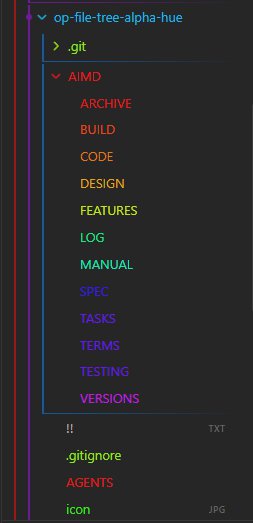

📑 AI Primary Files
- 🔹 AGENTS.md
- 🔹 ARCHIVE.md
- 🔹 BUILD.md
- 🔹 CODE.md
- 🔹 DESIGN.md
- 🔹 FEATURES.md
- 🔹 LOG.md
- 🔹 MANUAL.md
- 🔸 README.md
- 🔹 SPEC.md
- 🔹 TASKS.md
- 🔹 TERMS.md
- 🔹 TESTING.md
- 🔹 VERSIONS.md
🔍 Table of Contents
- [[#🎯 Project Abstract & Core Value]] ^toc-abstract
- [[#🛠️ Technology Stack at a Glance]] ^toc-stack
- [[#🗺️ Project Layout Blueprint]] ^toc-blueprint
- [[#⚡ Quick Start for AI Developers]] ^toc-quickstart
- [[#Go to...]] ^toc-goto
🎯 Project Abstract & Core Value
[[#^toc-abstract|TOC]]
- An efficient Obsidian desktop plugin that scans file explorer navigation items, matches their first alphabetical character via regex, and stamps them with matching data attributes (
data-alpha-char). This builds a dynamic, high-performance UI stylesheet layer that colors folders and markdown files across a 360-degree HSL hue spectrum without incurring DOM layout reflow penalties.
🛠️ Technology Stack at a Glance
[[#^toc-stack|TOC]]
- Target Operating System: Cross-platform (Windows, macOS, Linux desktop targets running Obsidian)
- Core Languages & Runtimes: JavaScript (CommonJS modules format), Node.js runtime environment API, HTML5 DOM API
- Integrations: Obsidian API (
Plugin,debounce, workspace layout event hooks), DOMMutationObserverEngine
🗺️ Project Layout Blueprint
[[#^toc-blueprint|TOC]]
AGENTS.md➔ System prompts and operational boundaries for AI teammates.AIMD/ARCHIVE.md➔ Scriptorium for scrapped ideas and sunset components.AIMD/BUILD.md➔ Compiler pipelines, flags, and packaging steps.AIMD/CODE.md➔ Syntax style guidelines and error-handling mandates.AIMD/DESIGN.md➔ Structural topology, design patterns, and data flows.AIMD/FEATURES.md➔ Capability matrices and functional product roadmap.AIMD/LOG.md➔ Chronological audit trail of development decisions.AIMD/MANUAL.md➔ Installation, user runbooks, and diagnostic workflows.README.md➔ Primary entry point and structural system abstract.AIMD/SPEC.md➔ Technical constraints, parameters, and protocol definitions.AIMD/TASKS.md➔ Dynamic task board and backlog management queue.AIMD/TERMS.md➔ Technical glossary, definitions, and vocabulary indexes.AIMD/TESTING.md➔ Automation suites, edge cases, and QA assertion routines.AIMD/VERSIONS.md➔ Change trackers and version milestone evolution lists.
⚡ Quick Start for AI Developers
[[#^toc-quickstart|TOC]]
1. Verify Environment
node -v && npm -v
2. Compile & Run Tests
npm install && npm run build
🚀 Go to...
[[#^toc-goto|TOC]]
- 🔹 AGENTS.md
- 🔹 ARCHIVE.md
- 🔹 BUILD.md
- 🔹 CODE.md
- 🔹 DESIGN.md
- 🔹 FEATURES.md
- 🔹 LOG.md
- 🔹 MANUAL.md
- 🔸 README.md
- 🔹 SPEC.md
- 🔹 TASKS.md
- 🔹 TERMS.md
- 🔹 TESTING.md
- 🔹 VERSIONS.md