
README file from
GithubFile Master
Take control of your Obsidian attachments: an all-in-one workspace combining local vault cleanup with your self-hosted file server.
简体中文 · English · Server (file-master-server) · Changelog
Why File Master?
As an Obsidian vault grows, attachment management quickly gets messy:
- Bloated vaults: screenshots, images, and videos pile up locally and slow down sync, yet you hesitate to delete anything for fear of breaking notes.
- Duplicates and orphan files: pasting the same screenshot multiple times leaves redundant copies; deleting a note leaves unused attachments behind.
- Publishing friction: local images don't travel well to blogs or external editors without manual re-uploading and link rewriting.
- Painful renames: renaming a hosted file breaks every note that links to it unless you hunt down each reference by hand.
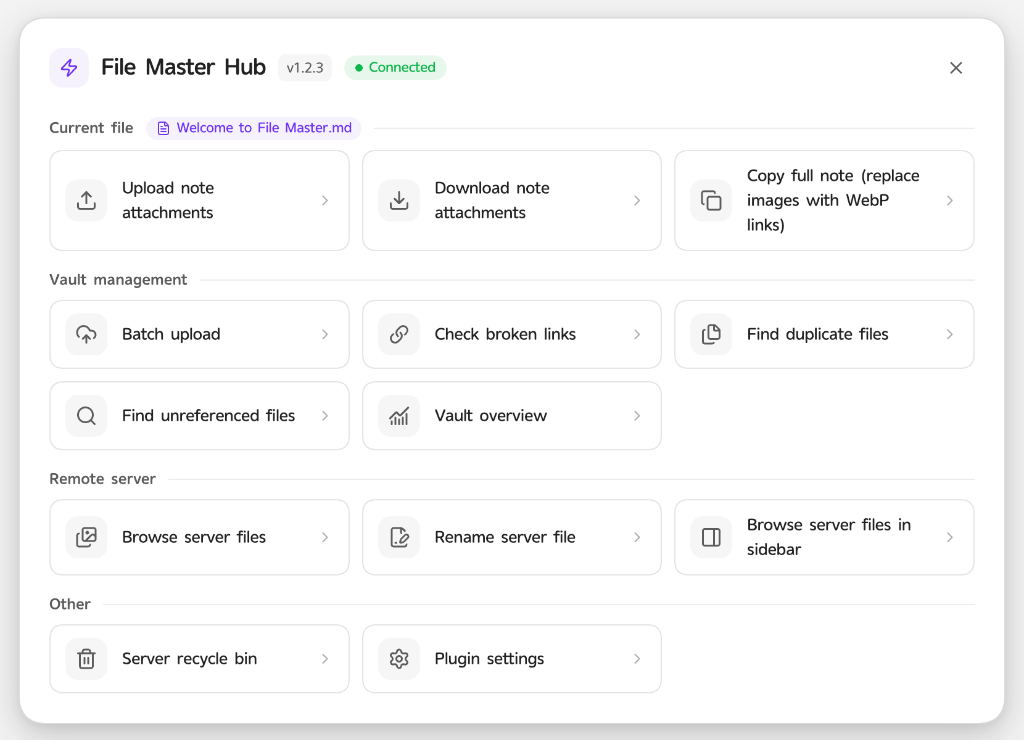
File Master brings all of this into one safe workflow: use it locally with zero server setup for deduplication, orphan cleanup, and broken-link checks—or connect your own server for WebP optimization, watermarks, vault-wide renames, and a cloud recycle bin.
Core Workflows
1. Instant Capture & Two-Way Migration
- Smart paste & drag-and-drop: automatically save incoming images, videos, or documents locally or upload them to your server and insert the right link.
- One-click note migration: upload every local attachment in the active note to your server, or download remote attachments back into your vault—all links are rewritten automatically.
- Multi-format support: works across Markdown, Canvas, and Excalidraw files.
2. Ready to Publish: WebP & Link Copying
- Copy full note with WebP links: copy the current note with image URLs swapped to their WebP variants without modifying your original note.
- Flexible link copying: copy raw URLs, WebP URLs, or Markdown snippets directly from the gallery or file preview dialog, and inspect every note referencing a file.
3. Safe Vault Cleanup Without Broken Links
- Exact SHA-256 deduplication: find byte-identical duplicates, keep one copy, and merge references across all notes automatically.
- Orphan attachment cleanup: detect unreferenced local and remote files across your vault, with lock protection so important assets are never swept up by cleanup or deduplication.
- Broken-link health check: scan your vault for dangling
[[wikilink]]s, missing local embeds, and HTTP 404 remote links—grouped by note with inline hover previews that scroll straight to the line without leaving the modal. - Vault analytics: view local vs. remote attachment counts, storage usage, and largest files at a glance.
4. Vault-Wide Server File Renames
- Before renaming a file on the server, File Master scans affected Markdown, Canvas, and Excalidraw documents and lists every matching link with hover preview and one-click jump to line.
- Committing the rename updates all note references automatically while the server keeps an alias grace period for old URLs so external posts don't immediately 404. Renamed target filenames remain permanently reserved on the server even after deletion to prevent future uploads from hijacking historic external links.
5. Preview, Insert, and Recover Anytime
- Gallery & desktop sidebar: filter by directory, type, search query, and sort order; zoom images, toggle Original/WebP, and insert directly into the active editor.
- Server recycle bin: deleted server files go to the recycle bin first so you can restore mistakes or purge them permanently.
Local-Only vs. With Server
| Capability | Local-Only (No Server) | With file-master-server |
|---|---|---|
| Paste / drop attachment handling | ✅ | ✅ |
| Exact SHA-256 duplicate merge | ✅ | ✅ |
| Orphan scan & safe cleanup | ✅ | ✅ |
| Broken-link health check | ✅ | ✅ |
| Vault attachment analytics | ✅ | ✅ |
| Auto upload, WebP optimization & watermarks | — | ✅ |
| Vault-wide remote rename (with alias grace period) | — | ✅ |
| Cloud gallery, sidebar browser & recycle bin | — | ✅ |
Safe by Design & Cross-Platform
- Pre-deletion reference safety gate: re-checks live note contents before deleting or merging, blocking deletion if a reference still exists or a note changed mid-operation.
- Resumable checkpoints & operation logs: batch migrations and renames journal progress so interrupted jobs can recover cleanly.
- Desktop & mobile: supports English and Simplified Chinese and adapts to your Obsidian light/dark theme.
Installation
Option 1: With BRAT (Recommended)
- Install and enable BRAT from Obsidian Community Plugins.
- Add
https://github.com/weichen-ink/file-masterin BRAT. - Enable File Master in Settings → Community Plugins.
Option 2: Manual Installation
- Download
main.js,manifest.json, andstyles.cssfrom Releases. - Copy them into your vault's
.obsidian/plugins/file-master/folder. - Reload Obsidian and enable File Master in Community Plugins.
Quick Start
- Click the File Master ribbon icon to open the Hub (or use the command palette).
- Local cleanup right away: run Duplicate Merge, Orphan Cleanup, Broken Link Check, or Vault Analytics with no server required.
- Connect your own server (optional):
- Deploy the backend using the file-master-server guide.
- Enable the server connection in plugin settings and enter your site URL plus the API token from the server's Site settings.
- Click Test Connection to start uploading and browsing server files.
Note: Plugin 1.2.9+ requires File Master Server 1.2.8 or later (and vice versa). On mobile, use a server URL reachable from your phone rather than
localhost.