
README file from
GithubObsidian File Heatmap Plugin
A minimal, zero-interaction file heatmap visualizer for Obsidian.
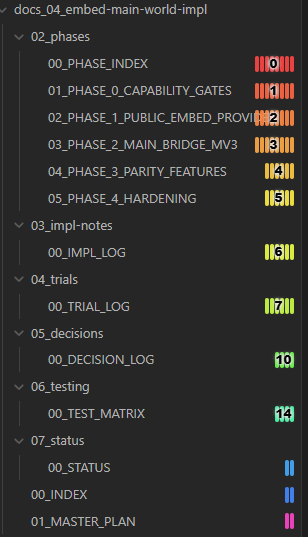
Why This Plugin?
View recently changed files at a glance. Usually requires opening a separate "Recent Files" tab, pressing some hotkeys, sorting the explorer by modification date, or using other disruptive tricks to view recently changed files.
This plugin eliminates that friction by rendering a real-time heatmap overlay directly in your file explorer.
- Always Visible: Glancing at your sidebar shows active areas of work immediately.
- Zero-Friction: No hotkeys, no popups, no context switching.
- Aesthetically Minimal: Designed to look clean and integrated.
How It Works
The plugin overlays a collection of vertical indicators next to each file title in the explorer pane:
1. Color Scale (Up to 30 Days)
Colors dynamically shift from hot/active to cold/dormant as time passes:
- 0–5 days: High-activity colors (Red, Orange, Gold).
- 6–11 days: Moderate-activity colors (Yellow, Lime, Green).
- 12–22 days: Low-activity colors (Teal, Cyan, Blue).
- 23–30 days: Inactive colors (Purple, Magenta, Pink).
- >30 days: Automatically hidden (no indicator) to keep old files clean and uncluttered.
All styling properties and color scales are configurable.
2. Bar Width / Block Count (Intuitive Density)
The horizontal width (number of vertical blocks) indicates age by week:
- First Week (0–7 days): Widest indicators.
- 0–3 days: 8 blocks.
- 4–7 days: 6 blocks.
- Second Week (8–15 days): Medium-width indicators (4 blocks).
- Over Two Weeks (16–30 days): Narrowest indicators (2 blocks).
3. Smart Number Overlay (Recent Activity)
To maintain a clean sidebar, exact numeric day counts are only overlayed on files modified up to 2 weeks ago (15 days or less). Files older than 15 days show only the color blocks without numbers.
4. Fully Configurable & Global Hotkey
- Customizable: Every aspect—from the 30-day color scale to the bar width density and number overlay thresholds—is fully configurable in the plugin settings. You can tweak individual colors or revert specific settings back to their defaults with a single click.
- Global Toggle: Need the heatmap gone for a moment? You can bind a single hotkey to the "Toggle File Heatmap Overlay" command to instantly hide or show the heatmap without restarting the plugin.
Technical Details
- Mutation & Event Tracking: Leverages Obsidian's vault
modifyandcreateevents, as well as aMutationObserveron the file explorer tree container. Indicators update automatically as soon as you save or modify a note. - Smooth Overlay rendering: Rendered inside a single pointer-transparent overlay (
.heatmap-overlaywithpointer-events: none). All click events pass through naturally to Obsidian file tree items. - Performance Optimized: Updates are debounced and coalesced using
requestAnimationFrame, preventing UI lag and layout thrashing during fast scroll or resizing operations.