
README file from
GithubFakeLink
FakeLink is an Obsidian plugin that automatically generates virtual links based on note titles, aliases, and headers inside your notes.
These links are not written into the Markdown file. Instead, they are dynamically rendered in the editor, which keeps your notes clean while still providing auto-linking functionality.
This plugin is a fork of Virtual Linker / Glossary.
Since the original plugin is no longer actively maintained and some features broke after the Obsidian API updates in 2025, FakeLink continues development with fixes and new functionality.
The main improvements include:
-
Fixing compatibility issues with newer versions of Obsidian
-
Improving IME compatibility
-
Enhancing stability
-
Adding virtual links that can point directly to note headers
Features
Original plugin features:
-
Automatically create virtual links for matching note titles or aliases
-
Works similar to a Glossary system
-
Works in both Edit Mode and Read Mode
-
Links are always up-to-date
-
No need to manually create Markdown links
-
Supports note aliases
-
Virtual links do not appear in Graph View
-
Does not affect backlink counts
-
Automatically updates as your vault grows
-
Can convert virtual links into real links via right-click
FakeLink improvements:
-
Virtual links created from headers can now jump directly to the target header
-
Improved behavior inside tables
-
Fixed broken features from the original plugin
-
Auto-toggle activation status by mode
- When enabled, virtual links appear only in Edit Mode
-
Excluded keywords
- Right-click a virtual link to add it to excluded keywords
-
Excluded file extensions
- Example:
.mp4files will not be matched
- Example:
-
Only match headers between symbols
-
When enabled, header matching logic changes
-
Only keywords between configured symbols will trigger virtual links
-
-
Jump to line via
obsidian://adv-urilinks- A single click reliably positions the cursor on the target line
Demo
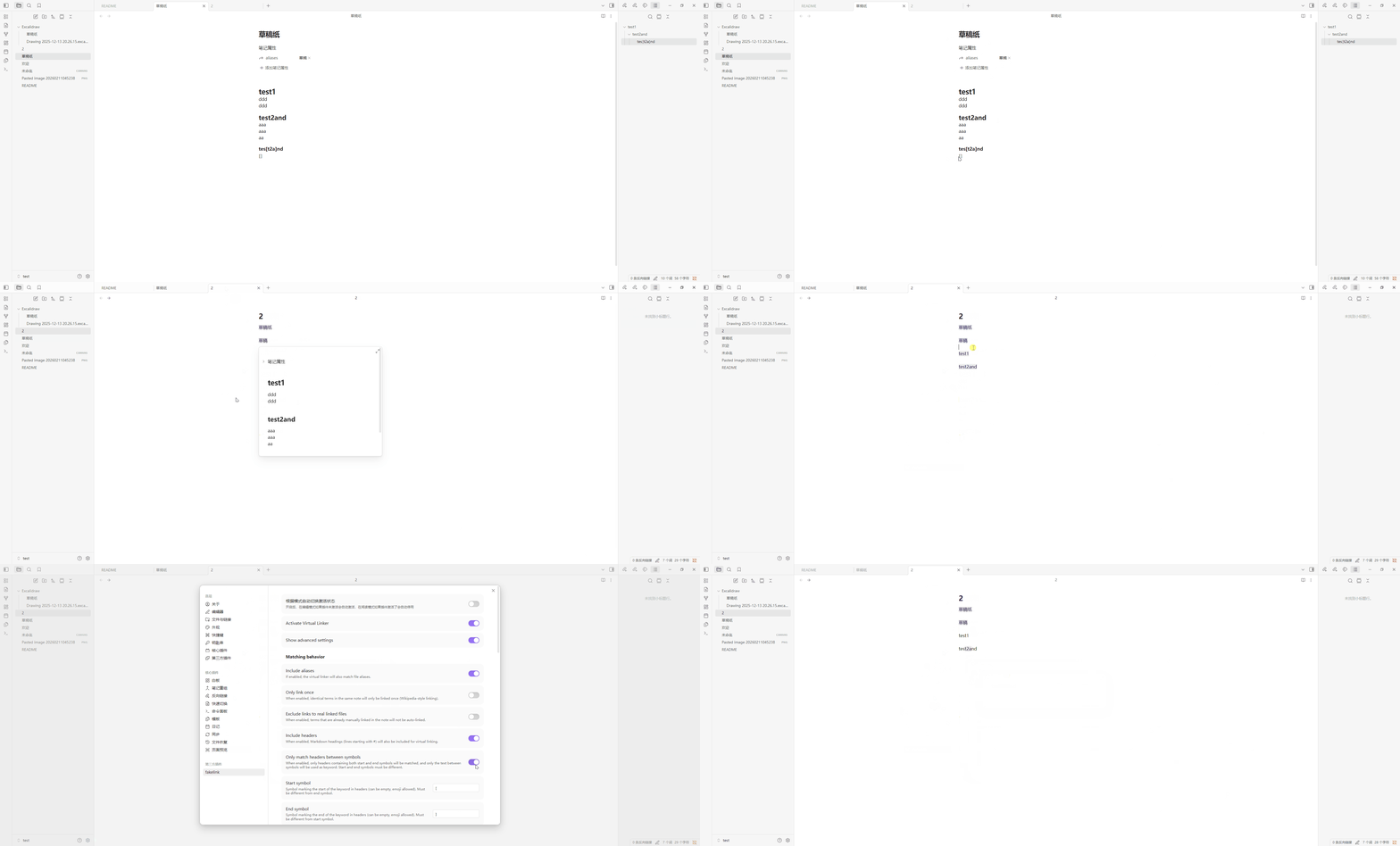
How It Works
By default, the plugin scans the entire vault.
If text in a note matches a note title or alias, a virtual link will automatically appear.
You can limit matching to a specific folder in the settings.
Note
Virtual links are generated dynamically:
They do not modify the original Markdown
They are not converted into
[[links]]They do not appear in Graph View or backlinks
Additional note:
The toggle command cannot fully disable rendering in Canvas and Tables.
If you need a full on/off switch, you can:
-
Use another plugin to control FakeLink
-
Or use a QuickAdd script to toggle FakeLink.
Installation
Install from Community Plugins (after approval)
-
Open Obsidian
-
Go to Settings → Community Plugins
-
Search for FakeLink
-
Install and enable
Manual Installation
-
Download the latest release
-
Copy the files into:
VaultFolder/.obsidian/plugins/fakelink/
Make sure the folder contains:
main.js
manifest.json
styles.css (if included)
Or clone the repository and build it manually.
Settings
Matching Scope
You can choose to:
-
Match the entire vault
-
Match only specific folders
This is useful for creating a Glossary folder.
You can also control inclusion using tags:
Default tags:
-
linker-include→ Force include the file -
linker-exclude→ Exclude the file
These tags can be changed in settings.
You can also exclude specific folders.
Case Sensitivity
Matching can be configured to be case-sensitive.
Default rule:
If a word is more than 75% uppercase, it will automatically use case-sensitive matching.
You can also control it via tags:
-
linker-match-case -
linker-ignore-case
Or define it in frontmatter:
linker-match-case
linker-ignore-case
Matching Modes
Prevent Duplicate Matches
By default:
-
The same word will not create multiple virtual links in one note
-
If a real link already exists, a virtual link will not be created
Partial Matching
Matching options:
-
Match full words only
-
Match word beginnings
-
Match any part of a word
Example:
book does not match notebook
note can match notebook
Self Links
By default, links pointing to the current note are disabled.
You can enable them in settings if needed.
Current Line Linking
By default, links are generated in real-time while typing.
If you use Chinese or Japanese IME input methods, it is recommended to disable current line linking to avoid conflicts.
Link Style
Virtual links use a subtle background shadow by default.
This helps distinguish them from real links.
Default behavior:
Virtual link color is slightly darker than normal links.
If you want custom styles, you can disable the default style and use CSS.
Line Jumping
FakeLink can take over clicks on obsidian://adv-uri links that carry a line parameter, so a single click reliably positions the cursor on the target line (no need to click twice while the target file loads).
Do I need the Advanced URI plugin?
No. FakeLink handles both sides itself:
- To jump (click a link): With Jump to line on adv-uri click enabled, FakeLink registers the
obsidian://adv-uriprotocol and jumps to the target line on a single click — including files that are not open yet. Because Obsidian only allows ONE plugin per protocol, disable the Advanced URI plugin while this feature is on. - To create the links: Use the editor's right-click menu → Copy line link (adv-uri). It copies an
obsidian://adv-urilink for the current line to your clipboard, ready to paste into a checklist. No Advanced URI plugin needed.
Link format
A full link looks like this:
obsidian://adv-uri?vault=bba24b423cdaaeeb&filepath=2026%E4%B8%8A...%2F...%2Fnote.md&line=3&column=1&openmode=true&view-mode=source
FakeLink only reads two parameters:
| Parameter | Meaning | Required |
|---|---|---|
filepath |
URL-encoded path relative to the vault root (slashes encoded as %2F) |
Yes |
line |
1-based line number to jump to | Yes |
vault, column, openmode, view-mode |
Ignored by FakeLink | No |
So the minimal link FakeLink needs is:
obsidian://adv-uri?filepath=<URL-encoded relative path>&line=<line number>
How to create these links
filepath must be URL-encoded, so the recommended way is to install the Advanced URI plugin and use its "Copy URI" command (or a checklist/task tool that produces them). If you already have such links in your notes, they will work as-is.
To jump, enable Jump to line on adv-uri click in Settings → Line Jumping, and adjust Jump delay (ms) if large files need more time to render.
Commands
The plugin provides the following command:
- Toggle virtual links
You can run it from the command palette or assign a hotkey.
Context Menu
Right-click on a virtual link to:
-
Convert to a real link
-
Exclude the file
-
Include the file
-
Add to excluded keywords
Project Origin
This project is a fork of Virtual Linker / Glossary.
Original author: Valentin Schröter
License: Apache License 2.0
FakeLink continues development with compatibility fixes and new features.
Development
If you want to contribute:
- Clone the repository into:
your-vault/.obsidian/plugins/
- Install dependencies
yarn
- Development mode
yarn dev
- Build the plugin
yarn build
Using the Hot Reload plugin is recommended during development.
License
Apache License 2.0
This project is based on Virtual Linker / Glossary and continues its development.
Why FakeLink vs Virtual Linker
Many important pieces of knowledge in a vault are stored inside headings rather than as separate notes. With the original Virtual Linker, links mainly target note titles, which means users often have to open a note and manually search for the relevant section.
FakeLink improves this workflow by allowing virtual links to resolve directly to headings. This enables a more granular knowledge structure:
-
Important concepts can be intentionally written as headings inside notes.
-
When the same concept appears elsewhere in the vault, FakeLink can immediately link to that exact section.
-
Users can navigate directly to the relevant content instead of locating it manually inside a long note.
In practice, this turns headings into a lightweight knowledge index. Over time, as your vault grows, FakeLink helps you quickly locate and reuse key ideas simply by typing them.
This approach works especially well for:
-
Glossaries stored as headings
-
Structured knowledge bases
-
Long-form notes with multiple concepts
-
Incrementally building a personal knowledge system