
README file from
GithubExtended Headings
Extended Headings extends Obsidian's ATX heading workflow from H1–H6 through H12. It adds editing, styling, folding, outlines, heading navigation, heading-level markers (in the editor gutter and outline pane, respectively), heading shifting, block-or-heading reference commands, Outline pane heading tree indentation guide lines (both static guides and dynamic threading), Outline pane Markdown Rendering, Outline pane SVG rendering, and heading hover breadcrumbs.
###### Native H6
####### Extended H7
######## Extended H8
######### Extended H9
############ Extended H12
The default maximum is H12. It can be lowered to H7 under Settings → Community plugins → Extended Headings.
Obsidian compatibility
- Latest compatibility target: Obsidian 1.13.7 (Desktop, public release).
- Minimum supported Obsidian version: 1.13.0.
The compatibility target records the Obsidian version used for the compatibility audit. For 2.1.1, automated tests, Chromium/CodeMirror checks, and integration checks with the Style Settings manager are separate from testing inside Obsidian; see 2.1.1 validation. Version 0.4.9 deliberately raises the minimum from 1.7.2 to 1.13.0 so the plugin can use Obsidian's searchable declarative settings API without retaining a second legacy settings renderer. Earlier releases remain mapped to their historical minimum versions in versions.json.
Extended Headings declares mobile compatibility because its runtime uses Obsidian and CodeMirror APIs rather than Node.js or Electron APIs. Version 2.1.1 has not been device-tested on Obsidian Mobile.
Features
- Heading typography in Source mode and Live Preview.
- Hash markers hidden on inactive content-bearing Live Preview heading lines by default, while blank headings retain their hashes.
- Heading rendering and optional folding in Reading View.
- Editor folding ranges that respect the complete H1–H12 hierarchy.
- A supported-API Extended Outline side pane.
- An experimental bridge for the core Outline,
[[Note#Heading]]links, link suggestions, and heading navigation. - True H7–H12 levels in Obsidian's default Outline, preserving the complete unflattened hierarchy.
- Default-on reversible inline Markdown rendering for H1–H12 labels in Obsidian's default Outline; embedded links remain compact instead of transcluding note contents, and leading numbered labels remain ordinary heading text rather than Markdown lists.
- Optional sanitized rendering of inline SVGs from H1–H12 heading source in Obsidian's default Outline, enabled by default.
- Default-on H1–H12 heading-level markers beside labels in Obsidian's default Outline.
- Default-on static Outline heading-tree indentation guides with measured spines and branch connectors.
- Default-on full-row Outline heading threading for active ancestor paths, virtual root-level H1 trees, orphan H2–H12 trees, and combined root-level ⟺ orphan trees, with optional all-branches modes and a default-off selected-heading activation override.
- Reliable H1–H12 Outline decoration and Markdown link rendering for plain, Markdown-formatted, internal-link-only, and embedded-internal-link-only headings, including rows mounted after scrolling.
- Immediate active-note injection at workspace readiness, followed by a background vault-wide reindex after metadata resolution.
- Punctuation-preserving H7–H12 labels in the default Outline, including parentheses and colons.
- An independent Live Preview rendering fallback for heading-subpath links placed directly on H7–H12 lines.
- Heading increase and decrease commands across selected lines or the heading under the cursor, from H1 through H12.
- Forced heading conversion, contextual insertion, and H1–H12 Set as heading commands.
- A configurable lower heading limit and optional Tab/Shift+Tab override.
- Formatting-cleanup and child-list behaviors inspired by Heading Shifter.
H1–H12markers in the editor gutter.- H1–H12-aware rename, copy-link, and copy-embed commands, including ancestor segments in nested links and embeds.
- Default-on automatic wrapping and expansion of long titles in the rename dialog, with a main-settings toggle.
- A clickable, scrollable heading hover breadcrumb in Live Preview, Source, and Reading mode, with independent Editor/Outline activation and decoration controls.
- Heading- or block-specific copy actions in the editor context menu.
- Minimal-style typography controls for every extended level from H7 through H12.
- An Editor Gutter Style Settings section with global heading-level-marker and hash-marker size, weight, and font-variant controls across all H1–H12 heading levels.
- Synchronized precise number inputs that accept arbitrary in-range values for every numerical Style Settings control.
- H7–H12 ATX hash markers that track the size, weight, style, and variant selected for their heading level.
- Searchable plugin settings through Obsidian 1.13's declarative settings API.
Miscellaneous Feature-Specific Performance Warnings
- Enabling the
Outline Pane Heading Static Tree Indentation Guidestoggle may cause some lag to render those guides in the pane upon activation of a given note or while scrolling through a given outline pane.- The lag seems to be proportional to the heading count and hierarchy complexity of a given note.
Feature preview
This representative Live Preview shows every extended level. H8 is active, so its eight ATX hashes are visible; the inactive H7, H9, and H10–H12 lines demonstrate the default hash-concealment behavior. Current plugin-added outline-pane decorations are disabled:
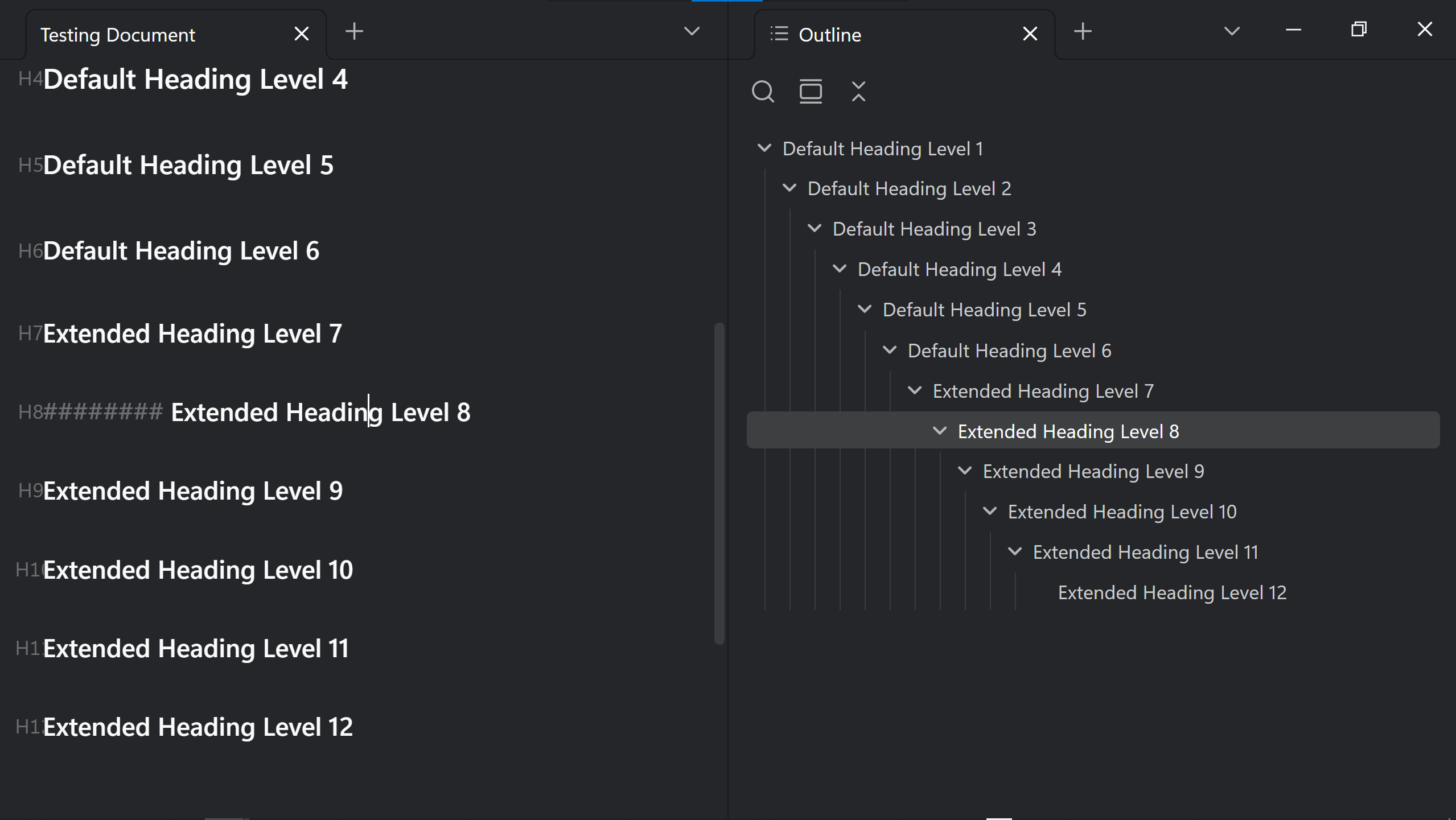
Active Heading Threading Toggle ENABLED - Default Colors
Active Heading Threading Toggle ENABLED - Global Override Heading Thread Colors Toggle ENABLED - Default Color
Outline Pane Static Heading Tree Indentation Guides Toggle DISABLED - Outline Pane Heading Threading Global Toggle DISABLED
Outline Pane Markdown and SVG Rendering Toggles ENABLED
Editor Pane Heading Hover Breadcrumb ENABLED - With Default Settings
Outline Pane Heading Hover Breadcrumb ENABLED - With Default Settings
Settings
| Setting | Default | Effect |
|---|---|---|
| Maximum heading level | 12 |
Recognizes extended ATX headings from H7 through the selected level. |
| Hide hashes on inactive Live Preview heading lines | On | Conceals H7+ hashes on inactive content-bearing headings while keeping blank-heading hashes visible. |
| Reading View folding | On | Shows a folding control beside extended headings in Reading View. |
| Core Outline and heading-link bridge | On | Adds H7+ entries to Obsidian's in-memory heading cache for the core Outline, heading links, and navigation. |
| Outline Pane Markdown Rendering | On | Renders inline Markdown formatting in H1–H12 default-Outline labels while keeping embedded links compact. |
| Outline Pane – Expand Long Heading Titles | On | Wraps Markdown-rendered long heading titles onto additional lines; turn it off to use single-line ellipsis truncation. Available only while Outline Pane Markdown Rendering is enabled. |
| Render inline SVGs in default Outline | On | Renders sanitized inline SVGs from H1–H12 heading source beside their labels in Obsidian's default Outline. |
| Expand long heading titles in rename dialog | On | Wraps and fits the H1–H12 rename field immediately, then resizes it as you edit or resize the dialog. Enter renames; visual wrapping adds no line breaks to the heading. Disable for a single-line field. |
| Copy fully nested heading paths | On | Includes every ancestor heading in copied heading links and embeds; disable it to copy only the shorter target-heading link. |
| Lower limit of heading | 1 |
Sets the shallowest level that Decrease headings may reach; 0 permits conversion to a paragraph. |
| Enable override Tab behavior | Off | Makes Tab and Shift+Tab shift headings when the active selection contains a heading. |
| Show Editor Gutter heading level markers | On | Shows H1–H12 heading markers in the editor gutter and inside linked embeds. Existing showHeadingMarkers preferences migrate automatically. |
| Show Outline pane heading level markers | On | Shows an H1–H12 marker to the left of every matched heading in Obsidian's default Outline. |
| Show before line numbers | On | Places heading markers before the line-number gutter. |
| Show in source mode | On | Shows heading markers in Source mode as well as Live Preview. |
| Enable Outline Pane Heading Static Tree Indentation Guides | On | Shows persistent measured spines and connectors for root-level, nested, and orphan heading branches. |
| Enable Outline Pane Heading Threading | On | Enables active heading-tree paths in the default Outline. |
| Active Selected Heading Threading | Off | Uses the selected Outline heading, instead of pointer hover, to activate every enabled regular, root-level, orphan, and combined threading mode. |
| Active Heading Threading | On | Highlights the ancestor path inside the active heading's individual H1-rooted tree. |
| All Branches of an Active Heading Tree Threading | Off | Highlights every descendant branch in the active heading's individual H1-rooted tree. |
| Active Root-Level Heading Tree Threading | On | Allows the note's sibling H1 headings and all their descendants to act as one virtual root-level tree. |
| Active Root-Level Heading Threading | On | Highlights the H1-root sequence and nested ancestor path leading to the active heading. |
| All Branches of an Active Root-Level Tree Threading | Off | Highlights every H1 root and descendant branch in the virtual root-level tree. |
| Active Orphan Heading Tree Threading | On | Allows threading for top-level H2–H12 branches without an H1 ancestor. |
| Active Orphan Heading Threading | On | Highlights the virtual orphan-root sequence and nested ancestor path leading to the active heading. |
| All Branches of an Active Orphan Heading Tree Threading | Off | Highlights all roots and descendant branches in the active orphan tree. |
| Active Root-Level ⟺ Orphan Heading Tree Threading | On | Allows orphan H2–H12 roots, sibling H1 roots, and their descendants to act as one combined bidirectional tree. |
| Active Root-Level ⟺ Orphan Heading Threading | On | Highlights the combined top-level root/orphan spine and the nested ancestor path to the active heading. |
| All Branches of an Active Root-Level ⟺ Orphan Heading Tree Threading | Off | Highlights every root, orphan root, and descendant branch in the combined tree. |
| Unordered list | On | Removes a leading unordered-list marker when a non-heading line becomes a heading. |
| Ordered list | On | Removes a leading ordered-list marker when a non-heading line becomes a heading. |
| User-defined beginning patterns | Empty | Removes matching regular expressions from the start of converted lines. |
| Bold | Off | Removes matching bold wrappers that surround an entire converted line. |
| Italic | Off | Removes matching italic wrappers that surround an entire converted line. |
| User-defined surrounding patterns | Empty | Removes matching regular-expression wrappers around an entire converted line. |
| Children behavior | Outdent to 0 |
Controls how a contiguous child list is re-indented when its preceding line becomes a heading. |
| Tab size | 4 |
Sets the spaces per indentation level for child-list operations. |
With the Style Settings community plugin enabled, open Settings → Style Settings → Extended Headings. The Editor Gutter section groups the global editor-gutter heading-level-marker and hash-marker controls. Both marker types expose size, weight, and font variant across all H1–H12 heading levels. Both marker-size controls default to 1em, while weight and font variant default to inherit, preserving their current appearance. Every adjustable numerical value has a synchronized precise number input beside its slider or weight selector. These boxes accept arbitrary in-range values, including decimals between the slider's predefined ticks. A blank numerical weight input means Inherit. Complete in-range values update immediately; incomplete values such as 1. and out-of-range values remain editable but revert to the last accepted value when editing ends. The editor preserves decimal typing and its caret position instead of rewriting the box during entry.
All 55 themed color controls use separate Light and Dark buttons opening the replacement dialog adapted from List Tree Indentation Guides 2.0.2. Choose a color or enter RGB/RGBA hex, then Save. Saving awaits Style Settings persistence and CSS generation before closing. Default restores the declared color; fields with inherited defaults clear their saved override. Cancel and Esc discard pending edits. Existing Style Settings keys and export/import remain compatible.
The Default Outline Pane Style Settings section supplies heading typography and appearance controls for font family, size, weight, color, style, variant, letter spacing, opacity, and row spacing. Its heading-level-marker subsection independently controls marker size, weight, color, style, variant, spacing, opacity, reserved width, and label gap. Marker size defaults to 1em, marker weight inherits the Outline heading, and marker font variant defaults to All small caps. Static-guide controls cover color, opacity, thickness, solid/dashed/dotted patterns, dash and dot spacing, connector length, marker gap, first-branch rise, and connector offset. Thread controls cover opacity, thickness, corner radius, line cap, connector geometry, eight independently toggleable depth colors, deeper-level fallback, and light/dark fallback and override colors. Those thread controls apply uniformly to individual H1 trees, the virtual root-level H1 tree, orphan H2–H12 trees, and the combined root-level ⟺ orphan tree. When a branch's parent is above the scroll viewport, its visible guide and active thread continue from the Outline content boundary instead of disappearing or drawing through the toolbar.
H7 through H12 each also have a collapsible section with font size, weight, individual light/dark color, variant, style, and divider controls. The default size and weight for every extended level are 0.9em and 500; H7 also defaults to the normal font variant and style. A shared H7+ color remains the fallback until an individual level color is set. Unless overridden by the global controls, ATX hashes inherit the selected font size, weight, style, and variant for their corresponding heading level.
Heading Hover Breadcrumb
Hover an H1–H12 level marker to open the heading's ancestor hierarchy. The originating heading stays highlighted in the popover. By default, hovering another entry temporarily previews and highlights that heading in the editor and default Outline without moving the editor caret, then restores the prior view when the popover closes. Click an entry to navigate permanently; in Source and Live Preview the caret moves to the heading line. The popover scrolls independently, and its focused entries support Up, Down, Home, End, Enter, and Space. Esc closes it.
Breadcrumb labels render inline Markdown, LaTeX, and SVG through Obsidian's Markdown renderer using the source note's path. Internal links remain clickable; note embeds are shown as compact links. Rendering resources are released when the popover closes, including delayed completions.
The Heading Hover Breadcrumb section appears last in the main settings. Subordinate controls become inaccessible whenever a required parent is off; stored values are retained.
| Control | Default | Behavior |
|---|---|---|
| Heading Hover Breadcrumb | On | Enables the entire feature. |
| Full-Width Heading Field Heading Hover Breadcrumb Activation | Off | Enables full-row activation in each enabled pane. Both the global toggle and that pane's subordinate toggle must be on. |
| Editor / Outline Pane Full-Width Heading Field Heading Hover Breadcrumb Activation | Off / Off | Activates anywhere across the heading field in the corresponding pane. Takes precedence over marker activation in that pane. |
| Full-Width Heading Marker Heading Hover Breadcrumb Activation | On | Activates across the Hn marker area, excluding the heading hashes. |
| Editor / Outline Pane Full-Width Heading Marker Heading Hover Breadcrumb Activation | On / On | Enables marker activation independently for each pane. |
| Editor Pane / Outline Pane Heading Hover Breadcrumb | On / On | Enables the popover in each pane. |
| Heading Hover Breadcrumb in Live Preview / Source Mode / Reading Mode | On / On / On | Controls activation for the note's viewing mode. |
| Expand Long Heading Titles in Heading Hover Breadcrumb | On | Wraps full titles; turn off for single-line ellipsis truncation. |
| Heading Hover Breadcrumb Heading Markers | On | Shows H1–H12 labels in the popover; the Editor and Outline subordinate toggles both default on. |
| Heading Hover Breadcrumb Static Tree Indentation Guides | On | Shows tree spines and branch connectors; the Editor and Outline subordinate toggles both default on. |
| Heading Hover Breadcrumb Threading | Off | Enables threading inside the popover; the Editor and Outline subordinate toggles both default off. |
Breadcrumb threading has separate global, Editor, and Outline controls for all of the regular, root-level, orphan, combined root-level ⟺ orphan, all-branches, and selected-heading submodes described in the Outline settings above. Regular, root-level, and orphan active paths and the root/orphan/combined master submodes default on. Active Root-Level ⟺ Orphan Heading Threading defaults off globally; its per-pane defaults remain on for use when the global option is enabled. All-branches and selected-heading activation default off. Turn on the global and desired pane's breadcrumb-threading toggles to use them. A pane's submode also requires its global counterpart. Root modes add the relevant root entries to the ancestor path; all-branches modes include the applicable branch entries. These settings are independent of threading in the main Outline.
In Source and Live Preview, marker activation covers the left editor margin through the complete visible Hn marker, including glyphs that extend outside their gutter cell. It requires the existing marker visibility settings and excludes heading hashes. Reading mode supplies Hn hover markers beside headings while marker activation is enabled. Outline marker activation requires Show Outline pane heading level markers. With marker and field activation both off for a pane, it has no hover trigger.
The Heading Hover Breadcrumb Popover Timeout controls adapt Nested Properties Advanced's dismissal behavior. The global timeout defaults to 0.01 seconds, with its control enabled. Each viewing mode has an optional independent override, disabled by default and also initialized to 0.01 seconds. Decimal values are supported. The timeout is a dismissal delay, not a lifetime while interacting: entering the popover or its connecting gap cancels it, and scrolling or previewing ancestors keeps the popover open. Ordinary main-pane scrolling outside the popover uses the same delay. Changing notes/modes, editing the document, leaving the window, or pressing Esc still dismisses it. Hover previews and dismissal preserve the editor caret.
Heading Hover Breadcrumb Navigation adds two independent controls in 2.1.0, available while the master Heading Hover Breadcrumb toggle is enabled:
- Hover Over a Given Breadcrumb Heading to Change the Screen Focus to the Corresponding Heading in the Main UI Before the Breadcrumb Popover Timeout — On by default. Preview hovered or keyboard-focused entries while the popover is open.
- Hover Over a Given Breadcrumb Heading to Change the Screen Focus to the Corresponding Heading in the Main UI After the Breadcrumb Popover Timeout — Off by default. Keep or apply the last hovered or keyboard-focused entry when the dismissal timer expires.
| Before timeout | After timeout | Navigation behavior |
|---|---|---|
| On | Off | Preview while open; restore the prior view on dismissal. |
| On | On | Preview while open; keep the last preview when the timer expires. |
| Off | On | Keep the view still while open; navigate to the last hovered entry when the timer expires. |
| Off | Off | Hover highlights entries without scrolling the main UI. Click to navigate. |
These controls apply to both Editor and Outline breadcrumbs in all three viewing modes. They use the existing global/per-mode dismissal delay; there is no extra hover timer. Click navigation always takes priority and is never undone by dismissal. Escape, window blur, settings changes, or replacing the popover cancel deferred navigation. Clicking outside the popover also cancels it and leaves the main UI under your control. A changed note, mode, or document is never scrolled back to an old preview position.
Internal linked embeds now show H1–H12 level markers using Show Editor Gutter heading level markers and its existing typography controls. The full label and heading text occupy separate spaces within the embed, including H10–H12 and wrapped titles. Extended headings do not add a fold button inside embeds; Reading View folding still applies outside embeds. These are display markers; an embedded heading does not activate a breadcrumb for the containing note.
In Style Settings → Extended Headings → Heading Hover Breadcrumb, customize popover typography, dimensions, spacing, scrolling area, colors, current/hover appearance, borders, corners, shadow, and main-heading highlights. Marker typography includes size, weight, color, style, variant, letter spacing, opacity, reserved width, and gap; All small caps is the default variant. Static guides and threading expose all of the Outline's corresponding pattern, geometry, opacity, thickness, palette, fallback, and override controls. Editor Pane Breadcrumb Decorations and Outline Pane Breadcrumb Decorations can override the shared marker/guide/thread appearance independently, using the same defaults and precise numerical inputs.
The breadcrumb reuses a heading model until that note's editor document changes. It has no timer polling or vault-wide breadcrumb scan. Popover geometry is measured only while open; Reading-section registrations, window listeners, timers, observers, and highlights are cleaned up when their owners disappear. This does not change the existing Outline renderer or its performance warning above.
The default maximum popover height is 400 px, enough for twelve short ancestor titles at the default typography. Taller lists scroll within the configured maximum height and available window space. Existing custom height values remain in effect.
Commands and hotkeys
Commands operate on every heading in the selected line range, or on the heading line containing the cursor when nothing is selected.
| Command | Default hotkey | Behavior |
|---|---|---|
| Increase headings (H1–H12) | None | Adds one hash within the configured maximum. |
| Decrease headings (H1–H12) | None | Removes one hash, subject to Lower limit of heading. |
| Increase headings (forced, H1–H12) | None | Also converts selected non-heading lines. |
| Set as paragraph (heading 0) | None | Removes heading syntax. |
| Set as heading H1 through H12 | None | Assigns the selected heading level. |
| Insert heading at current level | None | Inserts a heading at the surrounding section level. |
| Insert heading one level deeper | None | Inserts a heading one level below the surrounding section. |
| Insert heading one level higher | None | Inserts a heading one level above the surrounding section. |
| Insert extended heading one level deeper | None | Inserts the next extended level beneath H6–H11. |
| Rename this heading (H1–H12) | None | Renames H1–H12 headings and updates the matching segment of short or fully nested vault links and embeds, including descendant paths. |
| Copy embed to current block or heading (H1–H12) | None | Copies a fully nested heading embed by default or creates/reuses a block ID and copies its embed. |
| Copy link to current block or heading (H1–H12) | None | Copies a fully nested heading link by default or creates/reuses a block ID and copies its link. |
| Open extended outline | None | Opens the plugin's supported-API outline pane. |
| Reindex headings | None | Rebuilds the experimental core-heading bridge. |
In 2.0.0, the plugin command and Obsidian's Rename this heading… editor command/context-menu action share the nested-path-aware rename handler for supported ATX headings. The native command ID and assigned hotkeys are retained, and its original handler is restored when the plugin unloads. Each affected link keeps its note destination, unaffected ancestor/descendant segments, explicit alias or Markdown label, and embed syntax. When names repeat, resolution follows the heading path and source order rather than renaming every identical label.
Extended Headings deliberately assigns no default hotkeys, preventing conflicts with Obsidian and other plugins. Assign desired combinations under Settings → Hotkeys. To reproduce the original workflow, use:
- Increase headings (H1–H12):
Alt+]. - Decrease headings (H1–H12):
Alt+[. - Rename this heading (H1–H12):
F4. - Copy embed to current block or heading (H1–H12):
F6. - Copy link to current block or heading (H1–H12):
F7.
The editor context menu exposes the same reference behavior. Right-clicking an H1–H12 line shows Copy link to heading followed by Copy heading embed; right-clicking an ordinary block shows Copy link to block followed by Copy block embed. Disable Copy fully nested heading paths to make both heading commands and both heading context-menu actions copy only the target heading title instead of its complete ancestor path.
Replacing Heading Shifter, Lapel, and Copy Block Link
Extended Headings can (and probably should, when this plugin is used) replace the relevant Heading Shifter, Lapel, and Copy Block Link features used by this workflow:
- Install and enable Extended Headings.
- Confirm or assign the desired command hotkeys under Settings → Hotkeys.
- Disable Heading Shifter to avoid duplicate heading-shift commands.
- Disable Lapel to avoid a duplicate H1–H6 marker gutter.
- Disable Copy Block Link after confirming the three reference commands and context-menu actions.
The marker elements retain Lapel's .cm-heading-marker[data-level="n"] convention, so compatible CSS snippets can continue to style them.
Core integration and compatibility boundary
Markdown and HTML officially stop at H6. Other Markdown applications therefore treat H7+ lines as ordinary paragraphs.
The editor, Reading View, folding service, Live Preview link fallback, and Extended Outline use supported Obsidian and CodeMirror APIs. The optional Core Outline and heading-link bridge adds H7+ objects with their true levels to Obsidian's in-memory metadata cache so the default Outline remains unflattened through H12. Obsidian's public type documentation describes cached heading levels as 1–6, so this bridge is intentionally outside that documented range and is the plugin's most fragile compatibility surface.
The unified default-Outline renderer canonicalizes plain text, inline Markdown, ordinary internal links, and embedded internal links before matching H1–H12 source headings to their transient Outline rows. This accounts for Obsidian's rendered emphasis text and both its Note > Heading and compact Note#Heading link-label forms, then adds the enabled heading-level markers, measured static guides, active threads, Markdown output, and sanitized SVG elements. Outline Pane Markdown Rendering uses Obsidian's renderer inside a reversible wrapper; embedded links are converted to ordinary links for the Outline so they cannot transclude an entire note. Pointer activation uses each measured row's vertical bounds, so its active area spans the Outline pane width rather than only the label or connector beneath the pointer. Enabling Active Selected Heading Threading instead derives that same active heading from Obsidian's selected Outline row and suppresses hover activation for every threading submode. Raw inline SVG fragments pass through Obsidian's sanitizeHTMLToDom, and only the resulting SVG elements are attached; SVGs enclosed inside trailing parentheses retain that placement. The renderer never assigns raw source to innerHTML, coalesces source and geometry refreshes to animation frames, unloads Markdown-rendering components, and restores the original Outline DOM when disabled or unloaded. Because Obsidian does not expose a public API for decorating core Outline rows, these features observe the core Outline's non-public DOM structure. H7–H12 Outline rows also require the Core Outline and heading-link bridge. If an Obsidian update changes that structure, disable the affected default-Outline toggles until the plugin is updated; headings and note text remain unchanged.
The separate Live Preview link fallback does not alter cache levels or the default Outline hierarchy. If an Obsidian update disrupts the bridge, disable it and use Extended Outline until the plugin is updated; note content is not migrated by enabling or disabling the bridge.
Syntax boundaries
- Zero to three leading spaces are allowed.
- A space or tab must follow the hashes.
- Headings inside fenced code blocks or YAML frontmatter are ignored.
- Root-level headings are supported.
- Extended headings nested inside list items or blockquotes are not interpreted.
Installation
Manual installation
- Download the release assets
main.js,manifest.json, andstyles.css. - Create
<vault>/.obsidian/plugins/extended-headings/. - Place the three release assets in that folder.
- Restart Obsidian or reload community plugins.
- Enable Extended Headings under Settings → Community plugins.
When upgrading, replace those three files and retain data.json so existing Extended Headings and Style Settings preferences remain intact.
Build from source
npm ci
npm run check
npm run lint
npm test
npm run build
The production bundle is written to dist/main.js. GitHub release assets are dist/main.js, manifest.json, and styles.css. In accordance with Obsidian's release guidance, compiled main.js is not committed at the repository root.
If you received the combined distribution ZIP, the contents of _source are the GitHub repository contents. The surrounding extended-headings folder is the directly installable distribution and should not be uploaded as the repository root.
Privacy, security, and file-change disclosures
- No telemetry, analytics, advertisements, payments, account requirement, or network access.
- No access to files outside the active Obsidian vault.
- No bundled third-party runtime dependencies; editor integrations use the Obsidian-provided CodeMirror modules.
- Settings are stored through Obsidian's plugin data API.
- Startup and manual reindexing enumerate Markdown file paths inside the active vault and read those notes through Obsidian's Vault API to index H7–H12 headings. No files outside the vault are examined.
- Copy-link and copy-embed commands write the generated reference to the system clipboard only when explicitly invoked. The plugin does not read clipboard contents.
- The experimental core bridge changes only Obsidian's in-memory metadata cache and does not rewrite note content.
- Default Outline markers, guides, threads, and SVG rendering change only the Outline pane's transient DOM. SVG source is sanitized with Obsidian's HTML sanitizer; none of these features rewrite note content or inject unsanitized HTML.
- Heading-shift, set-heading, and contextual-insert commands modify only the active editor selection or cursor line when explicitly invoked.
- Copying a reference to an ordinary block may append a block ID to that block when none exists.
- Renaming an H1–H12 heading may update matching heading links and embeds in Markdown files throughout the vault after explicit confirmation through the command.
Keep Obsidian's File Recovery enabled and maintain ordinary vault backups before testing a new release.
Development and release
The repository includes a package lock, the official eslint-plugin-obsidianmd rules, automated type-checking and tests, and GitHub Actions workflows for validation and releases. ESLint warnings fail validation. The release workflow also generates signed GitHub artifact attestations for main.js, manifest.json, and styles.css. Before publishing a release:
- Make the version in
manifest.json,package.json, andversions.jsonagree. - Run
npm ci,npm run check,npm run lint,npm test, andnpm run build. - Create a Git tag exactly matching
manifest.json's version, without avprefix. - Attach
dist/main.jsasmain.js, plusmanifest.jsonandstyles.css, to the GitHub release.
Only the initial version is submitted through the Obsidian Community directory form. Later versions are discovered from matching GitHub releases.
Personal Motivation for Creating This Plugin
I often find myself writing long, highly categorized, and deeply nested notes in Obsidian, and I use the default Outline plugin pane to navigate through and/or move the various headings and their levels. I would rename already linked headings using the Obisidian default Rename this heading command. I also would use heading markers from the Lapel plugin; hotkeys and context menu commands to copy heading links through the Copy Block Link plugin; and hotkeys to shift a set of heading levels through the Heading Shifter plugin to further facilitate efficient navigation and manipulation of those headings.
While I do generally agree with constraining oneself to the default Markdown heading limit of 6 levels for most documents, I prefer the flexibility of having more than 6 headings, such as up to 12 (although in practice I have yet to go beyond 9), for some documents instead of having to subdivide those documents into seperate ones. In order to attain this flexibility with Obsidian with all the aforementioned features for all of the new additional heading levels (Obsidian's default heading specific commands and those other plugins, as released at the time of writing, only work with the default 1 – 6 heading levels), along with the default ones, I knew I needed to either find or create this plugin.
I had hoped someone capable and sufficiently ambitious might create a plugin like this before the present era of competent AI coding agents. However, since no one else has publically shared such a creation (to my knowledge), and since the requisite AI coding capability has emerged in frontier models to create this plugin just from iterative development with detailed English prompts and output testing by the prompter, I decided to create and share this plugin myself.
Credits and attribution
- Concept, requirements, product direction, and testing: obsidiest
- Core implementation through version 0.4.6 generated with GPT-5.6 Sol (Extra High), OpenAI, under obsidiest's direction.
- Version 0.4.7 attribution, documentation, repository preparation, and release packaging generated with GPT-5.6 Sol (Max), OpenAI, under obsidiest's direction.
- Version 0.4.8 default-hotkey removal, documentation, validation, and release packaging generated with GPT-5.6 Sol (Max), OpenAI, under obsidiest's direction.
- Version 0.4.9 Community-review remediation, declarative-settings migration, validation, documentation, and release packaging generated with GPT-5.6 Sol (Max), OpenAI, under obsidiest's direction.
- Version 0.4.10 marker-size correction, typography-default update, regression coverage, documentation, and release packaging generated with GPT-5.6 Sol (Max), OpenAI, under obsidiest's direction.
- Version 0.4.11 complete marker-typography correction, README visual replacement, regression coverage, documentation, and release packaging generated with GPT-5.6 Sol (Max), OpenAI, under obsidiest's direction.
- Version 0.4.12 nested heading-path references, compatibility toggle, regression coverage, documentation, and release preparation generated with GPT-5.6 Sol (Max), OpenAI, under obsidiest's direction.
- Version 0.4.13 marker typography controls, core Outline SVG rendering, Community-scorecard remediation, regression coverage, documentation, and release preparation generated with GPT-5.6 Sol (Max), OpenAI, under obsidiest's direction.
- Version 0.4.14 H1–H12 marker controls, precise Style Settings inputs, heading-marker and parenthesized-Outline-SVG fixes, regression coverage, documentation, and release preparation generated with GPT-5.6 Sol (Max), OpenAI, under obsidiest's direction.
- Version 0.4.15 intrinsic H10–H12 gutter sizing, arbitrary-value and caret-stable Style Settings inputs, regression coverage, documentation, and release preparation generated with GPT-5.6 Sol (Max), OpenAI, under obsidiest's direction.
- Version 0.4.16 targeted H10–H12 Minimal-padding correction, restoration of the 0.4.14 H1–H9 marker layout, regression coverage, documentation, and release preparation generated with GPT-5.6 Sol (Max), OpenAI, under obsidiest's direction.
- Version 2.0.0 heading hover breadcrumbs, nested-heading rename corrections, validation, and release preparation developed with Codex, OpenAI, under obsidiest's direction.
- Version 1.0.0 default-Outline Markdown rendering, robust formatted/link/embed heading matching, markers, static guides, full-row individual/root-level/orphan/combined threading, Outline and Editor Gutter Style Settings, regression coverage, documentation, and release preparation generated with GPT-5.6 Sol (Max), OpenAI, under obsidiest's direction.
Incorporates features inspired by the following Obsidian community plugins:
-
List Tree Indentation Guides v1.0.6 (static-guide and threading interaction/appearance reference; MIT licensed)
-
Nested Properties Advanced v2.0.0 (hover breadcrumb interaction, timeout, navigation, and appearance reference; MIT licensed). See third-party notices.
Primary implementation references: