
README file from
GithubEpXsC Syntax




An Obsidian plugin for EpXsC (Expaulxsirian Construct), a fictional conlang used in a novel. It provides syntax highlighting, hover glosses and linting for EpXsC fenced code blocks.
This plugin is for a fictional language only. It is not related to any real-world language. It is also an experiment for a future corpus/glossary toolchain.
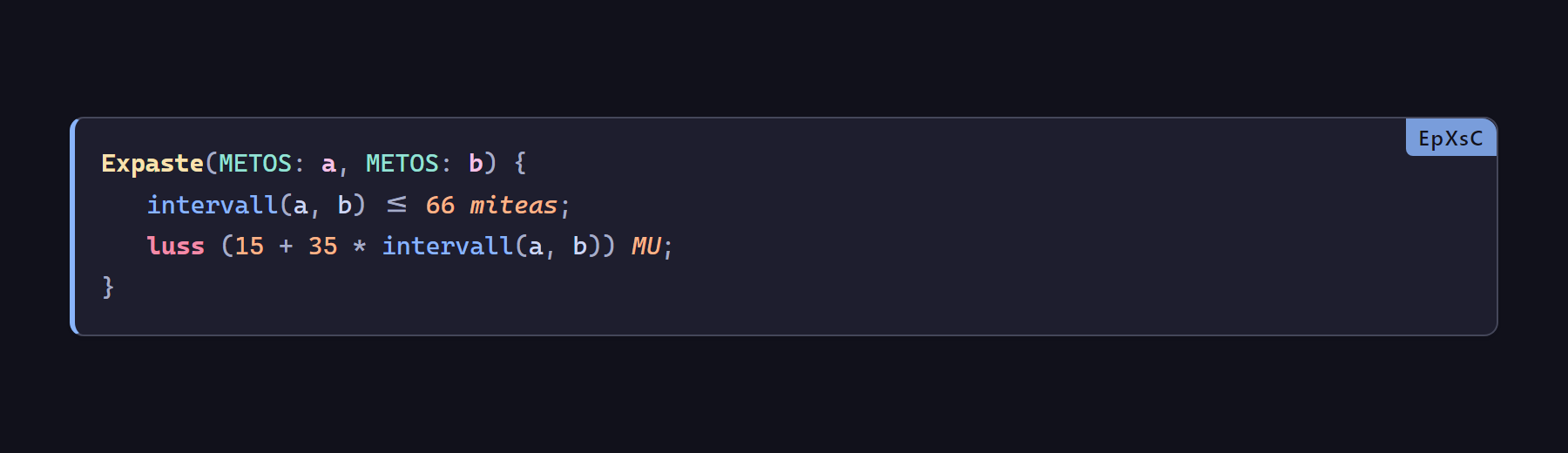
Rendered by the plugin in Obsidian: token colors, frame and language tag.
The code samples below are source examples. In Obsidian, the plugin renders them with the same frame and colors; the community page does not load plugin styles.
Features
- Syntax highlighting for
EpXsC,EpXsTandEpXsGfenced blocks; language names are case-insensitive. - Hover glosses on tokens: part of speech, meaning and abbreviation from the vault dictionary.
- Linting with one command: bracket matching, clause order, unit compatibility,
constarewrites, axis arity and more. - Vault data first: reads the dictionary / grammar / rank / root files from the vault; falls back to a built-in snapshot when they are absent.
- Reading view + Live Preview: both render; click a rendered block to go back to source editing.
- Mobile friendly: narrow screens keep the frame, translation and gloss lines readable.
- Optional CSS snippet for users who only want the visual style.
- Optional model-assisted translation: when enabled, an OpenAI-compatible local endpoint can translate untranslated T blocks and draft an EpXs reference from Chinese. Off by default.
- Reusable core: tokenizer, grammar, parsers and linter are Obsidian-free and can be consumed by CLI or other editors.
Installation
Community plugins
- Open Obsidian → Settings → Community plugins, turn off Restricted mode.
- Click Browse, search for EpXsC Syntax.
- Install → Enable.
styles.cssloads with the plugin; no extra CSS snippet is required.
BRAT
Add the repository Shir0Tak1na/EpXsC-Syntax, then enable the plugin.
Manual installation
- Download
main.js,manifest.jsonandstyles.cssfrom a Release. - Put them in
<vault>/.obsidian/plugins/epxsc-syntax/. - Restart Obsidian → Settings → Community plugins → enable EpXsC Syntax.
Usage
Fenced blocks
| Language | Purpose |
|---|---|
EpXsC |
Spell/technique body: coloring, glosses and linting |
EpXsT |
Sentence pairs: source and translation laid out per block |
EpXsG |
Grammar annotation: part-of-speech/constituent labels under each word |
EpXsC / epxsc / EPXSC are equivalent; the same applies to EpXsT and EpXsG.
For EpXsT, the translation must be inside the same block: one source line followed by a translation line starting with > (or a line containing CJK characters).
Tallse aris agrus nec manis humal.
> The fields must stay moist when plowing.
EpXsG annotates each word with its part of speech, followed by the translation.
Translations can also carry BCP-47 language tags. Only the translation matching the current Obsidian language is shown; untagged > lines remain the default translation. A missing translation renders 尚未翻译 / Untranslated.
Tallse aris agrus nec manis humal.
> (zh-CN) 凡耕田,必须保持湿润。
> (en) Fields must stay moist when plowing.
Language, fallback language, and custom lexicons are configured in Settings → EpXsC Syntax.
Translation is opt-in and off by default. When enabled, T-block source sentences are sent to the configured OpenAI-compatible endpoint; no other vault content is sent. API keys are stored in the plugin settings file, so do not use a high-privilege long-lived token. Secret Storage is not implemented in this version; this is a known limitation.
Optional local-model translation
Open Settings → EpXsC Syntax → 翻译. Enable automatic translation only when needed, then configure an OpenAI-compatible endpoint (for example Ollama at http://127.0.0.1:11434/v1, model qwen2.5:7b). The plugin does not install or start a model server. Model output is a reference only; it is never written into Markdown. The 从中文生成 EpXs 参考 command uses the same endpoint and validates unknown words and lint before allowing insertion.
Hover
In Reading view and Live Preview, hover a token to see its category and meaning. On mobile, touch-hover works without double-clicking the block.
Commands
Search EpXsC in the command palette:
| Command | Action |
|---|---|
| 检查当前笔记的 EpXsC 代码块 | Open the lint panel; click a result to jump to the line |
| 重新载入词表与释义 | Reload dictionary/grammar/rank data after vault edits |
| EpXsC 自检(视图/token/颜色/样式表) | Diagnose missing colors or hover |
| EpXsC 诊断报告 | Write a diagnostic report to the vault root |
| 重载 EpXsC 插件 | Reminder to disable/enable the plugin in settings |
Dictionaries
At startup the plugin reads these sources when present:
| Path | Provides |
|---|---|
世界设定集/地域文化图鉴/语言/述无空语/述无空语词典.md |
Part of speech, meaning, abbreviation |
世界设定集/地域文化图鉴/语言/述无空语/述无空语术式语法.md |
Filter keys, unit tables |
世界设定集/设定概念集合/维度/维度模型.md |
Rank/ dimension mapping |
世界设定集/地域文化图鉴/语言/述无空语/词库/词根表/ |
Root volumes (whole directory) |
世界设定集/设定概念集合/魔法/ |
Spell declaration registry (whole directory) |
Edit DICT_PATH, SYNTAX_PATH, RANK_PATH, ROOTS_DIR and SPELL_DIR in src/adapter/config.js for a different vault layout, then run npm run build.
When a source is unavailable, the plugin uses data/builtin-lexicon.json (schemaVersion 1). The snapshot is canonicalized and validated by scripts/generate-lexicon.mjs --check.
Customization
Colors are CSS variables in styles.css: --epx-comment, --epx-decl, --epx-keyword, --epx-type, --epx-verb and others. Change the variables instead of editing main.js.
For colors only, put snippets/EpXsC-Highlight.css into <vault>/.obsidian/snippets/ and enable it under Appearance → CSS snippets. The snippet provides the frame/static style, not token coloring.
Compatibility
- Minimum Obsidian 1.4.0; desktop and mobile are supported.
- Reading view and Live Preview are supported. In Live Preview, placing the cursor inside a block shows the source; this is Obsidian's default behavior.
- Blocks longer than 50 lines keep the plain code-block appearance and skip token coloring for performance.
- The outer frame is added as the
pre.epx-preclass by the plugin; it no longer depends on:has(). - The plugin makes no network requests and does not modify notes.
Core API
The pure core does not import Obsidian, DOM or vault APIs:
const core = require('./src/core');

const dict = core.parseDictionary(text);
const grammar = core.buildGrammar(lists, keys);
const html = core.tokenize(source, grammar);
const spells = core.collectSpells(source, new Map(), 'file.md');
const issues = core.lint(source, { info, units, keys, spells, path });
Stable aliases: extractBlocks, parseDictionary, buildGrammar, tokenize, lint.
CLI
The same core is available without Obsidian:
node bin/epxsc.mjs tokenize note.md
node bin/epxsc.mjs lint note.md --dictionary path/to/dictionary.md --syntax path/to/syntax.md
See docs/CLI.md for commands, JSON output and exit codes.
Development
Source lives in src/; the root main.js is an esbuild bundle — do not edit it by hand.
npm install       # install esbuild
npm run build     # src/main.js -> main.js
npm run check     # manifest / syntax / CSS / lexicon canonical form
npm test          # behavior tests + tokenizer/parser/lint/markup fixtures
| Path | Purpose |
|---|---|
src/main.js |
Build entry; requires the adapter only |
src/adapter/plugin.js |
Obsidian adapter: lifecycle, DOM, hover, commands, processors |
src/adapter/config.js |
Vault source paths and highlight limit |
src/core/ |
Pure language logic: grammar / tokenizer / markup / lint / spells / fences |
src/core/index.js |
Stable core entry and aliases |
src/data/parsers.js |
Dictionary / roots / ranks / filter keys / units parsing |
src/data/lexicon.js |
Built-in snapshot schema gate |
data/builtin-lexicon.json |
Canonical built-in lexicon snapshot |
styles.css |
Token colors, code-block frame, T/G layout |
snippets/EpXsC-Highlight.css |
Standalone color snippet |
manifest.json / versions.json |
Plugin metadata and version map |
docs/ARCHITECTURE.md |
Actual Core / Adapter / Data layers |
docs/ROADMAP.md |
Architecture-review execution plan |
docs/RELEASING.md |
Release policy: at most one GitHub Release per day |
Local debugging: put the repository in <vault>/.obsidian/plugins/epxsc-syntax/, run npm run build, then disable/enable the plugin in Obsidian. A Release contains exactly main.js, manifest.json and styles.css.
Release notes
CHANGELOG.md · ROADMAP.md · GitHub Releases · Release policy: at most one Release per day.
