
README file from
GithubEML Email Viewer
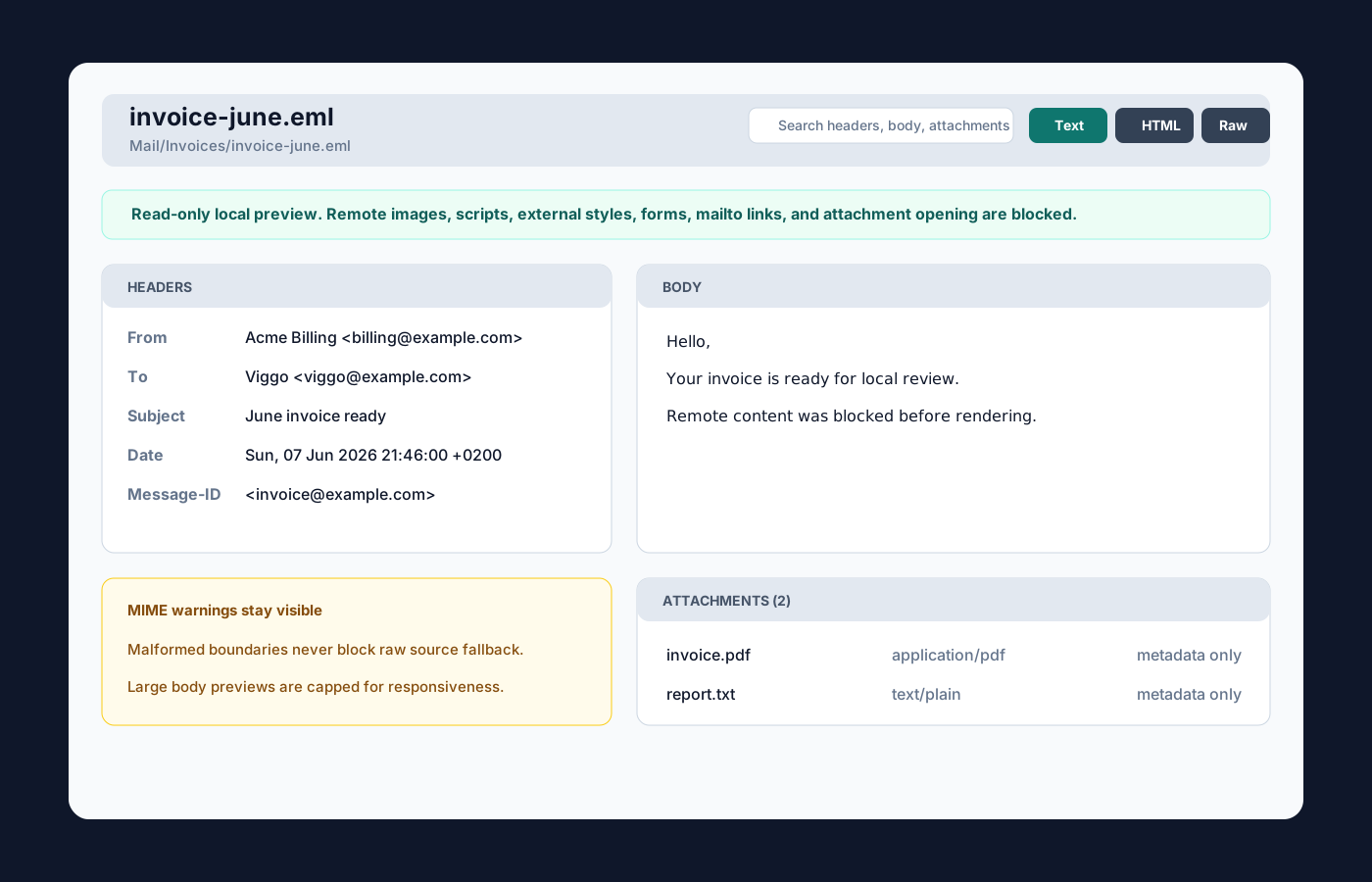
EML Email Viewer is a read-only Obsidian plugin for opening local .eml files directly from the file explorer. It shows a header summary, plain text and sanitized HTML previews, attachment metadata, raw MIME source, parse warnings, search, and refresh.
Features
- Registers
.emlfiles with a dedicated Obsidian file view. - Parses From, To, Cc, Bcc, Subject, Date, Message-ID, In-Reply-To, and References.
- Shows body tabs for Text, sanitized HTML, and Raw MIME.
- Lists attachments as metadata only: filename, content type, size when available, and disposition.
- Searches across headers, body text, sanitized HTML text, and attachment names.
- Shows MIME parse warnings while keeping raw source available.
- Applies render caps for large mail bodies and source previews.
- Keeps the viewer read-only: it never edits
.emlfiles.
Privacy and security model
Email HTML frequently contains tracking pixels, remote images, scripts, styles, forms, and external links. EML Email Viewer blocks those in v0.1:
- no mailbox sync
- no IMAP or SMTP
- no sending, reply, forward, archive, or import workflow
- no remote image loading
- no scripts, external styles, forms, or active URL attributes in HTML preview
- no mail client launch
- no attachment opening
- no clipboard access
- no plugin network APIs
- no
.emlwrite-back - no vault interaction-note creation
The Raw MIME tab remains available even when parsing is incomplete.
Email Reader overlap
The existing community plugin Email Reader renders embedded .eml files in preview mode. EML Email Viewer is positioned differently: it is a dedicated file-open viewer from Obsidian's file explorer with structured headers, body tabs, attachment metadata, raw MIME fallback, search, and explicit privacy controls.
Installation
Community plugin directory
EML Email Viewer is ready for submission to the Obsidian Community plugin directory. Once accepted, it can be installed from Settings -> Community plugins -> Browse inside Obsidian.
Manual installation:
- Download
main.js,manifest.json, andstyles.cssfrom a release. - Create
.obsidian/plugins/eml-email-viewer/in your vault. - Place those three files in that folder.
- Reload Obsidian.
- Enable EML Email Viewer in Settings -> Community plugins.
BRAT installation
For beta testing, install the plugin with BRAT using this repository URL:
https://github.com/viggomeesters/obsidian-eml-email-viewer
Usage
Open any .eml file in your vault. Obsidian will open it with EML Email Viewer.
Use the toolbar to:
- search headers, body text, sanitized HTML text, and attachment names
- switch between Text, HTML, and Raw MIME
- refresh the file after local changes
Attachments are intentionally metadata-only in v0.1.
Development
npm install
npm run build
npx tsc --noEmit
npm test
For local testing, copy or symlink this repository into .obsidian/plugins/eml-email-viewer/ inside a test vault.
Release process
Obsidian installs community plugin files from GitHub releases. For each release:
- Update
manifest.json,package.json, andversions.json. - Run
npm install,npm run build,npx tsc --noEmit, andnpm test. - Create a GitHub release whose tag exactly matches
manifest.json.version. - Attach
main.js,manifest.json, andstyles.css.
The source repository intentionally does not track main.js; it is built and attached as a release asset.
The repository includes a GitHub Actions release workflow with artifact attestation support. If GitHub Actions is disabled for the owner account, manual releases are still usable for Obsidian, but the Community automated review may show a recommendation about missing artifact attestations.
Community directory submission
The repository is prepared for Obsidian Community plugin submission. The remaining submission step must be completed by the repository owner because it requires signing in, linking GitHub, and confirming the developer policies/support commitment.
Submit this repository URL:
https://github.com/viggomeesters/obsidian-eml-email-viewer
The current release is ready for review when:
- root
README.md,LICENSE, andmanifest.jsonexist manifest.json.idiseml-email-viewermanifest.json.versionis0.1.1- GitHub release
0.1.1exists - release assets include
main.js,manifest.json, andstyles.css versions.jsonmaps supported Obsidian versions
Official references: