
README file from
GithubEcho Recall
Memorize your notes and paragraphs actively with spaced repetition and retrospective revision timetable directly inside Obsidian.



Echo Recall is a lightweight but powerful revision engine for Obsidian. It turns your long study notes into a dynamic memory game. You never have to export your data again.
1. Core Philosophy & Problem Statement
The Problem: Flashcard apps like Anki are great for tiny facts. But they are terrible for long notes. Breaking a big paragraph into tiny cards ruins the flow. You lose the context of your notes. Also, exporting text often breaks tables and links.
The Solution: Echo Recall fixes this problem. It brings the testing environment directly to your notes. Just open a note and click "[▶ echo]" in the top right. Follow the instructions on the screen. That's it! You have reviewed your note.
For scheduling, this plugin uses spaced repetition. It also uses a "retrospective revision" schedule based on your deadlines. This idea was conceptualized by Ali Abdaal.
2. New Updates (experimental)
We have massively expanded what Echo Recall can do. You can configure these in the settings.
A. Anki Export & Differential Sync
Do you love Obsidian for notes but prefer Anki for scheduling? Echo Recall now acts as a bridge. Obsidian remains your source of truth, and Anki becomes your revision app. (Requires the AnkiConnect add-on).
- Context-Aware Cards: Click the Export to Anki ribbon icon. It slices your note by headings. Each Anki card displays a full left-sidebar Table of Contents, highlighting exactly where you are in the note.
- Rich UI & Full Note View: The Anki cards use a custom CSS theme that mimics Obsidian. Forgot the context? Click the "👁 View Full Note" button inside Anki to instantly see your entire Obsidian note as an overlay.
- Media Support: Images (
![[]]) and GIFs are converted to Base64 and injected directly into Anki's media database. No broken links. - Differential Update Engine: If you edit a paragraph in Obsidian, click the Update Anki ribbon icon. The plugin uses string-hashing to push the text updates to Anki, but it will ONLY mark the specific changed card as 'Again' (resetting its progress). The rest of your deck's scheduling remains untouched.
B. Heavy Recall & Brainstorming Mode
If progressive fill-in-the-blanks is too easy, switch to Heavy Mode. It completely hides the content under your headings to force hardcore brainstorming.
- Step 1 (Skim): View the entire note to prime your memory.
- Step 2 (Recall): Go chunk-by-chunk. You only see the heading. Recall everything under it, then click to reveal.
- Step 3 (Final Test): The entire note is blanked out. Reconstruct the whole document's structure in your head.
C. Context-Aware Hierarchical Chunking
Instead of splitting blindly by paragraphs, the new Hierarchical chunking setting reads your Markdown headers (# H1, ## H2). When reviewing a small H3 section, it keeps the H1 and H2 parents visible so you never lose the big picture.
Additional miscellaneous updates are detailed in the release notes.
3. Review Workflow
A. The 3-Step Revision and Review
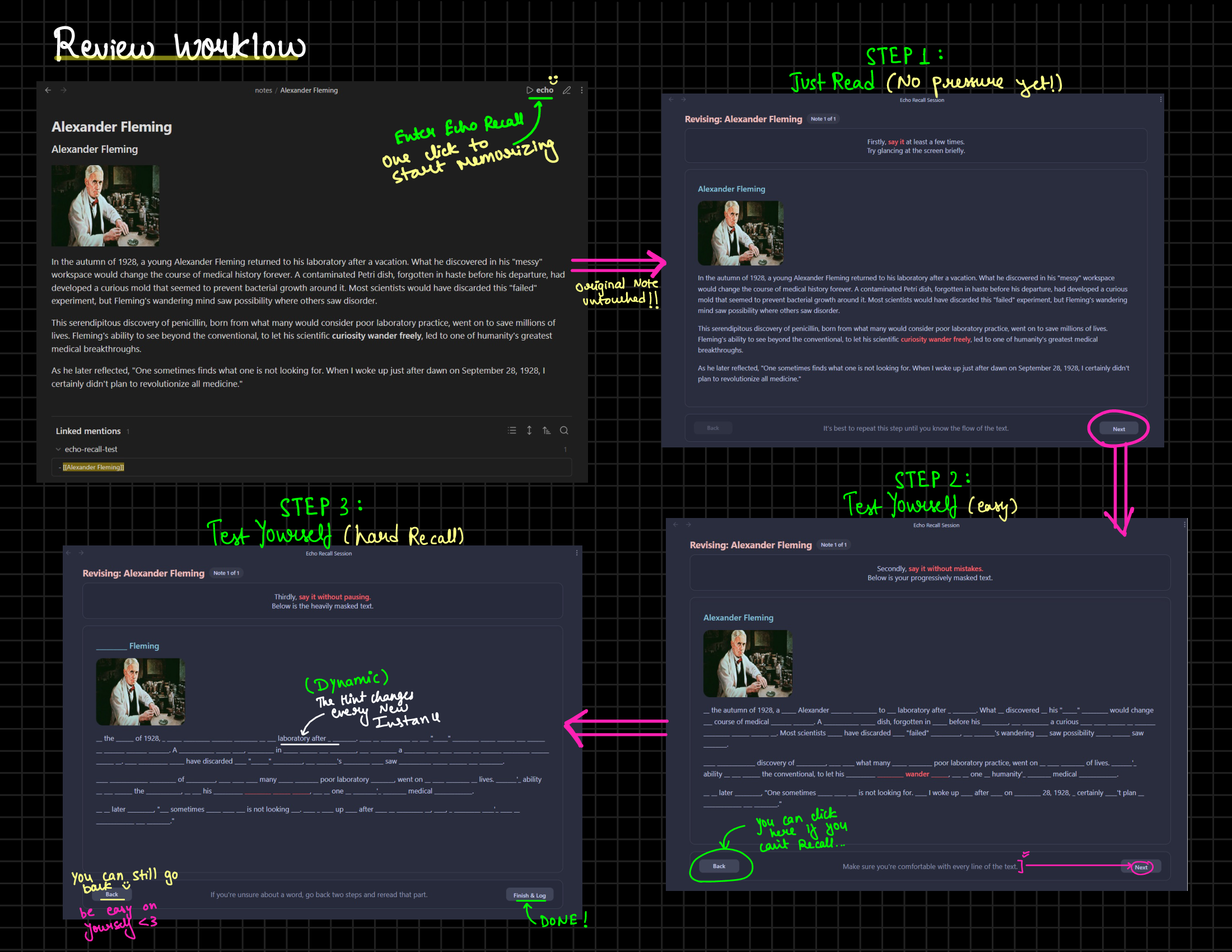
When you start a session, Echo Recall opens a clean UI in a new tab. This uses a Progressive Masking System.
Progressive = Masking gets harder based on your confidence level. If a note is Hard, it uses normal masking. If Moderate, it hides 10% more words. If Easy, it hides 20% more words. This forces you to remember more with fewer clues.
Smarter Review Tools (New in v1.2.0)
- Context Chunking: Break long notes into smaller chunks (paragraphs/sentences). The engine safely remembers your
## Headingsso you never lose context! - The Peek Button (👁️): Forget what the chunk is about? Click the Eye icon to quickly peek at the full, unhidden note.
- Graduated Cueing: Turn full blanks into first-letter hints (like
w____) to help nudge your memory. - Typed Recall: Open a text box, type what you remember, and get an exact accuracy percentage.
Step 1: Read-Through View
This step helps your brain remember the note's flow.
- Functionality: It shows your full markdown text clearly. Nothing is hidden yet.
Step 2: Progressively Masked View
This is your first active recall challenge.
- Functionality: Some words are replaced by blanks (
____). The blanks match the exact length of the hidden words. It protects your formatting like bold text, tables, highlights, lists, etc.
Step 3: Heavily Masked View
This is the final test for true memory retention.
- Functionality: Most of the text is hidden. Only a few anchor words remain to guide your memory.
UI Controls & Interactivity
- [Back] Button: Go back one step. Use this if you forget something and need a quick hint.
- [Next] Button: Move forward to the next step.
- [Finish & Log] Button: This ends the session. It saves today's date in your history. Then, it safely returns you to the dashboard.
B. Dashboard
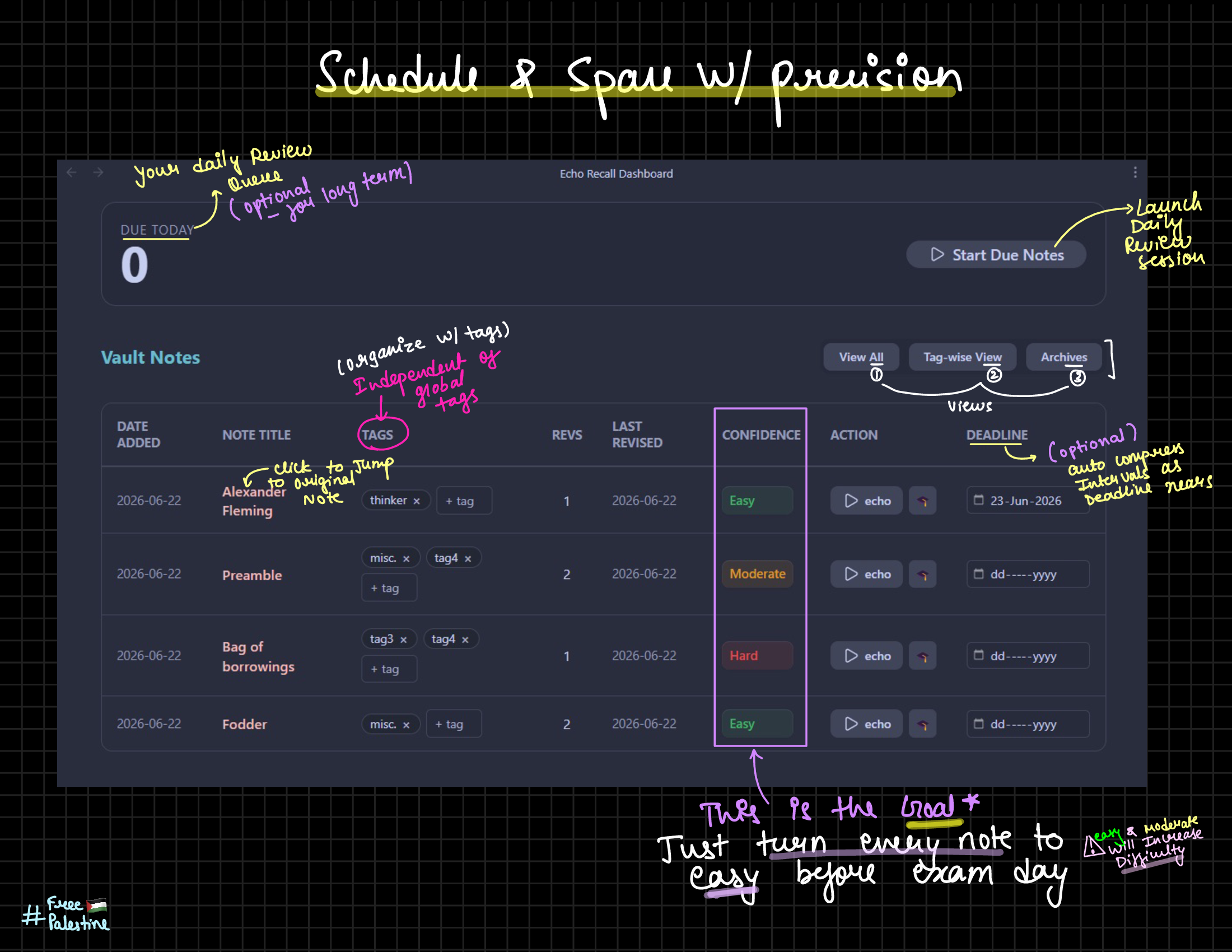
Click the brain icon in the ribbon to open the Dashboard. This is your main control center. Here, you can view, manage, and start your daily reviews.
1. "Due Today"
This shows a big number of notes you need to review today. It has a [▶ Start Due Notes] button. Click it to instantly start reviewing all your due notes in order.
2. Advanced Analytics Panel
- Stats Board: Track your Current Streak (🔥), total revisions, and average daily reviews.
- Revision Heatmap & Future Echoes: Beautiful charts showing your past consistency and exactly how many notes are due over the next 7 days.
3. Data Navigation Tabs
- "View All": A clean list of all tracked notes in your vault. You can sort them by date.
- "Tag-wise View": This groups your notes by custom "Echo tags". It shows stats for each tag, like total reviews and confidence levels.
- New: You can now bulk-apply a deadline to a tag, bulk-archive a tag, or click
[▶ echo all]to instantly review all notes in that tag! - Note: These are different from standard Obsidian tags. Echo tags help you organize notes for a specific exam.
- New: You can now bulk-apply a deadline to a tag, bulk-archive a tag, or click
- "Archives": This shows archived notes. They are completely hidden from your review schedule.
- Think of this like "suspending" cards in Anki.
- When an exam is over, just archive those notes! You can unarchive them later. Archived notes ignore spaced repetition.
4. Dashboard Data Table Columns
| Column Name | Functionality & Interaction |
|---|---|
| Date Added | Shows when the note was first added to Echo Recall. |
| Note Title | Click this to instantly open the markdown file. Notes failing 8+ times get a 🩸 Leech warning. |
| Tags | Click + tag to add and remove Echo tags easily. |
| Revs | Shows the total number of times you finished a 3-step review. |
| Last Revised | Shows the exact date you last reviewed this note. |
| Confidence | A dropdown with 🔴 Hard, 🟡 Moderate, or 🟢 Easy. Changing this updates your next review date. |
| Action | [▶ echo]: Starts a quick review for just this note.[🎓/🔄]: Archives or unarchives the note safely. |
| Deadline | Set a target exam date. The plugin will prioritize notes with closer deadlines. You can set this for a whole tag at once! |
C. Plugin System Settings Panel
Echo Recall safely reads your markdown text. But you can choose what it ignores during reviews. There are 4 toggles:
- Don't revise callouts (Default: On): Ignores text inside Obsidian callouts (
> [!). - Don't revise checkboxes (Default: On): Ignores checklist items (
- [ ]). - Don't revise quotes (Default: Off): Ignores standard markdown quotes (
>). - Don't revise custom regex (Optional): Advanced users can type custom rules here. This hides things like code snippets or footnotes.
4. Metadata Spec (YAML Schema)
Echo Recall saves all data in your note's YAML properties. This means you own your data forever. It will never break your vault.
When you study a note, the plugin adds these properties:
---
echo_date_added: 2024-01-01      # YYYY-MM-DD: Creation date
echo_last_revised: 2024-01-15    # YYYY-MM-DD: Last completed session
echo_revision_count: 4           # Integer: Total completed loops
echo_confidence: Moderate        # String: 'Hard', 'Moderate', or 'Easy'
echo_next_due: 2024-01-22        # YYYY-MM-DD: Scheduled due date
echo_tags:                       # Array: Independent dashboard tags
  - Law
  - Chapter_1
echo_deadline: 2024-02-01        # YYYY-MM-DD: Target exam/deadline date
echo_archived: false             # Boolean: Suspension state
echo_history:                    # Array: Appended timestamps for Heatmap
  - 2024-01-01
echo_ease: 2.5                   # (SM-2) Ease multiplier
echo_interval: 6                 # (SM-2) Uncapped interval
echo_reps: 2                     # (SM-2) Consecutive passes
echo_past_grades:                # (SM-2) Last grades history
  - Good
---
5. Scheduling Algorithm
[!info] philosophy It's NOT necessary to revise ALL your daily due cards. It is completely up to you! My personal goal is to hit "EASY" on all notes before my exam arrives. My exam is months away, so spaced repetition keeps me from forgetting. You can use spaced repetition alone, use it with deadlines, or just use deadlines. Feel free to ignore this and study your own way!
Engine A: Standard Confidence (Fixed Multipliers) Standard spaced repetition uses fixed days. Echo Recall sets intervals based on your choice:
- Hard: 1 Day
- Moderate: 7 Days
- Easy: 14 Days
Engine B: Adaptive SM-2 (Opt-in via Settings) If you enable SM-2 scheduling, your intervals adapt based on a post-session grade (Again, Hard, Good, Easy) using industry-standard SM-2 math. Pro-tip: Enable "Simplify SM-2 grades" in settings to only show Pass/Fail buttons and prevent decision fatigue.
Deadline Prioritization (The Override)
Studying for exams also requires deadlines. If you add an echo_deadline, the plugin counts the days left until your exam.
The Override Logic: Is your confidence marked "Hard" or "Moderate"? Are you running out of time before the deadline? If so, the plugin safely shortens your wait time. It ensures you review the note again before test day.
The Math:
Days = Math.max(1, Math.floor(DaysRemaining * 0.5))
<<<<<<< HEAD
Example: A "Moderate" note usually waits 7 days. But what if your exam is in 4 days? The plugin cuts the wait to 2 days (4 * 0.5). You will safely review it before the test.
Example: A "Moderate" note usually waits 7 days. But what if your exam is in 4 days? The plugin cuts the wait to 2 days (4 * 0.5). You will safely review it before the test.
Credits & Contributors
- sxjeel: Creator and maintainer, Ideation, UI/UX, Dashboard, analytics, Context-aware chunking, etc. ☕
- @DocGRD: Core contributor of the Adaptive SM-2 logic, base Chunking engine, Graduated cueing, and Typed-recall scoring. 🧩
A massive thank you to the open-source community for helping improve Echo Recall!
44784f2231a4f3761c1314dad1c74b7affb69280