
README file from
GithubDSH Bridge
Embed your locally running DeepSeek Harness (DSH) into Obsidian as an AI collaborator: your vault becomes its working directory, and DSH can read, write, and search your notes directly.
Why this plugin
Most Obsidian ↔ agent bridges wrap a web UI or shell out to a CLI. This one is a native client: it speaks DSH's own RPC and event stream, then renders everything with Obsidian's own UI.
- Native, not embedded — chat, tool cards, approvals and plan mode are real Obsidian UI: your theme, your fonts, your hotkeys.
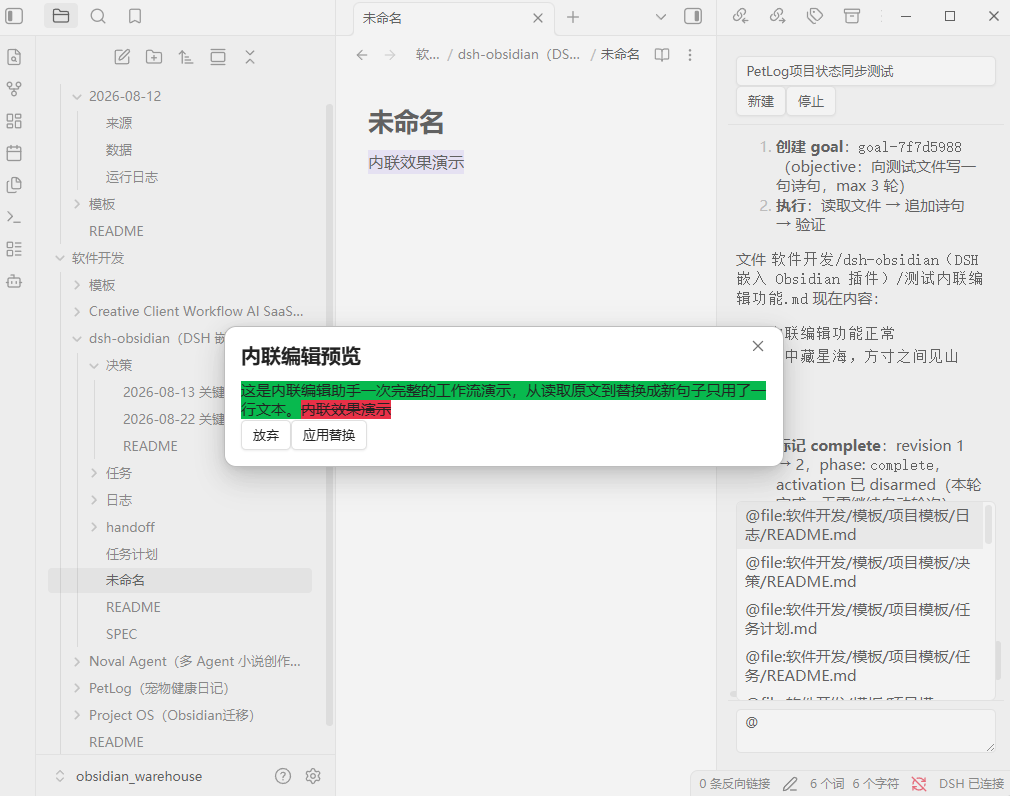
- Inline edit with a word-level diff — select text, give an instruction, review the diff, apply;
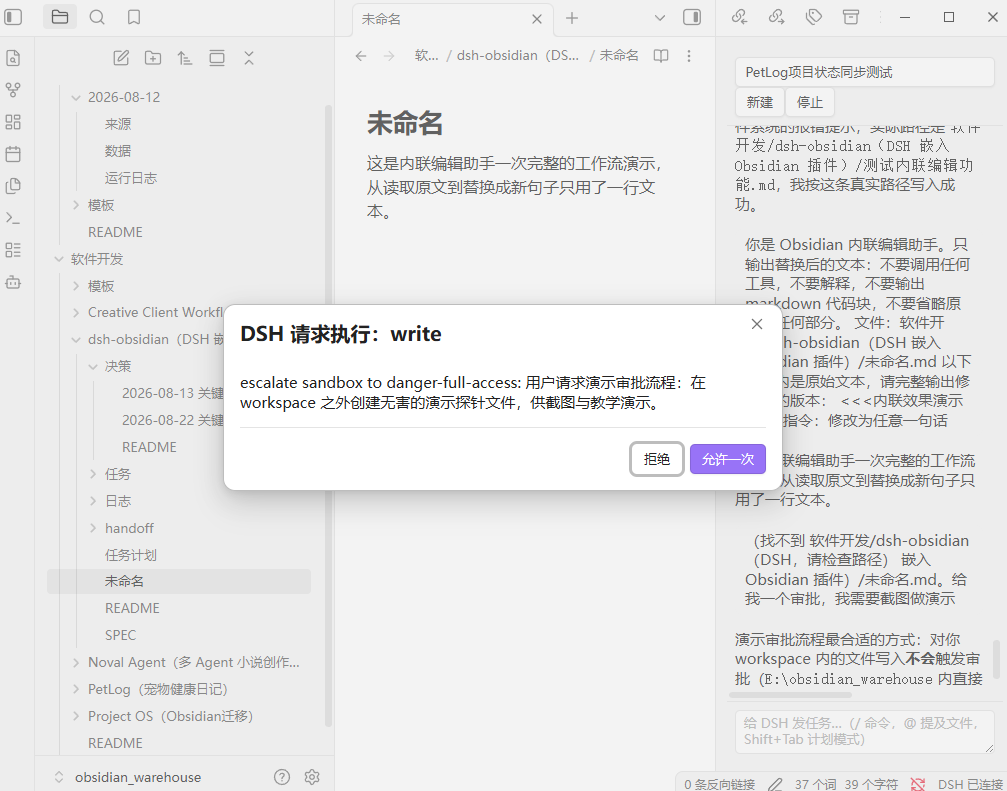
Cmd+Zundoes it. - Approvals land where you are — DSH's write/exec confirmations and its questions appear inside the panel, no window switching, and they survive a reconnect.
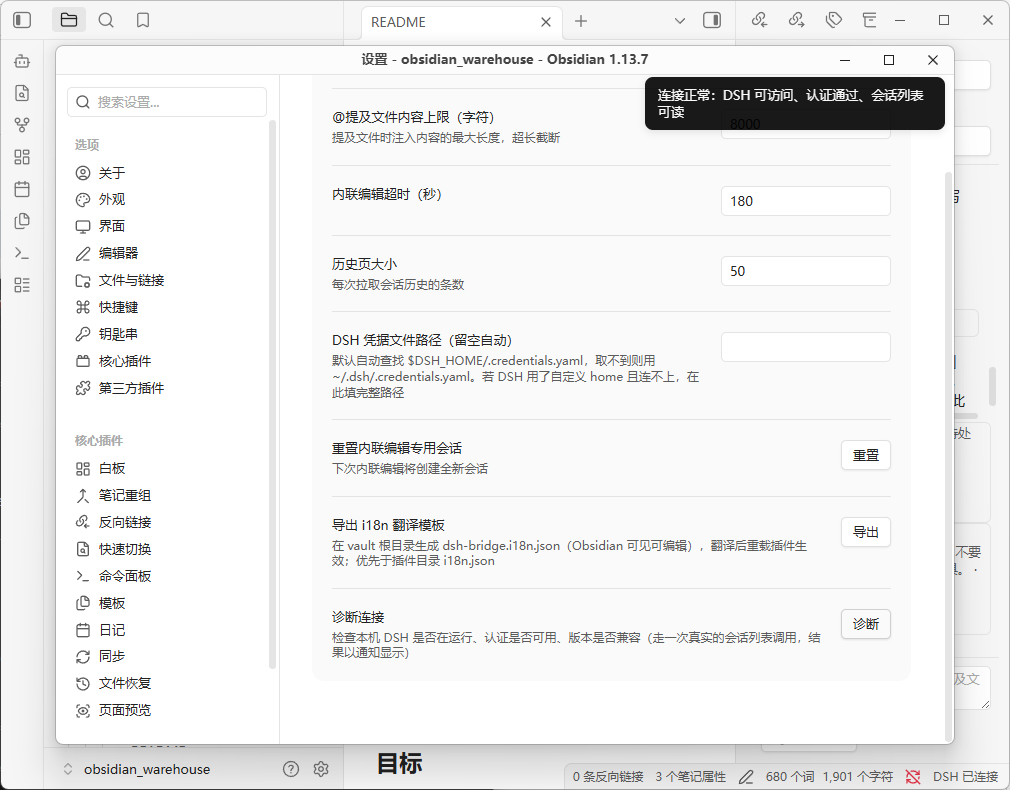
- Connection diagnosis —
401/404/ connection-refused are translated into an actionable conclusion (Settings → Diagnose connection). - Engineered to last — 550+ unit tests, strict TypeScript build, byte-reproducible artifacts, listed in the community directory.
The plugin is a client, not a runtime: it needs a local DSH to talk to (see Prerequisites). If something looks wrong, the diagnose button will tell you which of the two it is.
Prerequisites
- A running DSH instance on your machine. The port depends on how you start it: the desktop app pins
http://127.0.0.1:19387, thedsh webcommand defaults tohttp://127.0.0.1:3080. On startup the plugin auto-detects both (desktop first) and writes the working one back to settings — you normally don't need to type an address - Your vault must be inside DSH's accessible directory scope (decided by DSH's sandbox / workspace config)
- Obsidian ≥ 1.7.2, desktop only
Features
Conversation
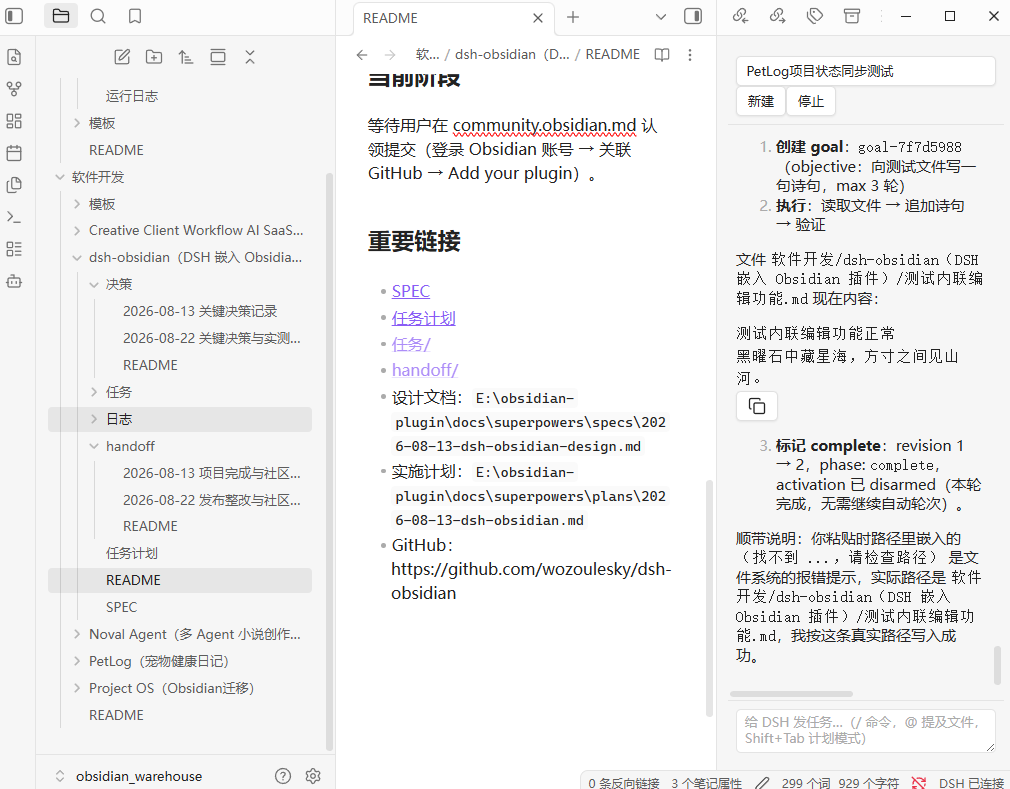
- Chat sidebar — streamed responses, tool-call cards, session switching and creation, "load older" pagination, and automatic re-sync after reconnects
- Approval & question popups — retryable, grouped per session, replayed after a reconnect
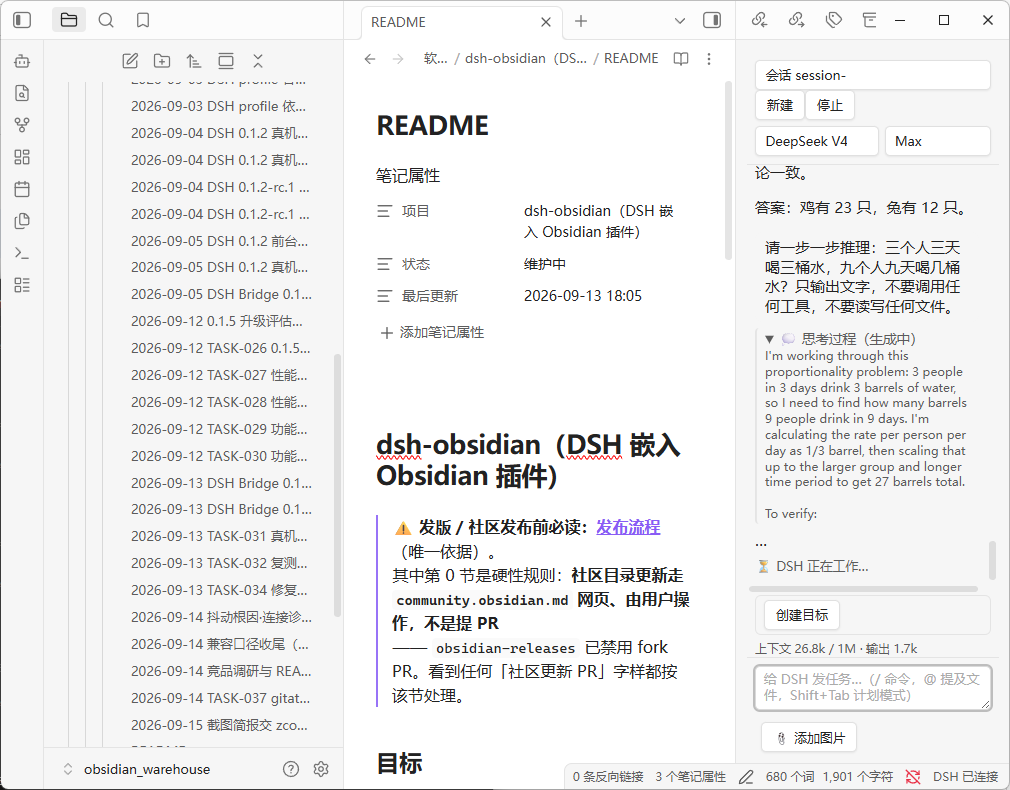
- Thinking process — collapsible reasoning block above each reply, streamed live and folded once the turn completes
- Image attachments — attach images from your vault to a prompt; the agent reads them directly
Editing your notes
- Inline edit — select text + hotkey → instruction → word-level diff preview → apply (editor selection is re-validated before applying; large selections degrade to a plain confirm dialog)
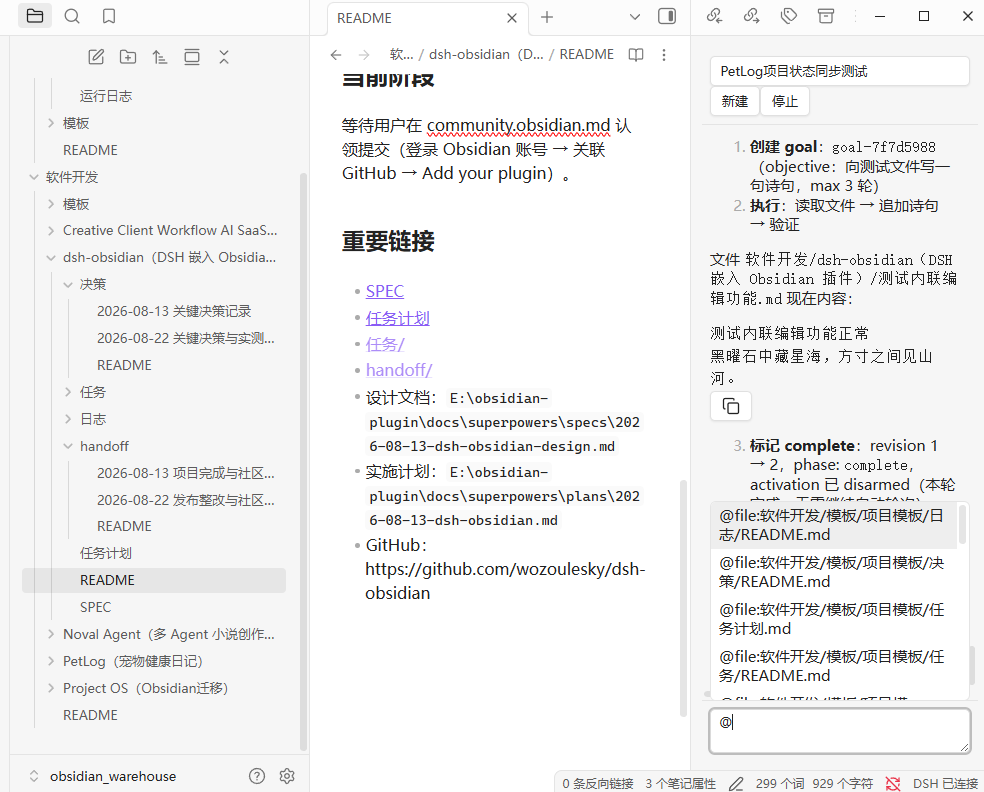
- @mentions — type
@to pick vault files (@file:path, content injected) or folders (@folder:path, directory tree injected), with truncation and missing-file notices - Slash commands & plan mode — commands come from the running DSH (so the list always matches your install), plus the local
/clear;Shift+Tabtoggles plan mode with a status banner
Context & control
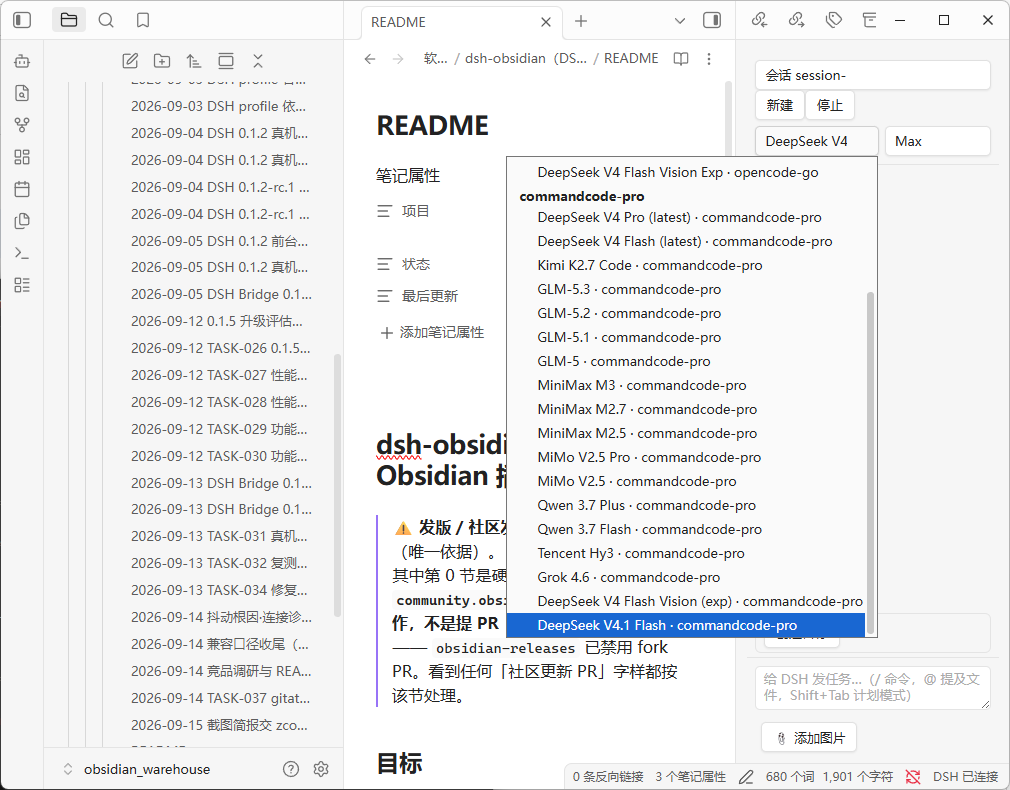
- Model & reasoning effort — pick provider/model and reasoning effort from the panel; the list is grouped from your DSH model catalog
- Context usage — a status line showing projected tokens against the context window, plus output tokens
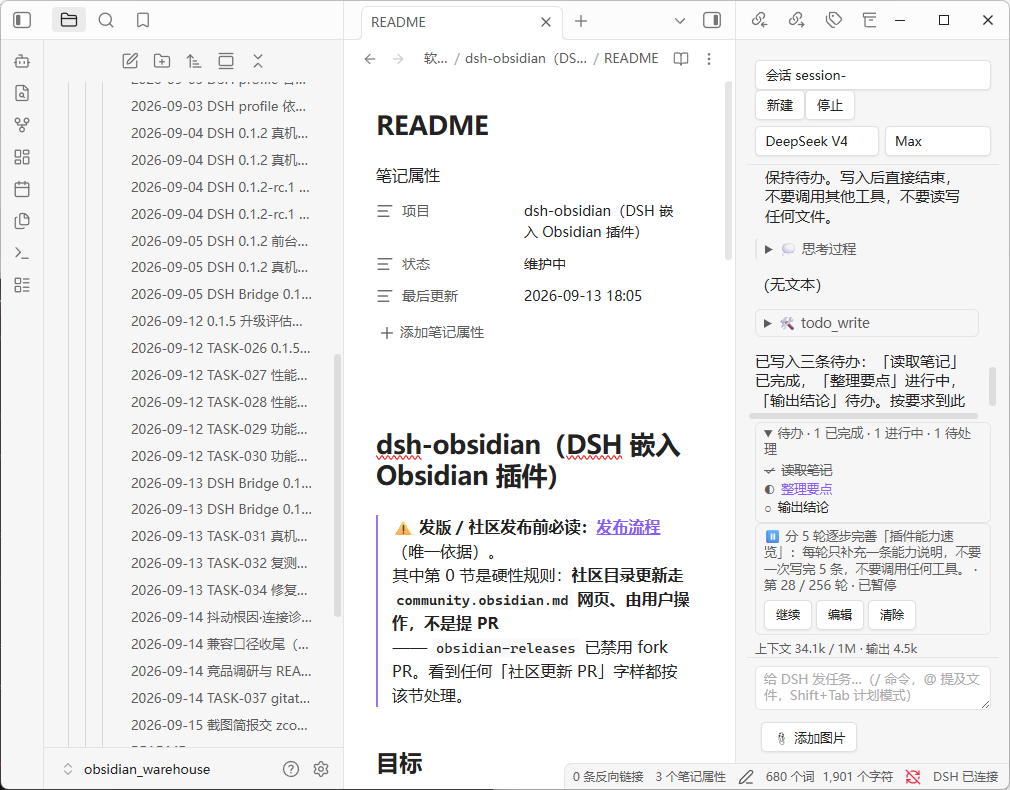
- Todo list — the agent's live todo list with pending / in-progress / completed states
- Goal panel — view and control a long-running goal (create / pause / resume / complete / clear)
Long sessions stay bounded: when DSH compacts history, replaced messages collapse into the summary instead of piling up.
Screenshots
| Chat sidebar | @ Mention picker |
|---|---|
 |
 |
| Inline edit diff preview | Approval popup |
|---|---|
 |
 |
| Thinking process & context usage | Todos & goal |
|---|---|
 |
 |
| Model & reasoning effort | Connection diagnosis |
|---|---|
 |
 |
Installation (Community Plugins)
- Settings → Third-party plugins → Browse → search DSH Bridge → Install → Enable (desktop only)
- Make sure DSH is running locally and the plugin's DSH address matches it:
http://127.0.0.1:19387for the desktop app,http://127.0.0.1:3080fordsh web
Prefer a manual install? Grab the latest artifacts from the GitHub releases page and extract them into vault/.obsidian/plugins/dsh-bridge/.
Installation (local / dev)
npm install && npm run build- Copy
main.js,manifest.json, andstyles.cssintovault/.obsidian/plugins/dsh-bridge/ - Settings → Community plugins → enable "DSH Bridge"
Privacy
All data flows through your local DSH to its configured model providers, using the same policy as the DSH Web GUI. The plugin sends no telemetry.
Translations / Localization
The plugin ships with all UI strings in a key-value table (built-in default: Chinese). To switch the UI to another language:
- In the plugin settings tab, click Export i18n template — this creates
dsh-bridge.i18n.jsonat the root of your vault (visible in Obsidian's file explorer). - Replace the values with your translations (or hand the file to your local DSH / any translator).
- Reload Obsidian (or disable/enable the plugin) to apply — repeatable.
The vault-root file takes priority; a legacy i18n.json inside the plugin directory (.obsidian/plugins/dsh-bridge/) is still read as a fallback. Missing keys or invalid JSON silently fall back to the built-in defaults. In v0.1.x, model-facing instructions (inline-edit prompt, @mention expansion) intentionally remain in Chinese; the UI-only string table is safe to translate.
Development
npm install
npm run dev    # watch build
npm test       # unit tests
Architecture
Transport: unary RPC over Node http (POST /api/<namespace>/<method> with {args} payload + self-signed browser-session cookie); live streams over a bundled ws WebSocket (/api/remote.mux — session/follow, session/control, $events). A core layer folds session events into view models; a UI layer renders the sidebar and modals.
DSH compatibility
| DSH version line | Plugin version | Status |
|---|---|---|
0.2 line (verified on 0.2.0-rc.2) |
0.1.8+ (current) | ✅ Protocol-layer verification and in-Obsidian UI acceptance both pass (2026-10-01): the plugin's own code connected to a live 0.2.0-rc.2 over real HTTP + WebSocket — authentication, all 18 RPC endpoints, and the $events / session/control / session/follow streams pass; and a real Obsidian 1.13.7 accepted @-mentions, streaming output, approval-gated file writes, inline-edit diff, and port auto-detection. 0.2 did not change auth, the RPC envelope, or the WS frame protocol, so no upgrade work is needed. The one gotcha is the port: the desktop app pins 19387, dsh web defaults to 3080 — the plugin auto-detects it (desktop first), so you normally don't set it by hand. Per-item record and verification boundaries: docs/dsh-0.2-compat-audit-2026-10-01.md |
0.1.5 line (verified on 0.1.5-rc.1) |
0.1.6+ (incl. 0.1.7) | ✅ Verified end to end on a real vault (2026-09-13): streamed output, approvals, inline-edit diff, reconnect |
0.1.2 line (0.1.2-rc.1, 0.1.2) |
0.1.5+ | ✅ Supported — the contract this plugin was built against. 0.1.6+ keeps it working through capability probing: the 0.1.5 streaming channel is requested field by field and dropped automatically if the server rejects it. Verified on a real machine at plugin 0.1.5, covered by unit tests since |
before 0.1.2 (e.g. 0.1.0-rc.6) |
≤ 0.1.4 | ❌ Not supported — returns 401/404. Upgrade DSH, or stay on plugin 0.1.4 |
| newer than 0.2 (0.3+) | latest plugin | ⚠️ Unverified — DSH ships often and has already changed this plugin's contract twice (0.1.2 → 0.1.5). If the panel breaks after a DSH upgrade, check for a plugin update first |
Direct filesystem access (disclosed for community review): DSH's browser-session authentication requires reading the signing secret from ~/.dsh/.credentials.yaml (the DSH process's credentials store, outside the vault). The plugin reads this file read-only — it never writes, never logs its contents, and only uses the secret to sign the per-request cookie required by DSH's browser-session API (0.1.2-rc.1 onwards). The vault API cannot reach this path (it is outside the vault root), so Node fs is required for this one purpose.
Related
- obsidian-project-management — the Obsidian-based project management skill that governs this plugin's development workflow (project records are tracked in a local Obsidian vault).