
README file from
GithubDrag and Drop Sort
Plugin for Obsidian to provide custom drag & drop reordering in the File explorer.
Overview
Drag and Drop Sort adds custom drag-and-drop ordering to Obsidian's File explorer. Files and folders can be freely interspersed, like in OneNote.
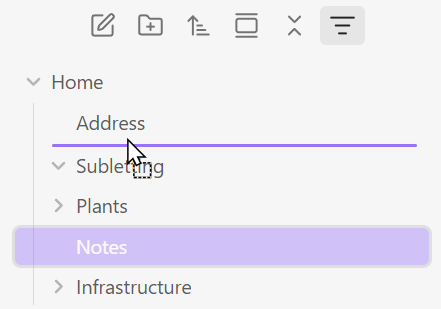
Features
- Fully Custom Sort Order: Customize sort order by dragging and dropping folders or notes directly in the File explorer.
- Handles Renames and Moves: Keeps custom ordering through renames and moves.
- Context Menu and Command Palette: Alternatively, use context-menu items or the command palette to move items up, down, to the top, or to the bottom. The commands can also be assigned hotkeys in Settings → Hotkeys.
- Reset Controls: Reset a folder or an entire branch of descendants.
Installation
Community Plugins
Open Settings → Community plugins → Browse, search for Drag and Drop Sort, then select Install and Enable.
Manual
- Build the plugin:
cd src
npm install
npm run build
-
Copy
src/dist/main.js,manifest.json, andsrc/styles.cssinto.obsidian/plugins/drag-drop-sort/. -
Enable Drag and Drop Sort under Settings > Community plugins.
Usage
Drag any file or folder in the File explorer. A blue drop indicator shows where the item will land; release to commit the new order. Dropping between rows in another folder moves the item into that folder at that position. Hover over a closed non-empty folder for two seconds to expand it and reveal its child rows.
You can also right-click an item and use Drag and Drop Sort commands to move it up, down, to the top, or to the bottom. Right-click a folder and choose Reset sort to remove that folder's saved order, or Reset sort (all descendants) to remove the folder's order and all custom orders below it.
How it Works
The plugin patches getSortedFolderItems() on the internal File explorer view, makes visible tree items draggable, and saves each changed folder's order to data.json. When a folder has no saved custom order, its currently rendered DOM order is captured when dragging starts before the new position is applied. Hovering over a closed non-empty folder for two seconds expands it through Obsidian's collapse control, then refreshes the visible order snapshot so positional drops remain consistent. Dropping across folders also moves the item through Obsidian's file manager. Hidden rows and unsupported file types are excluded from positional calculations so the drop position matches what is visible.
Data Format
The plugin stores one simple object in .obsidian/plugins/drag-drop-sort/data.json:
{
  "orders": {
    "Personal": ["Home", "Career", "Health", "Travel", "Finances"],
    "Personal/Home": ["Furniture.md", "Plants.md", "Kitties.md", "Assets"]
  }
}
Only folders you've actually reordered appear in this file. The order array contains item names (not full paths), and files and folders are freely mixed together.
Versioning and Releases
This plugin is built and released using the repository's release.yml workflow. It is versioned using Semantic Versioning.
It is published as a community plugin, with release assets published to a corresponding GitHub Release:
Development
The TypeScript source lives in src/. Run the plugin in watch mode while developing:
cd src
npm install
npm run dev
Run npm run build for a production build.
Chrome DevTools
To inspect the plugin in Obsidian's live renderer, close any running Obsidian instance and start it with remote debugging enabled:
& "C:\Program Files\Obsidian\Obsidian.exe" --remote-debugging-port=9222
- Confirm that the renderer is available at http://127.0.0.1:9222/json/list.
- Attach a Chrome DevTools MCP or CDP client to the
webSocketDebuggerUrlreturned for the renderer target. - Evaluate JavaScript inside Obsidian's live renderer.
The --remote-debugging-port switch is documented in Electron's command-line switch reference, and the /json/list endpoint and webSocketDebuggerUrl are part of the Chrome DevTools Protocol.
Contributing
Contributions are welcome. Please fork the repository, create a focused branch for your change, and open a pull request with a clear description of what changed and why; issues are also welcome for bug reports and feature ideas.
Security
We welcome responsible security reports. Please contact the repository owner privately with the details rather than opening a public issue, so the problem can be investigated and addressed before it is disclosed.
Acknowledgements
Drag and Drop Sort is an independent implementation based on the architecture and patterns of Folder Sort Rules by Adam. The getSortedFolderItems monkey-patch and per-item drag handler pattern are adapted from that MIT-licensed codebase.
License
This project is licensed under the MIT License - see the LICENSE.md file for details.