
README file from
GithubDiscord Emoji Picker


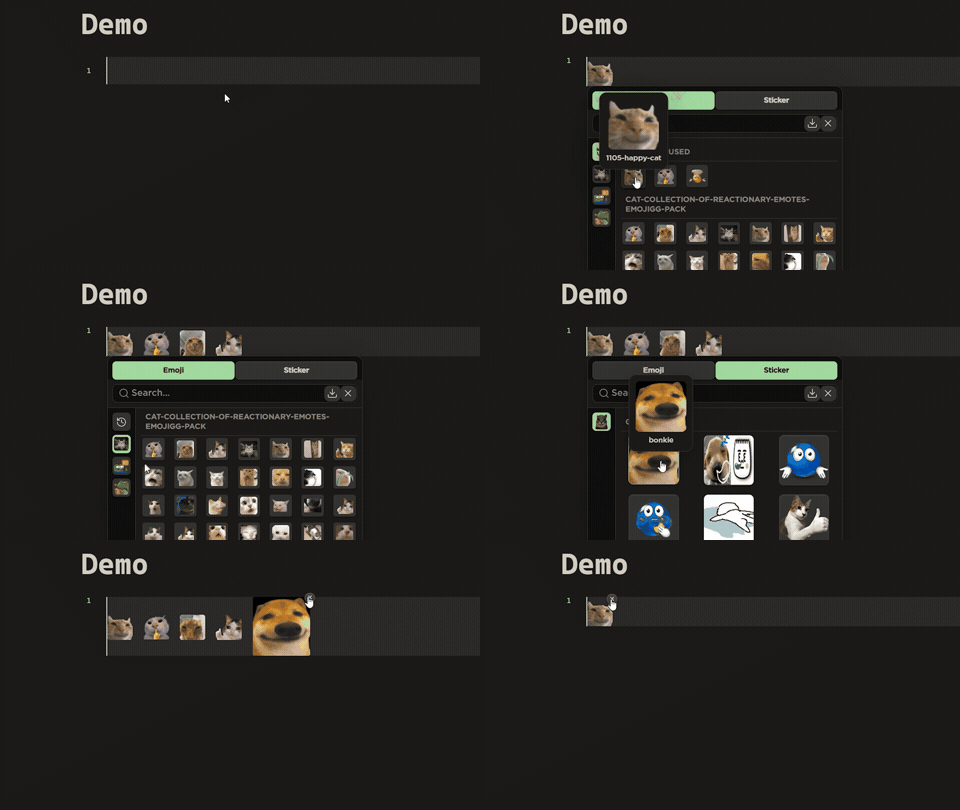
A Discord-style emoji and sticker picker for Obsidian. It reads images from folders in your vault and lets you insert them into notes — fully offline by default.
Demo
Features
- Emoji & sticker pills with set navigation, live search, and a "recently used" row.
- Resizable & movable picker: drag the corner handle to resize (remembered between sessions, double-click to reset) or hold Move in the ⋮ menu to drag the panel anywhere.
- Guided onboarding tours for the picker and the import modal — shown on first use, re-runnable anytime from the ? buttons or Settings.
- Three insert styles: shortcode (
:name:), native embed ([[image|size]]), or raw HTML. Shortcodes render as images in the editor and reading mode. - Import modal with a queue: drag & drop or paste links from Discord, local files, clipboard, note embeds, and emoji packs.
- Clone from Discord servers using a token — grab emojis and stickers from servers you're in.
- Set management: create, delete, and open set folders from the picker, the import modal, and the settings tab.
- Themable picker: built-in Default / Compact / Vibrant / Minimal styles, all driven by
--gl-*CSS variables you can override in a snippet.
Known limitation
Shortcodes in syntax-highlighted code blocks (e.g., ```js, ```python) display as plain text (:smile:) rather than rendering as emoji. This is because syntax highlighters fragment code into token spans, breaking the shortcode pattern.
Workarounds:
- Plain code blocks (no language) — renders as emoji ✓
- Callouts — renders as emoji ✓
- Inline code — renders as emoji in reading mode ✓
See issue #6 for details.
Installation
Community plugin list
Once approved, install from Settings → Community plugins → Browse and search for "Discord Emoji Picker".
Manual
Copy main.js, manifest.json, and styles.css to:
<Vault>/.obsidian/plugins/discord-emoji-picker/
Then reload Obsidian and enable the plugin in Settings → Community plugins.
Quick start
- On first run, the plugin seeds sample sets (Cats emojis, Pets stickers) into
discordemojipicker/emojis/anddiscordemojipicker/stickers/so you can try it out immediately. Delete them whenever you like. - Open a note, click the smile ribbon icon (or run Open emoji & sticker picker) and click an image to insert it.
- Type
:name:anywhere to insert by shortcode — autocomplete will kick in. - Run Import emojis & stickers to pull images from the web, Discord, popular emoji packs (Twemoji, Noto Emoji, OpenMoji), or local files — or add the fully offline system emoji set rendered from your device's emoji font.
Settings
| Setting | What it does |
|---|---|
| Emoji folder | Vault folder with emoji images (default discordemojipicker/emojis); each subfolder becomes a set |
| Sticker folder | Vault folder with sticker images; each subfolder becomes a set |
| Emoji sets / Sticker sets | Create, delete, or open set folders |
| Insert style | Shortcode, embed, or HTML when clicking in the picker |
| Render shortcodes in editor | Show shortcode images in live preview / source mode |
| Emoji size / Sticker size | Grid size in the picker and inserted size |
| Picker theme | Default, Compact, Vibrant, or Minimal |
| Resizable picker | Adds a drag handle to the picker corner (double-click resets) |
| Show onboarding tours | Replay the picker and import tours the next time they open |
| Start picker onboarding / Start import onboarding | Play either guided tour right away |
| Clear recently used | Empties the recently used row in the picker |
| Discord token / Token type / Test connection | Credentials for cloning from Discord servers |
Documentation
- Usage guide — every feature, step by step.
- Troubleshooting & FAQ — common problems and fixes.
Security & privacy
- The plugin is offline by default: no telemetry, and no network requests except to the public Discord CDN when you import or clone from Discord, and to the jsDelivr CDN when you use the Emoji packs import tab (Twemoji, Noto Emoji, and OpenMoji are open-license sets).
- Vault access is limited to the two folders you configure (emoji and sticker folders, hidden by default). The plugin never scans the rest of your vault.
- The clipboard is only read when you click Read clipboard image in the import modal.
- The Discord token is stored locally in this vault's plugin data and is only ever sent to Discord.
- Using your personal user token violates Discord's Terms of Service and may get your account flagged or banned — the same risk as tools like Vencord. A bot token is safe; add the bot to the servers you want to clone from.
Building
npm install
npm run dev     # watch mode
npm run build   # production build -> main.js
npm run lint    # eslint
Changelog
See CHANGELOG.md.
License
ISC © KuroTheDev