
README file from
GithubDice Rolls
Roll dice right inside your notes. Write a formula in inline code that starts
with dice: and it turns into its result. Click the result to roll again.
The goblin attacks: `dice: 1d20+4` to hit, `dice: 1d6+2` slashing damage.
Ability scores: `dice: 4d6dl1` `dice: 4d6dl1` `dice: 4d6dl1`
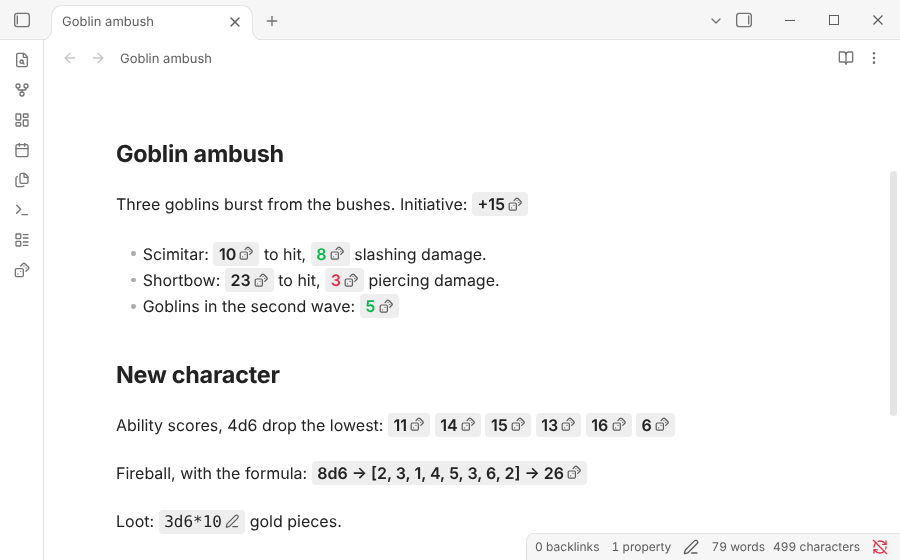
It works in Live Preview and in Reading view, on desktop and on mobile. Hover over a result to see the formula and every die rolled. Put the cursor inside a roll to edit its formula. A roll keeps its result while you edit around it; it changes only when you click it.
Coming from Dice Roller
This plugin reads the dice formulas of
Dice Roller, with the same dice:
syntax, modifiers and flags, so notes written for it roll the same way.
Settings → Import from Dice Roller copies your saved formulas.
What is different:
- No surprise rewrites of your notes. A
dice-mod:roll writes its result into the note only when you click it, or when you run Write the results of dice-mod rolls in this note. Either way it is one change that one undo takes back, and it is refused if the note changed in the meantime. - Custom ranges include both ends.
1d[3,5]rolls 3, 4 or 5, and so does1d[3-5]. A list of three or more numbers, such as1d[1,3,5], is a die with exactly those faces. - A roll history in the sidebar, with the note each roll came from, and a dialog to roll any formula without writing it into a note.
- Clear errors. A formula that cannot be rolled stays visible, underlined, with the reason in its tooltip.
Not included: section, tag, line and Dataview rollers (dice: #tag),
narrative dice and 3D dice. Those codes stay as plain code, so you can keep
Dice Roller installed for them.
Tables
dice: [[Note#^table-id]], dice: [[Note#Heading]] or dice: [[Note]] rolls
on a Markdown table: the block id names the table, the heading takes the first
table under it, and a note alone takes its first table. The picked row is shown
as Markdown, so images (![[sword.png]]) and links in the cells appear; click
to roll again. Add |2 to show only the second column.
If the first header is a die (d6, d100) and the first column holds numbers
or ranges (1, 2-3), that die is rolled and the matching row is picked, and
the column is not shown. Otherwise every row is equally likely.
Formulas
| Formula | What it rolls |
|---|---|
1d20, d20 |
One twenty-sided die. |
3d6+2 |
Three six-sided dice plus 2. Use + - * / ^ and parentheses. |
d%, 4d% |
Percentile dice (d100). |
4dF |
Fudge/Fate dice: −1, 0 or +1 each. |
1d[3,5], 1d[3-5] |
A die from 3 to 5. |
1d[1,3,5] |
A die with exactly these faces. |
1d66% |
One d6 per digit, read together: 11 to 66 (Traveller's d66). |
1dS |
Fantasy AGE stunt dice: 3d6, with stunt points on doubles. |
(1d4)d6 |
Roll 1d4 to decide how many d6 to roll. |
3d |
Faces left out: 100 by default (change it in settings). |
1d20+dex |
A number from the note's properties (dex: 2) or an inline field (dex:: 2). |
attack |
A saved formula, by name. |
Modifiers
Add them right after the dice. A number after a modifier is optional and defaults to 1.
| Modifier | Example | What it does |
|---|---|---|
| Keep highest | 2d20kh, 2d20k, 4d6kh3 |
Keeps the highest n dice (advantage). |
| Keep lowest | 2d20kl |
Keeps the lowest n dice (disadvantage). |
| Drop lowest | 4d6dl1 |
Drops the lowest n dice. |
| Drop highest | 4d6dh1 |
Drops the highest n dice. |
| Explode | 1d6!, 1d6!3, 1d6!i |
A die showing its highest face rolls one more die, once, n times or until it stops (i, up to 100). |
| Explode and combine | 1d6!! |
The same, adding the new dice into the one that exploded. |
| Reroll | 2d6r, 2d6r2, 2d6ri |
Rerolls a die showing its lowest face, once, n times or until it stops. |
| Sort | 4d6s, 4d6sd |
Shows the dice in ascending or descending order. |
| Unique | 3d6u |
Rerolls duplicates until every die differs. |
Explode and reroll take conditions: 1d6!>=5 explodes on 5 and 6,
2d6r<3 rerolls 1s and 2s, 1d4r<2>3 rerolls 1s and 4s.
Counting successes
A condition right after the dice counts each die that meets it as one success.
| Formula | What it counts |
|---|---|
5d10>7 |
Dice above 7. Also >=, <, <=, = and =! (not equal). |
4d6=1=6 |
Dice showing 1 or 6. |
5d10>=8-=1 |
Dice of 8 or more, minus one for each 1. |
3d6>1d6 |
Dice above a d6 rolled once. |
Flags
Add flags after the formula with |, such as dice: 1d20+5|signed|nodice.
| Flag | What it does |
|---|---|
|nodice, |dice |
Hides or shows the dice button. |
|form, |noform |
Shows the formula and the dice with the result, or the total alone. |
|avg |
Starts at the average instead of a roll. |
|none |
Shows nothing until clicked. |
|text(Dexterity save) |
Shows this text instead of the result; the result is in the tooltip. |
|signed |
Shows +3 instead of 3. |
|round, |ceil, |floor, |noround |
Rounding of results with decimals. |
|paren |
Shows the formula in parentheses after the result. |
Writing a result into the note
dice-mod: 3d100 + 12 shows the formula with a pencil button. Click it and
the code is replaced by the result, as Dice Roller writes it:
3d100 + 12 -> [75, 20, 75] + 12 -> 182. With |noform, or the setting off,
only the total is written. dice+: and dice-: roll like dice:.
Commands
| Command | What it does |
|---|---|
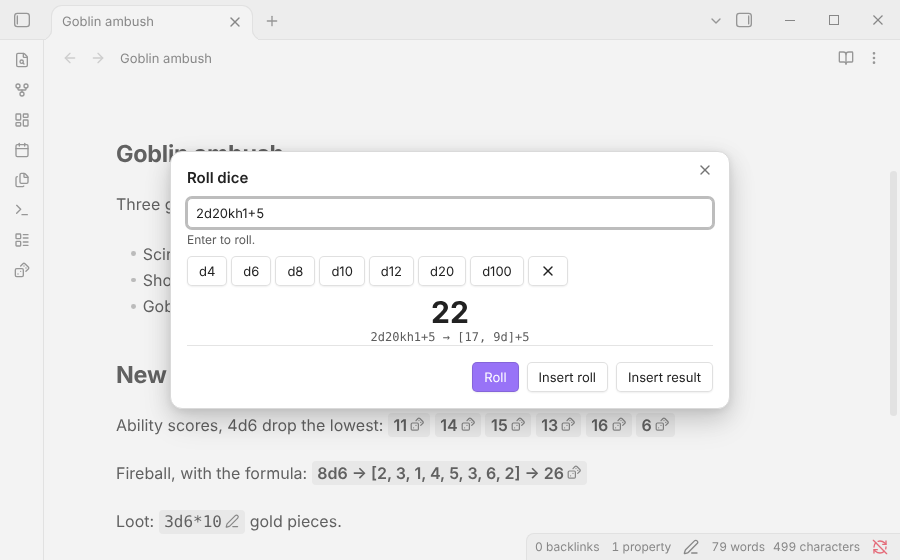
| Roll dice… | Opens a dialog: type a formula, or build one with the d4–d100 buttons, and roll. In a note, insert the roll or its result at the cursor. |
| Open roll history | Shows every roll in the right sidebar, newest first, with its dice and the note it came from. Roll again, edit or copy any of them. |
| Insert inline dice roll | Turns the selected formula into a dice: roll, or inserts dice: 1d20 ready to edit. |
| Write the results of dice-mod rolls in this note | Rolls every dice-mod: code in the note and writes the results, in one undo step. |
| Reroll every dice roll in this note | Rolls everything in the note again. |
None has a hotkey by default; assign them in Settings → Hotkeys.
Settings
- Show a dice button next to each result.
- Show the formula with the result, such as
2d6+3 → [3, 4]+3 → 10. - Rounding of results with decimals: two decimals (the default), round, round up or round down.
- Plus sign on positive results.
- Faces of a die written without them: 100 by default, as in Dice Roller.
- Write the formula and the dice with
dice-mod:, and Escape Markdown in what it writes so[75, 20]does not read as a link. - Add rolls from notes to the history, and how many rolls to keep.
- Saved formulas: give a formula a name, such as
attackfor1d20+5, and use the name alone (dice: attack) or inside a formula (dice: attack + 2).
Installation
In Obsidian, open Settings → Community plugins → Browse and search for "Dice Rolls".
More plugins by Siulved54
| Plugin | What it does | Source |
|---|---|---|
| Shared Blocks | Write a block of text once and reuse it in any note. Edit the source and every reference re-renders live. | shared-blocks |
| Text Case and Cleanup | Change case, make camelCase or slugs, sort lines and remove duplicates, and repair text pasted out of a PDF, without touching code or URLs. | text-format |
| Typography as You Type | Curly quotes, dashes and ellipses as you type, kept out of code and maths, with Backspace to take one back. | smart-typography-plugin |
| Section Numbering | Number headings as an outline (1, 1.1, 1.2) and keep every link to them working when they renumber. | section-numbering |
| Spreadsheet to Table | Paste cells from Excel or Google Sheets as a Markdown table with a real header, insert CSV files, and copy tables back out. | spreadsheet-to-table |
| Hybrid Line Numbers | Relative and hybrid line numbers for Vim-style jumps, where a folded section counts as one line. | hybrid-line-numbers |
| List Item Callouts | Colour a single list item as a callout by starting it with a character such as &, ! or ?. |
list-item-callouts |
| Folder Counts | See how many notes or files each folder holds, right in the file explorer, with a vault total and folder exclusions. | folder-counts |
| Note Reading Time | Reading time of the current note or your selection in the status bar, optionally saved to a property. | note-reading-time |
| Task Rollover | Roll unfinished tasks from your last daily note into today's when it is created, with a real undo. | task-rollover |
| Zoom Into Section | Zoom into a heading or list item to see only it and its contents, with a breadcrumb bar to climb back out. | zoom-into-section |
| Link Title on Paste | Paste a web address and get a Markdown link with the page's title, fetched in the background and undone in one step. | link-title-on-paste |
| Update Radar | Checks your installed community plugins for updates in the background, shows what changed, and flags the ones that look abandoned. | community-update-checker |
| Dataview to Bases | Convert Dataview queries into Bases blocks, and see which queries in your vault can be converted. | dataview-to-bases |
| Line Editing Commands | Duplicate, join, sort and reverse lines, insert blank lines and jump to a line number, with multi-cursor support. | line-editing-commands |
| Note Mover Rules | Move notes into folders by ordered rules on tags, properties, titles and paths, with a preview before any bulk move. | note-mover-rules |
| Tab History | Keeps each tab's back and forward history across restarts, and adds commands to move, maximize and close tabs. | tab-history |
| URL Cards | Shows web addresses as cards with title, description and image, and reads existing cardlink blocks. | url-cards |
| Vim Config | Loads a vimrc-style file from your vault so your key mappings and editor commands are ready when vim mode starts. | vim-config |
| Task Archive | Moves completed tasks, with their sub-items, into an archive section or note. | task-archive |
| Revisit Later | Link the current note into a future daily note, with a date typed in plain English, so it comes back when you want to review it. | revisit-later |
| Explorer Colors Plus | Color files and folders in the file explorer, with a palette, cascading to children, and import from File Color. | explorer-colors-plus |
| Book Lookup | Create book notes from Open Library or Google Books, with cover images, ISBN search and Book Search compatible templates. | book-lookup |
| Web Search Menu | Search the web for selected text or the note title from the right-click menu, with engines you define. | web-search-menu |
| Word Lookup | Look up any word in a sidebar dictionary with definitions, phonetics, synonyms and antonyms, or create a note for it. | word-lookup |
| Quick Translate | Translate the selection or a whole note into another language with no account, keeping links, code and front matter untouched. | quick-translate |
| Claude Studio | Notion-style AI writing, chat and vault tools powered by your local Claude Code CLI. | claude-studio |
| Book Studio | Turn notes into a print-ready paperback PDF and an EPUB 3, entirely on your device. | book-studio |
| Emoji Search | Insert emojis from a searchable picker or by typing a :shortcode. | emoji-search |
| Inline TOC | Show a live table of contents inside any note with a toc code block, or insert a plain Markdown one. | inline-toc |
All of them are in the community directory: Settings -> Community plugins -> Browse, then search for the name. Demos and install links for every one: the catalog.
Follow new plugins and updates on X: @luenpereza