
README file from
GithubDeepseedian
English | 简体中文
Quick start · Feature walkthrough · Documentation · Releases
Overview
Deepseedian is a desktop Obsidian assistant powered by a locally installed DeepSeek Harness (DSH) runtime. Ask questions with note context, inspect sources and citations, fork conversations, manage vault memory, generate local article catalogs and Bases, and request manual inline completion.
Version 0.7.2 · GitHub Releases · Community listing. The interface is currently primarily Chinese; an English interface is not yet available.
Highlights
- Chat with your notes — bring in the current note, a selection, or attachments; inspect the context before sending.
- Follow sources — preview note properties, headings, paragraph blocks, related notes, and citations.
- Fork a conversation — continue from a completed answer in an independent chat, with a link back to its parent.
- Manage vault memory — edit memory locally or use AI extraction and optional proposals.
- Organize articles locally — preview and confirm an Obsidian Base and a Markdown navigation page.
- Inspect each run — see tool activity, elapsed time, and provider-reported token usage.
- Request inline completion — explicitly request a suggestion, accept with Tab, dismiss with Esc. Off by default.
Preview
Captured in Deepseedian 0.7.1 on macOS / Obsidian 1.13.7, using dedicated demo notes. The learning card is an actual deepseek-flash response; no private articles are shown. Responses can vary.
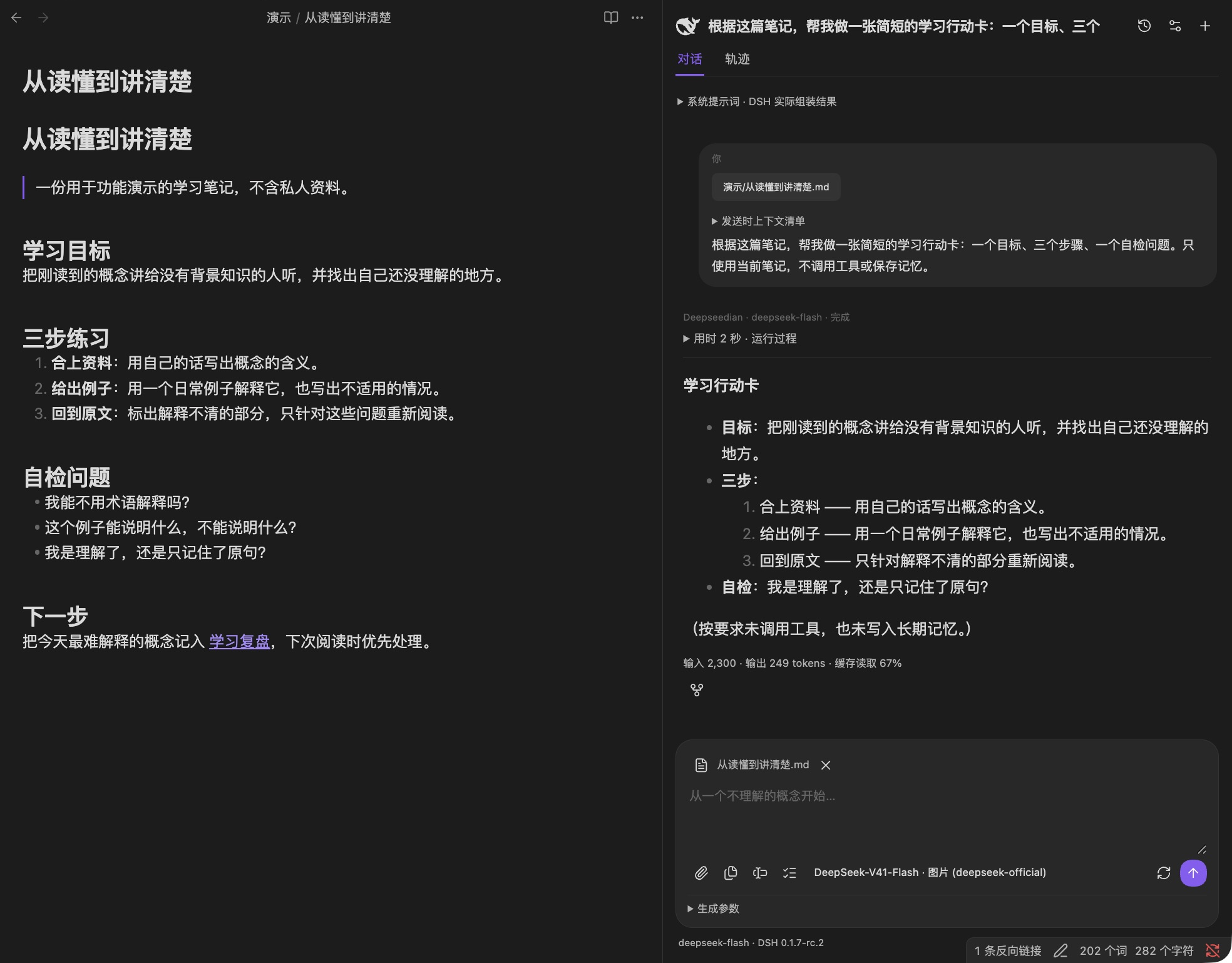
| Trace and context | Forks and catalogs |
|---|---|
Inspect real tool calls |
Fork a conversation |
Check outgoing context |
Preview a local catalog |
Click a screenshot for the full image. Follow the feature walkthrough to reproduce these workflows with the included notes.
Quick start
Installation status, September 26, 2026: the community web listing is public, but our fresh Obsidian client could not find the plugin, and the public plugin registry did not yet contain
deepsidian. Use the GitHub Release installation below for now; it has passed a fresh-vault native test. The 0.7.1 automated community review completed without blocking errors; advisory warnings remain. See the acceptance report.
Requires desktop Obsidian 1.13.7+, Node.js 24+, and DSH 0.1.7-rc.2. Mobile devices are not supported. Install Node.js separately, then run:
npm install -g @deepseek-ai/[email protected]
dsh web
Configure a model provider and its credentials in DSH and test a conversation there. You can then close DSH Web. Deepseedian starts a separate local runtime; it does not install or update Node.js, DSH, or itself.
Download main.js, manifest.json, and styles.css from the release into your vault's .obsidian/plugins/deepsidian/ directory and enable Deepseedian in Community plugins. Keep data.json and runtime/memory directories when updating. The embedded bridge needs no separate download. The plugin ID remains deepsidian for compatibility with existing settings and conversations.
On macOS, Obsidian launched from Finder may have a different PATH from your terminal. If automatic discovery fails, set the full Node.js executable path and DSH package directory in advanced runtime settings. Find them with command -v node and npm root -g; on Windows, use where.exe node.
Usage, payment, and privacy
- Select text and use the note-question command, or open the sidebar to chat. Inspect the next-message context before sending. Source removal does not erase already sent history.
- Manual completion is off by default. Enable it in settings, run the completion command in Markdown prose, then accept the gray suggestion with Tab or dismiss it with Esc. Acceptance is a separate undo step. Completion uses paid deepseek-official / deepseek-flash, independently of the chat model, and sends the title plus text around the cursor. It has no access to chat history, memory, or tools. Limits are 10 calls per minute and 200 per UTC day per vault, including failed or cancelled requests; these are not monetary limits.
- The plugin is free and open source. Cloud AI and search providers may require accounts, credentials, and payment; their fees are separate. AI chat may send questions, conversation history, selected note context, attachments, tool results, and enabled memory to the chosen provider. AI memory extraction and optional idle proposals also make model requests.
- Memory reading, AI memory management, web search, and web fetching are enabled by default for new installations; existing disabled settings are preserved. AI memory management can directly change vault memory when session permissions allow. Idle memory proposals and manual completion are off by default. Catalog generation and updates require confirmation and run locally.
- Web search sends queries to the configured search service; web fetching accesses public websites. The DSH update check queries the public npm registry at most daily by default, without note or chat content, and can be disabled.
- The plugin uses Node.js filesystem and child-process APIs to locate and run Node.js/DSH, read configuration and credentials from
~/.dshor a custom directory, and read explicitly attached external files. Chats, runtime logs, sent attachments, and memory are stored under the vault's plugin directory. No client-side telemetry is added. Remote services have their own data policies, including DeepSeek's privacy policy. - Note properties such as
draftorencryptedare not access controls. Completion exclusions do not restrict chat tools. Publishing or reviewing this plugin does not require uploading personal articles.
See the walkthrough for note chat, context inspection, forks, catalogs, and manual completion. The 0.7.2 acceptance report covers numbered forks, upgrade persistence, and release verification.
AI suggestions can be incomplete or factually wrong. Read them before accepting; completion is not a fact-checking tool. The 0.7 validation report records both successful and failed real-provider cases. Windows/Linux CI does not replace native UI testing, and third-party completion plugins, native input methods, and all themes have not been exhaustively tested. Runtime migration and three-file installation are covered by integration tests.
Development and releases
The check command includes the official Obsidian ESLint rules. Existing general JavaScript/TypeScript findings remain visible warnings; Obsidian rules retain their recommended severity. TypeScript 5.9.3 is pinned for the linter’s compiler API compatibility. Local checks do not replace the directory scan.
Use Node.js 24+ and run npm ci, npm run check, and npm run test:integration (requires DSH). Older-runtime migration fixtures are optional and are reported as skipped when absent. npm run package:release produces the three release assets. Live-provider test scripts incur charges and use synthetic fixtures by default; real-article testing requires authorization. Reports and credentials must not be committed.
Source pushes alone do not deliver plugin updates. Increment the version, publish a matching Git tag and GitHub Release with the three assets, and check the community review results. See the release guide.
License and acknowledgements
The README organization takes inspiration from dsh-TUI: language navigation, highlights, preview, and quick start. The projects are independent.
Licensed under MIT. The DeepSeek whale icon's attribution and license are in THIRD-PARTY-NOTICES.txt and included in the release bundle. The runtime uses DeepSeek Harness; sidebar interaction design draws inspiration from Claudian. Deepseedian is an independent community project, not an official Obsidian or DeepSeek product.