
README file from
GithubDB Atlas
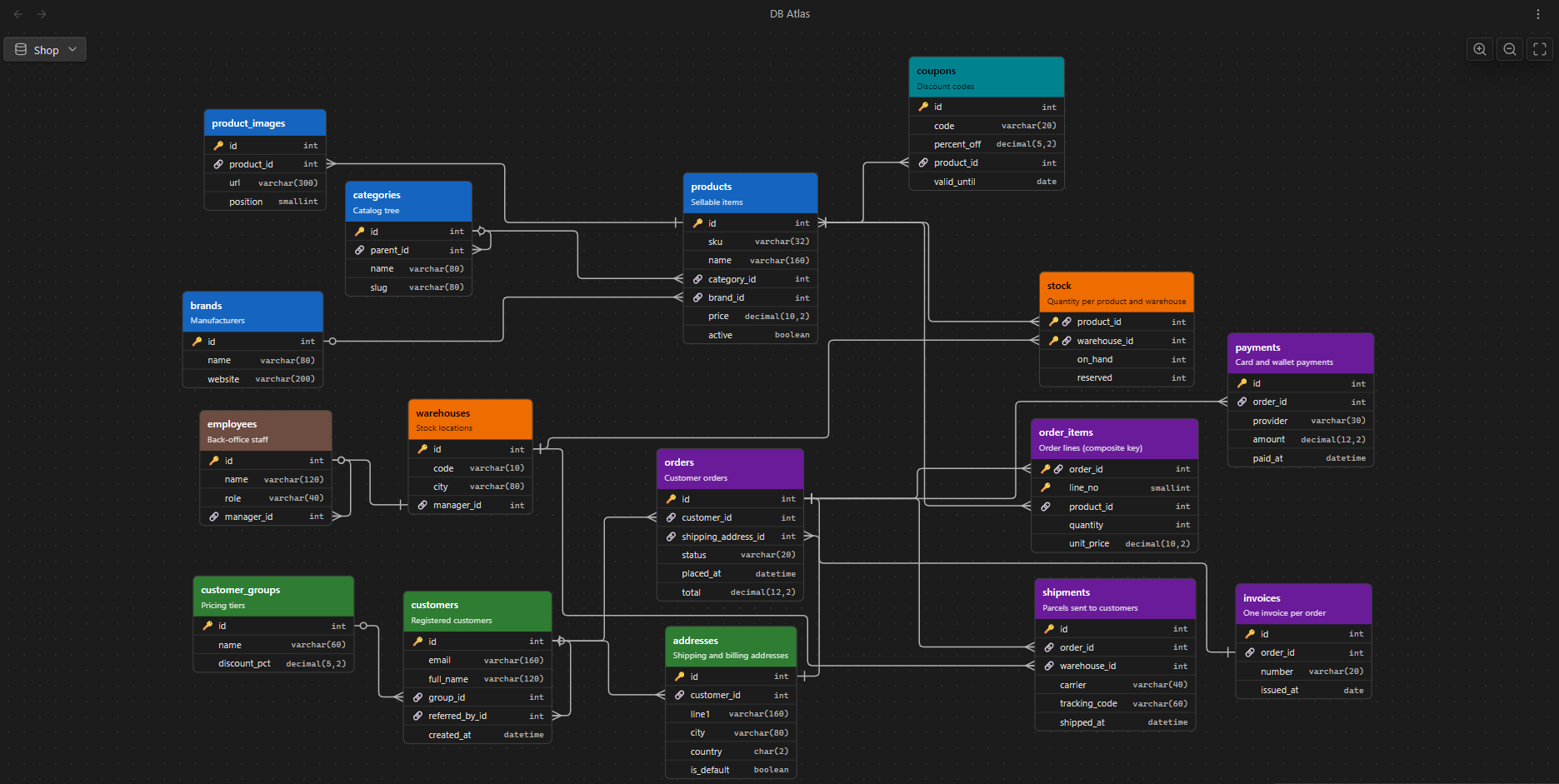
Document database schemas in Obsidian with one note per table, and explore them as an interactive ER diagram.
Each table note keeps the column definitions in its properties and your notes about each column in its body. The diagram view reads a folder of table notes, draws tables and relations, and opens the right note — or the paragraph about a column — with a click.
Features
- One note per table: columns as
col_*properties, notes about each column under## columnheadings. - Interactive diagram: pan, zoom, fit; drag tables (positions are saved); orthogonal relation lines with crow's foot cardinality; tooltips with column details.
- From the diagram to your notes: click a table to open its note, click a column to jump to its heading (created if missing).
- Always in sync: live updates while you edit; renaming a table updates every reference to it.
- Clear feedback: invalid columns in red, broken references marked with ⚠️, reasons in the tooltips — one broken note never breaks the others.
- Built for large schemas: smooth with 1000+ tables.
- 13 languages: English, 中文, हिन्दी, Español, Français, العربية, বাংলা, Português, Русский, 日本語, Deutsch, Bahasa Indonesia, Italiano (follows Obsidian's language by default).
- Desktop and mobile.
Installation
With BRAT: install BRAT, choose Add beta plugin, enter https://github.com/lucabersel/db-atlas, then enable DB Atlas in Settings → Community plugins.
Manually: download main.js, manifest.json and styles.css from the latest release into <vault>/.obsidian/plugins/db-atlas/ and enable the plugin.
Requires Obsidian 1.13.0 or later.
Quick start
-
Create a folder (e.g.
Shop) and add it in Settings → DB Atlas → DB folders. -
Run DB Atlas: New table, or create notes in the folder: each note is a table named after the file.
-
Define the columns as properties — a JSON object in single quotes:
--- table_description: Customer orders col_id: '{"type":"int","pk":true,"increment":true}' col_customer_id: '{"type":"int","notNull":true,"ref":"customers.id"}' col_status: '{"type":"varchar(20)","notNull":true,"default":"pending"}' --- ## status pending → paid → shipped → delivered, or cancelled. -
Open the diagram with the ribbon icon or DB Atlas: Open diagram.
Documentation
- User guide: writing table notes, column keys, relations and cardinality, errors, using the diagram, commands, settings, FAQ.
- Developer guide: architecture, modules, algorithms, coding conventions, tests and benchmarks, translations, releasing.
- PROJECT.md: full functional specification (Italian).
Contributing
Issues and pull requests are welcome — especially improvements to the translations or new languages (see Translations in the developer guide; npm test checks that every language is complete).
License
MIT, see LICENSE. The bundled main.js includes elkjs (EPL-2.0), see THIRD_PARTY_NOTICES.md.