
README file from
Github🔐 CryptoPad — Obsidian Plugin
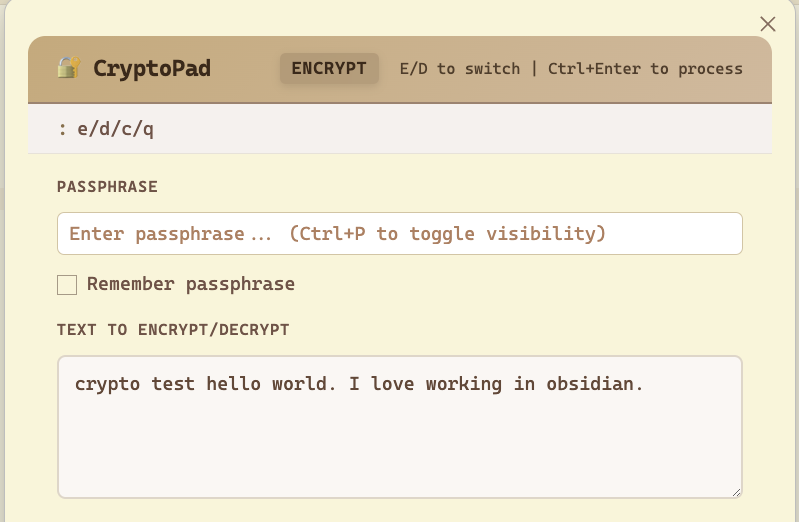
Encrypt and decrypt text inline using a keyboard shortcut. Powered by AES-GCM + PBKDF2 via the Web Crypto API. Everything runs client-side — nothing is sent anywhere.
Features
- Keyboard shortcuts influenced by vim to efficiently encrypt/decrypt your text
- Encrypt & Decrypt tabs in one modal
- Optional passphrase memory via plugin settings
- Works on desktop and mobile
- AES-256-GCM encryption with your passphrase
- PBKDF2-SHA256 key derivation (200,000 iterations)
- Random salt + IV per encryption — every ciphertext is unique
Installation
From source (development)
- Clone / copy this folder into your vault under
.obsidian/plugins/cryptopad/ - Run:
npm install npm run build - In Obsidian: Settings → Community Plugins → enable CryptoPad
Manual install (pre-built)
- Copy
manifest.json,main.js, andstyles.cssinto.obsidian/plugins/cryptopad/ - Reload Obsidian and enable the plugin in Community Plugins
Usage
| Action | How |
|---|---|
| Open CryptoPad | Ctrl+Shift+E (Windows/Linux) / Cmd+Shift+E (Mac) |
| Encrypt | Type text → enter passphrase → click Encrypt |
| Decrypt | Switch to Decrypt tab → paste ciphertext → enter passphrase → click Decrypt |
| Copy result | Click 📋 Copy |
| Quick action | Ctrl+Enter / Cmd+Enter while focused in the textarea |
| Close modal | Escape |
Customizing the Shortcut
Go to Settings → Hotkeys, search "CryptoPad", and set your preferred key combination.
Security Notes
- Passphrase is never transmitted — all operations are local
- If "Remember passphrase" is enabled, it's stored via Obsidian's
saveData()in the plugin's data file inside your vault - Each encryption generates a fresh random 16-byte salt and 12-byte IV
- Output format:
base64(salt[16] || iv[12] || ciphertext) - AES-GCM provides both confidentiality and integrity
Technical Details
| Property | Value |
|---|---|
| Cipher | AES-256-GCM |
| Key derivation | PBKDF2-SHA256 |
| Iterations | 200,000 |
| Salt | 16 bytes random |
| IV | 12 bytes random |
| Output encoding | Base64 |
License
MIT