
README file from
GithubCogniTree
AI-powered branching knowledge trees for Obsidian. Type a single concept ("democracy", "tree", "consciousness") and a polymathic-taxonomist LLM grows it into a deep, interconnected tree of notes — one branch at a time, up to tens of thousands of nodes.
Built around a prompt system (Discovery, Expansion, Connection Discovery, Deep Dive, Review Cards, Vault Cartography, plus a Batch Generation builder) and designed for large-scale scalability: incremental growth, Markdown+frontmatter storage, response caching, background indexing via Obsidian's metadataCache, and virtualized rendering.
Features
| Capability | How |
|---|---|
| Discovery (root concept) | Polymathic taxonomist prompt → 3–7 domains × 3–5 children |
| Expansion (drill deeper) | Knowledge-graph engineer prompt → 5–10 granular sub-concepts with can_expand / estimated_depth |
| Connection Discovery | Ranked vault-note candidates (lexical index + semantic embeddings) → relationship types + priorities; link or create notes |
| Deep dive per note | Right-click a node → Write deep dive — a 350–600 word structured section (mechanism, examples, common confusions, open questions) written into the note's ## Deep dive region. Deep dive subtree does it branch-wide on a budget; hand edits survive every rewrite |
| Review (spaced repetition) | Create review cards per node or subtree, then study them in a keyboard-driven session (Space reveals, 1–4 grade). SM-2-lite scheduling lives in a hidden per-tree store, with a cards due chip in the stats row |
| Grow a tree from your vault | Grow a tree from your vault… turns notes you already have into a tree: it reads names, tags and links from metadataCache, has the model arrange them, and writes reference nodes that link to the originals instead of copying them |
| Semantic index | Optional /embeddings pass over your vault (incremental, budgeted, cached next to the plugin) that powers connection matching and gives Ask related notes from outside the tree |
| Ask & follow-up chat | Grounded Q&A on any node: branch digest + linked vault notes + semantic neighbours, Explain / Quiz / Critique / Expansion presets, adoptable Suggested children |
| Batch expansion | Level-by-level BFS with bounded concurrency, node budget, live progress bar |
| Incremental growth | Never generate the whole tree at once; expand branches on demand |
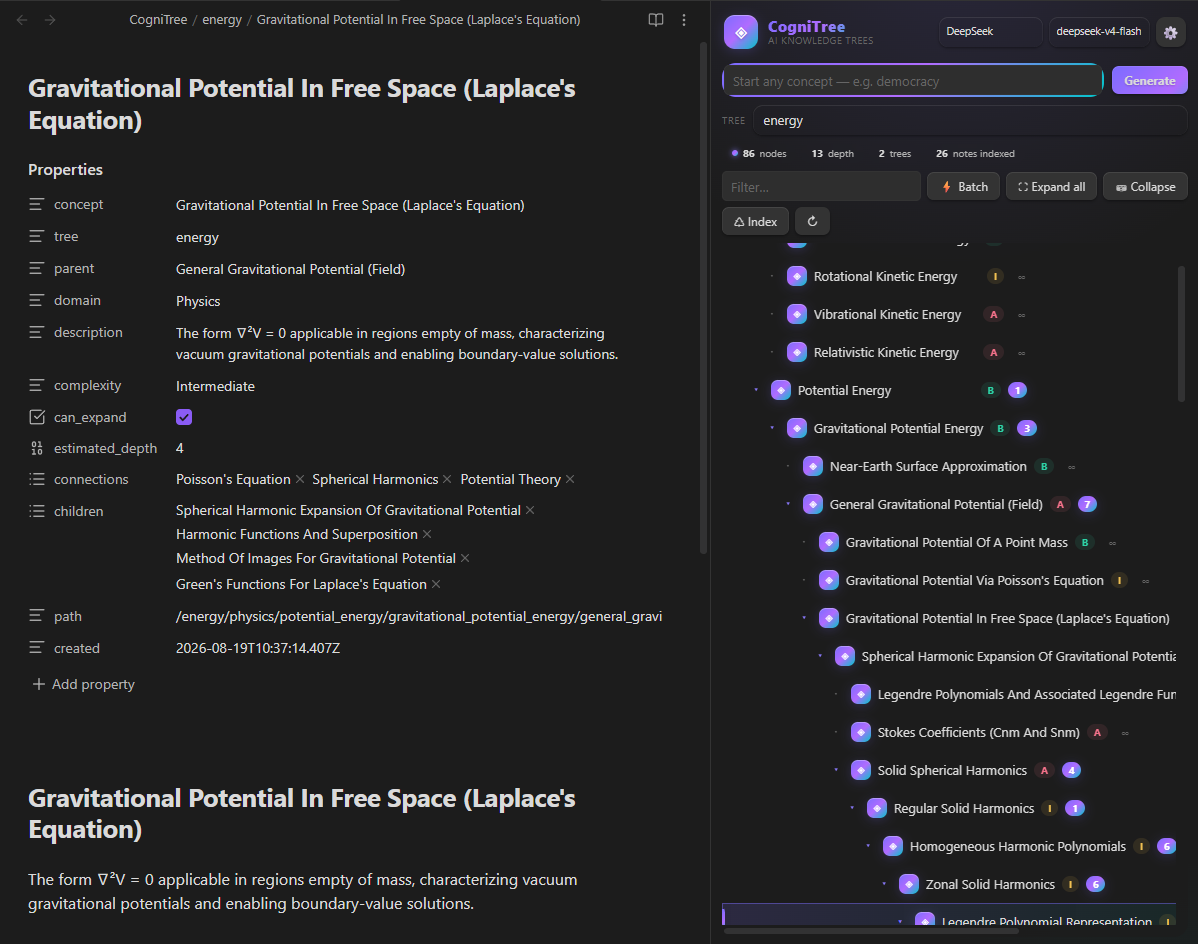
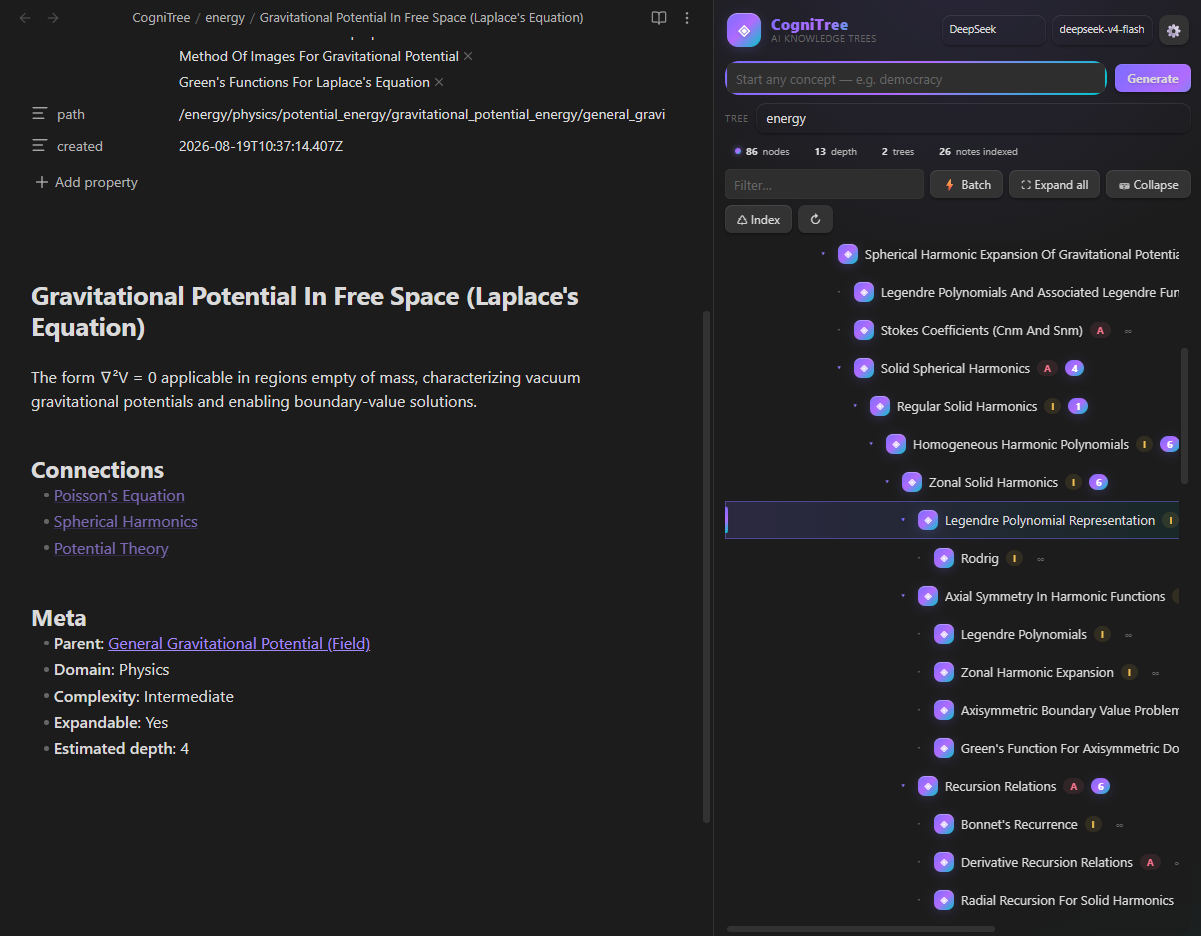
| Markdown storage | One note per concept, full frontmatter (parent, domain, complexity, children, connections, path), wikilink ## Connections section |
| Response cache | Identical queries hit the cache (LRU, expiry, disabled at 0) |
| Background indexing | Vault note names/tags indexed from metadataCache — powers connection matching without loading files |
| Virtualized rendering | Only visible rows are in the DOM; smooth with tens of thousands of nodes |
| Any OpenAI-compatible API | DeepSeek (default), OpenAI, OpenRouter, Ollama, LM Studio… with optional SSE streaming |
Tree interaction
| Feature | How |
|---|---|
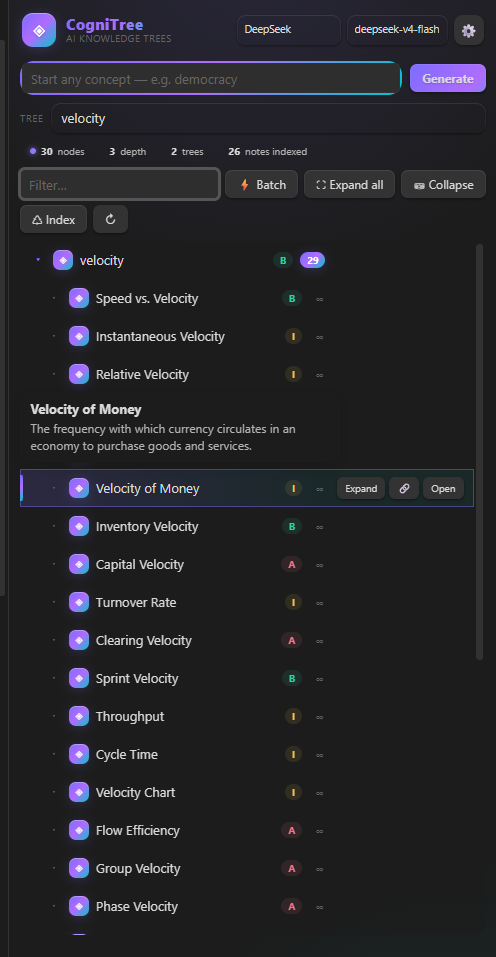
| Hover preview | Hover a node → tooltip with its description; the same preview follows keyboard selection |
| Keyboard navigation | ↑ / ↓ move the selection, → expand, ← collapse, Enter toggle — preview follows the selected node |
| Filter that jumps | Type in the search box: matching nodes keep their ancestor chain, matches are highlighted, and the view jumps to the first hit; a No matching nodes hint appears when nothing matches |
| Copy link / path | Right-click → Copy [[link]] or Copy note path |
| Safe delete with undo | Right-click → Delete node + descendants, then press Undo on the notice to recreate every deleted note and re-attach the branch to its parent. Reference nodes never delete the notes they point at |
| Export tree | Right-click → Export tree… → Markdown outline, JSON snapshot, SVG graph (layered) or SVG sunburst (radial), written to the vault root. The sunburst puts depth in rings and sizes each arc by the number of concepts in that branch — the right shape for wide trees |
| Batch connections | Right-click → Find connections in subtree — runs the connection pass over every node and auto-links high-priority hits |
| Tree stats & health | Right-click → Tree stats & health — depth distribution, complexity breakdown, orphaned / dangling-node detection |
| Duplicate detection | Right-click → Find duplicates across trees — lists concepts present in 2+ trees with Link and Merge A→B / B→A actions |
| Ask about a concept | Right-click (or the row's 💬) → a grounded chat on that node: Explain, Quiz me, Gaps & contradictions, Next expansion presets or any free question. Answers are anchored in a digest of the branch + linked vault notes + semantically related notes elsewhere in the vault, and Suggested children can be adopted straight into the tree |
| Deep dive | Right-click → Write / Refresh / Remove deep dive, or Deep dive subtree… for a budgeted branch-wide pass; the row's 💡 button does the same, and a 💡 badge marks notes that have one |
| Review | Right-click → Create review cards, Create review cards for subtree, Review this subtree, or the toolbar's 🧠 Review for everything due in the tree |
| Batch without collapsing | Batch expansion preserves the current expansion state, then expands the batch subtree afterwards |
| Expand all / Collapse | Toolbar buttons to show or hide the whole tree at once |
| Manual reindex | ♺ Index toolbar button (or the Reindex vault notes command) rebuilds the lexical vault index on demand |
| Jump to the source | A reference node (🔗 badge) opens the note it points at when you double-click it or choose Open source note |
Quick start
- Install — copy
main.js,manifest.json,styles.cssinto<vault>/.obsidian/plugins/cognitree/and enable the plugin. (Orgit cloneand runnpm run build.) - Set your API key — ribbon icon 🕸 Open CogniTree → ⚙ in the header → paste your key (defaults to DeepSeek +
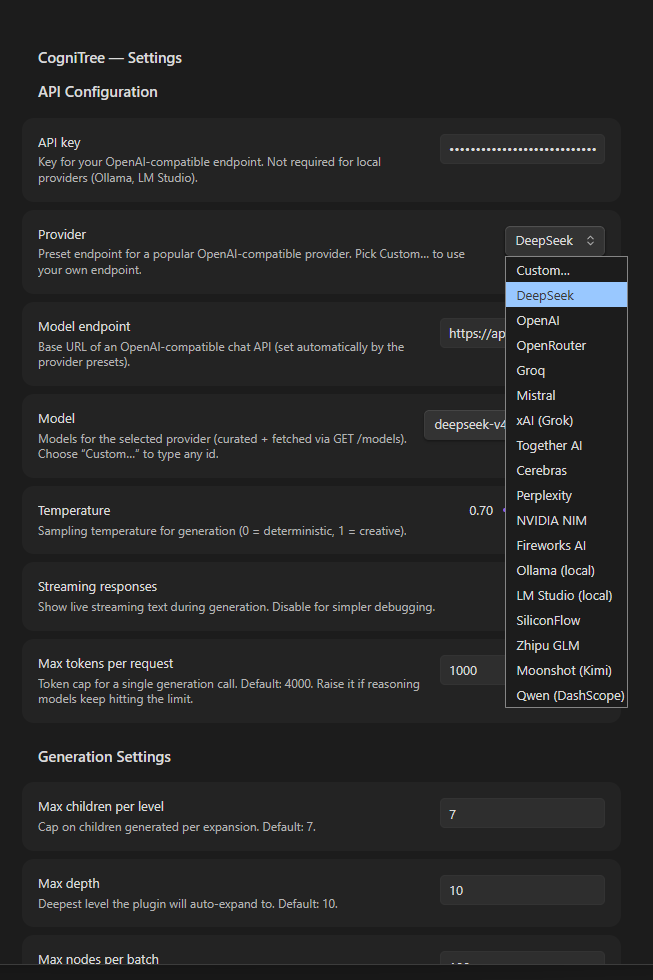
deepseek-v4-flash). To use another provider, pick it from the Provider dropdown — the endpoint and model list switch automatically (Ollama / LM Studio need no key). - Generate a tree — type
democracyin the input and press Generate. The Discovery prompt creates the root + domain children as notes underCogniTree/Democracy/. - Explore — click a row to select (or use ↑ / ↓ to navigate with the keyboard and a live preview tooltip); use Expand (Expansion prompt), 💬 (Ask about this concept), 🔗 (Find connections), 💡 (write/refresh the note's deep dive), Batch expand (subtree to a depth), hover for the description preview, right-click for the context menu (ask, deep dive, review cards, copy, export, stats, duplicates, safe delete), double-click to open the note, and ⛶ Expand all / ⛁ Collapse / ♺ Index / 🧠 Review from the toolbar.
- Fill the notes in and remember them — 💡 Deep dive or Deep dive subtree… writes real substance into each note; 🧠 Review (or right-click → Create review cards) turns them into spaced-repetition cards.
- Or start from what you already have — run Grow a tree from existing vault notes and pick the note you're reading or one of your tags: CogniTree arranges those notes into a tree and links them (🔗) instead of copying them.
Example flow: democracy → Discovery → Political Science / Direct Democracy / Referendums → click Referendums → Expansion → Mandatory / Optional / Popular Initiative → 🔗 Find connections → link to Elections, Switzerland, Popular Sovereignty.
Settings
Mirrors the spec's PluginSettings:
| Setting | Default | Purpose |
|---|---|---|
apiKey |
— | Key for the OpenAI-compatible endpoint (not needed for local providers) |
| Provider | — | Preset picker: DeepSeek, OpenAI, OpenRouter, Groq, Mistral, xAI, Together, Cerebras, Perplexity, NVIDIA NIM, Fireworks, SiliconFlow, Zhipu GLM, Moonshot, Qwen (DashScope), Ollama, LM Studio, or Custom… |
modelEndpoint |
https://api.deepseek.com |
Base URL (/chat/completions is appended if missing) |
model |
deepseek-v4-flash |
Model id — dropdown lists the provider's curated models + anything fetched via GET /models; Custom… accepts any id |
temperature |
0.7 |
Sampling temperature |
streaming |
true |
Request SSE streaming (Obsidian buffers the body, so text is revealed when the request completes) |
maxTokensPerRequest |
4000 |
Token cap per call (reasoning models auto-retry with a larger budget if they run out mid-reasoning) |
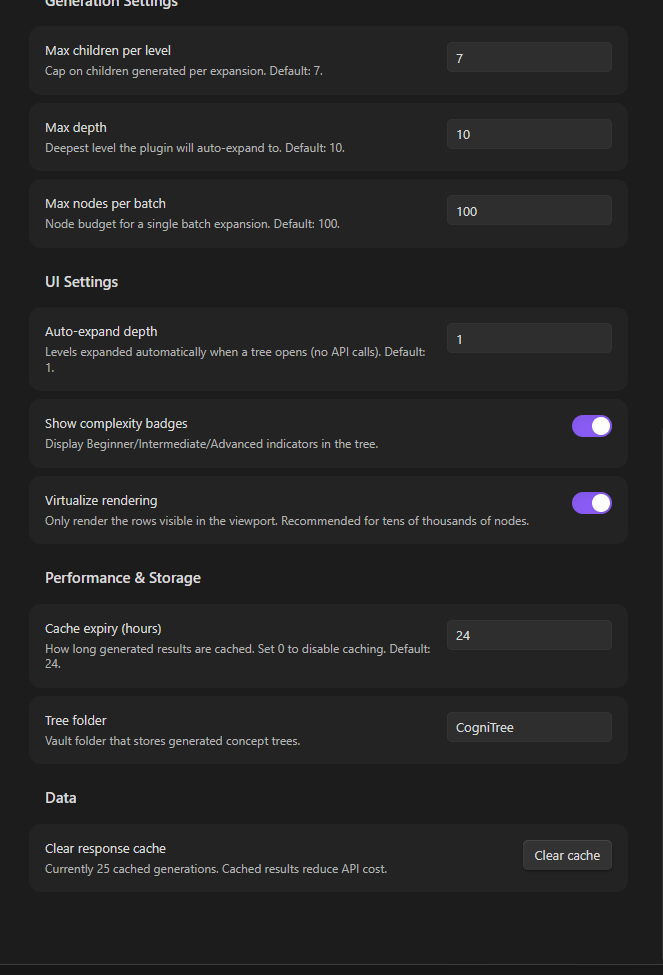
maxChildrenPerLevel |
7 |
Children cap per expansion |
maxDepth |
10 |
Deepest auto/batch expansion level |
maxNodesPerBatch |
100 |
Node budget for batch expansion |
autoExpandDepth |
1 |
Levels auto-expanded on open (no API calls) |
showComplexity |
true |
Beginner/Intermediate/Advanced badges |
virtualizeRendering |
true |
Windowed rendering (recommended for large trees) |
cacheExpiryHours |
24 |
Cache TTL; 0 disables caching |
treeFolder |
CogniTree |
Vault folder holding generated trees |
askContextMaxNodes |
60 |
Nodes included in the grounding context of an Ask question |
askContextMaxChars |
10000 |
Character budget for that grounding context (protects small-context models) |
askUseSemantic |
true |
Add semantically related vault notes to the Ask grounding context |
embeddingModel |
— | Model id for /embeddings; empty disables semantic matching (matching stays lexical: names + tags) |
embeddingMaxNotes |
300 |
Vault notes embedded per index run; re-run to continue |
reviewCardsPerNode |
3 |
Flashcards generated per concept |
vaultTreeMaxNotes |
60 |
Notes offered to the model when growing a tree from your vault |
Also: Clear cache (N cached generations), Build / Clear semantic index, and tree folder relocation.
The prompt system
The prompts from the spec are implemented verbatim in src/prompts.ts — plus follow-up, deep-dive, review-card and cartography prompts:
- Discovery Prompt — "You are a polymathic taxonomist and knowledge graph engineer…" — 3–7 domains, 3–5 children each, complexity ratings, connection hints,
suggested_starting_branch. Strict JSON schema. - Expansion Prompt — "You are a knowledge graph engineer specializing in deep taxonomic expansion…" — 5–10 granular children, sibling de-duplication context,
can_expand+estimated_depthdepth indicators. - Connection Discovery Prompt — "You are a knowledge graph analyst…" — ranked candidate vault notes,
relationship_type(parent-of / related-to / contrast-with…), High/Medium/Low priority, suggestions for concepts to create. - Batch Generation Prompt — "You are a batch knowledge expansion specialist…" — complete subtree to a depth within a node budget (
path-based hierarchical output). Builder only: no UI action sends it today — ⚡ Batch generates the subtree with repeated Expansion prompts, one branch at a time (ConceptGenerator.batch), which is what keeps the node budget and progress bar honest. - Follow-up (Ask) Prompt — "You are CogniTree Ask…" — a grounded tutor over the focused node's branch digest. Answers stay anchored in the digest (plus linked vault notes), keep Markdown short, and — when the answer proposes new sub-concepts — end with a
### Suggested childrenbullet list that the chat can adopt into the tree. - Deep Dive Prompt — "You are CogniTree Deep Dive…" — plain Markdown, not JSON: mechanism, examples, precise contrasts, open questions and next concepts for one node, written into the note's
## Deep diveregion. - Review Cards Prompt — "You are CogniTree Review…" — 1–N flashcards per node (recall / cloze / application) with one fact per card and answers that stand alone.
- Vault Cartography Prompt — "You are CogniTree Cartographer…" — arranges existing vault notes into domains and children, marking each slot that maps to a real note via
source(validated before it becomes a link).
Responses are parsed tolerantly (markdown-fence stripping, trailing-comma repair, balanced-brace extraction) in src/parser.ts.
Scalability design (tens of thousands of nodes)
- Incremental growth — one branch per API call; the tree only exists where you've explored it.
- Lazy loading — tree models are rebuilt from
metadataCachefrontmatter (no full-file reads); a raw YAML parse is the fallback for notes Obsidian hasn't indexed yet. - Virtualized rendering — fixed 34px rows, windowed DOM (
src/treeView.ts), ~50 rows in the DOM regardless of tree size. - Prompt caching — keyed
kind|model|prompt, LRU-capped, persisted in the plugin data file. - Background indexing —
VaultIndexersubscribes tometadataCachechanged/deleted/resolved(debounced) and ranks candidate note names by token overlap. - Semantic index (optional) —
SemanticIndexembeds note titles, tags and the head of each body via/embeddings, keeps vectors in<plugin>/embeddings.json, skips notes whosemtimeis unchanged, and caps memory at 20 000 vectors. Runs are budgeted (embeddingMaxNotes) and resumable. - Bounded batch concurrency — 3 parallel expansion requests per level, node budget enforced, progress
done/totalreported to the UI.
Note format
Every concept is one Markdown note, e.g. CogniTree/Democracy/Direct Democracy.md:
---
concept: "Direct Democracy"
tree: "Democracy"
parent: "Democracy"
domain: "Political Science"
description: "Citizens vote directly on laws and policies rather than through representatives."
complexity: "Beginner"
can_expand: true
estimated_depth: 4
connections: ["Athenian Democracy", "Referendums", "Citizen Assemblies"]
children: ["Referendums", "Citizen Assemblies"]
path: "/democracy/political_science/direct_democracy"
deepened: "2025-01-02T09:15:00.000Z"
source: "Notes/Greek Democracy.md"
created: "2025-01-01T00:00:00.000Z"
---

# Direct Democracy

> Source note: [[Notes/Greek Democracy]]

Citizens vote directly on laws and policies rather than through representatives.

## Deep dive
<!-- cognitree:deep-dive -->
### How it works
…

## Connections
- [[Athenian Democracy]]
- [[Referendums]]
This stays fully Obsidian-native: the graph view, backlinks, and search all work on generated trees. Three optional extras:
deepened— set when a## Deep diveregion exists, so the tree view can badge notes (💡) and skip them in a batch without reading any file.source+ the> Source note:line — a reference node created by Grow a tree from your vault: it points at a note you already own (🔗 badge, Open source note). Deleting the node deletes only the pointer, never your note..cognitree-review.json— hidden per-tree store holding review cards and their SM-2-lite schedule. It lives inside the tree folder, travels with the tree, and is invisible to Obsidian's search and file explorer.
The deep-dive region is delimited by the <!-- cognitree:deep-dive --> marker and ends at the next ## heading: the plugin rewrites the rest of the note body freely, but everything inside those markers — including your own edits — is carried over on every write.
Development
npm install          # dev deps (esbuild, typescript, obsidian types)
npm run dev          # watch mode → main.js
npm run build        # typecheck + production bundle
npm test             # pure-logic suite + store/generator suite (in-memory vault stub)
tests/smoke.ts covers the obsidian-free helpers (parser, note regions, providers, branch digest, semantic math, SRS scheduling, vault graph). tests/store.test.ts runs the real ConceptStore / ConceptGenerator against tests/stub-obsidian.ts — an in-memory vault, metadataCache and fileManager — so note writing, deep-dive preservation, subtree deletes/undo, merges, review stores and reference-node trees are testable without an Obsidian install.
Keyboard shortcuts
| Key | Action |
|---|---|
| ↑ / ↓ | Move the selection (description preview follows) |
| → | Expand the selected node |
| ← | Collapse the selected node |
| Enter | Toggle expand / collapse |
| Tab | Focus the tree list (then use the arrows above) |
In a review session: Space reveals the answer, 1 / 2 / 3 / 4 grade it again / hard / good / easy, Esc ends the session (grades are saved as you go).
Click any node once to grab keyboard focus for the list. The toolbar actions (⚡ Batch, ♺ Index, 🧠 Review) act on the currently selected node.
Commands
- Open panel
- Create concept tree from selection — uses the current editor selection as the root concept
- Refresh from vault — reload trees if you edited notes by hand
- Reindex vault notes — rebuild the lexical connection index on demand
- Build semantic index (embeddings) — embed new/changed vault notes for semantic matching
- Ask about selected concept — grounded Q&A chat on the selected node (or the tree root)
- Review due cards — study the cards that are due in the open tree
- Grow a tree from existing vault notes — arrange notes you already have into a new tree (linked, not copied)
Screenshots
License
MIT © 2026 Kerekes Stefan