
README file from
GithubCodex Share
Codex Share copies selected Obsidian notes and attachments into a separate workspace for an AI agent or another external tool.
It is an allowlist, not a sandbox. Only notes you switch on are copied, but your AI tool must still be launched with the destination as its workspace.
Codex Share is an independent project and is not affiliated with or endorsed by OpenAI, Docker or Obsidian.
How it works
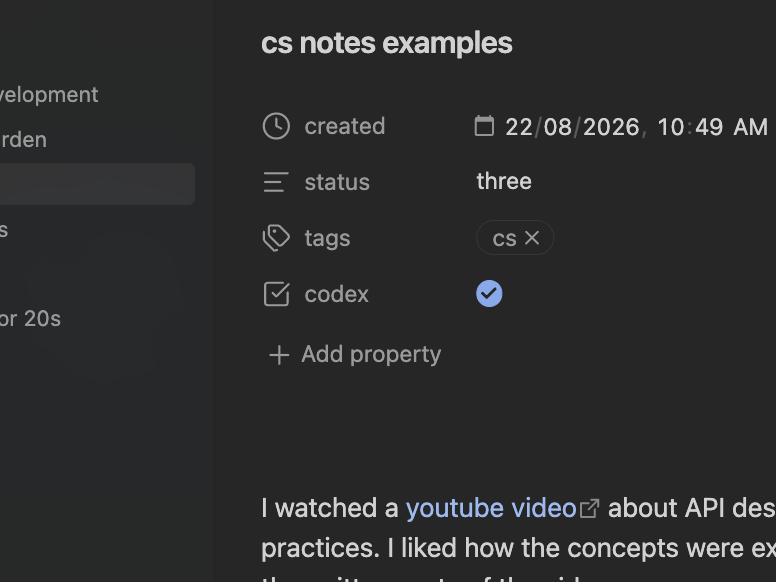
Add a Boolean property to a note and switch it on:
---
codex: true
---
The property defaults to codex and can be renamed in settings. Codex Share then:
- Copies the complete Markdown note and its directly embedded non-Markdown attachments.
- Preserves every vault-relative file path.
- Updates shared copies when notes or known attachments change.
- Moves a managed Markdown copy to the operating system Trash when sharing is switched off or the source is removed.
Ordinary links and embedded Markdown notes are not followed recursively. Link text and other content inside a shared note remain visible in its copy. Attachments are retained when a note is unshared because another shared note may use them.
Setup
- Open Settings → Community plugins → Codex Share.
- Select Choose folder and choose an external destination folder outside your private Obsidian vault.
- Optionally rename the Sharing property.
- Choose Use folder and sync or Use folder only.
- Enable the sharing property on a note.
There is no default destination. Changing it does not move or delete files in the previous destination.
For the complete Obsidian, Docker Sandbox and Terminal workflow, see Full setup.
Actions
- Toggle sharing for current note
- Sync all now
- Reconcile all sharing toggles
- Initialise simple sharing toggles
- Open quick guide
Initialise simple sharing toggles marks notes with an existing destination copy as shared and all other notes as private. It also removes metadata created by older Codex Share versions without deleting destination files.
Safety and privacy
Codex Share is desktop-only. It reads selected notes and resolved embeds from the current vault and writes them to the external destination folder you configure. It makes no network requests, requires no account and includes no telemetry.
The plugin rejects overlapping source and destination folders, source files that resolve outside the vault, and destination paths that traverse symbolic links. It records managed copies in .codex-share/manifest.json so unrelated destination files are not automatically removed.
Review a note, its frontmatter and its embeds before sharing it. The plugin does not control what an AI provider receives after another tool accesses the destination.
Docker Sandbox
From the separate workspace:
cd /path/to/your/ai-vault
pwd
sbx run codex
Confirm that pwd and the WORKSPACE shown by sbx ls both point to the separate workspace, never the private vault. The agent can modify anything mounted into its sandbox.
Development
Requires Node.js 18 or newer.
npm test
License
Codex Share is available under the MIT License.