
README file from
GithubCodecks Bridge
Browse your Codecks cards inside Obsidian and pull the ones you care about into Project Manager with Time Tracking as real projects and tasks — so they land in the kanban, the dashboard and the time tracking without being retyped.
Read-only towards Codecks. Nothing is created, changed or deleted over there.
What it does
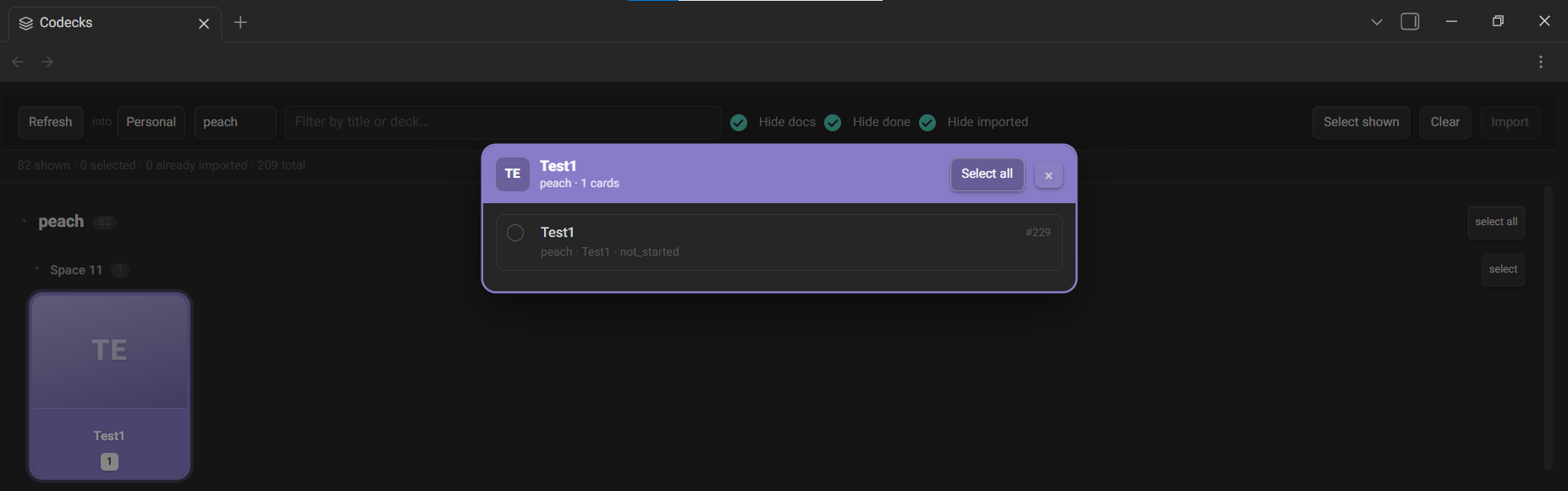
Decks are drawn as a grid of tiles the way Codecks draws them — each with its own colour, its name on a band, and counts along the bottom for picked, total and already-imported. Clicking a tile opens that deck's cards over the grid.
Cards can be filtered by project, by text, and by whether they are documents, finished, or already imported. Pick any number and import them in one go: each card becomes a task under a project named after its deck, stamped with its Codecks id so importing the same card twice is a no-op rather than a duplicate.
Setup
- Install Project Manager with Time Tracking — this plugin imports through its API and will say so if it is missing.
- Create a Codecks observer user and use that account's token. See below.
- In settings, enter your Codecks subdomain — the part before
.codecks.io— and paste the token. - Open Codecks from the ribbon or the command palette, choose which workspace to import into, and hit Refresh.
About the token
Codecks has no scoped read-only API tokens. The token is a session token: whoever holds it can act as you, across every organisation you belong to, with permission to change and delete.
So use an observer account's token instead. Observers are read-only, the Codecks manual recommends exactly this for API use, and this plugin only ever reads — nothing is lost. A leaked observer token means somebody can look at your board, not take it over.
Where the token is kept:
- In its own file inside the plugin folder, not in
data.json, which in many vaults is committed to git. - The settings field never shows it again. Saving replaces it; there is a Clear button.
- It is never logged and never included in an error message.
Two things worth being straight about. The file is plaintext at rest — on mobile a plugin has no OS keychain to reach for, so there is nowhere better to put it, and encrypting it with a key sitting next to it would be theatre rather than security. And if you sync .obsidian/ by any means other than git, add that file to your sync tool's ignore list too.
Add this to your vault's .gitignore:
.obsidian/plugins/*/secret.json
What the Codecks API does and does not give you
Discovered against a live account rather than assumed, and worth knowing if you extend this:
- Responses are normalised: a relation returns only an id, and the entity sits under its own type key.
- A card is keyed by
cardId, while decks, projects and users useid. - Ask for
projectIdon a deck andproject_idcomes back. - Deletion and archiving live in
visibility—default,archivedordeleted. There is nodeletedAtorisArchived; asking for either returns a 500. $limitis rejected in every form. Filters and$orderwork.assigneeIdis not a field;assigneeworks as a nested relation.- Decks carry a numeric
spaceId, but no route to a space entity works, so a space has no name to show. You can name them yourself in this plugin. - No field on a card yields a shareable URL, so cards show their number instead of a link.
There is a Test connection button in settings that runs read-only queries and writes what came back to a note, which is how all of the above was established.
Support
This project is offered for free so everyone can use it without restrictions. If you found this tool useful, you can support its continuous development and improvement through donations.
Licence
MIT — see LICENSE.