
README file from
GithubClaude Tutor for Obsidian
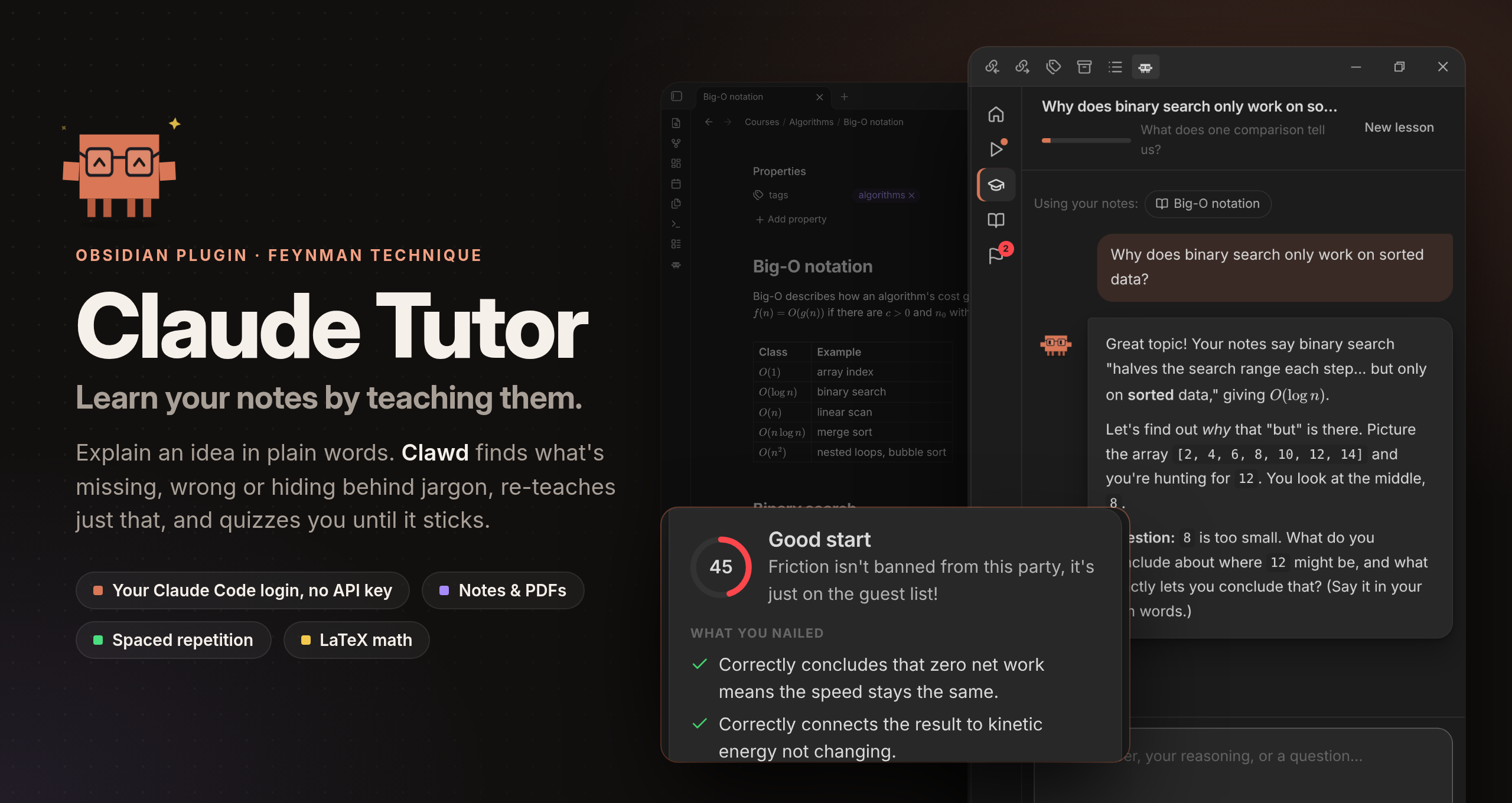
Learn the notes and PDFs in your vault with the Feynman technique. Your tutor is Clawd, a pixel tutor in glasses. You explain an idea in plain words; Clawd finds what's missing, wrong or hidden behind jargon, re-teaches just that, and quizzes you until it sticks. Claude runs through your Claude Code login, so your Pro/Max subscription works and you don't need an API key. You can use OpenAI's models through the Codex CLI instead.
What it does:
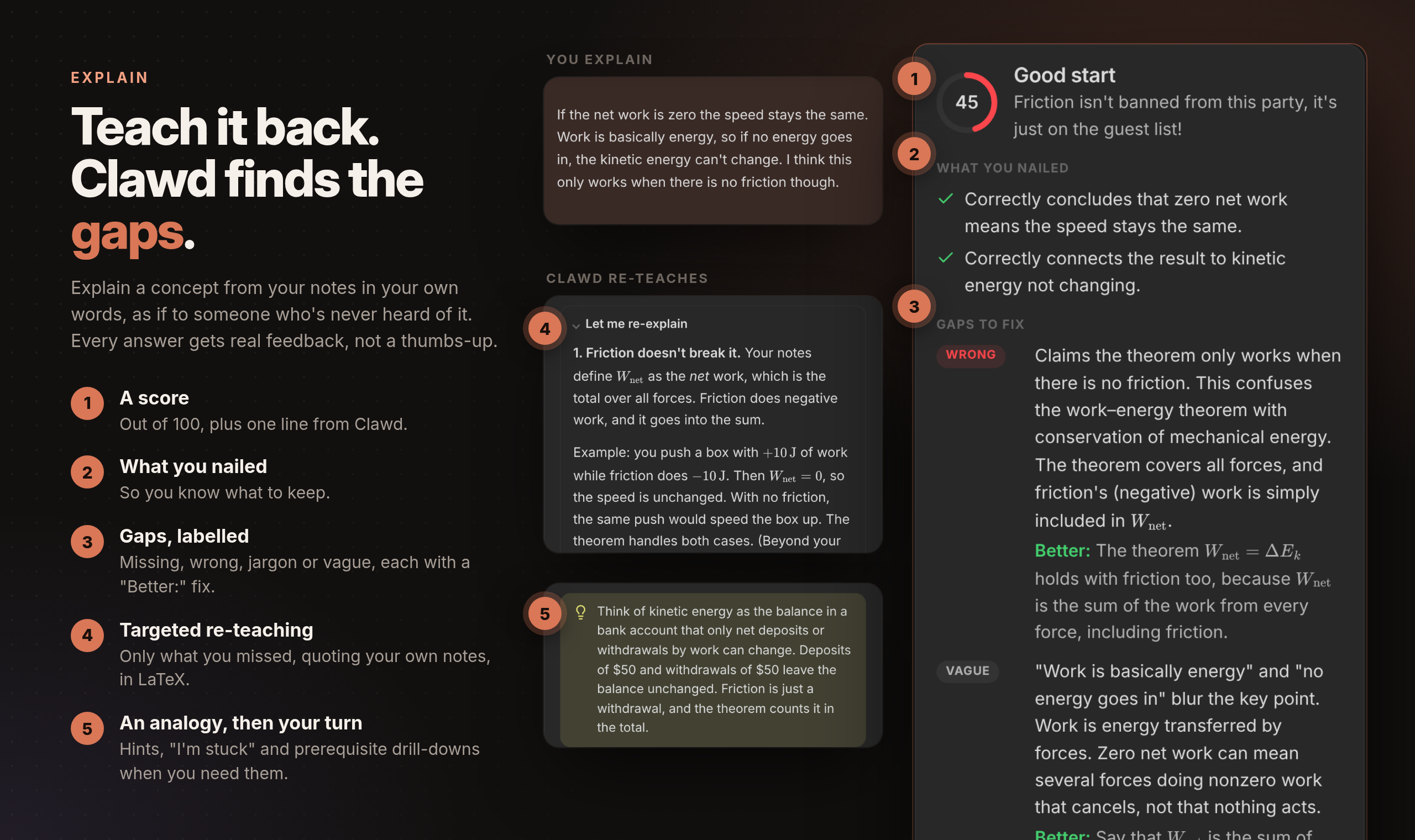
- Explain: Feynman loop with a score, what you nailed, gaps (missing / wrong / jargon / vague), targeted re-teaching, an analogy, prerequisite drill-down, hints and "I'm stuck".
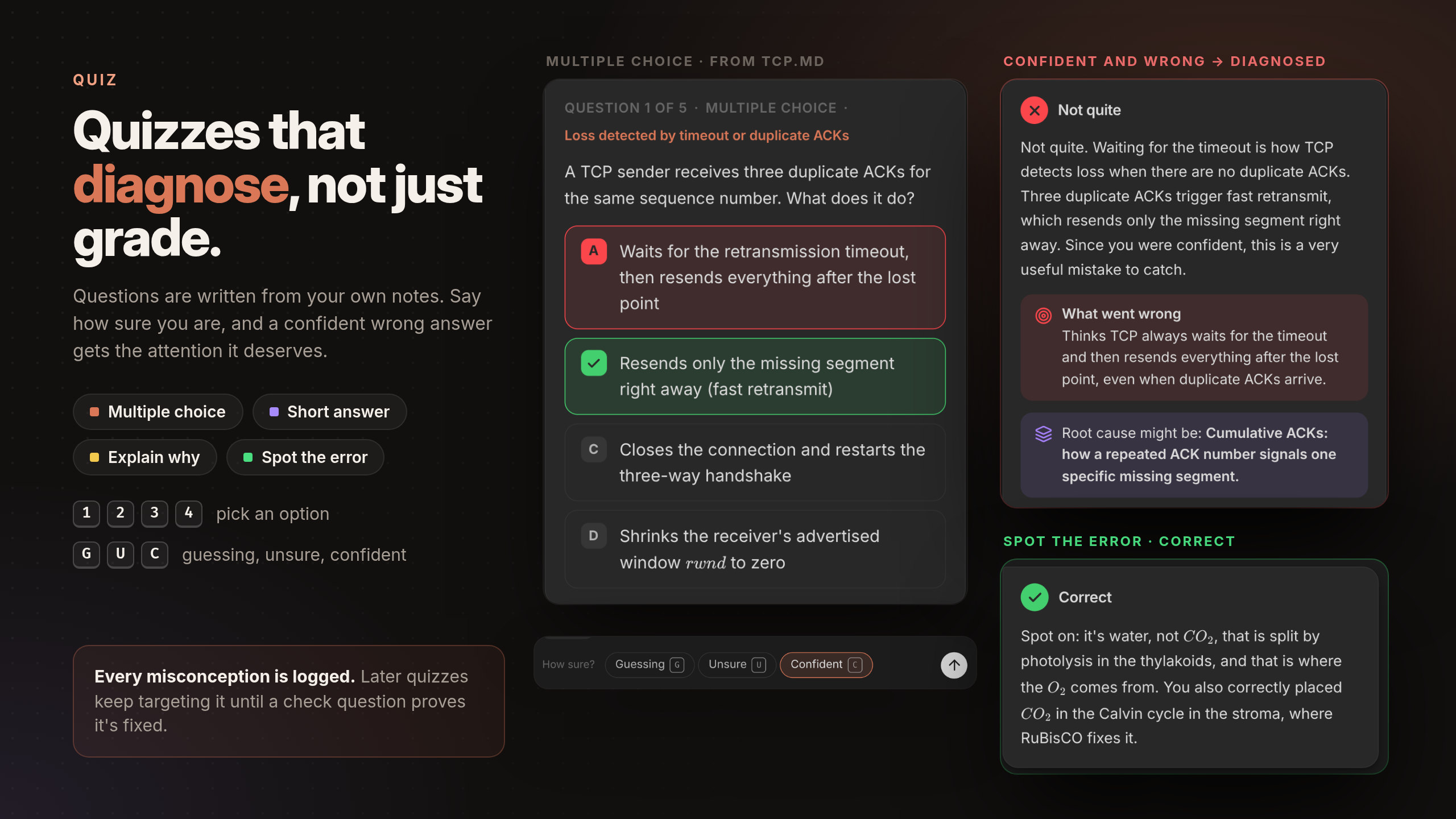
- Quiz: multiple choice (keys 1–4), short answer, explain-why and spot-the-error questions, with a confidence rating (keys G / U / C). Wrong answers get a diagnosed misconception, a mini-lesson and a new check question.
- Composers: Enter sends, Shift+Enter adds a line, Esc cancels a reply that's taking too long. Unsent explanations survive closing the view.
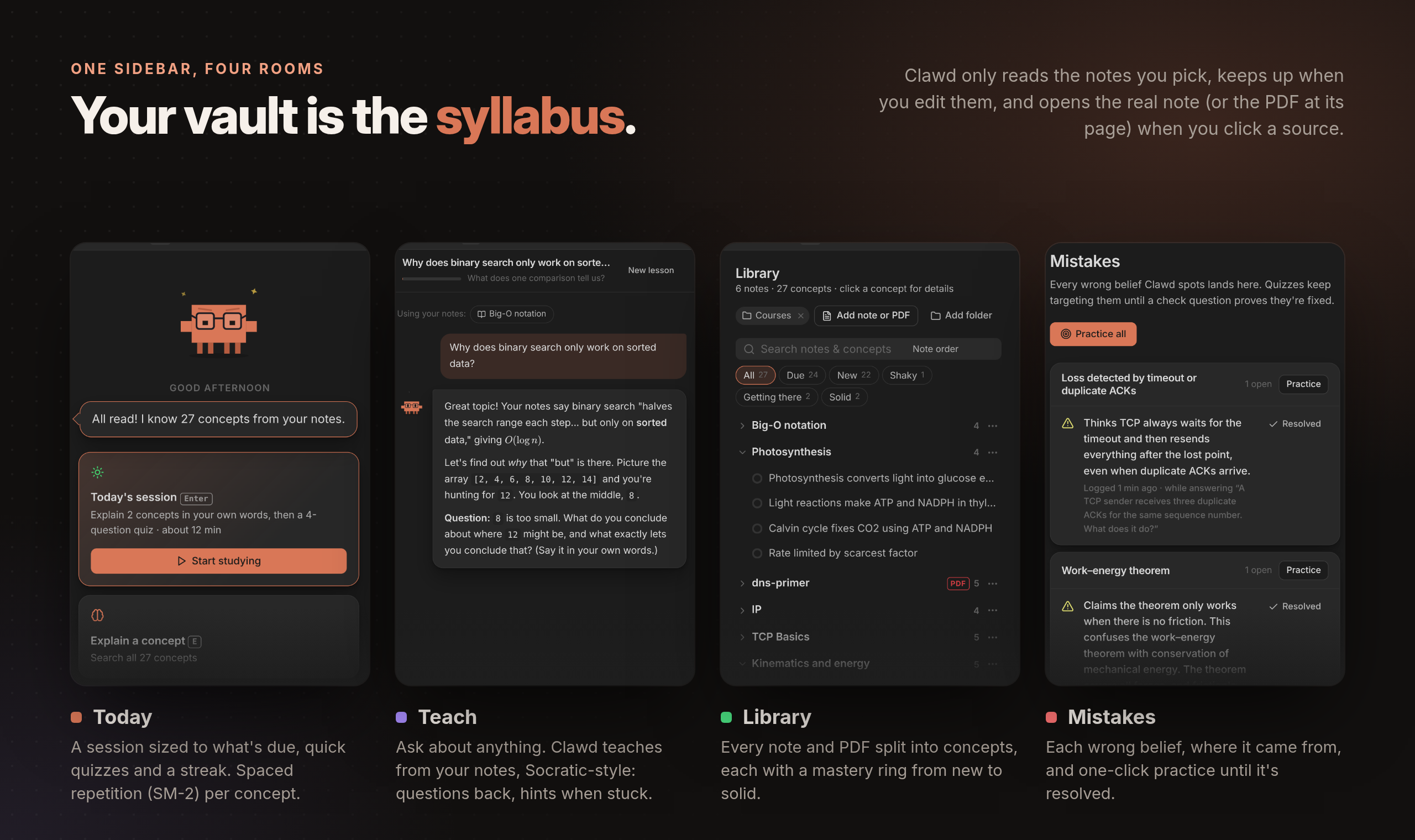
- Ask Clawd at any point, spaced repetition (SM-2) per concept, and a Mistakes log that quizzes keep targeting.
- PDFs: text extraction (poppler
pdftotext, falling back to Obsidian's built-in pdf.js), long PDFs split into page ranges, and page citations. Scanned PDFs are listed as unreadable. - Math: Claude writes all formulae as LaTeX (
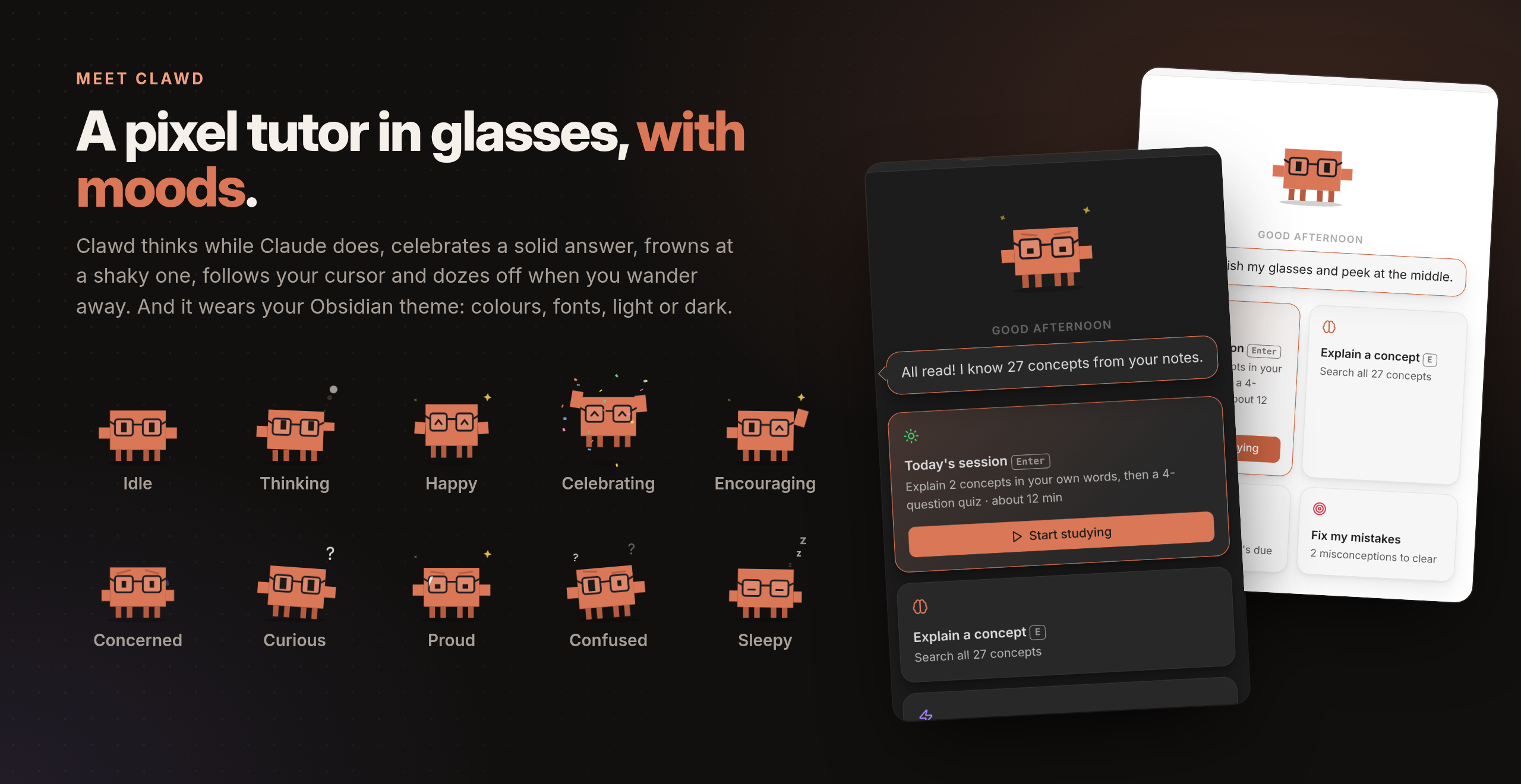
$…$,$$…$$), and everything is rendered with Obsidian's own Markdown renderer and MathJax, including quiz options, gaps and fixes. Formulas garbled by PDF extraction are written back as LaTeX. - Clawd has 10 moods, follows your cursor, and falls asleep when you leave.
What's different in Obsidian
- The library is your vault. On first run you pick study folders, and you can change them in settings. Right-click any note → Quiz me on this / Explain it to Clawd to study a single note.
- Notes stay in sync. Clawd never reads a note you haven't picked: after adding a folder, you tick the notes you want read on the Today tab. Notes it has already read are re-read in the background after you edit them (can be turned off), and renames keep your progress, as does a long PDF whose page ranges shift (a new range stays picked only if you'd picked all its pages). Before re-reading many notes at once (25 by default), Clawd asks first, since each one is a Claude request.
- Notes open in Obsidian. Clicking a source opens the real note, or the PDF at its page, in a new tab.
- It looks like your theme. Colours, fonts and light/dark mode follow Obsidian.
- Shortcuts stay in the tutor tab. They only work while it's focused, so they don't clash with your hotkeys.
See it in action
Every screenshot below is the real plugin running in Obsidian, graded live by Claude.
Requirements
- Obsidian desktop 1.13+ (the plugin is desktop-only, because it runs the
claudeorcodexCLI). On Obsidian 1.8.7–1.12, Obsidian installs version 0.1.3 automatically. - Claude Code installed and logged in. Run
claudeonce in a terminal to sign in. The plugin finds it in the usual places (~/.local/bin, Homebrew,/usr/local/bin); if it doesn't, set the path in settings. - Or, for OpenAI's models, the Codex CLI installed and logged in (
codex login). Pick it under Settings → Claude Tutor. - Optional:
poppler(pdftotext) for the best PDF text.
Install
Claude Tutor is in Obsidian's community plugins: open Settings → Community plugins → Browse, search for Claude Tutor, then install and enable it. Obsidian keeps it up to date.
Then click the Clawd icon in the ribbon (or run the Claude Tutor: Open command) and pick your study folders.
Manually
Download main.js, manifest.json and styles.css from the latest release into <vault>/.obsidian/plugins/claude-tutor/, then enable it under Settings → Community plugins.
From source
npm install
npm run build                     # type-checks, then writes main.js
VAULT="/path/to/your/vault"
mkdir -p "$VAULT/.obsidian/plugins/claude-tutor"
cp main.js manifest.json styles.css "$VAULT/.obsidian/plugins/claude-tutor/"
Then enable it under Settings → Community plugins.
For development, symlink the folder instead and run npm run dev to rebuild on save.
Commands
| Command | |
|---|---|
| Open | Opens the tutor (in the right sidebar, where it resizes with the sidebar; or in a tab if you turn that off in settings) |
| Start study session | Explain due concepts, then a short quiz |
| Quiz me on the current note | Reads the note if needed, then quizzes you on it |
| Explain a concept from the current note | Starts the Feynman loop on its most due concept |
| Re-scan study folders | Reloads the library |
Data
All data stays in the plugin folder (.obsidian/plugins/claude-tutor/):
data.json: settings.progress.json: concepts, scheduling, attempts and misconceptions. It's written atomically, and a backup is kept if the file can't be read.pdf-cache/: extracted PDF text.
In your vault, the plugin only writes notes you ask for: Teach → Save as note creates a note in Claude Tutor/Lessons/ (configurable).
Nothing is sent anywhere except to the model you chose, through your own claude or codex CLI: one request per note read, and one per answer graded.
Disclosures
- Requires an Anthropic or OpenAI account. Claude Tutor talks to Claude through Claude Code, which needs a Claude subscription (Pro/Max) or API billing; or to OpenAI's models through the Codex CLI, which needs a ChatGPT plan or an OpenAI API key. Requests count against your plan's usage.
- Runs an external program. The plugin starts your locally installed
claudeorcodexCLI (andpdftotext, if installed) as child processes, passing them your environment with common install folders added toPATHso they can be found when Obsidian is launched from the dock. That's why it's desktop-only. - Filesystem access outside the vault API. It checks the usual install locations for the
claudeandcodexbinaries, and replacesprogress.jsonwith an atomic rename so a crash can't leave it half-written. With Codex, each request runs in a temporary folder (holding its instructions and any attached images) next to a temporary Codex home that links to your Codex login (~/.codex/auth.json), so your global Codex instructions and skills aren't sent with your notes; both are deleted when the request ends. It doesn't read or write anything else outside your vault. - Network use. Note text, your answers and any images you attach are sent to Anthropic by the
claudeCLI, or to OpenAI by thecodexCLI, to evaluate explanations, write quizzes and reply. Replies, and lessons you save as notes, can't load anything from the web: remote images in them become links. The plugin itself makes no other network requests and has no telemetry. - Lists your vault's files. The plugin lists the file and folder paths in your vault (
vault.getFiles(),getAllLoadedFiles()) to find the notes in your study folders, to count notes per folder on the first-run screen, to offer notes, folders and images in the Add note or PDF, Add folder and Image from vault pickers, and to follow notes when a folder is renamed. Listing reads no content: it only reads notes in your study folders (or ones you add one by one) and images you attach, and only sends a note to the model once you've picked it for Clawd to read. - Verifiable releases. Release files are built by GitHub Actions from this repository and carry build provenance attestations; check one with
gh attestation verify main.js -R wanikhawar/claude-tutor. - Not affiliated with Anthropic. This is an independent, community plugin.
Development
See CONTRIBUTING.md for how to set up, test and send changes.
npm install
npm run build                                   # type-checks, then writes main.js
npm test                                        # core unit tests (notes, PDF reflow/split, SRS, progress)
npm run lint                                    # Obsidian's review rules and the vault-listing check
npm run format                                  # format with Prettier
CLAUDE_LIVE=1 npx vitest run tests/live.test.ts # live test against Claude (Haiku): checks LaTeX output
npm run dev                                     # rebuild main.js on change
| Path | Purpose |
|---|---|
src/main.ts |
Plugin: view, ribbon, commands, file menu, vault sync, progress file |
src/backend.ts |
What the UI calls: indexing, explain/quiz/grade/check, Ask Clawd |
src/library.ts |
Study scope, Markdown/PDF loading, PDF cache |
src/core/ |
Pure TypeScript: Claude Code and Codex bridges, prompts, SM-2, notes, PDF reflow/split, progress store |
src/ui/ |
Svelte 5 UI (Markdown and MathJax rendered by Obsidian) |