
README file from
GithubChess Tree





If you like this project, feel free to check out my page on
Likes, coins, and feedback are greatly appreciated.

Overview
Obsidian plugin for chess rendering and exploration inside notes. Supports PGN file viewing, two code block types (fen, tree), full chess rules via chess.js, interactive board via chessground, variation tree visualization, and built-in engine analysis powered by Stockfish 18 (WASM).
PGN File Support
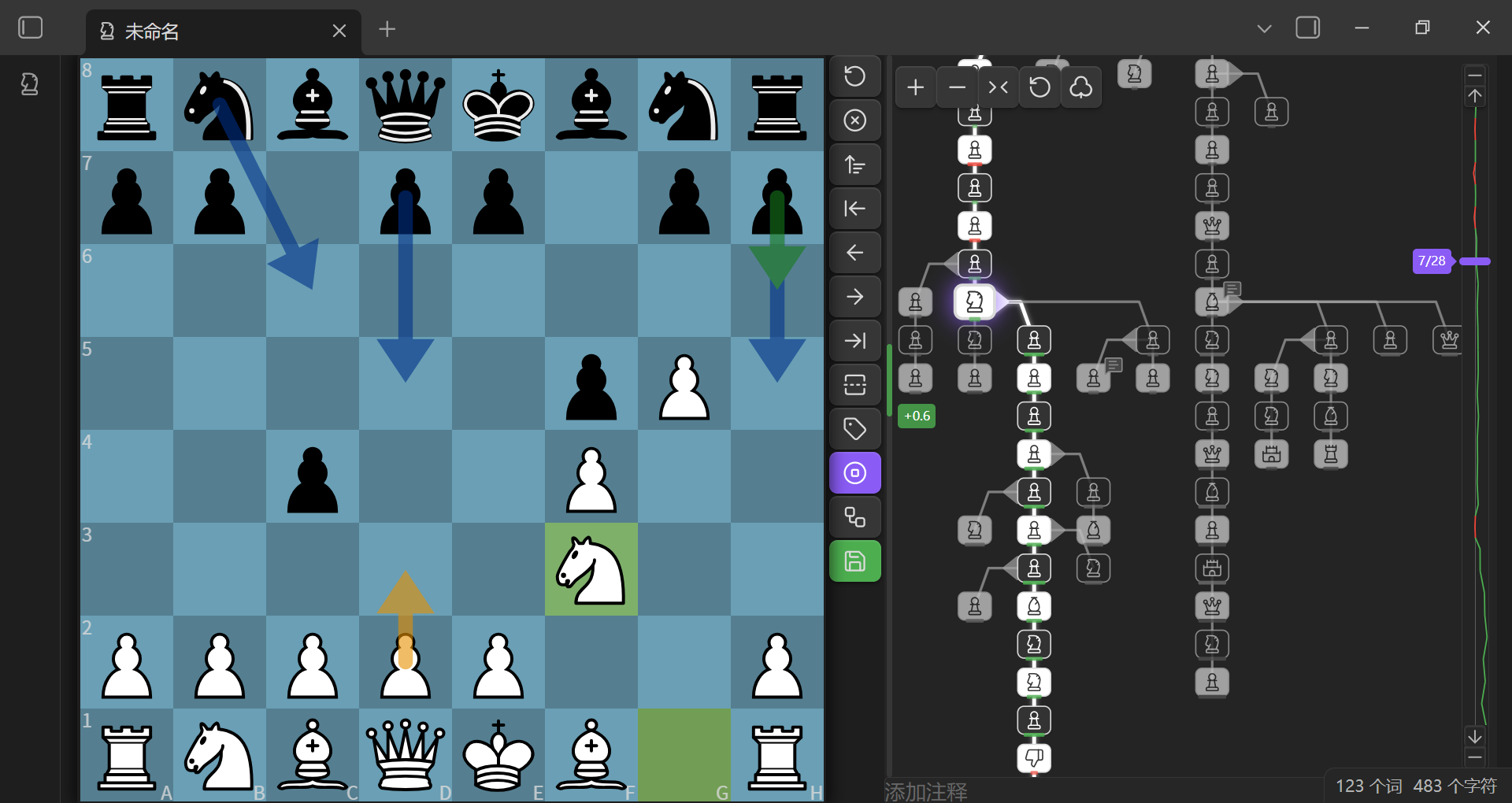
Open .pgn files directly in Obsidian — the plugin registers a dedicated .pgn file view with an interactive board interface.
-
Manual Save: Any changes (moves, variations, comments, annotations) are saved back to the file when clicking Save button
-
Variation Tree: Interactive tree graph showing all branches — click nodes to navigate
-
Comments & Annotations: Supports branch diagram and board annotation symbols, comments
-
Mode Toggle: Switch between icon mode and text mode in branch diagram
-
Quick Create: New PGN files from the ribbon button
-
Custom File Types: Set specific file types as PGN files
-
Context Menu: Right-click PGN files to switch between PGN view and Markdown view
-
Multi-Game Support: Navigate between multiple games within a single
.pgnfile using the game navigation bar; create, delete, and reorder games
Code Blocks
Two code block types — all code block names are customizable.
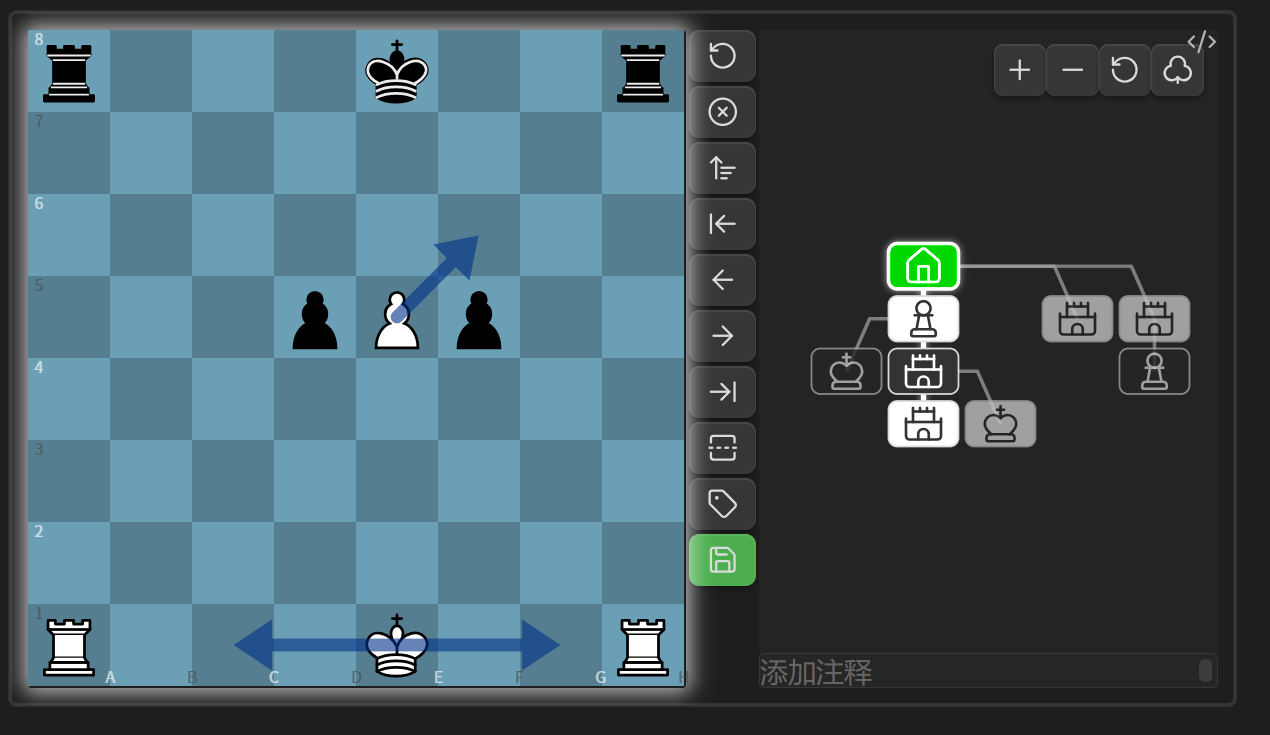
chess: Display and explore chess games with variation tree
```chess
1. e4 e5
2. Nf3 Nc6
3. Bb5 a6
```
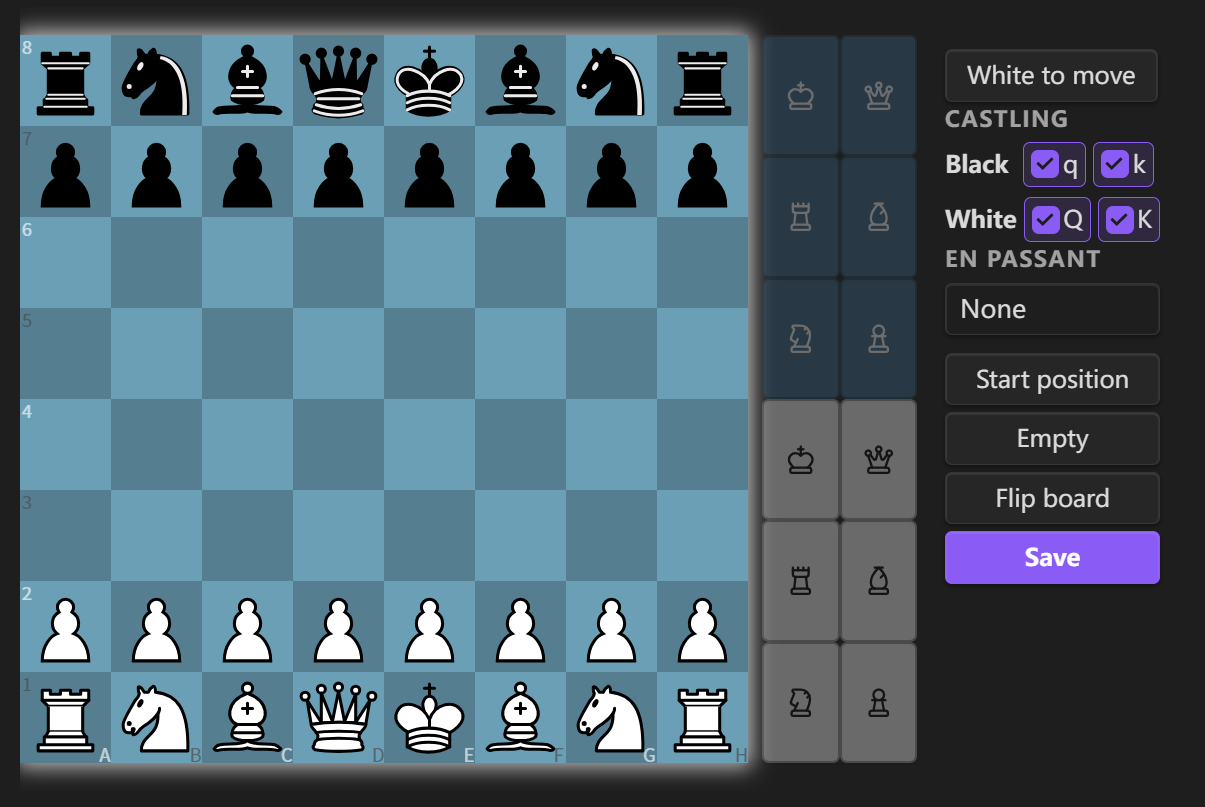
fen: Visual board editor — set up a position and save as a chess code block
```fen

```
Mobile Usage
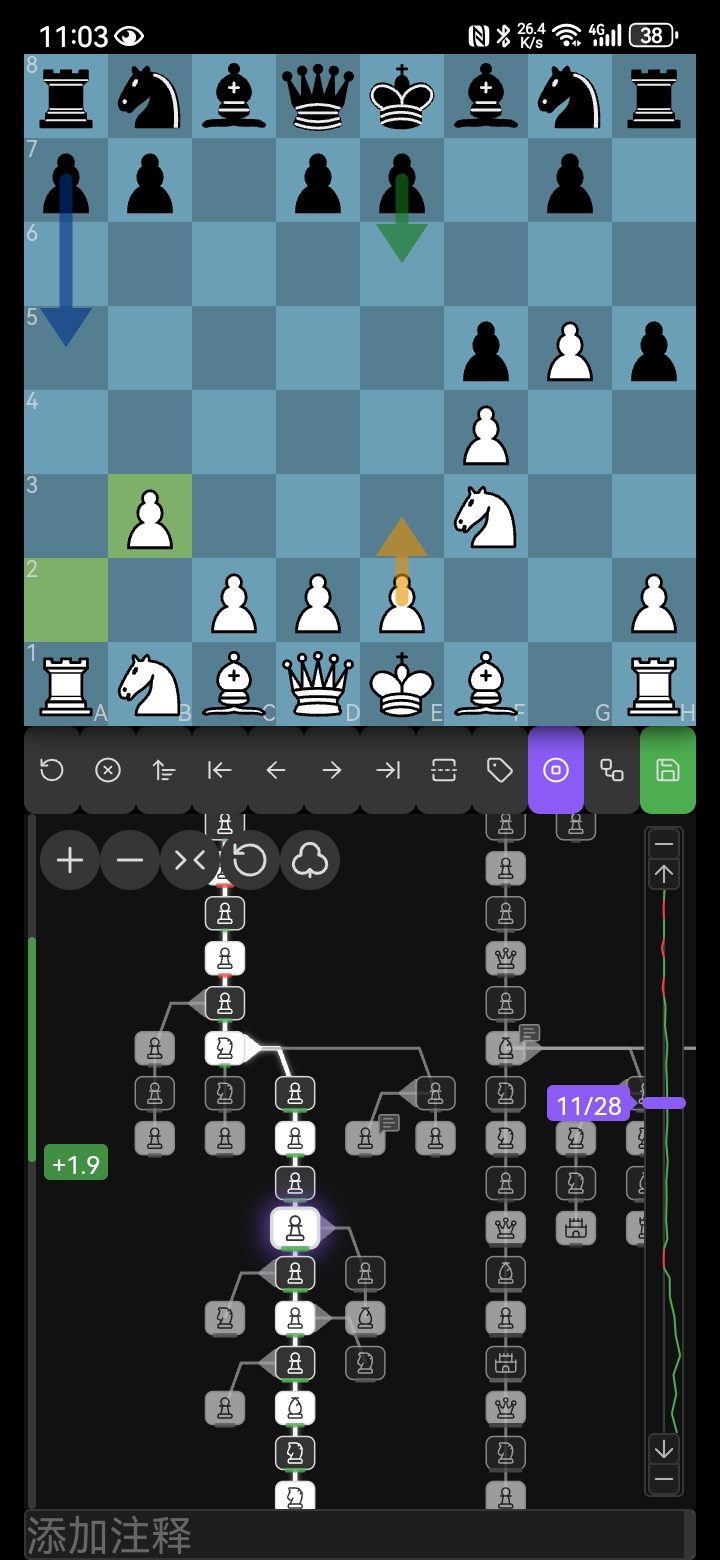
For the best experience on mobile devices, it's recommended to install the Full Screen Toggle plugin (donkeypacific/obsidian-full-screen-cross-platform-plugin) or similar fullscreen plugins and adjust the top/bottom margins in Settings > Chess > Board Margins to optimize the board display area.
Settings
Board Appearance
- Board Style: Wood, Wood Grain, Newspaper, Green, Blue, Grey, Dark, Light — switchable in settings or via the board menu's swatch picker
- Piece Set: 42 lichess piece sets (Cburnett, Merida, Alpha, …) — choose from the settings dropdown or the board menu's piece-set picker
- Board Zoom: Adjustable board scale
- Coordinate Labels: Show/hide board coordinates
Game Hints
- Last Move Highlight: Highlight the last move on the board
- Legal Moves: Show legal move destinations
- Other Variations: Highlight alternative variations on the board
- Turn Border: Highlight the current player's turn
- Move Sounds: Sound effects for moves, captures and checkmate, with adjustable volume
- Move Narration: Optional speech synthesis for moves (desktop only)
- Auto Jump: Jump to latest position — never / always / auto
Move List
- Show Move List: Toggle move list visibility
- Font Size: Adjustable move text size (10–25 px)
- Notation: Figurine (♔♕♖♗♘) or letter (SAN) move notation
- Move Marks: Eval bar, annotation badge, glyph (!?/??…) and comment underline shown next to moves — each can be toggled independently
Board Margins
- Top Margin: Adjustable top margin (0–100 px)
- Bottom Margin: Adjustable bottom margin (0–100 px)
Code Block Names
Customize code block aliases in Settings > Chess > Code Block Names:
- Code block names: Default
chess, tree— both names render the tree view with variation tree and engine analysis. Add custom aliases separated by commas - FEN save as: Choose which code block name to use when saving from the FEN editor (default
tree)
Note: Changes require restarting the plugin or Obsidian to take effect.
Engine Analysis
- Engine Depth: Search depth for Stockfish analysis (1–30, default 18)
- Engine Skill Level: Skill level for engine play (0–20, default 20)
- Show Best Move: Show the engine's best-move arrow (default on)
- Show Ponder Move: Show the ponder-move arrow (default on)
- Show Engine Annotations: Show engine glyphs (!?/?/??…) on analyzed moves (default on)
- Show Board Annotations: Draw engine annotations on the board (default on)
Save
- Save Eval by Default: Whether to include eval annotations when saving PGN (default off)
- Save Eval Prompt: Whether to show a prompt about eval when saving (default on)
PGN File View
Enable/disable PGN file view and customize file extensions:
- Enable PGN file view: Toggle to register/unregister PGN view
- PGN file extensions: Default
pgn, add custom extensions separated by commas
Note: Changes require restarting the plugin or Obsidian to take effect.
Features
- Complete Rules Engine: Castling, en passant, promotion, check/checkmate detection, threefold repetition, 50-move rule — all via chess.js
- Board Rendering: High-quality chessboard via chessground with drag-and-drop moves
- Board Styles: 8 board styles including texture-baked Wood Grain and Newspaper, switchable from the board menu's swatch picker
- Piece Sets: 42 lichess piece sets with pickers in settings and the board menu
- Move List: Grid-aligned move columns with figurine/letter notation and per-move marks (eval, annotation, glyph, comment)
- Variation Tree: Tree graph with icon/SAN display modes for node labels
- Visual FEN Editor: Drag/click to place pieces, clear/fill board, toggle side to move, set castling and en passant
- PGN Saving:
- Button colors — gray (empty), green (saved), orange (modified)
- Confirmation dialog before saving
- i18n: Supports English and Chinese UI
- Board Markers: Draw arrows and highlights on the board
- Engine Analysis: Built-in Stockfish 18 WASM engine with single position analysis, batch analysis, and auto-analysis
- Best Move Arrow: Green arrow shows the engine's best move; yellow arrow shows the ponder move
- Eval Bar: Left sidebar bar showing evaluation (green = white advantage, red = black advantage)
- Eval Trend Chart: Vertical polyline in the slider background showing evaluation across moves
- Eval Color Bar: Color bar on tree nodes indicating evaluation (green = white advantage, red = black advantage, gray = equal)
- Eval Persistence: Engine evaluations saved as
%e:comments in PGN
- Mobile Friendly: Adjust board size for small screens
Usage
fen Code Block
- Add a
fencode block to start the editor - Drag pieces or click piece buttons to set up the position
- Set turn, castling rights, and en passant as needed
- Click Save — the
fencode block is replaced with achesscode block containing the FEN, ready for play
chess Code Block
- Write your game inside a
chesscode block (optionally with FEN and SAN moves) - FEN is optional — defaults to the standard starting position
- Controls:
- The variation tree displays all branches graphically
- Click any node to navigate to that position
- The board menu (board icon in the toolbar) flips the board and toggles highlights, coordinates, and annotations on the fly
- Switch board style and piece set instantly from the board menu's visual pickers
- Click Save to overwrite the original PGN
- Click Edit board in the Edit menu to switch to position editor mode
- Modify the position by dragging/clicking pieces
- Set turn, castling rights, and en passant
- Click Save to apply the new position (existing moves will be discarded)
- Click Cancel to return to tree view
- Use engine analysis:
- Click Analyze for single position analysis, Batch to analyze all nodes, or enable auto-analysis
- Green arrow = best move, yellow arrow = ponder move
- Eval bar on the left shows position evaluation
- Eval color bars on nodes and eval trend chart on the slider show evaluation across the game
Optional Parameters
| Name | Value | Description |
|---|---|---|
protected / p |
true / false | When true, Save button is disabled; default false |
rotated / r |
true / false | When true, board is flipped (Black on bottom) |
Example
```chess
r:true
p:true
[FEN "rnbqkbnr/pppppppp/8/8/4P3/8/PPPP1PPP/RNBQKBNR b KQkq - 0 1"]
1... e5 2. Nf3 Nc6
```
- Colons can be Chinese or English;
randpare case-insensitive - FEN value works with or without quotes
Installation
- Open Obsidian
- Go to Settings
- Click Community plugins
- Ensure Restricted mode is off
- Click Browse
- Search for "Chess"
- Find this plugin and click Install
- Click Enable
Build
git clone https://github.com/west-shell/obsidian-chess-tree.git
cd obsidian-chess-tree
npm install
npm run build        # Minified production build (for release)
npm run build:debug  # Unminified production build (with sourcemaps)
Donation
If you like this plugin, feel free to support me!

Piece Artwork
The bundled piece sets are from lichess-org/lila (public/piece/), used under their respective free licenses (GPL/CC). Regenerate the embedded CSS after changing assets/pieces/:
node scripts/gen-piece-css.mjs