
README file from
GithubCanvas Sync Bridge







Seamlessly sync Canvas LMS courses, modules, assignments, discussions, grades, files, and calendars directly into your Obsidian knowledge vault as clean, structured, and cross-linked Markdown notes.
✨ Key Features & Hybrid Ingestion
Canvas Sync provides two flexible sync workflows depending on your institutional setup:
1. 🎓 Direct Canvas REST API (Primary / Mobile Compatible)
- Direct connection from Obsidian using your Canvas API token.
- Interactive course selector modal with multi-course batch syncing and in-modal auto-sync interval selection.
- Scheduled Background Sync: Automatically resyncs active courses on a schedule (15m, 30m, 1h, 2h, 4h, 6h, 12h, 24h) with course selection filters and silent background operation.
- Supports active and completed/concluded courses.
- Fully compatible with Obsidian Desktop and Obsidian Mobile.
2. 🌐 Companion Browser Extension (Zero-Token Bridge)
- Operates in Google Chrome, Brave, Edge, Arc, Opera, and Mozilla Firefox.
- Uses your logged-in browser session cookies — no API token required (ideal for institutions locking down student API tokens).
- Granular extraction toggles in the extension popup.
- Bridges securely to Obsidian over localhost (
127.0.0.1).
📊 Comprehensive Course Synchronization
Both ingestion pathways feed into a unified rendering engine:
- Course & Home: Course overview, home page banners/navigation, and full syllabus formatting.
- 📢 Course Announcements: Ingests instructor announcements, timestamps, and full multi-tier reply trees into a dedicated
Announcements.mdhub with formatted Obsidian callouts (> [!NOTE]). - 🏷️ YAML Frontmatter Metadata: Generates structured, typed YAML frontmatter for all assignments, pages, and announcements — fully compatible with Obsidian Dataview, Tasks, and Canvas cards.
- Modules: Hierarchical module folders, lecture wiki pages, readings, and embedded assets.
- Assignments & Rubrics: Due dates, points possible, submission instructions, and structured rubric criteria tables.
- Student Submissions & Grades: Live gradebook standing (
Grades.md), score breakdowns, submitted files, and instructor feedback comments. - Discussions: Full discussion topics and complete multi-tier student reply trees (
Discussions.md). - Calendar & Milestones: Schedule events, assignment due date milestones, and Zoom meeting links (
Calendar.md). - 🔍 Capability Probing & Diagnostics: Built-in diagnostics tab to test token permissions, verify module file downloads, and perform automatic fallback discovery for institutions with locked API endpoints.
- 📝 Student Personal Notes Preservation: Type student notes and annotations freely under
## 📝 Personal Noteson any course note — personal content is automatically preserved across all future syncs without tag clutter. - ⏱️ Per-Page "Last Synced" Timestamps: Every generated note and hub displays a localized timestamp showing exactly when the note was fetched.
- 🛡️ Safe Filename Capping: Automatically sanitizes and caps oversized module item titles (up to 100 chars) while preserving extensions to prevent OS
ENAMETOOLONGerrors. - Internal Obsidian Wikilinks: Automatically cross-links notes into native Obsidian
[[wikilinks]]with pipe escaping ([[path|alias]]). - Local File & Asset Downloader: Downloads embedded images, assignment attachments, and course documents (
.pdf,.docx,.pptx,.xlsx,.zip) with configurable size and extension filters. - 100% Local-First & Private: Zero cloud relays, zero analytics, zero tracking.
📸 Screenshots
| 1. Interactive Course Selector & Auto-Sync | 2. Real-Time Sync & Asset Download Progress |
|---|---|
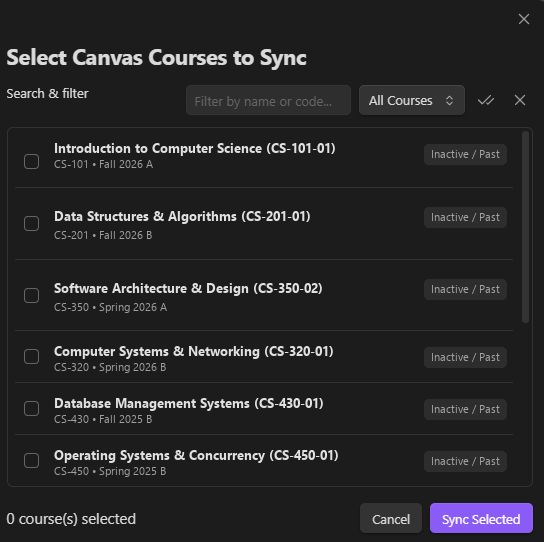 |
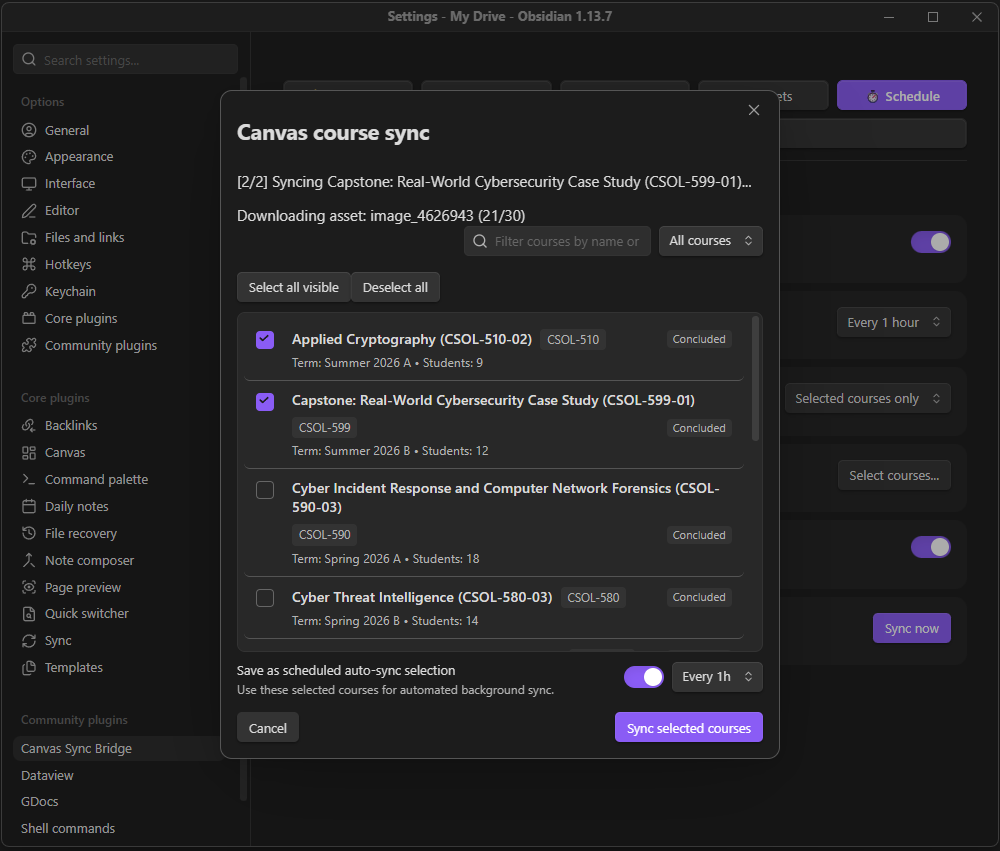 |
| 3. Scheduled Background Sync Automation | 4. Course Capability & Permissions Diagnostics |
|---|---|
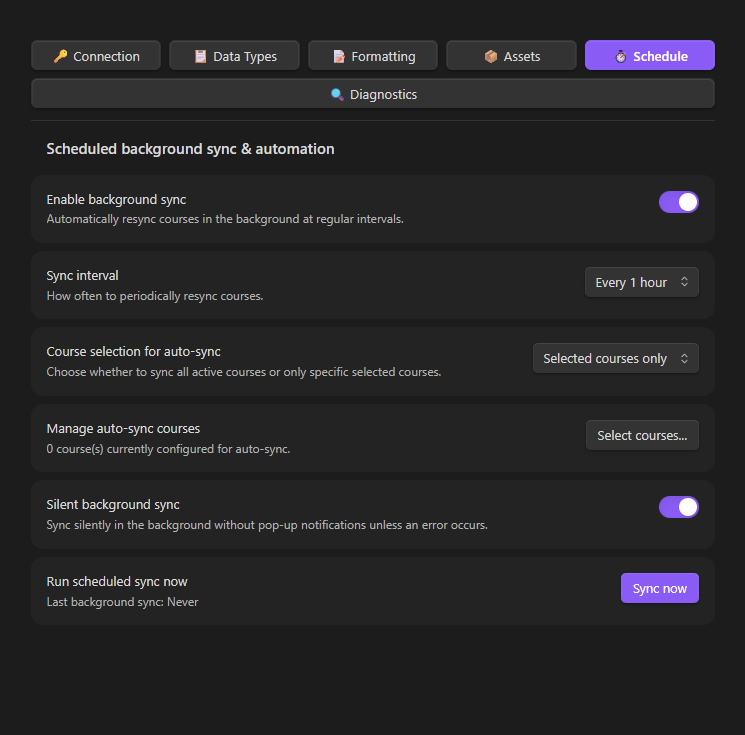 |
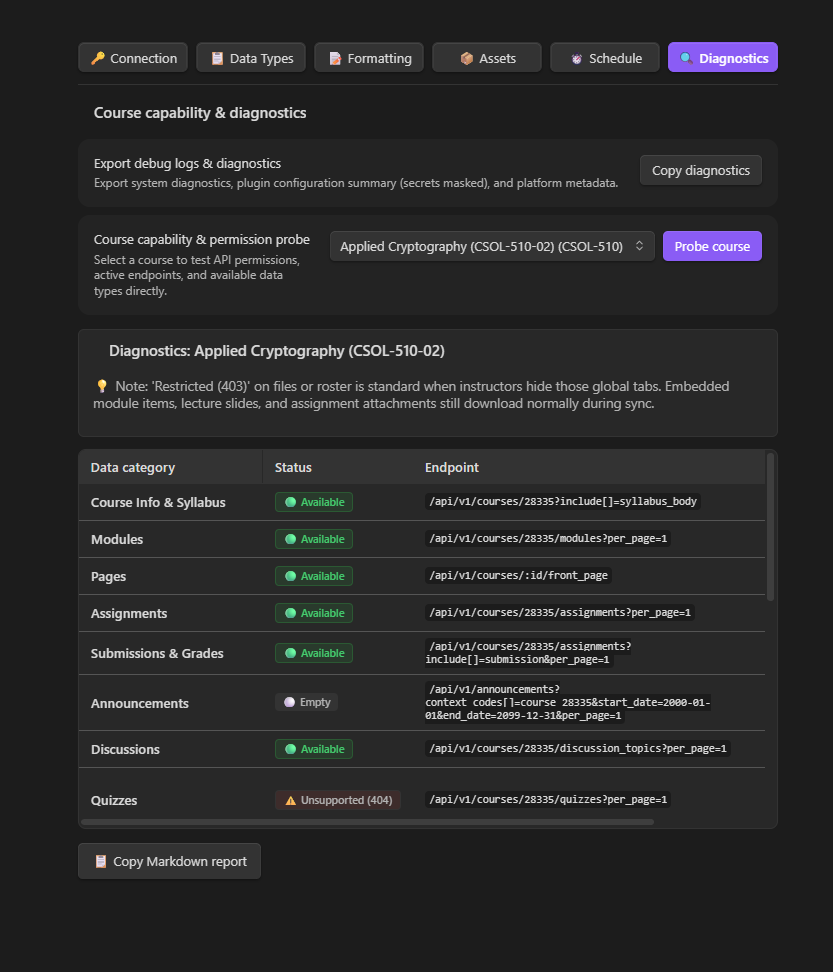 |
| 5. Connection & Browser Bridge Settings | 6. Data Types & Announcements Settings |
|---|---|
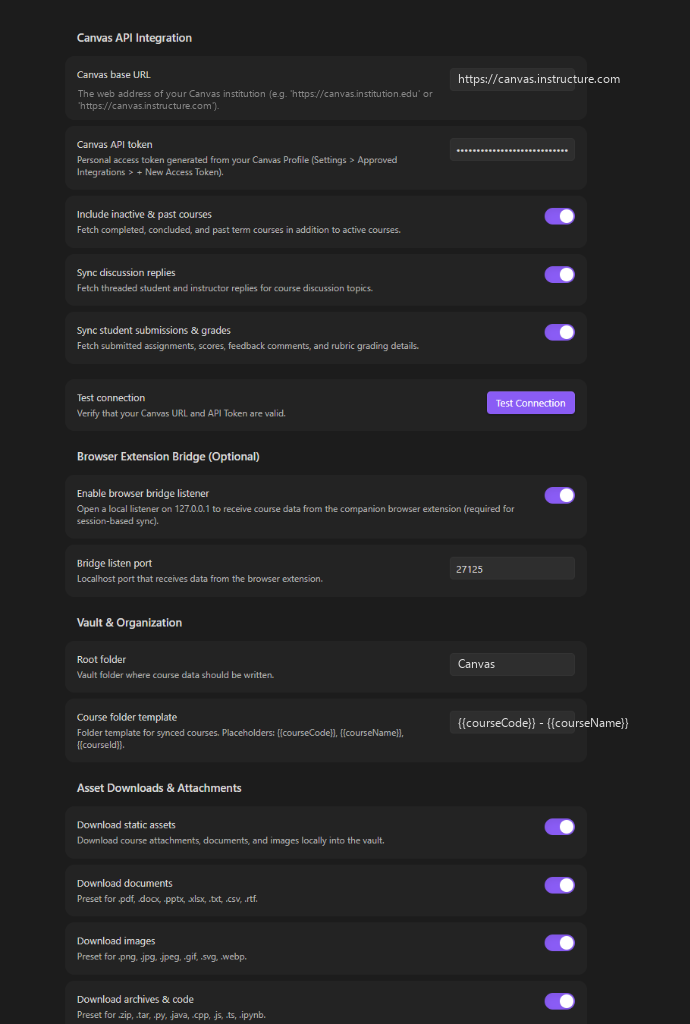 |
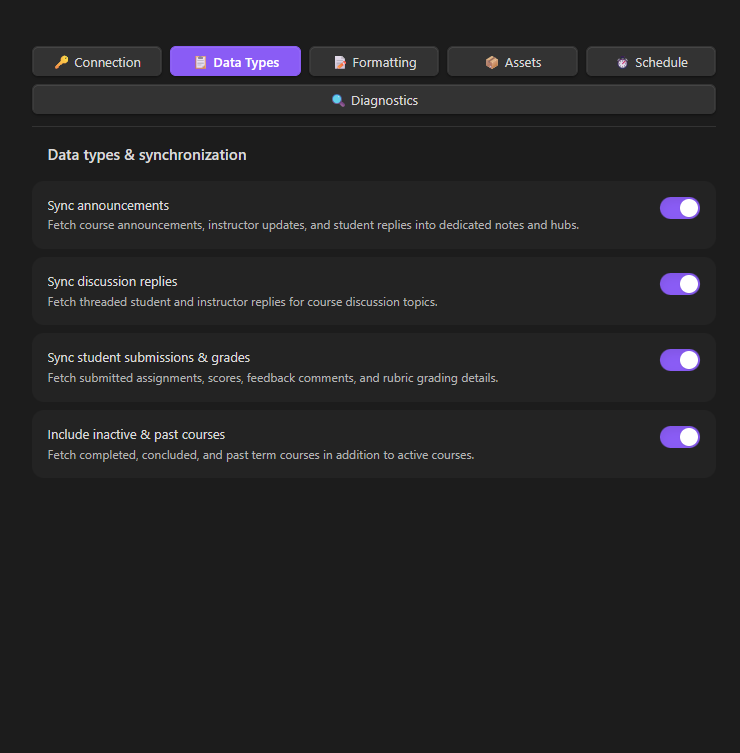 |
| 7. YAML Frontmatter & Formatting Settings | 8. Granular Asset & File Downloads |
|---|---|
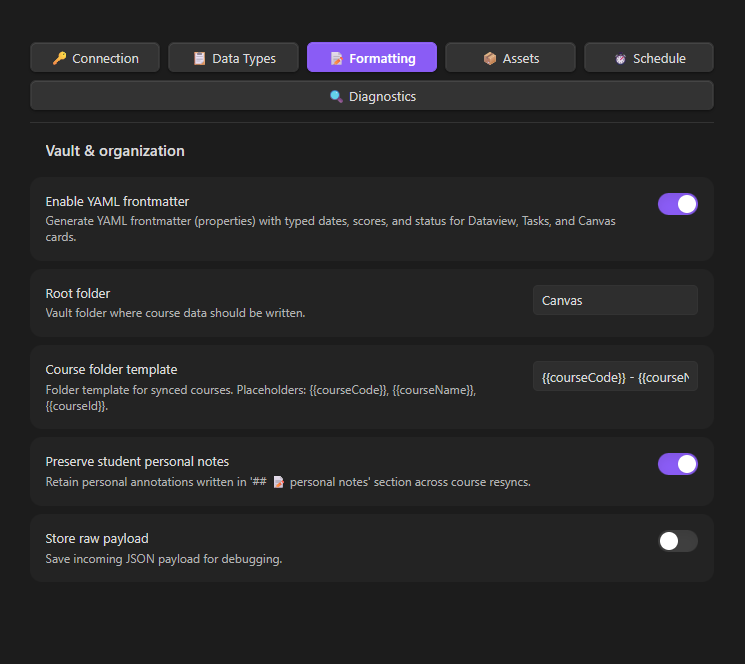 |
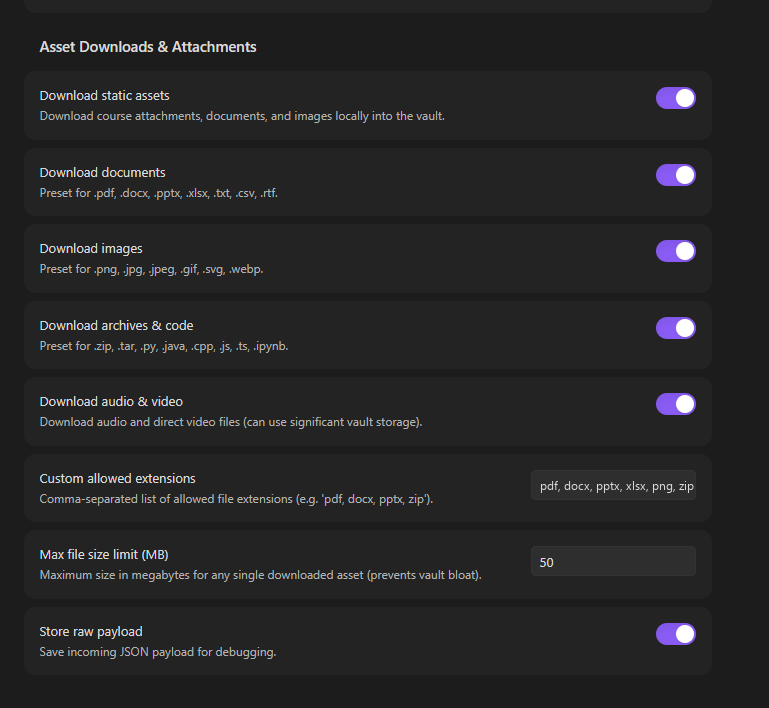 |
| 9. Companion Browser Extension (Zero-Token Bridge) |
|---|
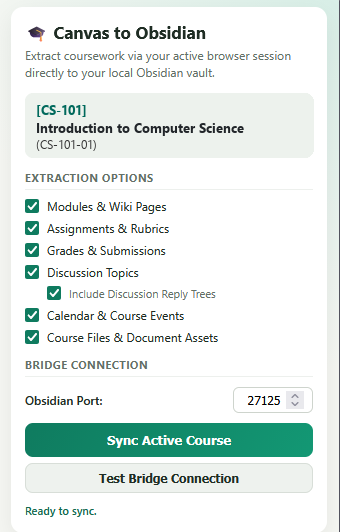 |
🚀 Quick Start & Installation
Step 1: Install the Obsidian Plugin
Method A: Community Plugins (Recommended)
- In Obsidian, open Settings > Community Plugins.
- Turn off Restricted mode if prompted.
- Search for Canvas Sync Bridge, click Install, and then Enable.
Method B: Obsidian BRAT (Beta Releases)
- Install the BRAT Plugin in Obsidian.
- In BRAT settings, click Add Beta plugin and enter:
https://github.com/SixFiveMil/obsidian-canvas-sync.
Method C: Manual Installation
- Download
main.js,manifest.json, andstyles.cssfrom the Latest GitHub Release. - Extract into
<Vault>/.obsidian/plugins/canvas-sync-bridge/and restart Obsidian.
Step 2: Choose Your Sync Method
Option A: Direct REST API (Recommended)
- In Canvas, go to Account > Settings > Approved Integrations > + New Access Token.
- Copy the generated token string.
- In Obsidian settings (Canvas Sync), enter your Canvas Base URL and API Token.
- Press
Ctrl/Cmd + Pand runCanvas Sync: Select & sync courses(or click the🎓ribbon icon) to sync.
Option B: Browser Extension Bridge (Zero-Token Session Sync)
- In Obsidian settings (Canvas Sync), toggle on Enable browser bridge listener.
- Install the extension:
- Chrome / Brave / Edge / Arc: Chrome Web Store
- Firefox: Firefox Add-ons (AMO)
- Navigate to any Canvas course tab in your browser, click the extension icon, test the bridge connection, select your extraction options, and click Sync Active Course.
🗂️ Generated Vault Structure
Courses are written to your vault using the configured template (default: {{courseCode}} - {{courseName}}):
Canvas/
└── CS-101 - Introduction to Computer Science/
    ├── Course.md         # Master course index, metadata, and quick navigation
    ├── Home.md           # Course home page with banner and graphic links
    ├── Syllabus.md       # Complete course syllabus and policies
    ├── Announcements.md  # Course announcements hub with callouts and replies
    ├── Tasks.md          # Assignment checklists, due dates, points, and submissions
    ├── Grades.md         # Gradebook table with scores, percentages, and status
    ├── Discussions.md    # Discussion board topics with full student reply trees
    ├── Calendar.md       # Course events, milestones, and Zoom meeting links
    ├── Modules/
    │   ├── 01 - Week 1 - Foundations & Architecture/
    │   │   ├── 01 - Page - Lecture Overview.md
    │   │   ├── 02 - Assignment - Lab 1 Analysis.md
    │   │   └── 03 - Discussion - Class Introductions.md
    │   └── 02 - Week 2 - Algorithms & Data Structures/
    │       ├── 01 - Page - Algorithm Complexity.md
    │       └── 02 - Assignment - Problem Set 2.md
    ├── Files/            # Downloaded PDFs, DOCX, slides, spreadsheets, and archives
    └── Attachments/      # Embedded images, course banners, and diagrams
🛠️ Building from Source
# Clone repository
git clone https://github.com/SixFiveMil/obsidian-canvas-sync.git
cd obsidian-canvas-sync

# Install dependencies (Node.js 20+ required)
npm install

# Run unit tests
npm test

# Type-check TypeScript files
npm run typecheck

# Build Obsidian plugin
npm run build
🌐 Companion Browser Extension
The browser extension source code, pre-packaged .zip release files, and store deployment pipelines are maintained in a dedicated repository:
- Repository: SixFiveMil/canvas-to-obsidian-extension
- Latest Extension Release (.zip downloads): Extension Releases on GitHub
- Chrome Web Store: Canvas to Obsidian Sync
- Firefox Add-ons: Canvas to Obsidian Sync
🔒 Security & Privacy
- Closed by Default: The local loopback listener (
127.0.0.1:27125) only runs when explicitly toggled on in Obsidian settings. - Origin & Header Guards: Inbound requests verify trusted extension origins (
chrome-extension://,moz-extension://) and custom application headers. - Local Storage: API tokens are stored strictly within
.obsidian/plugins/canvas-sync-bridge/data.jsoninside your local vault. - Read our full Security Policy and Privacy Policy.
📄 License & Author
Developed and maintained by Joshua A. Wortz (SixFiveMil).
Licensed under the MIT License.