
README file from
GithubCallouts Plus
Pick callout colors and types from a visual menu instead of typing the identifier by hand.
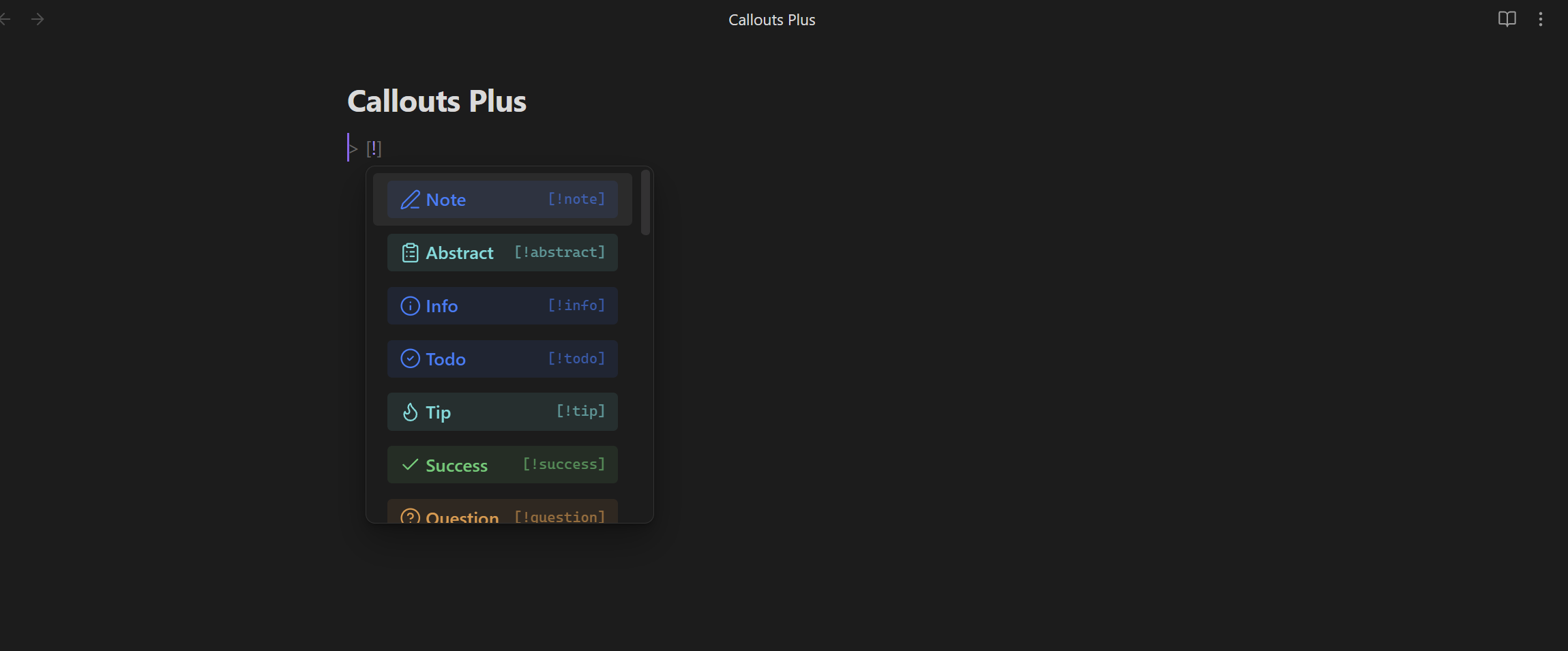
Obsidian's default [!type] syntax requires remembering the exact keyword for each callout. Callouts Plus adds a visual picker with a live preview of every callout, plus 20 extra colors and support for fully custom callouts.
Features
- Suggestions while typing: type
> [!in a note and a colored, searchable list of callout types appears. - Insert callout command: opens a picker with a title field and a fold option (none, expanded, collapsed). Wraps the current selection if there is one.
- Change callout type command: place the cursor inside an existing callout and swap its type from the same picker.
- 20 extra colors: red, orange, amber, yellow, lime, green, emerald, teal, cyan, sky, blue, indigo, violet, purple, fuchsia, pink, rose, brown, gray, and slate — each with its own icon, on top of the 13 native callout types.
- Custom callouts: define your own id, label, color, and icon (any Lucide icon name) from the settings tab, no CSS required.
Usage
- In a note, type
> [!and pick a color or type from the list that appears — or run Insert callout… from the command palette (or the ribbon icon) for more control over the title and folding. - To change an existing callout's type, place the cursor inside it and run Change type of current callout….
- Open Settings → Callouts Plus to toggle the native types, the extra color palette, and to add your own custom callouts.
Installation
Callouts Plus is available in the Obsidian Community Plugins directory:
Open Settings → Community plugins → Browse. Search for Callouts Plus and install it. Enable it — the commands and the right-click menu item appear immediately.
Manual install Download main.js, manifest.json, styles.css from the latest release into /.obsidian/plugins/callouts-plus/, then enable it in Settings → Community plugins.
Disclosures
This plugin works entirely offline: it makes no network requests, collects no telemetry, and doesn't require any account. All data (your custom callouts) is stored locally in the plugin's settings file.