
README file from
GithubBook Studio
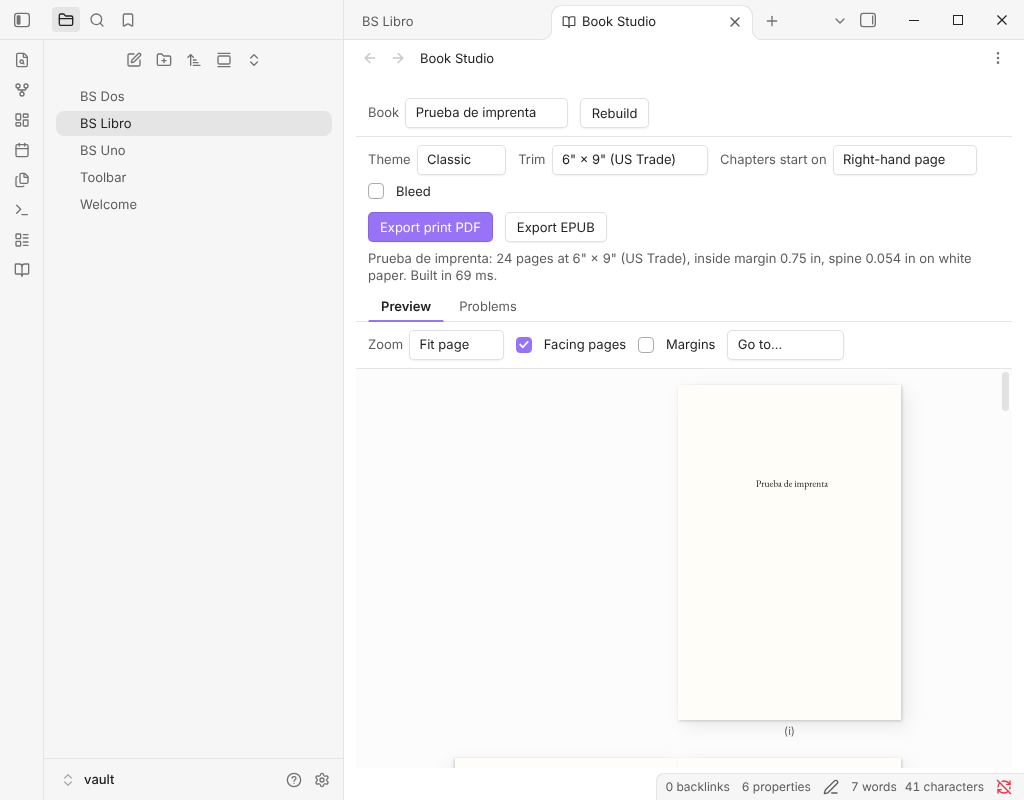
Turn a folder of Markdown notes into a print-ready paperback PDF for Amazon KDP and an EPUB 3 for every ebook store. Everything happens on your device: your manuscript is never uploaded anywhere.
No Pandoc, no LaTeX, nothing else to install, and it works on Obsidian mobile too.
Try it in your browser → The web app opens with a sample book, The Wonderful Wizard of Oz, already typeset.
Book Studio comes in two forms that share one engine and one interface:
- An Obsidian plugin. It works on the vault you write in, rebuilds the preview as you type and saves exports to a vault folder.
- A web app. Open a folder of Markdown files, such as your vault, in the browser, or write a book right there: it has a chapter editor, a book-details form, a cover image, and a Publish checklist of what KDP still needs. You can also import a Word (
.docx), Markdown or text manuscript. Books you write in the web app are kept in your browser only. Nothing is uploaded.
Book Studio is free: unlimited books, every KDP trim size, the Classic, Modern, Elegant, Non-fiction, Large Print, Literary, Minimal, Memoir and Textbook themes, footnotes at the page foot, the full wraparound cover, the KDP preflight and details sheet, the print PDF and EPUB 3. A separate Book Studio Pro edition, not on sale yet, will add genre themes, a back-of-book index, editions, box sets and the accessible-EPUB pack. See Book Studio Pro.
Features
- One note is the book. A manifest note lists the chapters as links, in order, under Front matter, Chapters and Back matter. Its properties hold the title, author, theme and trim. To reorder chapters, reorder the links.
- Real typesetting. Knuth–Plass line breaking, hyphenation in the book's language, smart quotes and dashes, old-style figures and small caps where the theme calls for them. Widows and orphans are avoided.
- Themes with character. Drop caps, ornamental scene breaks, chapter openers, part pages and running heads. Themes: Classic, Modern, Elegant, Non-fiction, Large Print, Literary, Minimal, Memoir and Textbook, plus the genre themes Thriller, Romance and Fantasy in Pro.
- Ready for KDP.
- The 6" × 9" trim, the most common paperback size.
- Inside margins that grow with the page count, as KDP requires.
- Optional bleed, embedded fonts, chapters that open on a right-hand page, and padding to KDP's 24-page minimum.
- The spine width is reported for your cover designer.
- Front and back matter, built for you. Half title, title page, copyright page (with ISBNs, edition and publisher), dedication, epigraph and table of contents, plus "Also by" and any notes you list.
- Live paged preview. Each page appears exactly as it will print. Zoom to fit the page or the width, and check facing pages side by side.
- EPUB 3 for every store. Semantic XHTML, a navigable table of contents and landmarks, embedded fonts, the cover, and the book's language on every page. Exports pass EPUBCheck with no messages.
- Problems tab. Broken links, missing images and chapters that can't be found are listed with the note and line they come from; in Obsidian, a click opens it.
Writing a book
Create a note with book: true in its properties. That note is the manifest:
---
book: true
title: The Lighthouse Keeper
subtitle: A Novel
author: Jane Doe
language: en
publisher: Harbor Press
isbn: 978-1-23456-789-7
ebook-isbn: 978-1-23456-790-3
copyright: "© 2026 Jane Doe. All rights reserved."
dedication: For my mother.
cover: images/cover.jpg
theme: classic
trim: 6x9
---

## Front matter
- [[Foreword]]

## Chapters
### Part One: The Sea
1. [[The Storm]]
2. [[Landfall|The Shore]]
3. ~~[[Cut Scene]]~~
### Part Two: The Light
4. [[The Keeper]]
5. [[Interlude]] unnumbered

%% Ideas for later:
- [[Sequel hook]]
%%

## Back matter
- [[Acknowledgments]]
- [[About the Author]]
- Sections. Links under Front matter, Chapters and Back matter go to those parts of the book. Section names in other languages work too ("Capítulos", "Kapitel", "Chapitres").
- Parts. A subheading inside Chapters starts a part, which gets its own part page.
- Titles. A chapter's title comes from the link alias (
[[Landfall|The Shore]]), then the note'stitleproperty, then the file name. Leading numbers in file names, such as "01 The Cyclone", are dropped. - Drafts and comments. A
struck-outlink is left out of the build. Anything inside%% … %%is ignored. - Unnumbered chapters. Write
unnumberedafter a link, or setnumbered: falsein the chapter note. Front and back matter are never numbered. - Starting from a folder. In Obsidian, Create book from current folder writes a manifest that lists the folder's notes.
Chapter notes are ordinary Markdown:
- Scene breaks.
* * *,***,---or# # #on a line of its own become the theme's ornament. - Images.
![[map.png|A hand-drawn map of the island]]uses the alias as the image description. Writedecorativeas the alias for an image that carries no meaning. - Footnotes, block quotes, lists, tables and poetry are all supported. For poetry, keep the line breaks.
Manifest properties
| Property | Meaning |
|---|---|
title, subtitle, author (or authors) |
Title page, metadata and running heads |
language |
Hyphenation, quote style and EPUB language, for example en, es, de, fr |
publisher, year, edition, copyright |
Copyright page |
isbn, ebook-isbn |
Print ISBN on the copyright page; ebook ISBN as the EPUB identifier |
description, subjects |
Store description and subjects in the EPUB metadata |
series, series-number, also-by |
Series metadata and the "Also by" page |
dedication, epigraph, epigraph-source |
Their own pages in the front matter |
cover |
Cover image for the EPUB |
theme |
classic, modern, elegant, nonfiction or large-print; the genre themes thriller, romance and fantasy need Pro |
trim |
Any of the sixteen KDP trims, for example 6x9, 5x8 or 5.5x8.5 |
binding |
paperback (default) or hardcover: hardcover offers 5 trims (5.5x8.5, 6x9, 6.14x9.21, 7x10, 8.25x11), 75 to 550 pages and its own cover sheet (the sheet's total size is not on KDP's help pages, so check it against KDP's cover calculator) |
paper |
white, cream or color: sets the spine width |
footnotes |
end (default) or page for notes at the foot of the page |
index-terms |
A list of words and phrases for the back-of-book index (Pro) |
editions |
A block of editions, each with its own settings, ISBN and format: print or epub (Pro) |
back-blurb, author-bio, author-photo, tagline |
Back cover text, author photo and the cover's tagline |
cover-background, cover-ink, spine-title |
Cover colours and the spine text |
bleed |
true when images run off the page edge |
chapter-start |
recto (right-hand pages, the default) or any |
running-heads |
author-title, title-chapter or none |
toc, half-title, hyphenate, smart-quotes |
Turn those features on or off |
font-size |
Body size in points, from 7 to 24 |
scene-break |
Glyph to use for scene breaks, such as ❦ |
chapter-image, chapter-image-alt |
In a chapter note (not the book note): a picture that opens the chapter, above the title, in every style. Describe it in chapter-image-alt, or write decorative. A warning appears when it would print under 300 ppi |
The studio's toolbar can override the theme and trim for a single export without editing the note.
Hyphenation. Words are split by language patterns (Spanish, Catalan, Galician, Basque, English, French, German, Italian, Portuguese and Dutch), never in capitalised acronyms or in words with digits, and a name in the middle of a sentence is split less willingly. To say where a word may split, put a soft hyphen (U+00AD) there: the word then splits only at those points. To keep a word whole, put a word joiner (U+2060) anywhere inside it. Neither character is printed.
Importing a manuscript (web app)
In My books, choose Import a manuscript and pick a Word (.docx), .md or .txt file, or paste the text. It becomes a new book; every # Heading, "Chapter 3" or "Capítulo 3" line starts a chapter. From Word it keeps headings, bold and italic, lists, quotes, footnotes, links, page breaks and PNG or JPG pictures with their alt text. It leaves out tables, text boxes, equations, comments and the table of contents, and a report lists what was left out. Old .doc files are not read: save them as .docx first.
Book Studio Pro
This repository and its releases are the free edition, and everything above is in it. Book Studio Pro is a separate, paid edition that is not on sale yet; its code is not in this repository. It will add:
- Genre themes: Thriller, Romance and Fantasy, and the ones to come.
- A back-of-book index built from
index-terms. - Editions: describe a paperback, a large-print edition and an ebook in the manifest and export them together, each with its own ISBN, cover and report.
- Box sets, twelve more cover templates and the accessible EPUB pack.
Free, and never Pro again: every trim size, the Elegant, Non-fiction and Large Print themes, footnotes at the page foot, the full cover (front, spine and back with barcode space, at the size KDP expects), the KDP preflight (page count, margins, images, blank runs, ISBN, metadata, spine and the PDF itself, with an HTML report; it reduces rejections, and KDP's own review makes the final decision) and the KDP details sheet (title, description, keywords and categories ready to paste). The list lives in src/engine/entitlements.ts, and tests/entitlements.test.ts makes sure nothing an earlier version let you do is ever taken away.
Network use
- The free edition makes no network requests: no telemetry, no analytics, no account, and your notes and books never leave your device.
- Author: Siulved54.
Privacy
- Your notes, images and exports never leave your device. Parsing, typesetting and PDF and EPUB generation all run locally.
- There are no network requests (see "Network use" above). The web app loads only its own files (the sample book and fonts) from the site it is served from. There is no account, no telemetry, no analytics and no ads.
- The plugin keeps its settings in its
data.jsonin your vault. The web app keeps them in your browser's local storage.
Free template
templates/starter-book is a small ready-to-write book that uses only free features. Copy it into your vault and open the studio. For numbered reports, see the free template in Section Numbering.
Installing
Obsidian
Search for Book Studio under Settings → Community plugins → Browse. To install by hand instead:
- Download
main.js,manifest.jsonandstyles.cssfrom the latest release. - Copy
main.js,manifest.jsonandstyles.cssinto<your vault>/.obsidian/plugins/book-studio/. - Enable Book Studio under Settings → Community plugins.
Open the studio from the ribbon icon or the command palette. The commands are Open studio, Export print PDF, Export EPUB and Create book from current folder. Exports are saved to the folder chosen in settings, Book Studio exports by default. The plugin works on desktop and mobile and needs Obsidian 1.7.2 or later.
Web app
Open the web app and choose Open a folder to load your own notes. To host it yourself, npm run build:web writes a static site to dist/web/ that any static host can serve.
The site also has guides for KDP authors in English and Spanish (trim sizes and margins, accessible EPUB, Markdown to book, a comparison with other formatters) and two sample books to download as print PDF, EPUB and Markdown source: The Wonderful Wizard of Oz and Bécquer's Leyendas y rimas (?sample=leyendas opens it in the app).
Development
npm install
npm run build          # plugin (main.js, styles.css)
npm run build:all      # plugin and web app
npm run build:web      # the web app, the sample downloads and the guide pages (dist/web/)
npm run downloads      # sample PDFs, EPUBs and source zips; fails if a PDF breaks a KDP rule
npm run epubcheck      # W3C EPUBCheck on the sample EPUBs (needs Java)
npm run dev            # unminified builds with source maps
npm run typecheck
npm run lint           # ESLint with Obsidian's plugin review rules
npm test               # Vitest: parsing, layout, EPUB, audit, KDP check, guide pages
npm run sample         # render the sample book to out/ from the command line
The guide pages are Markdown in site/en/ and site/es/, built by tools/site.mjs (no JavaScript on the pages, no requests to other hosts). Their facts and sources are in docs/web-launch/FACTS.md.
npm run sample runs the same pipeline from Node, which helps when checking output. Its script, tools/render-sample.ts, is a development tool that reads and writes files with node:fs and node:path; it is not part of the plugin, which never touches the file system outside Obsidian's vault API:
npm run sample -- path/to/folder
npm run sample -- --theme modern --out out/oz-modern
Layout
src/engine/    Parsing, typesetting, PDF, EPUB and checks (no DOM, no Obsidian)
src/app/       The studio UI shared by both hosts: toolbar, preview, export dialogs
src/preview/   Canvas renderer for the paged preview
src/obsidian/  Plugin entry: view, commands, settings, vault access
src/web/       Web app entry: folder picker, downloads, local storage
tests/         Vitest suites
tools/         Command-line renderer
sample/oz/     The sample book
fonts/         Bundled typefaces
Credits and licenses
- Book Studio is released under the MIT License.
- The bundled fonts are under the SIL Open Font License 1.1: EB Garamond, Crimson Pro, Cormorant Garamond, Montserrat, Atkinson Hyperlegible, Inconsolata and STIX Two Math (formulas).
- The text of The Wonderful Wizard of Oz (L. Frank Baum, 1900) is in the public domain. The sample's cover and illustration were made for this project and are under the MIT License.
- Libraries: pdf-lib, fontkit, JSZip, marked, yaml and hyphen.
More plugins by Siulved54
| Plugin | What it does | Source |
|---|---|---|
| Shared Blocks | Write a block of text once and reuse it in any note. Edit the source and every reference re-renders live. | shared-blocks |
| Text Case and Cleanup | Change case, make camelCase or slugs, sort lines and remove duplicates, and repair text pasted out of a PDF, without touching code or URLs. | text-format |
| Typography as You Type | Curly quotes, dashes and ellipses as you type, kept out of code and maths, with Backspace to take one back. | smart-typography-plugin |
| Section Numbering | Number headings as an outline (1, 1.1, 1.2) and keep every link to them working when they renumber. | section-numbering |
| Spreadsheet to Table | Paste cells from Excel or Google Sheets as a Markdown table with a real header, insert CSV files, and copy tables back out. | spreadsheet-to-table |
| Hybrid Line Numbers | Relative and hybrid line numbers for Vim-style jumps, where a folded section counts as one line. | hybrid-line-numbers |
| List Item Callouts | Colour a single list item as a callout by starting it with a character such as &, ! or ?. |
list-item-callouts |
| Folder Counts | See how many notes or files each folder holds, right in the file explorer, with a vault total and folder exclusions. | folder-counts |
| Note Reading Time | Reading time of the current note or your selection in the status bar, optionally saved to a property. | note-reading-time |
| Task Rollover | Roll unfinished tasks from your last daily note into today's when it is created, with a real undo. | task-rollover |
| Zoom Into Section | Zoom into a heading or list item to see only it and its contents, with a breadcrumb bar to climb back out. | zoom-into-section |
| Link Title on Paste | Paste a web address and get a Markdown link with the page's title, fetched in the background and undone in one step. | link-title-on-paste |
| Update Radar | Checks your installed community plugins for updates in the background, shows what changed, and flags the ones that look abandoned. | community-update-checker |
| Dataview to Bases | Convert Dataview queries into Bases blocks, and see which queries in your vault can be converted. | dataview-to-bases |
| Line Editing Commands | Duplicate, join, sort and reverse lines, insert blank lines and jump to a line number, with multi-cursor support. | line-editing-commands |
| Note Mover Rules | Move notes into folders by ordered rules on tags, properties, titles and paths, with a preview before any bulk move. | note-mover-rules |
| Tab History | Keeps each tab's back and forward history across restarts, and adds commands to move, maximize and close tabs. | tab-history |
| URL Cards | Shows web addresses as cards with title, description and image, and reads existing cardlink blocks. | url-cards |
| Vim Config | Loads a vimrc-style file from your vault so your key mappings and editor commands are ready when vim mode starts. | vim-config |
| Task Archive | Moves completed tasks, with their sub-items, into an archive section or note. | task-archive |
| Revisit Later | Link the current note into a future daily note, with a date typed in plain English, so it comes back when you want to review it. | revisit-later |
| Explorer Colors Plus | Color files and folders in the file explorer, with a palette, cascading to children, and import from File Color. | explorer-colors-plus |
| Book Lookup | Create book notes from Open Library or Google Books, with cover images, ISBN search and Book Search compatible templates. | book-lookup |
| Web Search Menu | Search the web for selected text or the note title from the right-click menu, with engines you define. | web-search-menu |
| Word Lookup | Look up any word in a sidebar dictionary with definitions, phonetics, synonyms and antonyms, or create a note for it. | word-lookup |
| Quick Translate | Translate the selection or a whole note into another language with no account, keeping links, code and front matter untouched. | quick-translate |
| Dice Rolls | Inline dice rolls you click to reroll, in Live Preview and Reading view, with full dice notation, a roll dialog and a roll history. Reads Dice Roller notes. | dice-rolls |
| Claude Studio | Notion-style AI writing, chat and vault tools powered by your local Claude Code CLI. | claude-studio |
| Emoji Search | Insert emojis from a searchable picker or by typing a :shortcode. | emoji-search |
| Inline TOC | Show a live table of contents inside any note with a toc code block, or insert a plain Markdown one. | inline-toc |
All of them are in the community directory: Settings -> Community plugins -> Browse, then search for the name. Demos and install links for every one: the catalog.
Follow new plugins and updates on X: @luenpereza