
README file from
GithubBook Highlights Importer



Book Highlights Importer is an Obsidian plugin that imports highlights and comments from Yandex Books into Markdown notes.
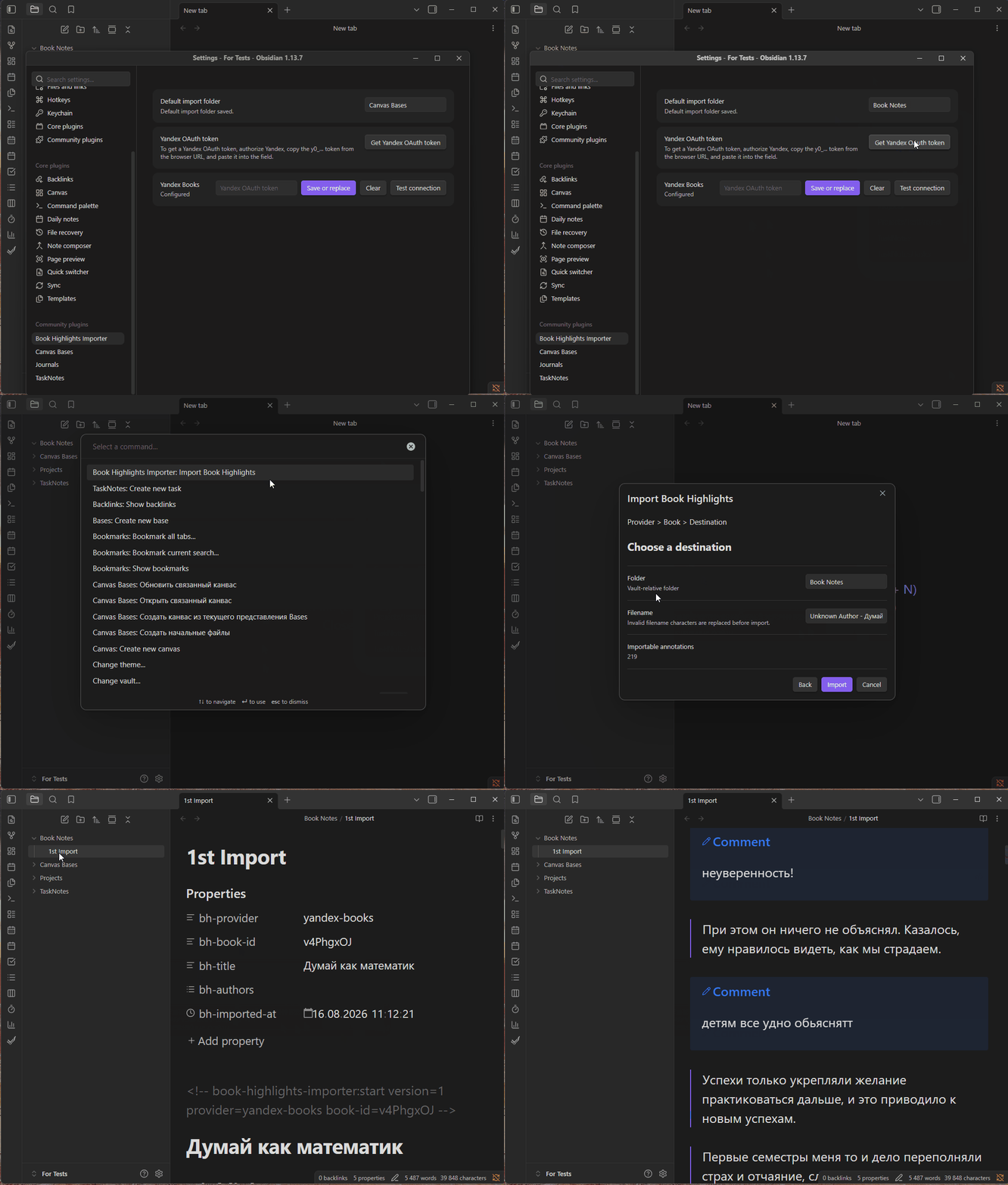
Features
- Search your authenticated Yandex Books library by title or author.
- Browse books grouped as In progress, Finished, and Unread or unknown.
- Import one book's highlights and comments through
Provider > Book > Destination. - Choose a Vault-relative folder and filename, with a configurable default folder.
- Replace only the plugin-owned Managed Section on re-import while preserving user Markdown and unrelated properties.
- Run on Obsidian desktop and mobile, version 1.13.0 or newer.
Installation
Manual installation
To build and install a development version manually:
- Clone this repository.
- Run
npm ci. - Run
npm run build. - Create
<vault>/.obsidian/plugins/book-highlights-importer/. - Copy
dist/main.js,dist/manifest.json, anddist/versions.jsoninto that directory. - Reload Obsidian.
- Open Community plugins in Obsidian's settings and enable Book Highlights Importer.
Community Plugins
Search for Book Highlights Importer in Obsidian's Community Plugins browser, then install and enable it.
Setup
- Open
Settings > Book Highlights Importer. - Optionally set the Default import folder.
- Select
Get Yandex OAuth token. - Authorize access in the external browser.
- Copy the
y0_...value from the browser URL. - Paste the value into the token field and save it.
- Select
Test connection.
[!WARNING] Keep your Yandex OAuth token secret and treat it as a password.
Usage
- Run the
Import Book Highlightscommand. - Select Yandex Books as the Reading Provider.
- Search for and choose one book.
- Confirm the destination folder and filename.
- Select
Import.
The default filename is Author - Title.md. After a successful import, the plugin attempts to open the destination Managed Book Note.
Generated notes
Each generated Managed Book Note includes these properties:
bh-provider: the source provider.bh-book-id: the provider's book identifier.bh-title: the book title.bh-authors: the book's authors.bh-imported-at: the import timestamp.
Highlights are rendered as blockquotes, and comments are rendered as [!note] Comment callouts. Imported content is enclosed in a marker-delimited Managed Section.
Re-import replaces the Managed Section from the latest provider snapshot and removes annotations the provider no longer returns. It preserves all content outside that section and unrelated properties. To protect existing notes, the plugin refuses to overwrite unmanaged notes, notes with malformed managed markers, or notes identified as a different provider or book.
Limitations
- Yandex Books is the only supported Reading Provider.
- Imports are explicit and handle one book at a time; there is no background sync.
- There are no custom templates.
- Importing the same book to another path can create another Managed Book Note.
- Identical Yandex quote rows are preserved because stable quote identifiers are unavailable.
Security and privacy
The Yandex OAuth token is stored through Obsidian Secret Storage and is not redisplayed. It can be replaced or cleared and must be treated as a password.
Development
Development requires Node.js ^20.19.0 || ^22.13.0 || >=24.
npm ci
npm run build
npm run check
Support and contributing
Use the GitHub issue tracker to report bugs or request features. Contributors should discuss substantial changes in an issue before opening a pull request.
License
Book Highlights Importer is licensed under the MIT License.
Disclaimer
This plugin is unofficial, is not affiliated with or endorsed by Yandex or Obsidian, and may be affected by changes to Yandex services.