
README file from
GithubBloomtype Publisher



在 Obsidian 中写 Markdown,在右侧直接查看公众号排版,并复制富文本到微信公众号编辑器。Obsidian 笔记是唯一文稿源,插件不会再提供一套重复的 Markdown 编辑器。
已正式上架 Obsidian 官方社区插件市场:查看插件页面并安装。
English overview
Bloomtype Publisher keeps Markdown as the single source of truth in Obsidian. It opens Bloomtype in a right-side view, synchronizes the active Markdown note, previews the final WeChat layout, and copies compatible rich text to the WeChat editor.
- Open the Bloomtype workspace from the ribbon or command palette.
- Synchronize only the active Markdown note through a restricted
postMessagebridge. - Switch themes, colors, and desktop or mobile preview modes inside the side view.
- Copy the rendered rich text directly to the WeChat editor.
- Configure a trusted HTTPS service URL; localhost HTTP is allowed for development.
Bloomtype Publisher is available from the official Obsidian Community Plugins directory. Open Settings → Community plugins → Browse, search for Bloomtype Publisher, then select Install and Enable. The embedded Obsidian mode does not load website analytics or client telemetry. See PRIVACY.md and SECURITY.md for details.
界面预览
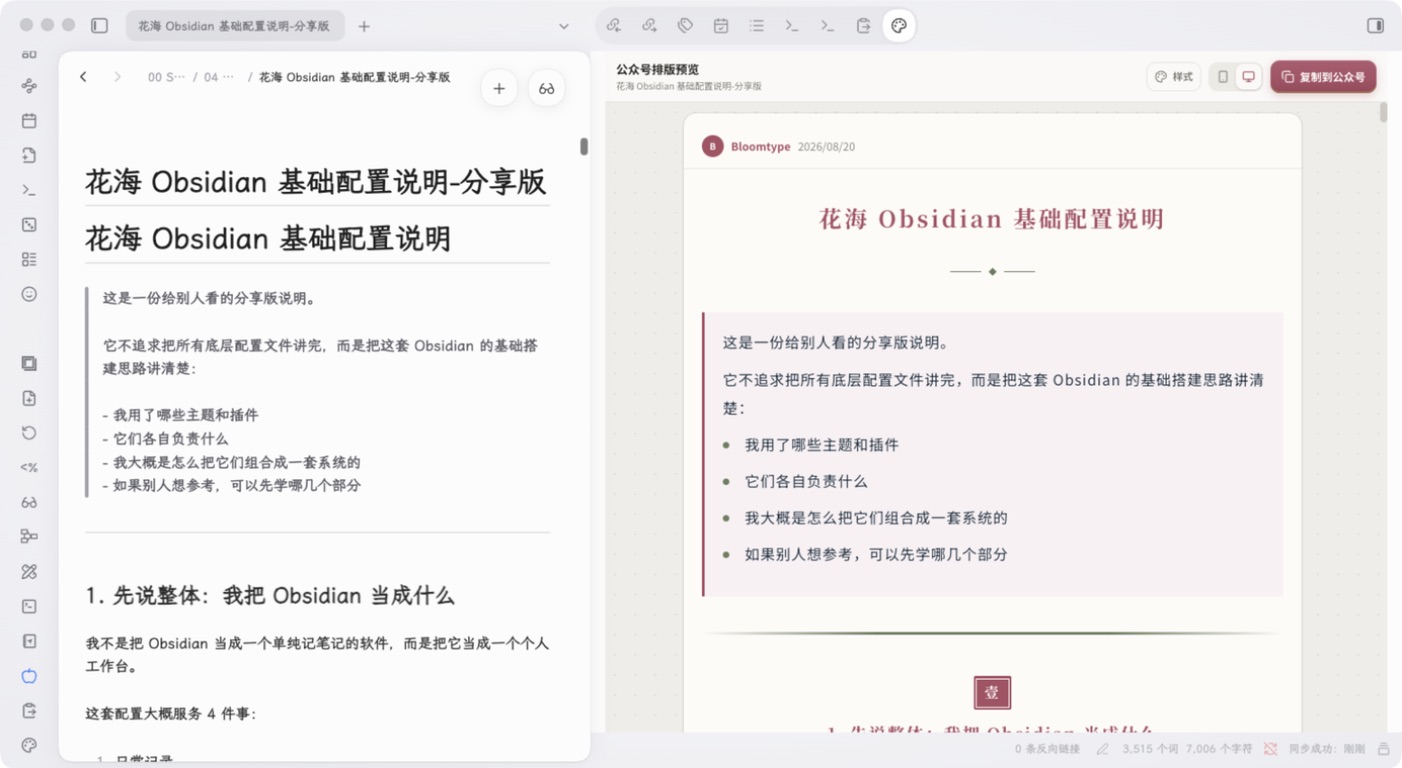
在 Obsidian 原笔记中写作,右侧同步显示公众号排版;默认使用电脑预览,也可以切换手机宽度后检查阅读效果。
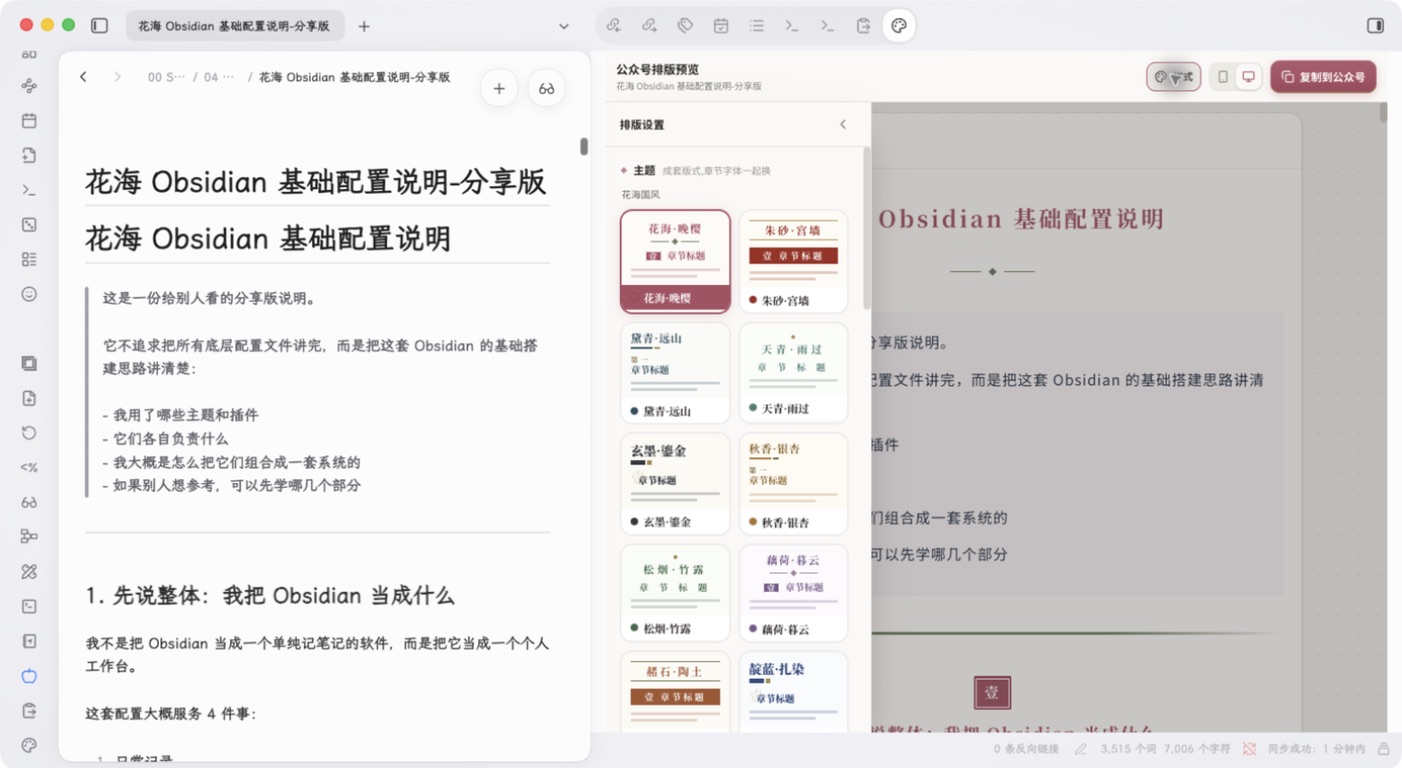
样式面板针对窄侧栏重新排布,可直接选择主题、配色和章节样式,不需要离开 Obsidian。
功能
- 从左侧功能区一键打开 Bloomtype 侧栏。
- 自动载入当前 Markdown 笔记并实时同步修改。
- 提供专为 Obsidian 窄侧栏设计的紧凑工具栏。
- 在侧栏内切换排版主题、配色和手机/电脑预览。
- 一键复制公众号兼容的富文本。
- 切换笔记或修改原文后自动同步,带 450 ms 防抖。
- 命令面板支持打开、同步、重载预览和浏览器打开。
- 服务地址可配置,默认使用 Bloomtype。
安装
从 Obsidian 社区插件市场安装(推荐)
- 打开 Obsidian“设置 → 第三方插件”。
- 点击“浏览”,搜索
Bloomtype Publisher。 - 点击“安装”,完成后点击“启用”。
最低支持 Obsidian 1.13.0,仅支持桌面端。
从 GitHub Release 手动安装
- 从最新 Release 下载
main.js、manifest.json和styles.css。 - 在 Vault 中创建
.obsidian/plugins/bloomtype-publisher/。 - 把三个文件放入该目录。
- 打开“设置 → 第三方插件”,启用“Bloomtype Publisher”。
从源码安装
npm install
npm run build
npm run install:vault -- /path/to/your/vault
安装脚本会复制构建文件并启用插件;若 Vault 已有第三方插件列表,会先创建备份。
使用
- 在 Obsidian 中打开一篇 Markdown 笔记。
- 点击左侧功能区的调色盘图标。
- 在右侧预览中选择模板、配色和预览宽度。
- 点击“复制到公众号”,粘贴到微信公众号编辑器。
数据与隐私
为了生成预览,插件会把当前 Markdown 笔记内容通过受来源限制的 postMessage 发送给设置中配置的 Bloomtype 页面。默认页面为 https://mp.autoaihub.cn。
- 插件不会读取当前 Markdown 笔记之外的文件。
- Obsidian 嵌入模式不会加载网站统计或客户端遥测脚本。
- 远程服务地址必须使用 HTTPS;本机调试允许 localhost HTTP。
- 超过 5 MB 的笔记不会自动同步。
- 请只配置你信任的服务地址;敏感内容建议使用可信的本地服务。
更多信息见 PRIVACY.md 和 SECURITY.md。
本地开发
npm install
npm run dev
本地联调:
- 启动兼容 Bloomtype 消息桥接协议的页面。
- 在插件设置中把服务地址改为
http://localhost:3000。 - 在 Obsidian 中重新加载插件并打开任意 Markdown 笔记。
生产构建:
npm run build
构建产物为 main.js,发布时需与 manifest.json、styles.css 一起作为 GitHub Release 附件。
参与贡献
欢迎提交 Issue 和 Pull Request。开发规范见 CONTRIBUTING.md。
许可证
MIT © 2026 花海