
README file from
GithubBeancount for Obsidian
Keep your Beancount plain-text accounting
ledger in your Obsidian vault and edit it like code: syntax highlighting,
completion for accounts, payees, commodities, tags and links, transaction
snippets, decimal-point alignment, one-command formatting, an outline, an
account-balances table, and bean-check validation every time you save.
It works with standalone .bean / .beancount files and with
```beancount code blocks inside ordinary notes, so a daily note can
record the day's spending next to what you wrote about it.
Desktop only. Validation runs Beancount's own bean-check; see
Privacy and permissions for exactly what the
plugin runs and touches.
Quick start
About five minutes, from a fresh install to a validated ledger.
1. Install the plugin
Settings → Community plugins → Browse, search for Beancount, install it, then enable it.
To install by hand instead, download main.js, manifest.json and
styles.css from a
GitHub release
into <Vault>/.obsidian/plugins/beancount/ and enable Beancount under
Settings → Community plugins.
2. Install Beancount (for validation)
Everything except validation and Fava works without this step.
pip install beancount
Then run bean-check --help in a terminal to confirm it is on your PATH.
[!tip] On macOS, Obsidian started from the Dock or Finder does not see the
PATHyour shell sets up (pyenv, Homebrew, virtualenvs). If saving a ledger later reports bean-check not found, runwhich bean-checkand paste the full path into Settings → Beancount → Bean-check executable.
3. Write a first transaction
The quickest start needs no new file type: open any note and paste a fenced ledger.
```beancount
2026-01-01 open Assets:Cash          CNY
2026-01-01 open Expenses:Food        CNY

2026-10-14 * "Corner café" "Coffee"
  Expenses:Food   18.00 CNY
  Assets:Cash
```
Save the note (Ctrl/Cmd+S, or just wait for autosave). The fence is checked
with bean-check; nothing is marked because the ledger is valid.
4. Try the editor features
Inside the fence:
- On a new line at column 0, type
txnand pick the snippet. It inserts today's date and puts the caret in the payee quotes. - Type
Cor— the payee Corner café is suggested. Picking it fills in the postings of that payee's last transaction, with the amounts as Tab stops. - Type an account such as
Exp; matching open accounts are suggested. - In an amount, type
.— the posting is re-spaced so its decimal point sits on the separator column (column 50 by default), in line with the other postings of that transaction. - In the coffee transaction, change the posting
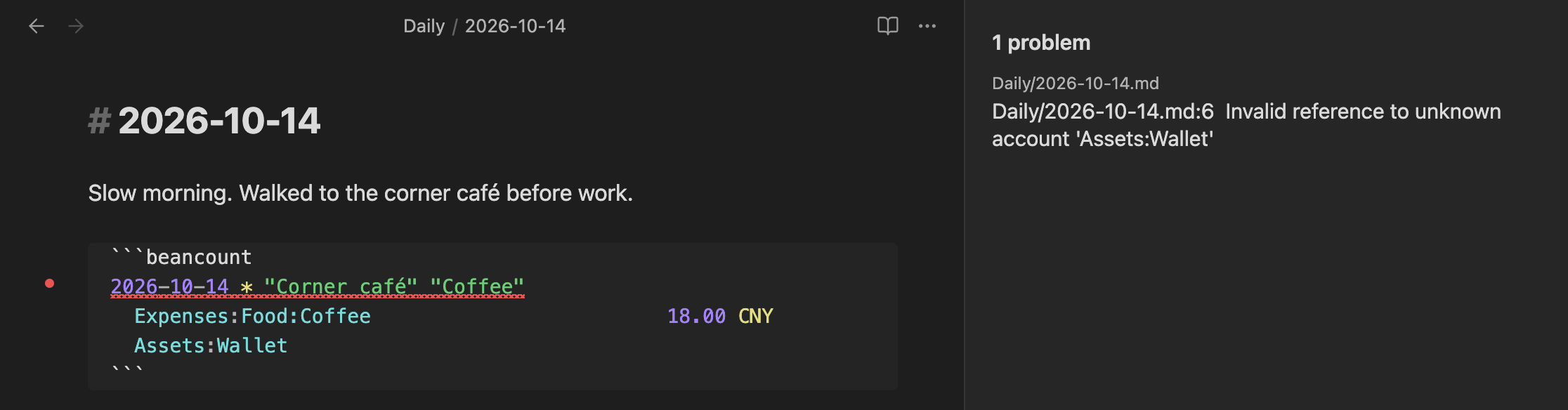
Assets:CashtoAssets:Walletand save. The transaction's header line gets an underline and a gutter dot; hover for bean-check's message (Invalid reference to unknown account 'Assets:Wallet'), click the dot for a quick fix that adds the missingopendirective. - Open the command palette (Ctrl/Cmd+P) and run Beancount: Show account balances.
5. Point the plugin at your main ledger
If you already keep a Beancount ledger, put its files in the vault and set
Settings → Beancount → Entry ledger to the vault path of the top-level file
(for example Finance/main.bean). From then on:
- saving any
.beanfile checks the wholeincludechain from that entry; - fences in notes are checked as if included after it, so they can use the accounts the main ledger opens;
- Show account balances reports the full ledger.
Ways to organize a ledger
| Setup | Good for | How validation works |
|---|---|---|
| Fences in notes | Trying the plugin; journaling expenses alongside notes | Each note's fences are checked together on save. |
.bean / .beancount files |
An existing ledger; larger books | Each saved file is checked on its own. |
| Entry ledger plus either of the above | Most real setups | .bean saves check the whole include chain; fences are checked against the entry's opens. |
A typical vault:
Finance/
  main.bean          ; options, plus: include "accounts.bean"  include "2026/*.bean"
  accounts.bean      ; open / close directives
  2026/
    01.bean
    02.bean
Daily/
  2026-10-14.md      ; prose plus ```beancount fences for the day
with Entry ledger set to Finance/main.bean.
Fences are checked against the entry ledger but are not part of it:
Beancount cannot include a markdown note, so the balances view and Fava
show only what the .bean files contain.
.bean files can't be created from Obsidian's New note (it always makes
a .md). Create them from your file manager or a terminal; once they exist,
Obsidian opens them in its editor with full Beancount highlighting. Use
Source mode for them — Live Preview can still render embeds and checkboxes.
Everyday features
Writing entries
- Completion for accounts (still-open ones only, with open date and allowed
currencies), payees, narrations (opt-in), commodities,
#tagsand^links, drawn from every ledger file and fence in the vault. Frequently and recently picked items rank first. Completion opens only in ledger text —.bean/.beancountfiles and beancount fences — so writing a note's prose never pops it up. - Directive snippets at column 0:
txn,open,balance,pad, and the rest of vscode-beancount's set. Tab walks the stops. - Insert today's date writes
YYYY-MM-DDat the cursor. - Enter inside an entry indents the next posting by two spaces (in ledger files and fences only).
- Optional pinyin-initial matching:
cyfinds餐饮.
Keeping it tidy
- Typing
.in an amount aligns that transaction on the separator column (default 50, shown as a dotted ruler in ledger files). - Align decimal points aligns the current transaction or the selection; Align amounts on save does every transaction in the file. Both use the separator column too, and in a note they only touch beancount fences.
- Format ledger normalizes indentation and spacing and aligns every transaction on the separator column, in one undo step. A syntax error stops it and names the line.
- Transactions fold to their header line, including beancount fences in
untitled buffers and
.txtfiles; Show account balances still only uses a ledger file or a markdown note.
Checking
bean-checkruns on save and when a ledger is opened. Errors appear as underlines with the message in a tooltip and a gutter dot that offers quick fixes: mark a!transaction cleared, add the missing balancing posting, or add anopendirective for an unknown account.- Show problems lists the latest report by file, including include-chain
files that are not open. When
bean-checkcannot run (not installed, crashed, timed out), it showsbean-check could not run: …for that ledger until the next report. - Inline hints while typing, before any save: the amount Beancount will infer
for the posting that omits it,
≠ 0on transactions that do not balance, the difference onbalanceassertions, and markers on!transactions.
Navigating and reporting
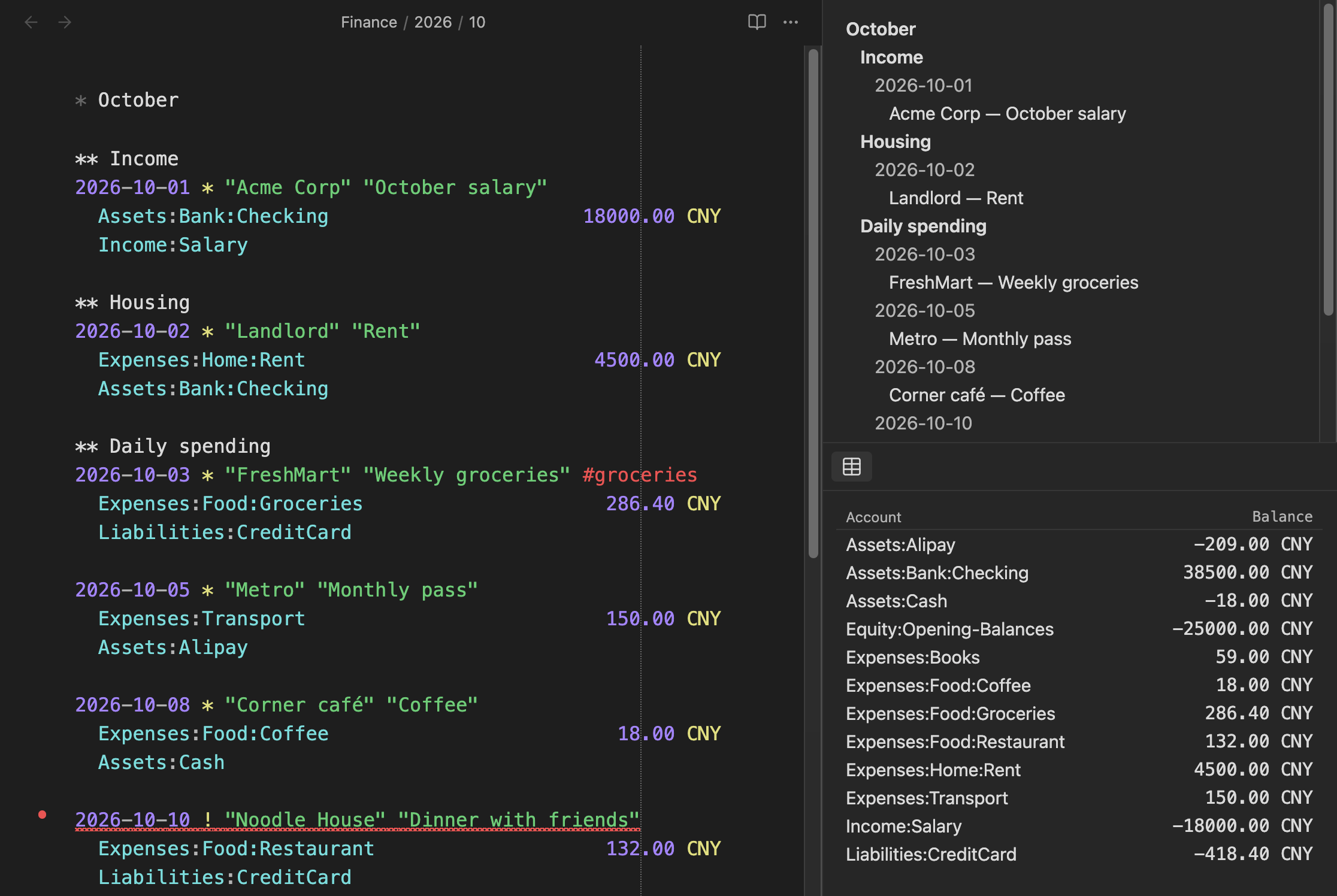
- Show outline:
*sections, date groups, transactions, andopen/close/balancedirectives; click to jump. - Cmd/Ctrl-click the path in
include "…"to open that file. - Show account balances: per-account balance per currency, following
include, with omitted amounts interpolated,padapplied, and Beancount's tolerance rules. - Start Fava runs Fava on the entry ledger and opens it in your browser once Fava answers.
Every feature's exact behaviour and edge cases are documented in the feature reference.
Commands
Run from the command palette; none has a default hotkey. Bind the ones you use under Settings → Hotkeys.
| Command | What it does |
|---|---|
| Align decimal points | Current transaction block, or the selection when there is one, on the separator column. In a note, only lines inside beancount fences. |
| Format ledger | Whole .bean / .beancount file, or each beancount / bean fence in any other buffer. A syntax error names the line and changes nothing. |
| Insert today's date | YYYY-MM-DD at the cursor. |
| Show outline | Sidebar of * sections, date groups, transactions, open / close / balance. |
| Show problems | Sidebar of the latest bean-check report, grouped by file — including include-chain files that are not open and <load> errors. Clicking a vault row jumps to the line. |
| Show account balances | Sidebar table of per-account unit balances, one line per currency. Uses the entry ledger when set, otherwise the active ledger or the active note's fences, and follows include. |
| Start Fava | Starts Fava (-H 127.0.0.1 -p <favaPort>) on the entry ledger or the active .bean file, then opens the UI once Fava answers. If Fava exits or does not answer within 30 seconds, a notice says why. Repeating the command reuses the live process and its port. |
| Stop Fava | Kills the Fava process started by this plugin. |
Settings
Settings → Beancount. Keys match the plugin's data.json.
| Setting | Key | Default | Description |
|---|---|---|---|
| Align amounts on save | alignOnSave |
off | Re-align posting amounts whenever a .bean / .beancount file, or a note with beancount fences, is saved (debounced). In notes only the fences change. |
| Instant alignment | instantAlignment |
on | Typing . in a posting amount aligns that transaction block and leaves the caret after the point. |
| Separator column | separatorColumn |
50 |
1-based display column of the decimal point for all alignment: typing ., Align decimal points, Align amounts on save and Format ledger (wide accounts still push past it; 1 aligns as tightly as possible). |
| Show separator ruler | showRuler |
on | Dotted vertical line at the separator column in .bean / .beancount files. |
| Bean-check executable | beanCheckPath |
empty | Path to bean-check; empty runs bean-check from PATH. Only a program named bean-check is accepted. |
| Entry ledger | entryLedger |
empty | Vault path of the ledger entry file (e.g. main.bean). |
| Balance inlay hints | inlayHints |
on | Show the single-commodity difference (asserted minus accumulated) at the end of balance lines. Hidden when an entry ledger is set, because postings outside the file are unknown. |
| Complete payees | completePayee |
on | Suggest historical payees in the first quoted field. |
| Autofill payee postings | payeeAutofill |
on | Picking a payee on an entry with no postings yet inserts the postings of that payee's latest transaction, amounts as Tab stops. |
| Complete narrations | completeNarration |
off | Suggest vault narrations in the second quoted field. |
| Pinyin initials matching | pinyinMatching |
off | Also match completions by pinyin initials (cy → 餐饮, Expenses:cy → Expenses:餐饮). |
| Fava executable | favaPath |
empty | Path to fava; empty runs fava from PATH. Only a program named fava is accepted. |
| Fava port | favaPort |
5000 |
TCP port Fava binds on 127.0.0.1 (-p). |
| Run Fava on activate | runFavaOnActivate |
off | Start Fava against the entry ledger (or the active ledger file) when the plugin loads. |
| Incomplete transactions (!) | flagWarnings["!"] |
warning | Marker style for ! transactions (none / warning / error). |
| Cleared transactions (*) | flagWarnings["*"] |
none | Marker style for * / txn transactions. |
What the entry ledger changes
- Saving a
.bean/.beancountfile checks that entry's wholeincludechain. - Saving a markdown note with
beancount /bean fences checks those fences as if included after the entry (its opens and accounts apply); without an entry ledger, the fences are checked on their own. - Empty: each saved ledger file (or note's fences) is validated alone.
Troubleshooting
"bean-check not found — install beancount …"
The plugin could not start bean-check. Install Beancount, or set
Bean-check executable to the full path printed by which bean-check
(where bean-check on Windows). The setting must point at a file named
bean-check (or bean-check.exe); wrappers such as python -m beancount
are refused, so the setting cannot run some other program on your ledger.
Nothing is marked after saving.
Validation runs on save and on open, not on every keystroke. Check that the
file ends in .bean / .beancount, or that the fence's info string is
beancount or bean. Open Show problems: when bean-check could not
run (missing, crashed, timed out), it says why there, and a Notice shows the
same reason.
Fences report unknown accounts that my main ledger opens. Set Entry ledger; fences are then checked against it.
Balance hints disappeared. They are hidden while an entry ledger is set: with an include chain, the totals in one file are not the account's balance. Use Show account balances instead.
Embeds or checkboxes appear inside a .bean file.
Switch that tab to Source mode. Live Preview can render widgets that
replace ledger text.
Fava does not start.
Install it (pip install fava), or set Fava executable as for
bean-check. When Fava exits right away, the notice quotes the last line it
printed. If the port is taken, change Fava port (on macOS, AirPlay
Receiver uses port 5000).
Privacy and permissions
The plugin never sends data over the network and has no telemetry. Because validation and Fava need native programs, it also uses Node.js APIs beyond Obsidian's vault API. All of it is listed here.
Runs programs (child_process)
bean-check <ledger>, when a ledger file or a note with fences is saved or opened. Only a program namedbean-checkis accepted.fava -H 127.0.0.1 -p <port> <ledger>, only when you run Start Fava or enable Run Fava on activate. Only a program namedfavais accepted; it listens on localhost only, and the plugin stops it when it unloads. Until Fava answers, the plugin requestshttp://127.0.0.1:<port>/(at most 30 seconds) so it opens the UI only once Fava is up; that request never leaves your machine.- Programs are started directly, never through a shell, and the ledger path must resolve inside the vault.
Reads and writes files outside the vault API (fs, os)
- Resolves the vault's real path so the entry ledger and include paths cannot point outside the vault.
- To validate a note's fences, writes them to a temporary
.beanfile in the system temp folder, runsbean-checkon it, and deletes it.
Lists vault files (vault.getFiles)
- To build the completion indexes (accounts, payees, commodities, tags,
links) from
.bean/.beancountfiles and the beancount fences of notes; to resolveincludepaths; and to find where a quick fix should add anopendirective. Indexes stay in memory.
Changes your files only when you ask
- Running Format ledger or Align decimal points, typing
.with instant alignment on, saving with Align amounts on save on, picking a completion, or applying a quick fix. - The plugin's own
data.jsonstores your settings and completion pick counts used for ranking.
Contributing
Bug reports and pull requests are welcome; see CONTRIBUTING.md for the development setup, checks, and release process. Release notes are in CHANGELOG.md.