
README file from
GithubBases Drag to Reorder
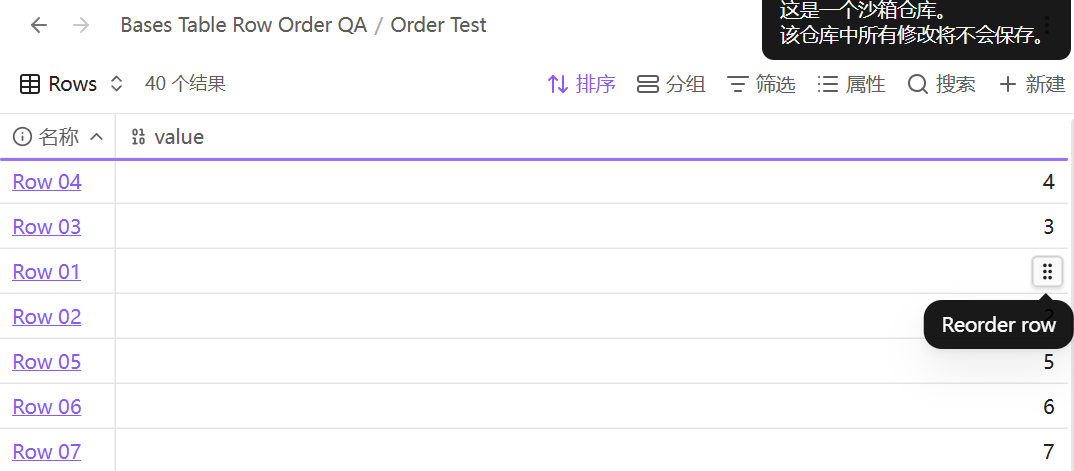
Drag rows directly in Obsidian's built-in Bases Table view. The grip appears on the right edge of the row under the pointer. The existing table toolbar, columns, and cell editing stay in place.
Use
- Open a
.basefile, link-embed one in a note, or render abasecode block in Reading view or Live Preview. Select a Table view. - Hover over a row, grab its grip, and drop above or below another row in the same group. The line shows where the row will land. Press Esc to cancel.
- To restore the view's configured sorting, right-click a grip and choose Reset manual row order.
The first move saves the current row sequence. Saved rows follow that sequence. Newly visible rows appear afterward in the view's configured sort order until moved. Filters, grouping, and result limits still determine which rows appear. Within a filtered view, visible rows exchange their slots while saved hidden rows keep theirs.
Storage and compatibility
The order is stored as vault-relative file paths in the corresponding Table view. For a standalone or link-embedded Base, this updates the .base file. For an inline Base, this updates that code block's YAML using Obsidian's native save action, which may normalize YAML formatting. Each code block and each Table view has its own order. Dragging does not edit the notes represented by the rows. A renamed or moved file is treated as a new row until positioned again. Disabling the plugin restores the normal visual sort.
Requires Obsidian 1.15.1 or later on desktop and the core Bases plugin. The integration uses internal parts of the built-in Table renderer, which can change in later app releases.
Install manually
From the latest GitHub release, place main.js, manifest.json, and styles.css in the vault's .obsidian/plugins/bases-table-row-order/ folder. Reload Obsidian and enable Bases Drag to Reorder in Settings → Community plugins.
The plugin runs locally and makes no network requests.
Development
The plugin is plain JavaScript and loads without a build step. Run node --check main.js to check syntax. To test, copy the three plugin files to an Obsidian test vault and reload the plugin there.