
README file from
GithubBard Player
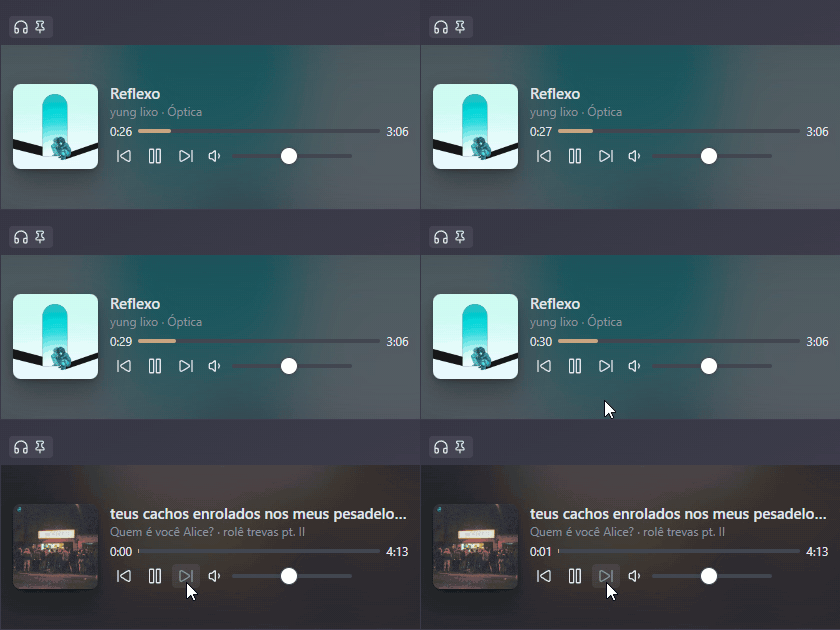
Music streaming player for Obsidian: a full player view, a mini player (dock, popout or floating always-on-top window), Windows taskbar buttons and media-key integration.
Desktop only. Bard Player relies on Electron's
<webview>and is not available on mobile.Compatibility and trademarks. Bard Player embeds the official YouTube Music web app; it does not block ads or download content. It is not affiliated with, endorsed by or sponsored by YouTube or Google. "YouTube" and "YouTube Music" are trademarks of Google LLC.
Status
Version 1.0.0. See docs/PLAN.md for the roadmap.
- Player view (ribbon icon or the "Open player" command): the full web player in a tab.
- Mini player (headphones ribbon icon, which can be hidden in settings, or "Open mini player"): compact controls to dock in a sidebar, a split or a popout.
- Windows taskbar buttons (previous / play-pause / next) and media keys.
Signing in
Sign in from the player view (Sign in, top right). Google sometimes refuses sign-in inside apps with "This browser or app may not be secure". If that happens:
- Update the Obsidian installer first. Obsidian updates itself, but those updates do not replace its built-in browser engine; only a new installer does. Google refuses sign-in on old engines no matter what Bard Player does, and Bard Player shows a notice when that is the cause. Check Settings → General: if the installer version is far behind the current version, download the latest installer from obsidian.md/download and install it over the old one (vaults and plugins are kept). You will have to sign in to Bard Player again afterwards.
- Try up to three times. Bard Player has three browser identities. When Google refuses, it switches identity, discards that attempt and goes back to the home page; a notice shows the step (for example 2/3). Select Sign in again each time.
- Reset and start over. If all three fail, open the command palette (Ctrl+P / Cmd+P), run Bard Player: Reset sign-in browser identity, restart Obsidian and try again.
- Send us the logs. If it still fails, turn on Settings → Bard Player → Troubleshooting →
Debug logging, open the developer console (Ctrl+Shift+I on Windows and Linux,
Cmd+Option+I on macOS) and select the Console tab. Try to sign in again, then copy every
line that starts with
[bard-player]into an issue. The first line names your Obsidian, Electron, Chrome (the engine; sign-in failed on Chrome 120 and worked on Chrome 150) and operating system versions; the next ones show each sign-in page and which identity Google refused. Page addresses are logged without their query string, so your e-mail and password never appear.
Where is my login stored?
Sign-in happens inside the player view. Cookies live in an Electron persistent partition
(persist:bard-player) under Obsidian's app data folder (%APPDATA%\obsidian\Partitions\bard-player
on Windows), never inside your vault, so vault sync and backups do not carry your login session.
Development
npm install
npm run build   # type-check, bundle main.js, copy to vault if .env.local sets OBSIDIAN_PLUGIN_DIR
npm run lint
npm run build:test   # same, but signs in through its own partition and copies to OBSIDIAN_TEST_PLUGIN_DIR
build:test is for a separate test vault: its build uses the persist:bard-player-test partition,
so you can sign out and test sign-in there without touching the login of your everyday vault.
See CONTRIBUTING.md.