
README file from
GithubAuto Equation Numbering for Obsidian
English
Introduction
When writing Markdown notes with a large number of mathematical equations, you often encounter the following issues:
- Painful manual renumbering: Inserting or deleting an equation in the middle of a long note forces you to manually update
\tag{n}for all subsequent equations, which is highly inefficient and error-prone. - Broken cross-references: Writing references like
As shown in Equation (3)...manually means you must search the entire note and update them one by one whenever equation numbers change. Missing even one leads to logical confusion for both you and your readers. - Duplicate equation synchronization: During complex derivations, the same equation may be repeated in multiple places. When managing numbers manually, keeping their numbering consistent (or incrementing them independently) is tedious and time-consuming.
- Non-linear editing & reference lookup friction: When jumping back to earlier formulas to add labels or citations, searching for formula labels across a long document is distracting and interrupts the writing flow.
- LaTeX compatibility issues: Using
\labeland\tagdirectly in Obsidian often leads to MathJax parsing errors or rendering glitches, disrupting your note-taking experience.
Automatic Equation Numbering & Cross-Referencing
Auto Equation Numbering is a plugin designed specifically for Obsidian. It fully automates equation numbering, in-text cross-referencing, and intelligent autocomplete suggestions, freeing you from tedious formatting chores so you can focus on expressing your ideas.
✨ Key Features
1. Automatic Display-Equation Numbering & Renumbering
- Automatic Parsing: Parses all display equations (
$$ ... $$) in your Markdown note and appends a LaTeX-compliant\tag{n}automatically. - Non-Intrusive Design: Ignores inline equations (
$...$) and code blocks (like```blocks) to ensure your source code remains safe and untouched. - Dynamic Updates: When you insert, delete, or rearrange equations, simply update the numbering with one click, and all equation tags will be recalculated and updated instantly.
2. Smart Cross-Reference Synchronization & Customizable Templates (Updated in v0.2.0)
Supports LaTeX-style equation label declarations and in-text links with customizable display templates:
- Define Labels: Use
\label{label_name}inside a display equation to declare a unique identifier. - In-text Reference: Link to the identifier in your text using Markdown link syntax, e.g.,
[Eq. ()](#eq:model). - Customizable Templates (Dropdown + Text Input):
Eq. ()$\rightarrow$[Eq. (2)](#eq:mlr)(International scientific paper standard)Equation ()$\rightarrow$[Equation (2)](#eq:mlr)(Full-word standard)()$\rightarrow$[(2)](#eq:mlr)(Parentheses only)式()$\rightarrow$[式(2)](#eq:mlr)(Chinese academic standard)xxx ()$\rightarrow$[xxx (2)](#eq:mlr)(Arbitrary custom prefix)
- Prefix Word Preservation on Renumbering: When equations are reordered (e.g. formula 2 becomes 3), the prefix (
Eq.,Equation,式, or customxxx) is completely preserved and only the number inside parentheses(3)is updated dynamically. - Optional Unification Toggle: Enable "Unify existing reference formats" in settings to convert all existing citations across the note into your chosen template upon update.
3. Equation Reference Autocomplete & Smart Candidate Ranking (New in v0.1.9)
- Instant Trigger: Typing
[式()](#or[式()](prefix:(or#followed by your prefix like#eq:or#f:) automatically triggers a floating autocomplete popup. - Rich Preview: Shows equation label, current numbering tag (
\tag{...}), and a clean LaTeX preview snippet. - One-Key Selection: Press
Enteror click an item to instantly complete the citation link and place the cursor conveniently outside the closing parenthesis. - Smart Multi-Tier Ranking (Smart Hybrid Mode):
- Tier 1 (Recent Edits): Newly created or modified equation labels in the current session are given highest priority (instantly ranked #1 even if added to an earlier equation in the middle of the document).
- Tier 2 (Unreferenced First): Equations not yet referenced in the document are prioritized before already-cited equations.
- Tier 3 (Cursor Proximity): Proximity-based scan upwards from current cursor position, ensuring equations directly above your cursor are prioritized.
- Configurable Sorting Modes: Choose between Smart Hybrid, Cursor Proximity, Recent Edit, or Document Bottom-Up in the settings tab.
- Insert Equation Reference Command: Use the Command Palette command
Insert Equation Reference Linkto automatically insert[式()](#and open the candidate list.
4. Flexible Numbering Formats
Customize equation numbering styles globally or per-note to match different document formats and layout requirements:
- Default:
1,2,3... - Chapter-based alphabetical style:
a-1,a-2... under 1st#chapter, resetting tob-1,b-2... under 2nd#chapter. - Prefix style:
A-1,A-2... - Sub-section style:
2.1,2.2... - Parentheses style:
(2-1),(2-2)... - Custom: Full customization where
*will be replaced with formula index, anda/{ch}with chapter letters (a-z).
5. Duplicate Equation Deduplication (Optional)
- Core Structure Extraction: The plugin extracts and normalizes the core LaTeX structure of equations (ignoring insignificant whitespace and existing tags).
- Reuse Numbers: If multiple identical equations are detected within the same note, the plugin reuses the same number by default to maintain derivation consistency.
- Independent Numbering: This can be turned off in the settings, allowing each equation to be numbered sequentially even if they are identical.
6. Convenient Control Panels & Shortcuts
- Redesigned Sidebar Control Panel: A modernized sidebar featuring a custom math logo, format settings, candidate preview, and a prominent full-width "Update" CTA button. Open it via the ribbon icon (
list-ordered) or command palette. - One-Click Ribbon Update (UpNum): Click the
refresh-cwribbon button to trigger instant numbering and reference synchronization on the active note. - Status Bar Toggle: Click the
🔢icon in the bottom-right status bar to quickly toggle auto-numbering on or off for the active note.
7. Diff-Range Performance Optimization
- Instant Updates: The plugin calculates the minimal changed character block and updates the editor using
editor.replaceRange()instead of replacing the entire file text. This prevents full-page MathJax/KaTeX re-renders and eliminates UI lag or freezing, even in extremely large notes.
| Sidebar Control Panel | Status Bar Switch |
|---|---|
 |
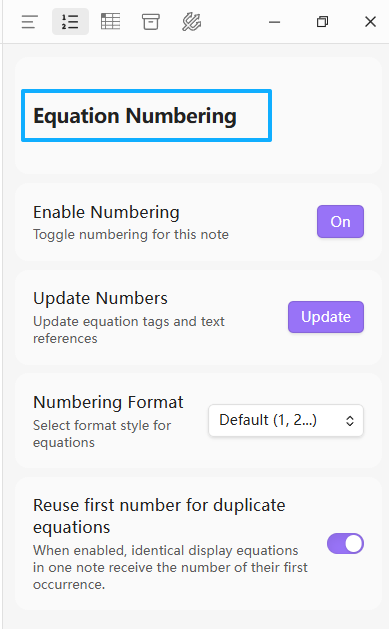 |
(Note: Total Toggle Switch:  )
)
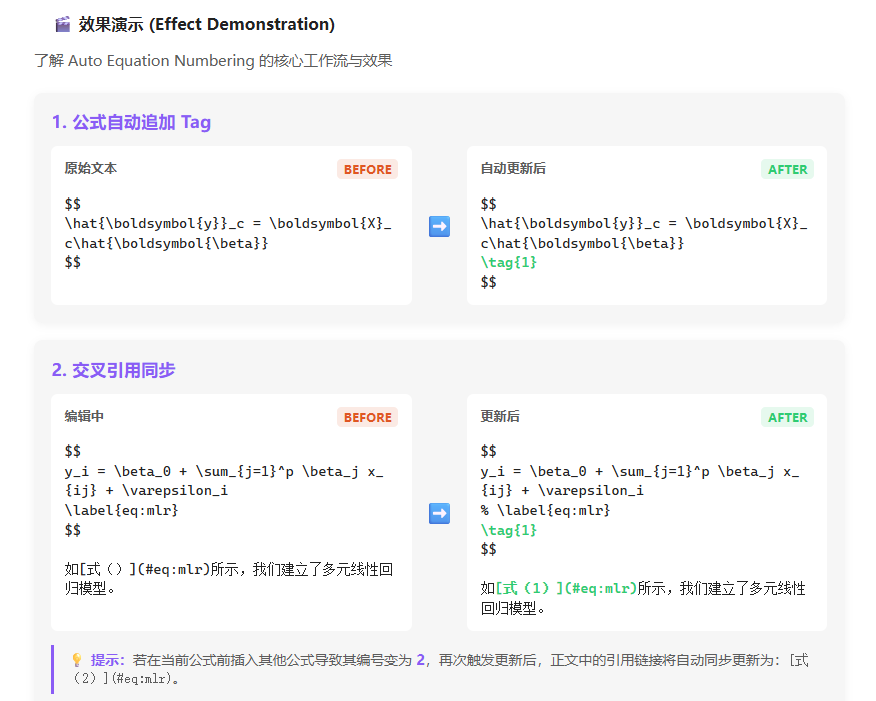
🎬 Demonstration
1. Automatic Tag Appending
Original text:
$$
\hat{\boldsymbol{y}}_c = \boldsymbol{X}_c\hat{\boldsymbol{\beta}}
$$
After auto-update:
$$
\hat{\boldsymbol{y}}_c = \boldsymbol{X}_c\hat{\boldsymbol{\beta}}
\tag{1}
$$
2. Cross-Reference Synchronization & Autocomplete
During editing:
$$
y_i = \beta_0 + \sum_{j=1}^p \beta_j x_{ij} + \varepsilon_i
\label{eq:mlr}
$$

As shown in [Eq. ()](#eq:mlr), we establish a multiple linear regression model.
- Typing
[Eq. ()](#eq:triggers the autocomplete popup witheq:mlrlisted at the top. - After pressing
Enter, it completes to[Eq. ()](#eq:mlr). - After clicking "Update" (or triggering via ribbon / command), the link placeholder in the text is filled automatically:
[Eq. (1)](#eq:mlr). - If another equation is inserted before it, shifting its number to
2, updating the document will automatically sync the in-text link to[Eq. (2)](#eq:mlr):
$$
y_i = \beta_0 + \sum_{j=1}^p \beta_j x_{ij} + \varepsilon_i
% \label{eq:mlr}
\tag{2}
$$

As shown in [Eq. (2)](#eq:mlr), we establish a multiple linear regression model.
🛠️ Installation & Building
1. Manual Installation
- Clone or download this repository.
- Install dependencies and build the project in the root folder:
npm install npm run build - In your Obsidian vault, navigate to
.obsidian/plugins/and create a folder namedobsidian-auto-equation-numbering. - Copy the compiled
main.js,manifest.json, andstyles.cssinto that folder. - In Obsidian's Community plugins settings, reload and enable the plugin.
2. Development
To automatically recompile the code during development, run:
npm run dev
💡 Important Technical Notes
- Overwriting Manual Tags: The plugin manages
\tag{...}tags dynamically. Any manually written\taginside display equations will be overwritten by the auto-numbering logic when you update. - MathJax Rendering Workaround: Because Obsidian's native MathJax rendering might throw errors when it parses a bare
\label{...}, the plugin automatically prepends a%comment prefix (rewriting it as% \label{...}) when modifying the file. This is only a workaround to prevent rendering issues in Obsidian and does not affect the plugin's ability to extract labels and update references.
中文
前言
在撰写包含大量数学公式的 Markdown 笔记时,经常遇到以下问题:
- “牵一发而动全身”的重排痛苦:在长篇笔记中间插入或删除一个公式,后面所有公式的
\tag{n}必须手动逐个修改,效率极低且极易出错。 - 断开的正文交叉引用:在正文中手写了
如公式 (3) 所示...,一旦前面的公式编号发生变动,必须人工搜索全文,逐一核对并修改引用。漏掉一个,就会导致读者和自己逻辑错乱。 - 重复公式的编号同步难题:在复杂的推导过程中,同一个公式可能会在多个地方重复出现。手动管理时,很难保证这些重复公式的编号始终保持一致(或按需独立递增),耗时耗力。
- 回溯补设与查找引用的割裂感:跳回前文补加公式标签后,要在长篇笔记中找到刚才的标签名称非常繁琐,频繁打断写作思路。
- LaTeX 语法兼容与报错折磨:在 Obsidian 中配合使用
\label和\tag时,常常因为 MathJax 原生渲染机制导致解析异常或报错,破坏写作流畅度。
自动化公式编号与交叉引用
Auto Equation Numbering 是一款专为 Obsidian 设计的公式管理插件。它将公式编号、正文交叉引用以及快捷自动补全彻底自动化,让您从繁琐的排版纠错中解放出来,专注于思路的表达。
✨ 核心特性
1. 显示公式自动编号与重排
- 全自动解析:解析 Markdown 文档中的所有独立显示公式(
$$ ... $$),并在末尾自动追加符合 LaTeX 规范的\tag{n}。 - 免干扰设计:不对行内公式(
$...$)和 Markdown 代码块(如```块内代码)进行任何处理,保证源码安全。 - 动态更新:插入、删除公式或调整段落顺序后,只需一键更新,所有公式编号均会自动重新计算与排列。
2. 正文交叉引用智能同步与引用模板定制 (v0.2.0 新特性)
支持 LaTeX 风格的公式标签声明与正文内的链接引用,并支持灵活定制引用前缀模板:
- 定义标签:在显示公式内部使用
\label{label_name}声明唯一标识符。 - 正文引用:在正文中使用 Markdown 链接指向该标识符,例如
[Eq. ()](#eq:model)或[式()](#eq:model)。 - 模板下拉预设与自定义输入:
Eq. ()$\rightarrow$[Eq. (2)](#eq:mlr)(国际期刊英文标准缩写)Equation ()$\rightarrow$[Equation (2)](#eq:mlr)(英文全称规范)()$\rightarrow$[(2)](#eq:mlr)(纯括号极简风格)式()$\rightarrow$[式(2)](#eq:mlr)(中文学术规范)xxx ()$\rightarrow$[xxx (2)](#eq:mlr)(支持任意自定义前缀词)
- 编号重排时完整保留前缀词:当因公式增删导致编号发生变化时(如由 2 变为 3),前缀词(如
Eq.、Equation、式或自定义的xxx)将完整保留,仅括号内的数字动态更新为(3)。 - 统一正文现有前缀(可选开关):开启后,更新时可将文档中所有已有引用统一规范化为当前选中的模板样式,方便批量格式统一。
3. 公式引用自动补全与智能候选排序 (v0.1.9 新特性)
- 键入即弹窗:在正文输入
[式()](#或[式()](prefix:(或#紧跟标签前缀如#eq:、#f:)时,自动弹出悬浮候选框。 - 丰富的信息展示:候选列表中实时展示标签名称(如
f:model)、当前公式编号 Tag(如a-14)以及精简的 LaTeX 公式代码预览。 - 一键回车插入:支持键盘上下方向键导航,按
Enter键即可自动补全引用标识符,并智能将光标移至括号外,书写行云流水。 - 三合一智能多级排序算法 (Smart Hybrid Mode):
- Tier 1 (最新编辑优先):实时追踪当前编辑会话中新增或修改的标签。即使用户跳回文档中部为第 9 个公式补设标签,该公式也会立即稳居候选列表第 1 位!
- Tier 2 (未引用优先):文档中尚未被任何链接引用的公式标签优先展示,已引用的公式自动后移。
- Tier 3 (光标就近原则):优先自当前输入光标位置向上扫描,完美兼容长文档各章节的非线性插写。
- 多模式切换:在设置面板中可自由切换为 智能推荐、光标就近、最近编辑 或 文档末尾逆序 模式。
- 快捷插入命令:命令面板提供
Insert Equation Reference Link(可绑定快捷键),一键自动键入[式()](#并唤醒候选弹窗。
4. 灵活的多样化编号格式
支持全局或单篇笔记独立的公式编号样式定制,满足不同文档与排版规范的要求:
- Default (默认):
1、2、3... - 按 # 大章节重编号:如
# 第一章下采用a-1a-n,# 第二章下自动重编号为b-1b-n,以此类推。 - 前缀样式:
A-1、A-2... - 小节点样式:
2.1、2.2... - 带括号样式:
(2-1),(2-2)... - Custom (自定义):支持完全自定义输入,其中
*被替换为序号,a或{ch}被替换为大章节字母(a-z)。
5. 重复公式去重机制(可选)
- 核心结构提取:插件会自动提取并标准化公式的 LaTeX 核心结构(剔除无意义的空白字符与已有 tag)。
- 复用编号:如果检测到同一篇笔记中存在多个完全相同的公式,默认会复用相同的公式编号,以保证推导的一致性。
- 独立编号:该机制可在设置中随时关闭。关闭后,每个公式都将获得独立递增的编号。
6. 便捷的交互面板与快捷按钮
- 全新设计的侧边控制面板:拥有精美的数学公式 Logo、精简的设置选项、候选设置、以及醒目的通栏(Full-width)“Update”更新按钮,更加美观易用。可点击侧边栏图标(
list-ordered)或通过命令栏打开。 - 侧边栏 Ribbon 快捷按钮 (UpNum):左侧 Ribbon 工具栏提供
refresh-cw快捷更新按钮,轻点一下即可瞬间更新当前笔记的全部公式编号与正文引用。 - 状态栏快捷切换:窗口右下角提供
🔢状态指示与快捷开关,随时切换当前笔记的自动编号状态。
7. 差分更新(Diff-Range)性能优化
- 瞬时更新不卡顿:采用差分算法计算文本的最小变化范围,仅通过
editor.replaceRange()进行局部替换,而不是粗暴地覆盖全文。这避免了整个文档的 MathJax/KaTeX 公式完全重新排版,彻底解决了大文档点击更新时的界面卡死和卡顿问题。
| 侧边控制面板 | 状态栏快捷切换 |
|---|---|
|
|
(注:自动编号总开关:)
🎬 效果演示
1. 公式自动追加 Tag
原始文本:
$$
\hat{\boldsymbol{y}}_c = \boldsymbol{X}_c\hat{\boldsymbol{\beta}}
$$
自动更新后:
$$
\hat{\boldsymbol{y}}_c = \boldsymbol{X}_c\hat{\boldsymbol{\beta}}
\tag{1}
$$
2. 交叉引用补全与同步
编辑中的笔记内容:
$$
y_i = \beta_0 + \sum_{j=1}^p \beta_j x_{ij} + \varepsilon_i
\label{eq:mlr}
$$

如[式()](#eq:mlr)所示,我们建立了多元线性回归模型。
- 当输入
如[式()](#eq:时,弹出候选框并推荐eq:mlr。 - 回车选中后,正文自动填充为
如[式()](#eq:mlr)。 - 点击“更新(Update)”(或通过 Ribbon 图标 / 状态栏),正文中的占位链接被自动填充为:
[式(1)](#eq:mlr)。 - 若在当前公式前插入其他公式导致其编号变为
2,再次触发更新后,引用链接将自动同步更新为:[式(2)](#eq:mlr)。 例如:
$$
y_i = \beta_0 + \sum_{j=1}^p \beta_j x_{ij} + \varepsilon_i
% \label{eq:mlr}
\tag{2}
$$

如[式(2)](#eq:mlr)所示,我们建立了多元线性回归模型。
🛠️ 安装与构建指南
1. 手动安装
- 克隆或下载本仓库至本地。
- 在项目根目录下执行依赖安装与打包:
npm install npm run build - 在您的 Obsidian 库中定位到
.obsidian/plugins/目录,并创建一个名为obsidian-auto-equation-numbering的新文件夹。 - 将编译生成的
main.js以及项目中的manifest.json、styles.css复制到该文件夹中。 - 在 Obsidian 的“社区插件”设置中重新加载并启用本插件。
2. 开发命令
本地开发调试时,可在本目录执行以下命令监听文件变化并自动重新编译:
npm run dev
💡 技术注意事项
- 手工 Tag 覆盖:插件会接管显示公式中的
\tag{...}。若文档中存在手动写入的\tag,在执行更新时会被插件的自动编号逻辑覆盖。 - MathJax 渲染兼容处理:由于 Obsidian 原生的 MathJax 渲染可能对
\label{...}抛出解析异常,插件在重写公式时会为其自动添加%前缀(即重写为% \label{...})。该处理仅在渲染层面避免报错,不影响插件对标识符的提取与交叉引用更新。