
README file from
GithubAttachment Cloud Cache
English · 简体中文
Your attachments live in your own storage — and still open offline. Paste a file into a note: it goes to your S3-compatible storage (Cloudflare R2, AWS S3, MinIO, Backblaze B2, self-hosted), the note keeps a link, and the file stays in your vault as the local copy — what renders is that copy, with no network round trip.
Install · Releases · Report a problem · Requires Obsidian 1.13.0+
Contents · Quick start · Why this plugin · Features · Requirements · Installation · Settings · Commands · Good to know · Troubleshooting · Privacy & security · How it is verified · Upgrading · Feedback · License
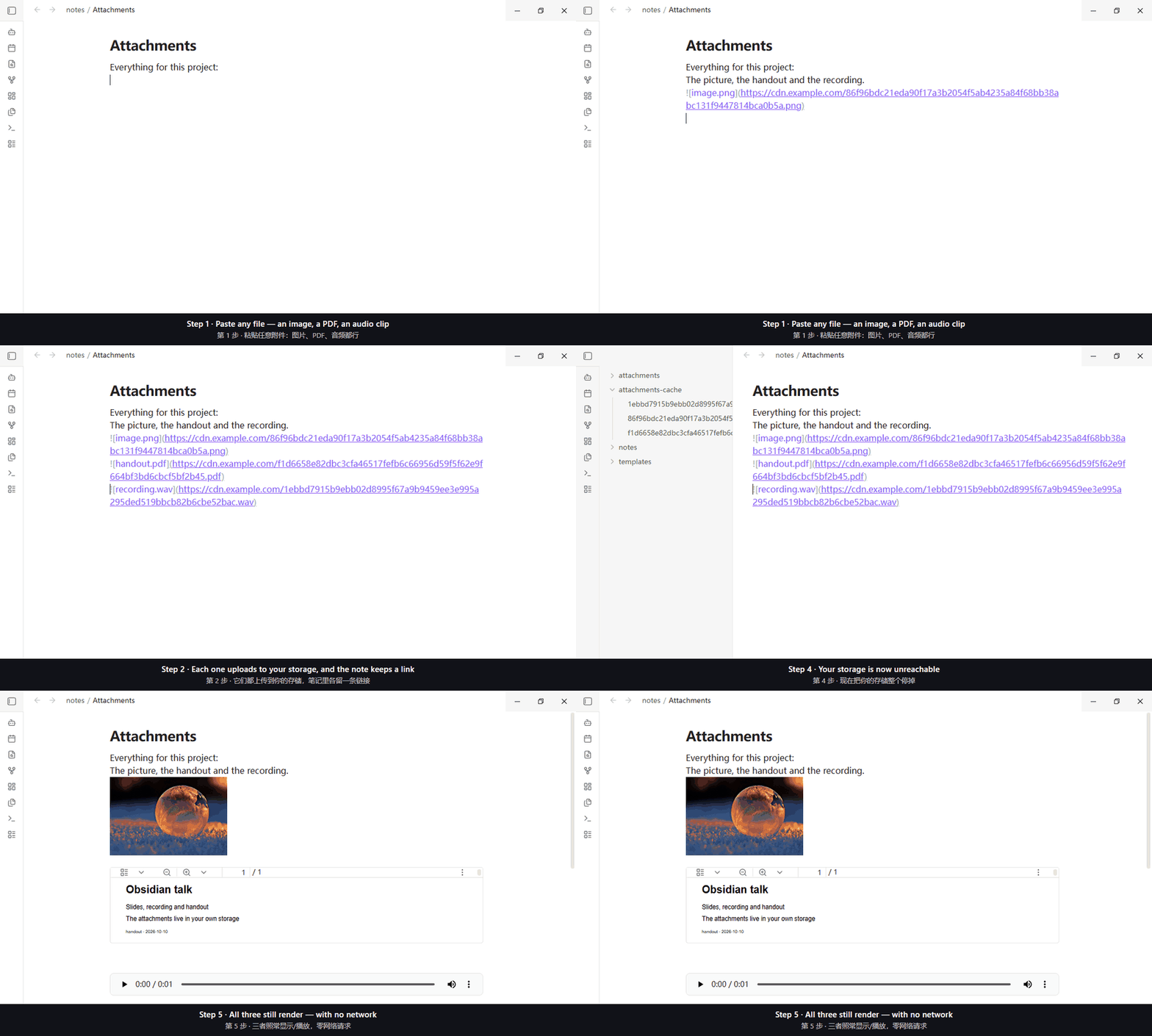
Paste it in: it uploads, the link is rewritten, the file stays in your vault as the local copy. One command opens the attachment manager; switch the storage off and all three still render — from the copies in your vault.
Quick start
- Fill in the storage connection — endpoint, bucket, region and a key pair (or import MinIO's credentials file).
- Press Test connection — a green public light or a blue private light, both work.
- Paste a file into a note — upload, link rewritten, file stays in your vault.
A vault full of attachments already? Upload all attachments in the settings does it in one go.
Why this plugin
Upload-only plugins break offline; localize-only plugins need one online pass first. This one does both: the file goes to your bucket, rendering reads the copy in your vault, the original stays with you.
| Upload-only | Localize-only | This plugin | |
|---|---|---|---|
| Offline | broken | after one online pass | works — renders the local copy |
| New device | links work online | download everything again | missing copies back-filled on demand |
| Vault size | small | grows with every file | small — copies are disposable |
| Who holds the original | a third party | you, on one device | you, in storage you control |
Features
- Any S3-compatible storage, any attachment type — images, audio, video, PDF, archives, documents, files with no extension; what Obsidian can preview becomes an embed, the rest a link.
- It uploads on the way in — pasted, dropped, from your phone's gallery or camera, shared into Obsidian, copied into the vault; the link is rewritten on the spot.
- Or everything already in the vault — Upload all attachments in the settings: one confirmation, no list; files already in your storage only get their links rewritten.
- Attachment manager — one dialog for the whole vault: a six-column table, counted filters, batch actions on the selection; rename works on a single row.
- Offline and multi-device — rendering uses the local copy, missing ones are back-filled on demand; canvas references count too.
- The same file twice is one object — deduped by content: one address, shared by every note and device that uses it.
- What your bucket allows, at a glance — a light next to Test connection: public / private / unreachable, re-checked on demand, rewriting no link.
- Cleanup — the “To clean up” filter in the attachment manager: cloud objects no note links to, unreferenced local files, cached off-site copies; it deletes only what you confirm. When an attachment loses its last link, a notice points here.
- Several devices on one bucket (optional) — each upload records what this vault uses, and cleanup skips anything another device still uses. Off by default; while off it sends no extra request.
- Two extras, off by default — off-site files treated as ordinary attachments (with a site list); a cap on local copies, least recently used trimmed first.
- On the way out — Revert links to local paths points the links back at the files in your vault: the reverse of uploading, and nothing is deleted.
Requirements
- Obsidian 1.13.0+, desktop and mobile.
- A bucket you control (S3-compatible), plus an access key pair.
ListBucketon that bucket — before every upload the plugin records which files this vault uses, and a cloud delete reads the other devices' records first. Without it the plugin refuses to upload rather than risk deleting something another device still uses. (R2's Object Read & Write includes it; on MinIO adds3:ListBucket.)- The bucket does not have to be public — that only matters when you share links out; otherwise the plugin fetches with your keys and shows the local copy. Test connection tells you which case you are in.
Installation
From Obsidian: Settings → Community plugins → Browse → search Attachment Cloud Cache → Install → Enable.
Manually: put main.js, manifest.json and styles.css from the
latest release into
<vault>/.obsidian/plugins/attachment-cloud-cache/ (the folder name must equal the plugin id, or it will not load).
Settings
In Settings → Attachment Cloud Cache (Chinese names are in the 中文版 below).
| Group | Setting | What it does |
|---|---|---|
| Storage connection | Endpoint · Bucket · Region | Where the storage is. The bucket name is case-sensitive; self-hosted services usually take us-east-1. |
| Access key ID · Secret access key | The secret goes into the OS keychain, never data.json; Import from a credentials file reads MinIO's JSON. |
|
| Compatibility mode | Addresses files as endpoint/bucket/key; keep it on for R2, MinIO and most self-hosted services. |
|
| Public link address (optional) | Empty uses the address built above; fill it in for a CDN or your own domain. | |
| Unify object names | Turns the objects already in your bucket into pure content hashes and points the notes at them. Optional — new uploads are already content-addressed; run it once if your bucket still holds names from an older version. Running it again is safe. Needs the CopyObject permission. |
|
| Test connection | A light (checking / public / private / unreachable) + a button: re-checks upload, read-back, delete and outside reach. | |
| Upload | Upload new attachments automatically | On by default; off leaves new files local only. |
| Upload files from other sites | Off by default. The site list only narrows the automatic path; picking by hand is never restricted. | |
| Also upload files on this computer | Off by default, desktop only: “Upload all” then reads the file:/// paths in your notes. |
|
| Upload all attachments | Sends the files your notes reference to your storage and rewrites the links. | |
| Revert links to local paths | For when you stop using the plugin: links point at the files in your vault again; files with no local copy keep pointing at your storage. | |
| Offline and local copies | What happens to the local copy | Keep it (default, works offline) or delete it (saves space, no offline, and PDFs cannot be shown). |
| Download missing local copies automatically | Fetches files this device lacks; skipped in delete mode, except for a private bucket. | |
| Local copy limit (MB) · Space used | 0 means no limit; over the limit the least recently used go first, and only once the object is confirmed in your storage. |
|
| Logs and troubleshooting | Deletion log · Debug logging | Every permanent delete is written down; debug logging prints to the console and changes nothing. |
Commands
| Command | What it does |
|---|---|
| Attachment manager | The only command. One dialog (wide window on desktop, full screen on phones): a table of every attachment + counted filters (to clean up / not uploaded / uploaded / in cloud only / not referenced) + batch actions on the selection. It closes itself when the batch finishes, and one notice reports how many succeeded, were skipped, failed. |
Uploading the whole vault is not a command — it is Upload all attachments in the settings.
Upgrading from 1.8 or earlier? The old Upload attachments and Clean up attachments are gone — they are filters and batch actions in Attachment manager now; hotkeys need rebinding.
Good to know
- A deleted local copy comes back on the next open, under its original name — as long as the plugin recognizes the link as yours. After a storage-address change, links written before it still open online, never offline.
- One file, one object, shared by several notes and devices; a storage deletion cannot be undone, and a cloud delete reads every device's records first — anything another device still uses is skipped and reported.
tiff,heicandicoare inserted as plain links — the host cannot preview them in an embed.- A dropped file's link lands at the caret, not at the pointer — no public API maps coordinates to an editor position.
- Switching devices? Copy the plugin folder, but delete
.cache-index.jsonfirst — it records where this device keeps its copies. The secret key is not in the folder.
Troubleshooting
Start with Settings → Attachment Cloud Cache → Test connection: the light answers “can this vault reach the storage, and can other people open my links”, and changes nothing.
| What you see | What it means | What to do |
|---|---|---|
Images blank, 403 in the console |
The bucket is private, the note holds a direct link | Nothing to fix — what renders is the local copy |
| Images blank, the light says Unreachable | Endpoint / bucket / keys | Re-run Test connection, then check the endpoint |
| The installer says No appropriate version found. | Obsidian older than 1.13.0 | Upgrade Obsidian — the installer is refusing, not a broken plugin |
| Links open for you, not for others | The bucket refuses anonymous reads | Accept it (links are for you), or make the bucket public / set a public link address |
| Broken on a second device | No local copy there, none could be downloaded | Open the note once to back-fill; if it stays broken, check the key can read |
| It says an off-site file is “a web page or plain text” and skips it | That address serves HTML | Refused on purpose — use a direct link |
| Test connection says the storage refused to write | The keys can read, not write | Uploads fail the same way — grant write access |
| Test connection says the address “answered with a web page” | A proxy or WAF returned 200 |
That is not public access — fix the public link address |
| A command seems to do nothing | Storage not set up (it says so), or a note cannot be read | Cleanup will not treat “unknown” as “unused” — fix that note and retry |
Privacy & security
- It only talks to your storage — no telemetry, no analytics.
- Two things can reach outside, both off by default: uploading files from other sites (the same switch decides whether “Upload all” touches off-site images), and letting “Upload all” read files on this computer. Turning either on is consent.
- A web page is never stored —
text/htmland othertext/*are refused. - The secret access key lives in the OS keychain, never in
data.json; the access key ID is stored in the clear — it is an identifier, not a secret. The file names you upload end up visible to your storage provider.
How it is verified
- Automated: signing, key and path derivation, settings, the index, the upload chain (byte-identical, one PUT, zero GETs), paste and drop decisions, canvas rewriting, every connection state; then a mutation check that breaks each rule on purpose and the suite must fail for that rule's own reason.
- Real Obsidian 1.14 (Windows) against a real MinIO: images, audio, video, PDF, archives checked down to the uploaded bytes; both canvas node kinds; offline audio/video/PDF; a round trip whose link opens anonymously. Bucket private, then public: the light lands on Private / Public, five rounds of Test connection agree, nothing left in the bucket.
- In-app scripts: CDP drives real Obsidian (build fixtures → open the dialog → read the DOM → assert → clean up): 38 checks, 18 more after a real upload. It never confirms, so your vault and bucket are untouched.
- Phones: Android, verified up to 1.1.2 — ⚠️ no device regression since.
Reproduce: npm run verify:real-storage (storage), node scripts/verify-connection-probe.mjs (connection).
Upgrading
- 1.13.0 — batch uploads are faster, and empty link labels get a name.
- A batch writes its cloud reference declaration once instead of once per file, and uploads up to four files at a time. Results are still committed in order, so notes and counters look exactly as before. If that one declaration fails, the batch falls back to per-file declarations and stays serial — never a half-protected upload. The "list the whole bucket first" pre-check is gone: it cost a full listing and never helped genuinely new files.
- An empty link label now shows the real file name.
becomes, for both in-vault links and localfile://// off-site links. A label you wrote yourself is never touched. Already-written empty links in old notes are left as they are.
- 1.12.0 — two settings are gone, and neither needs any action from you.
- Shared bucket is no longer a switch: recording what this vault uses (and checking other devices before a cloud
delete) now happens always. That is a safety change — with it off, a cleanup could delete an object another
device still used. ⚠️ It needs
ListBucket; without it uploads are refused (see Requirements). - Content-addressed keys is gone too: new uploads are always named
<sha256>.<ext>, so the same file is one object across every device, even when the names differ. Names still show as the original file name in your notes. Objects you already have keep their old names and keep working — Unify object names converts them if you want the bucket to look tidy. - Upload all attachments now shows a progress bar while it runs, and never says "upload N" for files that are already in your storage (those only get their links rewritten).
- Shared bucket is no longer a switch: recording what this vault uses (and checking other devices before a cloud
delete) now happens always. That is a safety change — with it off, a cleanup could delete an object another
device still used. ⚠️ It needs
- One command in the panel.
Upload files your notes link to…,Upload off-site or local files…,Pick files to cache…,Upload attachments,Clean up attachments— all gone: uploading and cleaning are filters and actions in Attachment manager, and the whole vault goes up via Upload all attachments in the settings. - ⚠️ Hotkeys are bound to command ids, and the ids changed — rebind them to Attachment manager.
- No cache folder since 1.2.0: a copy is simply the file in your attachments folder; nothing to migrate, the first render registers it.
- Settings are additive: new keys get defaults, unknown keys from older versions are ignored.
Feedback
Open an issue: https://github.com/udarent/obsidian-plugins-attachment-cloud-cache/issues — say what you saw, your Obsidian version and which storage you use. Issues and pull requests are welcome.
Working on it? npm install, then npm run dev (watch build) or npm test (build + all suites).
License
MIT — see LICENSE. Use it, modify it, redistribute it (commercial too); keep the copyright notice.
Attachment Cloud Cache(附件云端缓存)
English · 简体中文
附件放在你自己的存储里,断网也照样能看。 粘一个文件进笔记:它传到你的 S3 兼容存储(Cloudflare R2、AWS S3、 MinIO、Backblaze B2、自建服务),笔记里留下链接,文件留在库里当本地副本 —— 显示就读它,不走网络。
安装 · 版本发布 · 反馈问题 · 需要 Obsidian 1.13.0+
目录 · 快速开始 · 为什么用它 · 功能 · 环境要求 · 安装 · 设置 · 命令 · 使用须知 · 常见问题 · 隐私与安全 · 验证情况 · 从旧版本升级 · 反馈 · 许可
粘贴即上传、链接即时改写,文件留在库里当本地副本。一条命令打开附件管理;把存储整个停掉,三件照常显示 —— 读的是库里的副本。
快速开始
- 填好存储连接 —— 服务地址、存储桶、区域,加一对密钥(也可直接导入 MinIO 的凭据文件)。
- 点「测试连接」 —— 绿灯「公开访问」、蓝灯「私有访问」,都能用。
- 粘一个文件进笔记 —— 上传、改链接,文件留在库里。
库里已有一堆附件?用设置页的 「上传全部附件」 一次搬完。
为什么用它
只上传的插件,一断网就裂图;只本地化的插件,得先联网跑一遍。这个插件两件一起做:文件进你的桶,显示读库里的 副本,原件在你自己手上。
| 只上传 | 只本地化 | 本插件 | |
|---|---|---|---|
| 断网时 | 打不开 | 联网跑过一次才行 | 能看 —— 读的是本地副本 |
| 换新设备 | 联网能看 | 全部重下一遍 | 缺的副本按需补回 |
| 库体积 | 小 | 每多一个文件就大一分 | 小 —— 副本随时可以删 |
| 原件在哪 | 第三方 | 你手里,但只在那台设备上 | 你自己控制的存储里 |
功能
- 任意 S3 兼容存储,任意附件类型 —— 图片、音频、视频、PDF、压缩包、文档、无扩展名的文件;能预览的插成嵌入, 其余插成链接。
- 文件一进来就上传 —— 粘贴、拖入、手机相册或相机、分享到 Obsidian、拷进库,链接当场改写。
- 库里已有的也能一次搬完 —— 设置页**「上传全部附件」**:一次确认、没有清单;已在存储里的只改写链接,不重传字节。
- 附件管理 —— 一个弹窗管全库:六列表格、带件数的筛选、勾选后批量处理;重命名只对单条生效。
- 离线、多设备 —— 显示走本地副本,换设备时缺的按需补回;画布引用同样算数。
- 同一个文件传两次只存一份 —— 按内容去重:同一份内容只有一个地址,多篇笔记、多台设备共用它。
- 桶允许什么,一眼看到 —— 「测试连接」旁一盏灯:公开 / 私有 / 连不上,随时可重测,不改任何链接。
- 清理 —— 附件管理里的「待清理」筛选:云端没人引用的对象、没有引用的本地文件、站外缓存下来的副本; 只删你确认的。附件失去最后一条引用时,一条通知指路到这里。
- 多台设备共用同一个桶 —— 一直生效:每次上传先记下本库引用了什么,清理时跳过别的设备还在用的对象;
需要
ListBucket权限,没有就拒绝上传(而不是冒着删掉别人文件的风险)。 - 两个可选项,默认都关 —— 站外文件按普通附件处理(可配站点名单);本地副本上限,超限先清最久没用的。
- 想离开的时候 —— 「把链接改回本地路径」把链接指回库里的文件:上传的逆操作,什么都不删。
环境要求
- Obsidian 1.13.0+,桌面与手机。
- 你自己的 S3 兼容存储桶,一对访问密钥。
- 桶上要有
ListBucket权限 —— 每次上传前插件会记下本库引用了哪些文件,删除云端对象时先读其它设备的记录。 没有这个权限时插件拒绝上传(而不是冒着删掉别人还在用的文件的风险)。R2 的 Object Read & Write 已含它; MinIO 需要显式加s3:ListBucket。 - 桶不必公开 —— 只有把链接分享出去时才用得上公开读;否则插件用你的密钥取回、显示本地副本。「测试连接」会说明属于哪种。
安装
在 Obsidian 里装: 设置 → 第三方插件 → 浏览 → 搜 Attachment Cloud Cache → 安装并启用。
手动装: 从最新 release
下载 main.js、manifest.json、styles.css,放进 <库>/.obsidian/plugins/attachment-cloud-cache/
(目录名必须等于插件 id,否则不加载)。
设置
在 设置 → Attachment Cloud Cache 里(各项的英文名见上面的英文版)。
| 分组 | 设置项 | 作用 |
|---|---|---|
| 存储连接 | 服务地址 · 存储桶 · 区域 | 存储地址。桶名区分大小写;自建服务一般填 us-east-1 之类。 |
| 访问密钥 ID · 秘密访问密钥 | 秘密密钥进系统钥匙串,不写 data.json;从凭据文件导入 可直接读 MinIO 的 JSON。 |
|
| 兼容模式 | 地址按 服务地址/桶/键 拼;R2、MinIO 和多数自建服务要开。 |
|
| 公开链接地址(可选) | 留空用上面拼出的地址;用 CDN 或自己域名时填。 | |
| 统一对象名 | 把桶里已有的对象改成纯内容哈希,并把笔记里的链接指过去。可选 —— 新上传的对象名本来就是纯哈希;桶里还留着旧版带名字的对象时跑一次即可,重复跑是安全的。需要 CopyObject 权限。 | |
| 测试连接 | 状态灯(检测中 / 公开 / 私有 / 无法访问)+ 按钮:重测上传、读回、删除、对外访问。 | |
| 上传 | 新附件自动上传 | 默认开;关掉后新文件只留本地。 |
| 站外文件也上传到云端 | 默认关。站点名单只约束自动这一路,手动挑不受限。 | |
| 同时上传本机文件 | 默认关,仅桌面。开启后「上传全部附件」会读笔记里的 file:/// 路径。 |
|
| 上传全部附件 | 把笔记引用到的附件传到你的存储并改写链接。 | |
| 把链接改回本地路径 | 想停用插件时用:把链接改回指向库里的文件;没有本地副本的仍指向存储。 | |
| 离线与本地副本 | 上传后如何处理本地副本 | 保留(默认,可离线)或不保留(省空间,不能离线,PDF 也看不了)。 |
| 自动下载缺失的本地副本 | 这台设备缺的文件自动取回;「不保留」时跳过,私有桶除外。 | |
| 本地副本上限(MB)· 占用空间 | 0 不限制;超限从最久没用的开始删,且先确认云端还有。 |
|
| 记录与排障 | 删除记录 · 排障日志 | 每次永久删除都记一笔;排障日志只打控制台,不改行为。 |
命令
| 命令 | 作用 |
|---|---|
| 附件管理 | 唯一的命令。弹窗(桌面宽窗口 / 手机全屏):全库附件一张表 + 带件数的筛选(待清理 / 未上传 / 已上传 / 云端有本地无 / 没人引用)+ 勾选后批量处理。跑完自动关窗,一条通知报成、跳过、失败各几件。 |
整库一次传完不是命令 —— 它是设置页里的 「上传全部附件」。
从 1.8 及更早版本升级? 原来的「上传附件」「清理附件」已取消 —— 现在是「附件管理」里的筛选与批量动作, 快捷键需要重绑。
使用须知
- 删掉的本地副本,下次打开笔记会按原文件名补回来 —— 前提是插件认得出那条链接是你的存储。改过存储地址后, 改之前写下的链接在线能开,离线不显示。
- 一个文件只存一份,可能被多篇笔记、多台设备共用;云端删除不可撤销,但删除前会先读每台设备的记录 —— 别的设备还在用的那些会被跳过并逐个报出来。
tiff、heic、ico插入的是普通链接 —— 宿主不能在嵌入里预览。- 拖入的文件,链接落在光标处而非指针落点 —— 公开 API 没有「坐标 → 编辑器位置」的映射。
- 换设备可复制插件目录,但先删
.cache-index.json—— 它记的是这台设备的副本位置。秘密密钥不在目录里。
常见问题
先看 设置 → Attachment Cloud Cache → 测试连接:灯回答「连不连得上存储、别人打不打得开链接」,且什么都不改。
| 现象 | 原因 | 怎么办 |
|---|---|---|
图一直空着,控制台报 403 |
桶是私有的,笔记里却是直链 | 不用修 —— 显示的就是本地副本 |
| 图空着,灯是「无法访问」 | 服务地址 / 桶名 / 密钥 | 重跑测试连接,再核对地址 |
| 安装时说 No appropriate version found. | Obsidian 低于 1.13.0 | 升级 Obsidian —— 安装机制在拒绝,不是插件坏了 |
| 链接自己打得开,别人打不开 | 桶拒绝匿名读 | 接受(只给自己用),或把桶改公开、配上公开链接地址 |
| 换台设备就打不开 | 那台没有本地副本,也补不下来 | 打开一次笔记让它补回;仍不行查密钥读权限 |
| 插件说站外文件是「网页或纯文本」,没上传 | 那个地址回的是 HTML | 刻意拒收 —— 换一条直链 |
| 测试连接 说存储拒绝写入 | 密钥能读不能写 | 上传会同样失败 —— 去加写权限 |
| 测试连接 说地址「回的是一个网页」 | 代理或 WAF 回了 200 |
这不是公开访问 —— 去改公开链接地址 |
| 点了命令像没反应 | 没配好存储(它会说),或有笔记读不到 | 清理不把「不知道」当「没人引用」 —— 处理好那篇再跑 |
隐私与安全
- 只连你自己的存储 —— 没有遥测、没有统计。
- 会连到库外的只有两处,默认都关: 站外文件上传(同一开关也决定「上传全部附件」碰不碰站外图)、允许 「上传全部附件」读这台电脑的文件。打开就是同意。
- 网页不会被存下来 ——
text/html等text/*一律拒收。 - 秘密密钥进系统钥匙串,不写
data.json;密钥 ID 明文存着 —— 它是标识符,不是秘密。你上传时的文件名会出现在存储服务商那边。
验证情况
- 自动化: 签名、对象名与路径推导、设置、索引、上传链路(字节一致、一次 PUT、零次 GET)、粘贴与拖放判定、 画布改写、各种连接状态;之后一道变异验证:把每条规则故意改坏,套件必须因那条规则自己报错。
- 真实 Obsidian 1.14(Windows)配真实 MinIO: 图片、音频、视频、PDF、压缩包逐项核到上传字节;画布两类节点; 离线音频/视频/PDF;链接匿名可打开的回环。桶先私有后公开,状态灯分别落在「私有」/「公开」,连点五次 「测试连接」结论一致、桶里不留东西。
- 真机界面脚本: CDP 驱动真实 Obsidian(造数据 → 开弹窗 → 读 DOM → 断言 → 还原):验 38 项,真上传后再验 18 项。全程不点确认,不动你的库和桶。
- 手机: Android 验证到 1.1.2 —— ⚠️ 之后没再做真机回归。
复现:npm run verify:real-storage(存储侧)、node scripts/verify-connection-probe.mjs(连接探测)。
从旧版本升级
- 1.13.0 —— 批量上传更快了,空的链接文字也补上了文件名。
- 一整批只写一次云端引用声明(原来每个文件写一次),并且最多 4 个文件同时上传;结果仍按顺序提交, 所以笔记和计数与以前完全一致。整批声明写失败时会退回逐文件声明、并保持串行,不会出现「保护写了一半」。 另外撤掉了「先列整个桶」的预检:它要付一次全桶列举,对真正的新文件没有任何帮助。
- 空的
[]会补上真实文件名:→,库内链接与 本机file:////站外链接两条路都补。你自己写过的显示文字一个字不动;老笔记里已经写好的空链接不会回填。
- 1.12.0 —— 两个设置项没了,都不需要你动手。
- 共享桶 不再是一个开关:上传前记下本库引用了什么、删除云端前先看别的设备的记录,现在一直生效。
这是安全修正 —— 关着的时候一次清理可能删掉另一台设备还在用的对象。⚠️ 它需要
ListBucket; 没有这个权限时拒绝上传(见「环境要求」)。 - 内容寻址 key 也没了:新上传的对象名一律是
<sha256>.<ext>,于是同一个文件在所有设备上是同一个对象, 哪怕各自的名字不同。笔记里显示的仍是原来的文件名。桶里已有的对象保持旧名字、照常工作 —— 想让桶里整齐就点一次**「统一对象名」**。 - 「上传全部附件」跑的时候有进度条了,而且不会把"已经在你的存储里"的那些算成"上传 N 个"(它们只改链接)。
- 共享桶 不再是一个开关:上传前记下本库引用了什么、删除云端前先看别的设备的记录,现在一直生效。
这是安全修正 —— 关着的时候一次清理可能删掉另一台设备还在用的对象。⚠️ 它需要
- 命令面板只剩一条。
上传笔记引用的文件…、上传站外或本机文件…、挑选要缓存的外链…、上传附件、清理附件全部取消:上传与清理变成「附件管理」里的筛选与动作,整库一次传完用设置页的**「上传全部附件」**。 - ⚠️ 快捷键绑的是命令 id,这次 id 变了 —— 需重绑到**「附件管理」**。
- 1.2.0 起没有缓存目录:副本就是附件目录里那份文件,无需迁移,第一次显示时自动登记。
- 设置只增不减:新键有默认值,旧版本留下的未知键被忽略。
反馈
到 https://github.com/udarent/obsidian-plugins-attachment-cloud-cache/issues 提 issue —— 说清你看到的、Obsidian 版本和用的哪家存储。欢迎 issue 与 PR。
改插件?npm install,然后 npm run dev(监听构建)或 npm test(构建 + 全部套件)。
许可
MIT,见 LICENSE。 可自用、修改、再分发(含商用);保留版权声明。