
README file from
GithubAlteryx Viewer
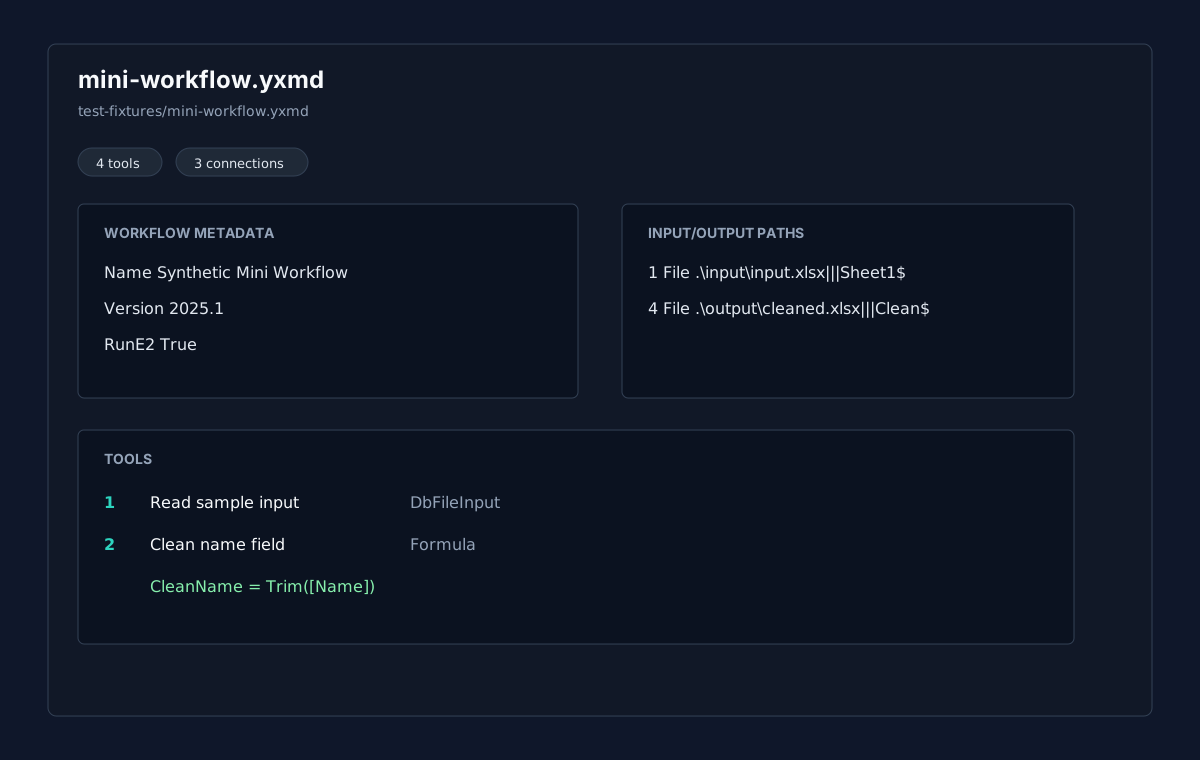
Alteryx Viewer is a read-only plugin for inspecting .yxmd workflows and listing .yxzp packages inside the vault. It summarizes workflow metadata, tools, tool types, connections, input/output paths, formula expressions, warnings, and source XML without executing, generating, converting, validating, or saving Alteryx files.
Features
- Opens
.yxmdworkflow files in a dedicated view. - Lists
.yxzppackage entries and highlights contained.yxmdworkflows. - Shows workflow metadata such as
yxmdVer, workflow id, name, and run settings when present. - Shows each tool with ToolID, inferred tool type, GUI plugin, engine entry point, annotation/label, container id, position, config summary, paths, and formulas.
- Shows connections as
origin tool.port -> destination tool.port. - Reports warnings for malformed XML, missing or duplicate ToolIDs, unknown synthetic/custom tool types, broken connections, and package contents.
- Keeps a source view with line numbers and lightweight XML highlighting available for workflow files.
- Filters tools, connections, package entries, paths, formulas, and config summaries.
Inspect-only scope
This plugin never runs Alteryx workflows. It does not open Alteryx Designer, does not invoke shell commands, does not call external apps, and does not use network APIs, clipboard APIs, eval, dynamic function construction, or process execution APIs.
Version 0.1 intentionally does not generate, convert, validate, edit, normalize, or save .yxmd files. The local alteryx-flow-agent-toolkit remains the reference toolchain for generation, reverse engineering, conversion, comparison, and structural validation work. Alteryx Viewer only reads bytes through the vault API and renders local inspection views.
Fixtures
Committed fixtures are synthetic only:
test-fixtures/mini-workflow.yxmdtest-fixtures/containers.yxmdtest-fixtures/broken-unknown.yxmdtest-fixtures/package-listing.yxzp
Do not commit real client workflows or private package fixtures.
Installation
Manual installation
Until a public release is available:
- Download
main.js,manifest.json, andstyles.cssfrom the latest release. - Create this folder in your vault:
.obsidian/plugins/alteryx-viewer/. - Put the downloaded files in that folder.
- Reload the app.
- Enable Alteryx Viewer in Settings -> Community plugins.
BRAT installation
For beta testing, install the plugin with BRAT using this repository URL:
https://github.com/viggomeesters/obsidian-alteryx-viewer
Usage
Open any .yxmd or .yxzp file in your vault. The file opens with Alteryx Viewer.
Use the toolbar to:
- filter visible details
- switch between summary, tools, connections, and source views for
.yxmd - refresh the current file after external changes
Malformed workflow XML automatically shows parse warnings and keeps source inspection available when possible.
Development
npm install
npm run build
npx tsc --noEmit
npm test
Optional fixture comparison with the separate Alteryx toolkit:
cd /Users/viggomeesters/Dev/alteryx-flow-agent-toolkit
python tools/validate_yxmd.py /Users/viggomeesters/Dev/obsidian-alteryx-viewer/test-fixtures/mini-workflow.yxmd
python tools/yxmd_to_spec.py /Users/viggomeesters/Dev/obsidian-alteryx-viewer/test-fixtures/mini-workflow.yxmd --out /tmp/alteryx-viewer-mini-spec.md
Release process
Community plugin files are installed from GitHub releases. For each release:
- Update
manifest.json,package.json, andversions.json. - Run
npm install,npm run build,npx tsc --noEmit, andnpm test. - Create a GitHub release whose tag exactly matches
manifest.json.version. - Attach
main.js,manifest.json, andstyles.cssas release assets.