
README file from
GithubAI Curator for Obsidian
Save anything. Read what matters.
简体中文 · Download 1.0.0 · Feedback
Turn saved articles and bookmarks into a reading inbox you can actually use. AI Curator reads Markdown in folders you choose, recommends Read / Skim / Reference / Skip, and writes concise notes with ideas, caveats and next actions.
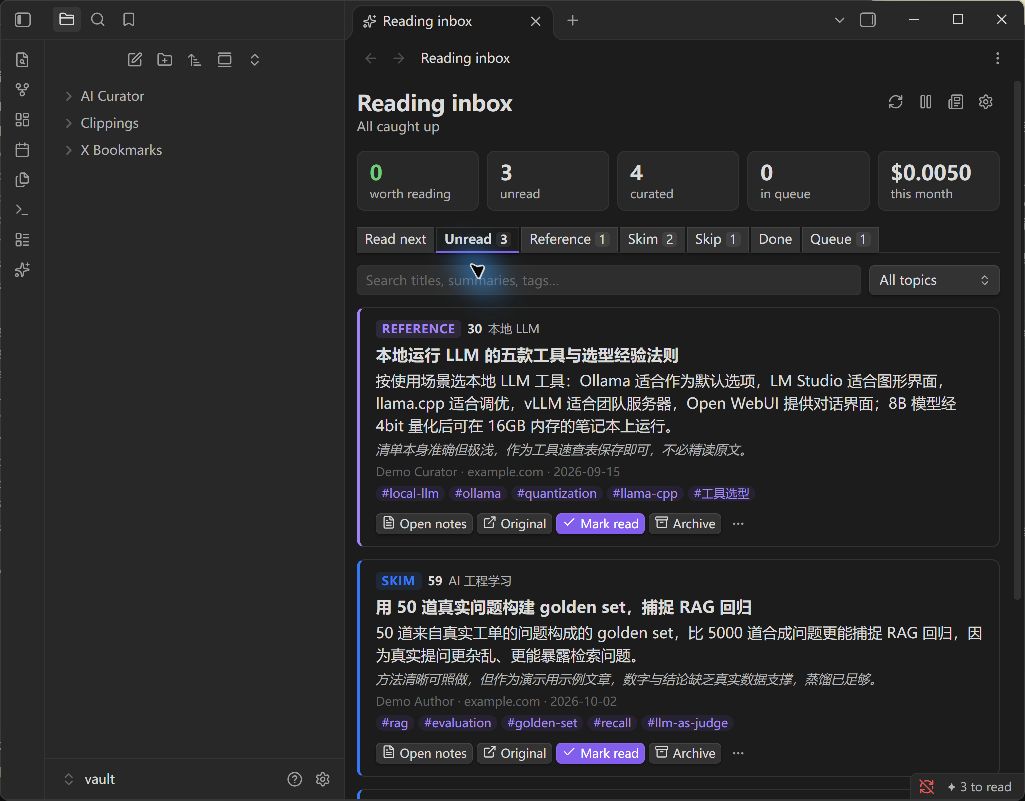
Demo screenshot from the earlier beta. Version 1.0.0 also includes a Simplified Chinese interface.
- Decide what deserves your time. A verdict, reason and locally computed score.
- Keep useful knowledge. TL;DR, key ideas, practical steps and action checkboxes in English or Chinese.
- Read in one place. Search, topic filters, read/archive controls, a Bases list and weekly digests.
- Connect notes locally. Related links use shared topics, tags and tools without another AI call.
- Keep your workflow. Web Clipper, X bookmark tools and other Markdown exporters; no Python or background service.
- Keep your originals. Sources are never changed. Your writing below the marker in curated notes survives regeneration.
Install
Requires Obsidian 1.11.4+. Distributed through GitHub and BRAT; not yet listed in Obsidian's community directory.
- Download
ai-curator-1.0.0.zipfrom the release. - Extract into
<vault>/.obsidian/plugins/. You should get:.obsidian/plugins/ai-curator/ ├── main.js ├── manifest.json └── styles.css - Reload Obsidian and enable AI Curator in Settings → Community plugins.
The release includes separate plugin files and SHA256SUMS.txt. Keep your usual vault backup.
BRAT alternative: install BRAT from Obsidian's community plugins, run Add a beta plugin for testing, enter MartinZhong2026/Obsidian-AI-Curator, and enable AI Curator. That BRAT command can install this stable release too.
First two minutes
- Choose source folders such as
Clippingsor your X bookmark folder. Existing notes wait for approval. - Connect a provider. DeepSeek is preselected; paste your own key and use Test, or choose another provider.
- Choose languages and interests. The interface follows Obsidian by default. Interface language offers English and 简体中文; the note output language is independent. Your optional profile helps assess relevance.
- Review network options. Full-text recovery is on by default and contacts the original website. X expansion uses third-party FxTwitter and is off until you enable it.
- Choose the backlog: newest 10, all existing saves, or new saves only.
Open the ✦ ribbon icon for the inbox. New saves settle before processing, usually within a minute while Obsidian is open. Turning off automatic curation leaves Process queue now available.
Notes and verdicts
Notes include a verdict and reason, TL;DR, summary, key ideas, how-to steps, caveats, actions, mentioned tools and related notes, with a link back to the saved source. See English examples and Chinese examples: real model outputs on synthetic demo material. Results vary between runs.
Scores use relevance (30%), depth (20%), actionability (20%), evidence (15%) and originality (15%). Popularity metrics do not affect scores. Incomplete saves are labeled and capped at 55/100. AI judgments can be wrong; check the original when accuracy matters.
AI Curator/
├── Notes/             curated Markdown: verdict, score, topic, tags, status
├── Digests/           reading digests, created on request
└── Reading list.base  Read next, Unread, All curated and Reference views
Providers and spending
| Provider | Setup |
|---|---|
| DeepSeek | Default; bring your API key |
| Anthropic Claude | Official SDK; key and an available model |
| OpenAI, Gemini, OpenRouter | Key and model name; use Load models |
| Ollama, LM Studio | A running local server and model |
| Custom | OpenAI-compatible /chat/completions endpoint |
Remote endpoints require HTTPS. HTTP is allowed only on localhost, 127.0.0.1 and [::1], even for local presets. On mobile, localhost means the phone; a desktop model needs a reachable HTTPS endpoint.
Default limits: US$3 estimated monthly budget, 100 items/day. Concurrent calls reserve the requested output allowance; duplicate saves share an analysis. Costs depend on tokens and provider prices. For models without a built-in price, enter input/output prices for meaningful budget tracking.
This is not a hard billing cap. Unknown prices, billed failures, tokenization differences and provider price changes affect actual charges. Set a provider-side spending limit when needed. Connection tests are not included in the curation counter.
Fully offline use requires a local model and both full-text recovery and X expansion disabled.
Privacy and control
- Only chosen folders and notes you explicitly curate are analyzed. Output is excluded.
- The selected AI provider receives note text and metadata, optional profile, and existing topic/tag names; text may include recovered web content.
- Keys use Obsidian SecretStorage. Settings keep a secret identifier; provider errors redact the configured key.
- Queue state and analysis results stay in plugin storage, with recovery copies. Originals are never changed.
- No telemetry, analytics or AI Curator account. A one-time optional star invitation only opens GitHub when clicked.
- Saved content is untrusted data. Model output is validated; its instructions are never executed.
See the complete privacy and network disclosure.
Commands
Open reading inbox · Process queue now · Pause or resume automatic curation · Curate the current note · Create weekly reading digest · Refresh related links in curated notes · Retry failed items · Open setup guide
Digests and related-link refreshes do not call AI. Single-note curation works outside watched folders. Reload after switching interface language to update command names.
Troubleshooting and limits
- Nothing happens: inspect Queue, key/model, pause state and limits; new files wait a few seconds.
- 401/402/403: fix the key, balance or access, then resume. Temporary errors back off.
- No content: image-only notes are skipped. Enable recovery for teasers and curate again.
- Changed source: re-curate from the menu. A sync tool completing a teaser can trigger reanalysis.
- Write failure: check disk space and permissions. Refresh curated notes retries writing analyzed items without another AI call.
- Obsidian must remain open. Images, PDFs and videos are not analyzed.
- Related links use local heuristics; no cross-article AI synthesis.
- Desktop/mobile APIs are targeted. Fresh native desktop/theme and iOS/Android device checks were unavailable for 1.0.0; try a test vault first.
Contribute
English and Chinese contributions are welcome. Read CONTRIBUTING.md and AGENTS.md.
npm ci
npm test             # unit, engine, persistence and bilingual tests; Node 24+
npm run build        # type check and browser-compatible production bundle
npm run package      # build, tests, ZIP and SHA-256 verification
npm audit
npm run demo:install # install into the synthetic demo vault
The optional real API demo in RELEASING.md uses your key and incurs charges. Changelog · MIT license.