
README file from
GithubEnglish | 日本語
Agent Sessions
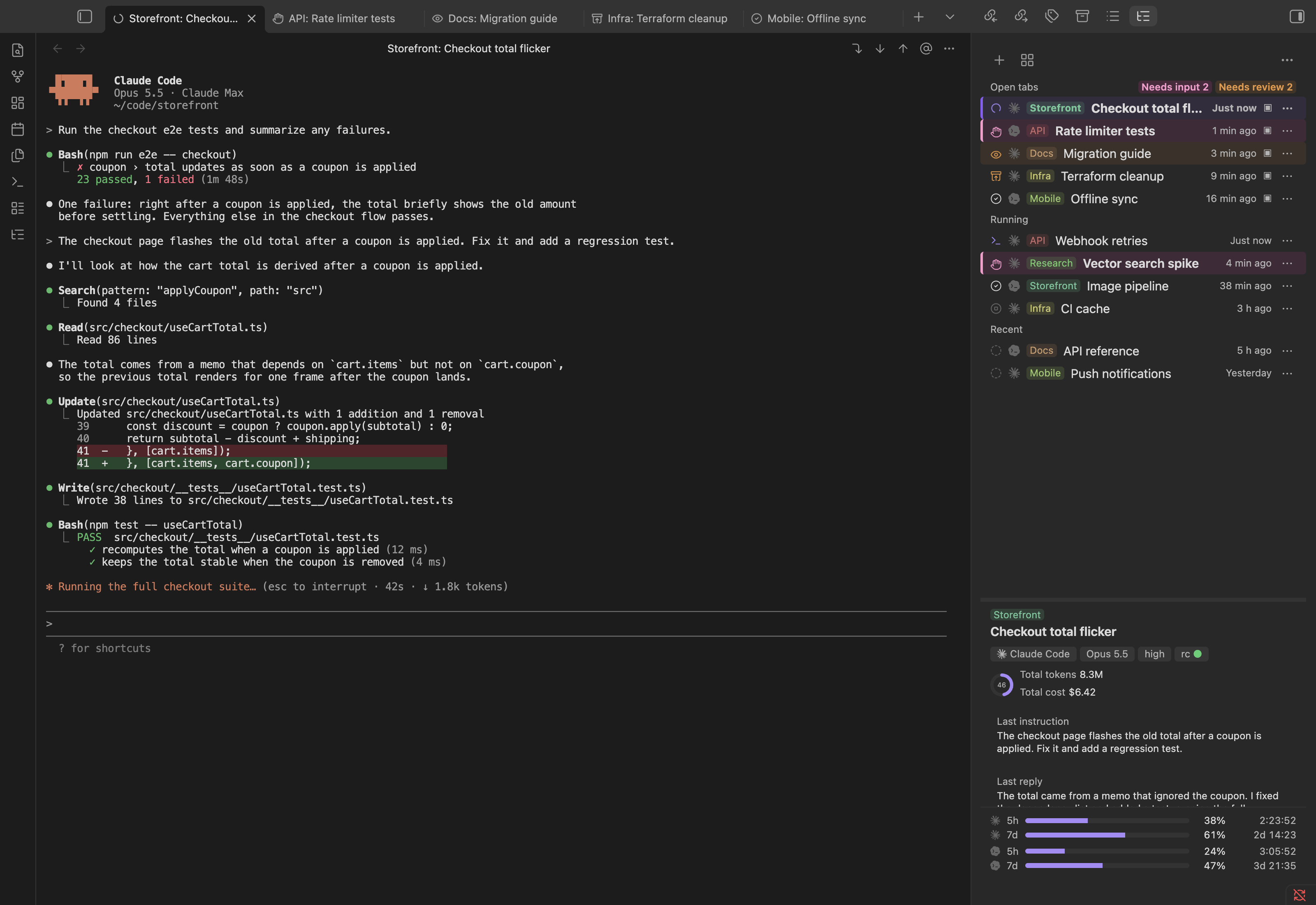
Run and manage Claude Code, Codex, and OpenCode sessions as terminal tabs inside Obsidian, with a session list, a usage dashboard, and a daemon that keeps sessions alive when you close a tab or quit Obsidian.
Features
- Multi-agent — Claude Code, Codex, and OpenCode sessions, mixed freely in the same list, sorted and filtered together. Auto-detected on first run; enable any of them, with per-agent path and environment-variable settings. Choosing "New session" with more than one enabled asks which one to start. OpenCode can also be started through
ollama launch opencodeto use a local model. - Terminal tabs — one session per Obsidian tab, backed by a real PTY (xterm.js). Close the tab or quit Obsidian and the session keeps running; reopen it and the last screen is replayed.
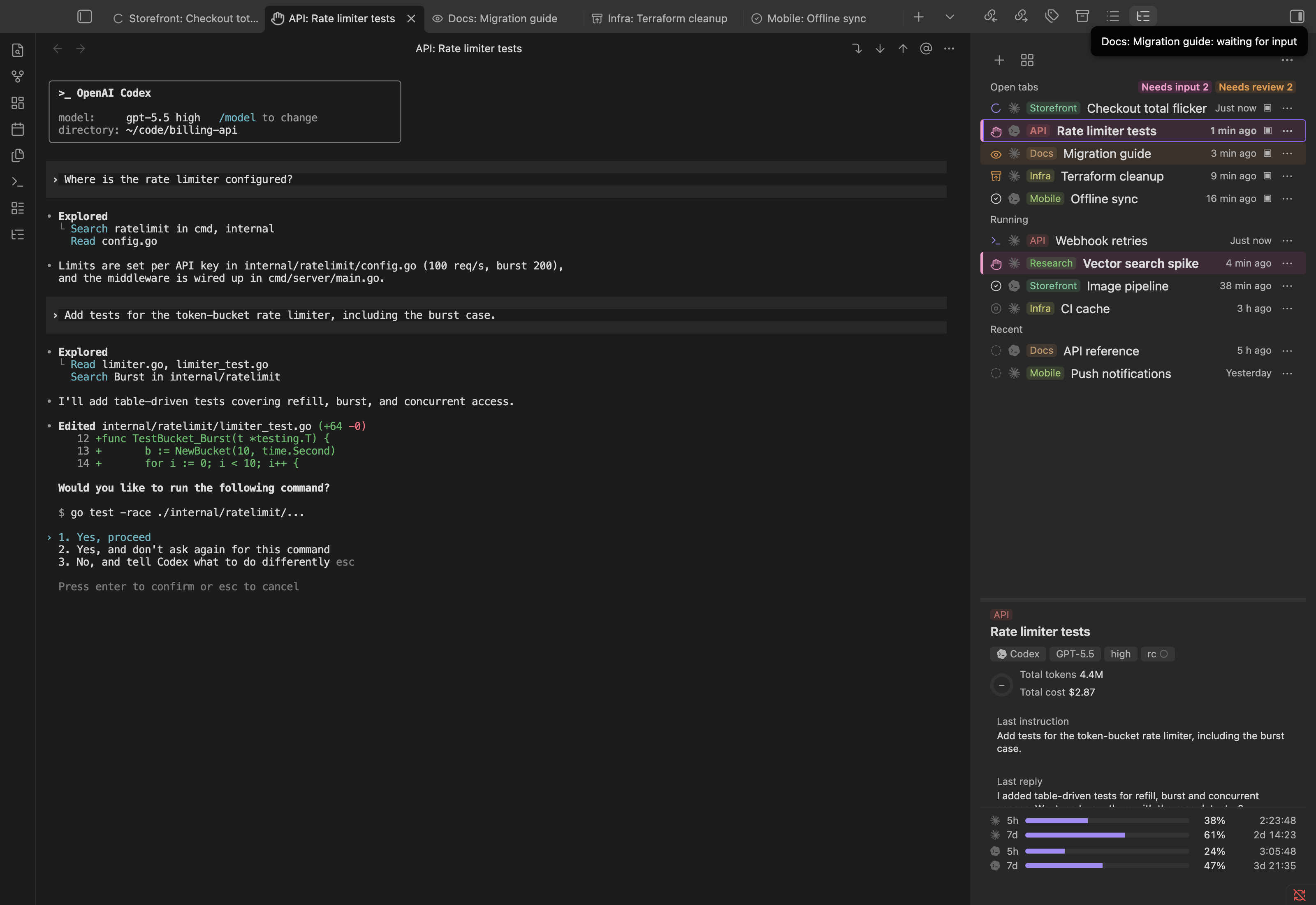
- Side panel — a right-sidebar list of open tabs, running sessions, and recent sessions, plus a details pane and a 5‑hour/7‑day rate‑limit view with a live countdown.
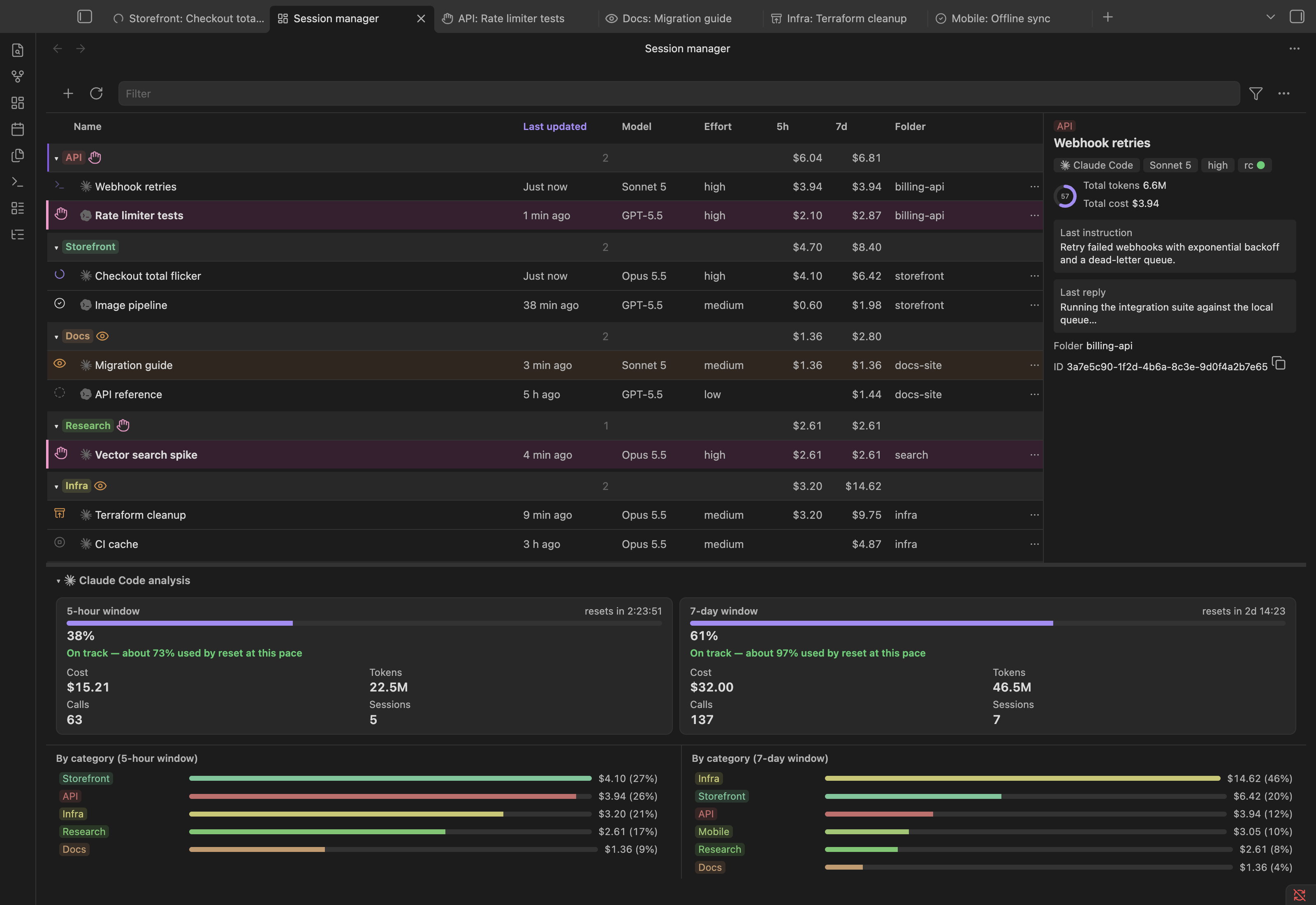
- Session Manager — a full session tree grouped by category, a sortable table (last activity, model, effort, 5h/7d cost, folder), and a usage-analytics panel: 5‑hour/7‑day stat cards, a weekly-pace projection ("on track" vs. "will run out at ‑‑"), and a per-category cost breakdown — split into a section per enabled agent when more than one is enabled.
- State-aware tabs and rows — icons, colors, and motion for each session state (working, running a shell command, waiting for your answer, unread response, editing, compacted, detached, exited, error), shared between the terminal tab, the side panel, and the manager.
- Naming and categories — name a session as
Category: Name; categories get a stable color and their own group in the manager. - Built‑in editor — press Ctrl+G inside a session to edit the current prompt (or
/memory,/keybindings, etc.) in a split pane under the terminal, with@-file completion, autosave, and paste/IME/undo handled natively. The terminal output stays visible while you edit. - Navigation helpers — file paths printed in the output become clickable links into the vault, "insert current note as
@path", and jump buttons for the previous/next prompt and the last response. - Session and usage analytics — per-session token/cost breakdown with a turn-by-turn table, and account-wide 5‑hour/7‑day usage totals, computed from each agent's own transcripts.
- CLI and TUI — a standalone
agent-sessionscommand for scripting or working outside Obsidian: a terminal UI to pick and attach to a session, andjsonsubcommands that back the plugin. - Agent skill — one skill, installed together with the program, that lets a Claude Code, Codex or OpenCode session started in the vault read the 5‑hour/7‑day usage windows and a session's tokens and cost, list other sessions with their status and last messages, and — only when you ask for it — start a new session (in a folder, with a name, on any enabled agent, Claude Code optionally with Remote Control).
- Status line in OpenCode — a bottom row in OpenCode's session screen with what OpenCode's own screen doesn't already show: the submit-key symbol and whether the session is busy, idle or waiting (model, variant, folder and context usage are on OpenCode's own prompt row and footer). Turned on with OpenCode; nothing to configure.
- Bilingual UI — English and Japanese, with an "automatic" mode that follows Obsidian's own language setting.
Supported environments
| OS | macOS — tested. Linux, including Linux Obsidian running under WSLg on Windows — supported (the terminal keybindings and the Python side both have platform branches for it, exercised in CI and in Linux containers by hand), but not yet verified on a real Obsidian install end to end. Windows (native) — not supported: the daemon depends on pty, fcntl, and termios, Unix-only standard-library modules with no Windows equivalent, and a native Windows build of Obsidian has no PTY to hold open; running the Linux build of Obsidian under WSLg avoids this entirely. On native Windows the plugin loads but stays inactive, saying why. |
| Obsidian | Desktop only (isDesktopOnly, since the plugin spawns processes and opens Unix sockets — neither is available to a mobile or web build), version 1.8.7 or later (minAppVersion). |
| Python | 3.9+, standard library only. macOS: the Command Line Tools' python3 (xcode-select --install), python.org, or Homebrew; Linux: your distribution's python3. |
| Claude Code, Codex, and/or OpenCode | At least one of the three, either on your PATH or pointed to from the plugin's Agents settings (auto-detected on first run). Claude Code: the plugin relies on its hooks (Stop, SessionEnd, SessionStart with matcher compact, UserPromptSubmit), its statusLine, and — only if you change the submit-key setting away from the default — its keybindings.json. Codex: no hooks/statusLine equivalent is used yet; hands-on verification is still pending (see docs/design.md §7.7, §25). OpenCode: sessions are read from its SQLite database, and busy/idle/waiting comes from a small OpenCode plugin the program installs when OpenCode is enabled. To start a session through ollama launch opencode, Ollama has to be installed as well. |
| Node.js / npm | Only if you are building the plugin from source (see Development); CI builds with Node.js 20. |
Disclosures
- No network use by the plugin. It talks only to its own daemon, over a Unix socket on this machine. Claude Code, Codex, and OpenCode, which it launches, connect to their own services under your own accounts.
- Runs local programs. The plugin runs the
agent-sessionsprogram with your Python (it ships inside the plugin as readable source and is written out only when you click Install), starts the Claude Code / Codex / OpenCode CLIs (orollama launch opencode) you have installed, and reads your login shell's environment so they find the samePATHas in a terminal. It never downloads code. - Reads and writes files outside the vault, because that is where the agents and the program keep their state:
- reads Claude Code's
~/.claude/projects/,~/.claude/sessions/, and~/.claude/settings.json, Codex's~/.codex/(or$CODEX_HOME), and OpenCode's database~/.local/share/opencode/opencode.db(or under$XDG_DATA_HOME; opened read-only), to list sessions and compute usage; - writes
~/.agents/sessions/(the daemon's socket, logs, status snapshots, caches); - installing the program writes it to a folder in your home directory (see Installation); the install and
install.shadd hooks and astatusLineto~/.claude/settings.json(backed up first); changing the submit-key or editor-key setting writes~/.claude/keybindings.json; - with Codex enabled, adds its submit-key keymap, its editor-key line (
open_external_editor, only for an editor key other than Ctrl+G) and a default[tui].status_lineto~/.codex/config.toml(backed up first; each line it adds is marked, andagent-sessions setup --removetakes exactly those out); - with OpenCode enabled, writes a status plugin,
~/.config/opencode/plugins/agent-sessions.js(or under$XDG_CONFIG_HOME), and the plugin writes one status file per session under~/.agents/sessions/opencode/. The plugin file starts with a marker line; only a file carrying it is ever overwritten, and Remove (Settings → agent-sessions program) oragent-sessions setup --removedeletes it, as does turning OpenCode off in the plugin's settings; the installer's dialog lists this file when OpenCode is enabled, and a routine update of the program only refreshes a plugin file that is already there. Next to it, an OpenCode status line,~/.config/opencode/agent-sessions-tui.jsx(same marker, same install, update and removal): a small JSX file thatopencodecompiles itself when it loads it, which draws one row at the bottom of OpenCode's session screen from OpenCode's own on-screen state (busy, idle, or waiting for a permission) and, in a session the plugin started, the submit-key symbol from~/.agents/sessions/ui.json; it reads and writes nothing else; - with OpenCode enabled, sets
keybinds.editor_open(the editor key; OpenCode's own is Ctrl+X, E) in OpenCode's~/.config/opencode/tui.json(or under$XDG_CONFIG_HOME), and, with a submit key other than Enter,keybinds.input_submitandkeybinds.input_newlineso that Return inserts a newline; and adds the status line,"./agent-sessions-tui.jsx", to itspluginlist (OpenCode loads such plugins from that list only); no other key is touched, and a file that isn't plain JSON is left alone. Your previous values are kept in~/.agents/sessions/opencode-tui-backup.jsonand put back when you turn OpenCode off or Remove, and the submit keys when you return to Enter (agent-sessions setup --removedoes the same); - whenever the program is installed or updated, writes the
agent-sessionsskill into the vault's own skill folders, never into your home directory (nothing is written to the vault while no program is installed):<vault>/.claude/skills/for Claude Code,<vault>/.agents/skills/for Codex, and<vault>/.opencode/skills/only when OpenCode is the only agent enabled (OpenCode also reads the first two). Each file carries anagent-sessions:managedmarker; a skill without it is never overwritten or removed. Installing also removes the three skills earlier versions wrote (agent-sessions-new,-stats,-info, only when marked); its text names only the enabled agents, and every copy is rewritten after a plugin update or when the launcher or the enabled agents change, disabling an agent or Remove takes it away again, and the installer's dialog lists the folders. Agents started in other folders do not see it; - the built-in editor edits the temporary file the agent hands to
$VISUAL.
- reads Claude Code's
- Sessions not listed. OpenCode sub-agent sessions and sessions started by
opencode runare not listed. - Lists the vault's files only to complete
@file paths in the built-in editor. - Uses the clipboard only when you ask: copying a session ID or an analysis table, and Ctrl+Shift+C / Ctrl+Shift+V in a terminal tab (Linux keybindings).
- No accounts, payments, ads, or telemetry of its own. Everything is open source under the MIT license.
Installation
The plugin drives a small Python program, agent-sessions, which holds the sessions and reads the agents' transcripts. It is bundled with the plugin as plain source and installed with one click; Python 3.9 or later has to be on the machine already (see Supported environments).
- In Obsidian, open Settings → Community plugins → Browse, search for Agent Sessions, then install and enable it.
- Open the side panel (the Agent Sessions ribbon icon) and click Install agent-sessions. The dialog shows, before anything is written, where the program will go, which Python will run it, and the change to Claude Code's settings; Install does the rest.
Where it goes: the first usable folder of $XDG_DATA_HOME/agent-sessions, ~/.local/share/agent-sessions, and ~/.agents/sessions/app — skipping any path with spaces or shell-special characters (it ends up in a hook command and in $VISUAL), inside the vault, or not writable. The Python is the one your login shell finds as python3, else /opt/homebrew/bin, /usr/local/bin, or /usr/bin (on macOS only once the Command Line Tools are installed, so the stub's installer pop-up never appears). Updating the plugin updates the program too; Settings → agent-sessions program reinstalls or removes it.
From a clone
For the agent-sessions command in your own terminal (the TUI, scripting), or to run the program straight from a checkout, install it from this repository instead — the plugin uses ~/bin/agent-sessions whenever it exists:
git clone https://github.com/kulikala/obsidian-agent-sessions.git
cd obsidian-agent-sessions
./scripts/install.sh
To install the plugin itself from source too, build it and give install.sh your vault, which also links this clone's plugin/ into the vault (enable Agent Sessions under Community plugins afterwards):
(cd plugin && npm install && npm run build)
./scripts/install.sh /path/to/your/vault   # or AGENT_SESSIONS_VAULT=/path/to/your/vault ./scripts/install.sh
install.sh:
- symlinks
bin/agent-sessionsandbin/agent-sessions-codeinto~/bin; - with a vault, symlinks
plugin/into<vault>/.obsidian/plugins/agent-sessions; - runs
agent-sessions setup, which modifies~/.claude/settings.json(a backup is written first, assettings.json.bak-<timestamp>): it adds or updates theStop,SessionEnd,SessionStart(matchercompact), andUserPromptSubmithooks to point atagent-sessions hook, and setsstatusLinetoagent-sessions status. It only ever touches entries it recognizes as its own; other hooks are left alone.
Changing the submit key setting away from the default (Enter) additionally makes the plugin write to ~/.claude/keybindings.json (the Chat context) so that Claude Code's own keybindings match — this affects Claude Code everywhere, including sessions started outside Obsidian (only this plugin's own terminal tabs are guaranteed to send the chosen key reliably, though; whether a terminal app elsewhere can even tell it apart from plain Enter depends on that terminal). Reverting the setting removes the keys the plugin manages for this setting.
The same goes for the editor key (default Ctrl+G; Ctrl+Q and Option/Alt+G are the other choices — keys that Claude Code, Codex and OpenCode all leave free): Claude Code and Codex already open their editor on Ctrl+G, so nothing is written for the default. For another key the plugin binds it to chat:externalEditor in ~/.claude/keybindings.json (freeing Ctrl+G there) and sets open_external_editor under [tui.keymap.global] in ~/.codex/config.toml; this also applies to those agents outside Obsidian. OpenCode's default is a different key (Ctrl+X, E), so with OpenCode enabled its tui.json always carries the editor key, Ctrl+G included.
Once the plugin has started at least once, the agent-sessions CLI can be run from outside Obsidian without repeating the vault path: it reads the vault location from ~/.agents/sessions/vault.json, which the plugin keeps up to date.
Usage
| Where | What you can do |
|---|---|
| Side panel (right sidebar) | New session, open the Session Manager, settings. A list split into open tabs, running (attached to the daemon but no tab), and recent; each row shows a state icon, a category chip, and the name. With no sessions at all yet, shows a "New session" button instead (or a link to settings, if no agent is available). A details pane (model, effort, connection status, context usage, total tokens/cost, last prompt/response). A rate-limit view with a 5‑hour/7‑day pair of bars and a countdown to reset for each enabled agent. |
| Session Manager | The default view for a new tab. A session tree (grouped by category, plus an "Other" group and an archive), and a collapsible/resizable analytics panel below it: 5‑hour/7‑day usage cards, a weekly-pace projection, and a per-category cost bar — one section per enabled agent when more than one is enabled. Opening it never starts a session. |
| Terminal tab | One session (Claude Code, Codex, or OpenCode) per tab. Header actions: insert the current note as @path, jump to the previous/next prompt or the last response. Cmd +/Cmd -/Cmd 0 (macOS) or Ctrl+Shift+=/Ctrl+Shift+-/Ctrl+Shift+0 (other platforms) change the tab's font size. On non-macOS, Ctrl+Shift+C/Ctrl+Shift+V copy the selection and paste, Ctrl+Shift+W closes the tab, and Ctrl+Shift+P opens the command palette; plain Ctrl+<key> combos (Ctrl+C, Ctrl+G, Ctrl+W, Ctrl+P, …) always reach the agent, not Obsidian. The submit-key setting and Enter interception apply to every tab: each agent's own keymap is adjusted to match (Claude Code's keybindings.json, Codex's config.toml, OpenCode's tui.json — see Disclosures), and plain Enter still confirms slash-command and file popups. Paths printed in the output are clickable if they resolve inside the vault. |
| Editor key, Ctrl+G by default (built-in editor) | Opens a split editing pane under the terminal for the file the agent would otherwise hand to $VISUAL. The key is the editor key setting; each agent is configured to open its editor on it. Supports @-file completion, autosave, and native paste/IME/undo. "Send" submits immediately for prompt edits; Esc returns to the input without sending. While it's open, Cmd+W (macOS) / Ctrl+W (other platforms) doesn't close the tab. |
| Row menu (⋯ / right-click) | Rename, move to category (a single field, with a dropdown of existing categories and free-form entry for a new one — disabled until the session has a name or a first prompt to attach a category to), compress (/compact), view session analysis, archive/unarchive, end session, copy ID. |
| Session analysis | From the row menu: cost, tokens, turn count, and duration cards; input/output/tool-use bars; a turn-by-turn table. Click rows to select a range; copy the result as Markdown. |
Session states
The terminal tab, the side panel rows, and the manager rows all share the same icon, color, and motion for a session's state: connecting, working (model is responding), running a shell command, waiting for your answer (a question or permission prompt), unread (finished responding, tab not yet brought to front), editing (built-in editor open), idle, detached (tab exists but not yet connected), compacted (just ran /compact, context was reset), exited, and error. Animated states respect prefers-reduced-motion.
These are further grouped into the same buckets Claude's own app filters sessions by — needs input, needs review, running, done — with matching icons and colors for each, plus an archived bucket. The Session Manager's toolbar has a status-filter menu for the same six buckets (all / needs input / needs review / running / done / archived).
A small icon next to the state mark shows which agent a session belongs to (Claude Code, Codex, or OpenCode) — each agent's own mark (single-color, matching the rest of the UI), not a colored brand logo.
Settings
Font family and size, padding (comfortable/compact/none), submit key, editor key, recent-sessions count, idle notifications, agents (Claude Code/Codex/OpenCode — enabled, path, environment variables; for OpenCode also whether to start it directly or through ollama launch opencode, and the Ollama model to use, chosen from ollama list or typed in), path to agent-sessions, terminal scrollback, built-in editor height, display language (auto/Japanese/English), and the saved heights of the side panel's details pane and the manager's analytics panel.
Troubleshooting
- "agent-sessions was not found" — the plugin is installed but the
agent-sessionsprogram isn't: run step 2 of Installation. If you keep it somewhere other than~/bin, set its path under the plugin's settings. - A Claude Code hook fails with something like
node: not found(often another plugin's own hook script) — node is likely installed through a version manager (mise, nvm, asdf, volta) whose shell integration only loads in an interactive shell (.zshrc/.bashrc), not the login-but-non-interactive shell a session's environment is normally built from. The plugin also probes an interactive shell'sPATHand merges it in (docs/design.md's §4.2), so this should self-correct on the next session; if it doesn't, check that$SHELL -i -c 'echo $PATH'actually includes node's directory from a regular terminal.
CLI
agent-sessions                 # terminal UI: pick a session, attach or resume it
agent-sessions attach ID       # attach from a terminal (Ctrl+\ to detach)
agent-sessions daemon [--detach]
agent-sessions json scan|live|detail ID|usage ID [--from ISO --to ISO]|stats
agent-sessions setup [--dry-run]
agent-sessions setup --opencode   # install OpenCode's status plugin and status line only (--remove-opencode: remove just those files and restore the tui.json keybinds)
agent-sessions setup --skills     # install the agent skill into the vault (--remove-skills: remove just that)
agent-sessions new [--agent A] [--cwd DIR] [--name N] [--remote-control] [--prompt TEXT]   # start a session in the daemon (exit 0 confirmed, 1 unconfirmed, 2 failed)
agent-sessions sessions [--query TEXT] [--agent A] [--limit N] [--json]   # list sessions with their status
agent-sessions show [ID|NAME] [--json]   # one session's usage and last messages (default: this session)
agent-sessions stats [--json]     # 5-hour/7-day usage windows per agent
agent-sessions json is the machine-readable interface the plugin itself uses (scan, live, detail, usage, stats); hook and status back the Claude Code hooks and statusLine described above; edit is the receiving end of the built-in editor.
How it works
A small daemon (agent-sessions daemon, started on demand by the plugin) holds each session's PTY over a Unix domain socket, so a session keeps running when no tab is attached to it. The plugin talks to the daemon directly for terminal I/O, and shells out to agent-sessions json … for everything else (scanning transcripts, computing usage and cost, building the session tree) — that logic lives entirely in Python so the plugin and the CLI/TUI see the same data.
Session bookkeeping (folded groups, archive, category colors) lives in <vault>/.agents/sessions/sessions.json; daemon and runtime state (socket, logs, status snapshots, caches) live under ~/.agents/sessions/. Claude Code's own files (~/.claude/projects/*/*.jsonl, ~/.claude/sessions/*.json) are only ever read, never written.
See docs/design.md for the full design and docs/requirements.md for the requirements this plugin is built against.
Uninstall
If you installed the program from the plugin, remove it under Settings → agent-sessions program → Remove first: that stops the daemon (ending running sessions), takes its hooks and statusLine out of ~/.claude/settings.json, its lines out of ~/.codex/config.toml, its submit-key and editor-key keybinds and status line entry out of ~/.config/opencode/tui.json, its status plugin out of ~/.config/opencode/plugins/ and its status line file out of ~/.config/opencode/, and the agent skills out of the vault, and deletes its folder. Then disable and remove Agent Sessions from Obsidian's Community plugins.
If you installed from a clone:
"<path to this repo>/scripts/uninstall.sh"            # plugin installed from Community plugins
"<path to this repo>/scripts/uninstall.sh" "<vault>"  # plugin installed from source
uninstall.sh stops the daemon (asking for confirmation first if any session is still
running — pass --force to skip that), removes the hooks and statusLine it added to
~/.claude/settings.json (backing that file up first, the same way install.sh does),
removes the enter/meta+enter entries (submit key) and the chat:externalEditor entry with its freed ctrl+g (editor key) it may have added under Chat in
~/.claude/keybindings.json (only if you changed those keys away from their defaults), and
removes the ~/bin/agent-sessions and ~/bin/agent-sessions-code symlinks and, given a
vault, <vault>/.obsidian/plugins/agent-sessions (a path that isn't actually a symlink is
left in place with a note, in case you replaced it by hand). It leaves other tools'
hooks, statusLine, and keybindings untouched, and is safe to run more than once.
Pass --purge to also delete ~/.agents/sessions/ (daemon runtime state) and, given a
vault, <vault>/.agents/sessions/ (session bookkeeping: folded groups, archive, category colors).
Development
cd plugin && npm install
npm test && npm run typecheck && npm run build   # plugin (vitest, tsc, esbuild)
AGENT_SESSIONS_BIN=$PWD/../bin/agent-sessions npm test   # also run the tests that exercise a real daemon

cd ..
python3 -W error -m unittest discover -s tests -t .   # Python (standard library only)
Screenshots
The images in this README are generated: node tools/screenshots/shoot.mjs (after npm run build) runs the built plugin in a separate, sandboxed Obsidian against made-up sessions and writes docs/images/. See tools/screenshots/README.md.
Adding a language
Add plugin/src/i18n/locales/<code>.ts (a Partial<Record<MessageKey, string>> plus a <CODE>_SELF_NAME autonym — see locales/ja.ts) and agentsessions/i18n/locales/<code>.py (a MESSAGES dict — see locales/ja.py), then register each one, one line apiece, in i18n/index.ts's LOCALES and i18n/__init__.py's _TABLES. A locale can start out partial; a key it hasn't filled in yet falls back to English on both sides. See docs/design.md.
Release (maintainers)
cd plugin && npm version minor --no-git-tag-version   # or patch / major; updates plugin/package.json, plugin/manifest.json, the root manifest.json, and versions.json
cd .. && git commit -am "Release X.Y.Z"
git tag -a X.Y.Z -m "Agent Sessions X.Y.Z"   # the bare version, no "v" prefix: it must equal manifest.json's version
git push origin main X.Y.Z
npm version runs inside plugin/, which is not the repository root, so it updates the files but does not commit or tag; the commit and tag are made by hand as above.
Pushing the tag runs .github/workflows/release.yml, which builds the plugin and attaches main.js, manifest.json, and styles.css to a draft GitHub Release. Review the draft, then publish it.
License
MIT, see LICENSE. plugin/main.js bundles xterm.js and its addons (also MIT); their license text and copyright notices are in THIRD_PARTY_NOTICES.md.