
README file from
Github📅 Agenda Tasks
A comprehensive task management and calendar plugin for Obsidian



🆕 What's New in v1.1.9 — Duration-aware task blocks with drag-to-resize and overlap lanes in the Day view, a shared reference date with a new date picker, and a compact icon-button view switcher. See details · Full changelog.
Overview
Agenda Tasks transforms your Obsidian vault into a powerful productivity system by providing intuitive task management interfaces and multiple calendar views. Seamlessly integrate with your existing Obsidian notes while organizing tasks across multiple views for maximum efficiency.
Key Benefits:
- 🎯 Multiple view types tailored to different workflows
- 🔄 Real-time synchronization with your notes
- 🏗️ Compatible with Obsidian Tasks plugin
- 🌐 Support for 6+ languages
- ⚙️ Highly customizable interface
📖 Table of Contents
- News
- Features
- Screenshots
- Installation
- Quick Start
- Gestures & Interactions
- Task Format
- Configuration
- Changelog
- Planned Features
- Support
- Contributing
🆕 News
v1.1.9 (latest)
- Day view now renders tasks with their real duration: connected blocks for 60+ minute tasks, half-cell blocks for shorter ones, and side-by-side lanes so overlapping tasks never cover each other
- Resize a task's duration directly from the Day view by dragging its bottom edge, snapping to 30-minute steps
- Dragging a task to a new time slot in the Day view now snaps to the exact half-hour under the pointer
- A shared reference date is kept when switching between calendar view types, with a new date picker (popover in Month/Week/Work Week/Year, always visible in Day) to jump to any date
- The calendar view-type switcher is now a compact row of icon buttons instead of a dropdown
- Double-click to create a task directly in the Day view's hour grid or "All day" section
- Click a day cell in Month/Week/Work Week/Year to select and highlight it as the reference date, without interfering with the double-click-to-create gesture
- Fixed the Work Week view's task click gesture to match the rest of the calendar (click edits, double-click opens the note)
v1.1.8
- Refreshed the List view with compact task rows, clearer folder hierarchy, priority cues, and improved selection feedback
- Refreshed the Table view with clearer filters, denser rows, visible status/priority cues, and compact date/tag styling
- Table search, filters and sort order are remembered when returning from task editing or switching views; column widths adapt to the filtered rows
- Sortable Table headers support mouse and keyboard interaction
- Added consistent themed tooltips across plugin views and task modals, with clearer Dashboard metric/list descriptions in all six supported languages
v1.1.7
- Fixed Habit Tracker startup after plugin updates: views wait for the initial habit cache to finish loading after saved settings are available
- Fixed habit edits that could duplicate the YAML frontmatter block; the editor now performs one write and normalizes affected notes when they are edited again
- Dashboard area/daytime percentages now count completed occurrences individually, so a completed morning occurrence counts while an afternoon occurrence remains pending
- Grid and Weekly show a consistent daytime badge beside every multi-daytime row; a setting (on by default) controls the badge for single-daytime habits
- Grid and Weekly remember their last selected sort order; the Habit List status column is sortable
- Routine groups can be collapsed independently, and each group's collapsed state is remembered
- Habit names use consistent gestures: single-click opens the Habit Editor and double-click opens the note in Grid, Weekly and List
- Known area names such as
daily planare normalized to their palette key (daily-plan) when resolving area colors
v1.1.6
- Fixed habit edits that could duplicate the YAML frontmatter block; the editor now performs one atomic write and normalizes affected notes when they are edited again
- Habit Grid, Weekly and List views now use consistent gestures: single click opens the Habit Editor and double-click opens the habit note
v1.1.5
- Fixed a race condition where editing a habit could save the file correctly but leave old values in the Habit Tracker views until a later refresh. The cache now parses frontmatter from the file content it just read.
v1.1.4
- Time-of-day scheduling: the ⏳
scheduleddate can now carry a 🕐 time and, for block-mode tasks, a ⏱️ duration — fully optional and additive, existing tasks are unaffected.duestays a whole-day field - Insert or edit task fields from the editor, no need to open a modal: a right-click context menu and a command (with keyboard shortcut) work on any task line, using a native date picker and a new iOS-style scroll wheel for the time
- Calendar views (Month/Week/Work Week/Day) can now show
startandscheduleddates alongsidedue, each with its own icon + color badge — configurable in Settings ▸ Calendar; completed tasks are dimmed by default, with an option to hide them entirely - Day view now has a real hourly grid populated from scheduled times, plus a collapsible "All day" section for
due/start - Drag and drop a task in any calendar view to reschedule it: drag to another day in Month/Week/Work Week, or to another hour in Day view
- Click a task in the calendar to edit it in a prefilled modal — double-click still opens the underlying note
- Task creation modal redesigned: scheduled date is now the default field, priority is a one-click segmented selector, and a collapsible "More fields" section holds start date, due date, recurrence, dependencies, on-completion behavior and a custom ID
See the full changelog below for older versions.
✨ Features
📊 Available Views
Overview View
- Dashboard-style task summary with key metrics
- Statistics and progress tracking
- Quick access to upcoming deadlines
- Task distribution by project/folder
- Overdue task highlighting
- Customizable widgets
List View
- Customizable task listing with multiple columns
- Advanced filtering by date, project, priority, and tags
- Group tasks by date, folder, status, or custom attributes
- Inline task editing
- Collapsible task groups
- Bulk actions for multiple tasks
Table View
- Spreadsheet-style task management
- Customizable columns and layouts
- Sortable and resizable columns
- Quick entry and editing of task attributes
- CSV export capabilities
- Conditional formatting
Calendar View
- Multiple calendar layouts (day, week, work week, month, and year)
- Task visualization on calendar grid
- Mini-calendar for quick date navigation
- Task indicators showing busy days
- Quick task creation at specific times
- Syncs with native Obsidian daily notes
Habit Tracker (new in 1.1.0)
- Habit Grid - GitHub-style day-by-day grid with a merged streak "pill", per-occurrence rows for multi-daytime habits, and a configurable sort order
- Daily Routine - Today's habits grouped by daytime or by area (toggle), with weighted progress bars and quick actions to open the note or edit the habit
- Habit Dashboard - Today's raw/weighted completion, current and best streaks, side-by-side breakdowns by area and daytime, a 30-day history chart, and a GitHub-style yearly heatmap you can navigate by year (this is now the default habit view)
- Weekly view - 7-day matrix sharing the same visual language as the Grid (pills, circles, sorting)
- Habit Table/List - Sortable catalog of all habits with area, related-file link, frequency, priority, daytime, time and streak columns
- Habit Creator - A modal to create and edit habits: a circular time dial, priority/max-gap sliders, an active/inactive switch, and an area combobox suggested from your vault's root folders (free-form, not a fixed list)
🔧 General Capabilities
- ✅ Parse and track tasks from your entire vault
- ✅ Compatible with Obsidian Tasks syntax
- ✅ Real-time task updates
- ✅ Built-in Habit Tracker module (Grid, Routine, Dashboard, Weekly and Table views, plus a habit creator/editor)
- ✅ Customizable interface with themes support
- ✅ Keyboard shortcuts for common actions
- ✅ 6+ language support (English, Spanish, German, Portuguese, French, Italian)
📸 Screenshots
| View | Screenshot |
|---|---|
| Overview Dashboard | 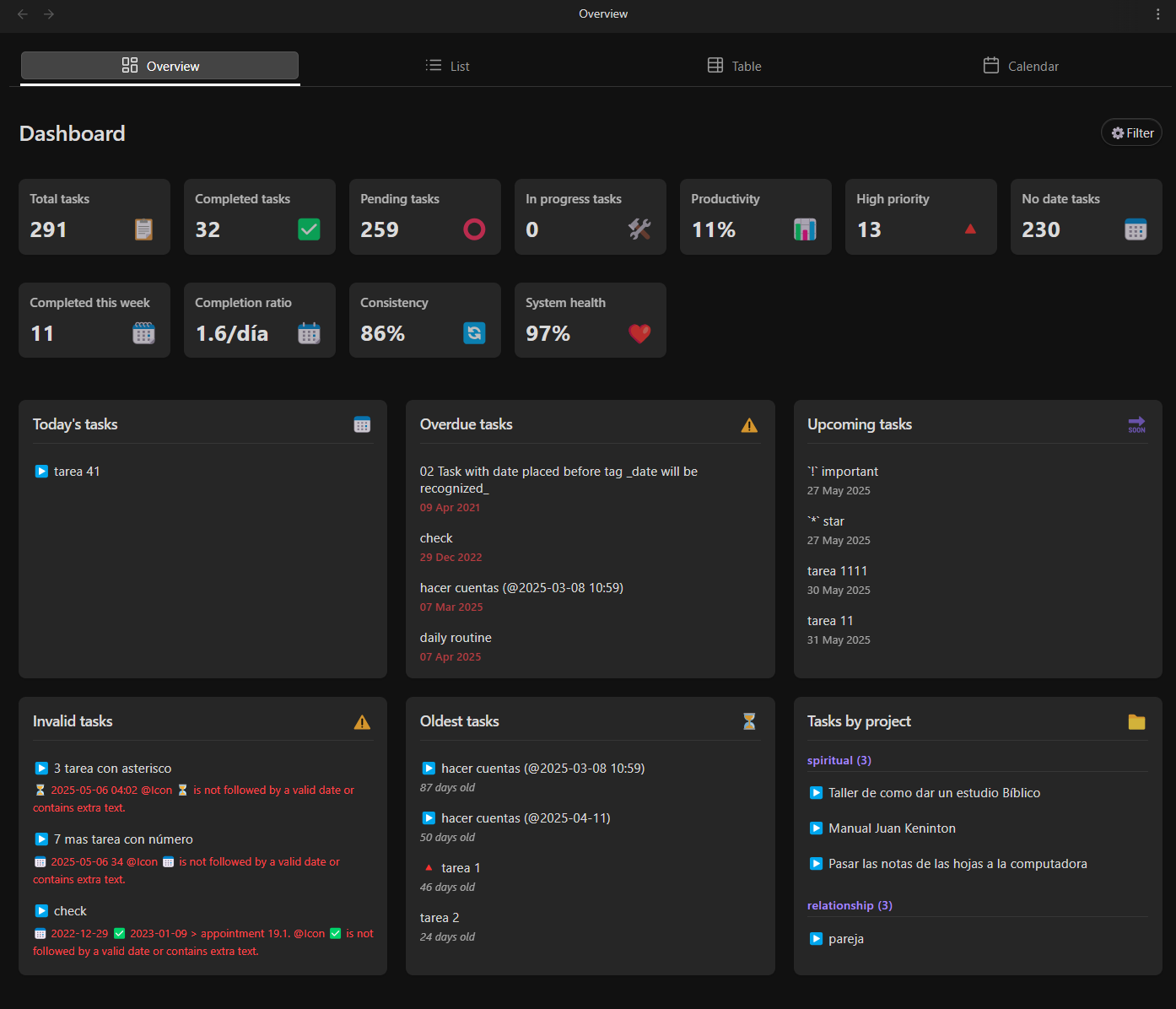 |
| List View | 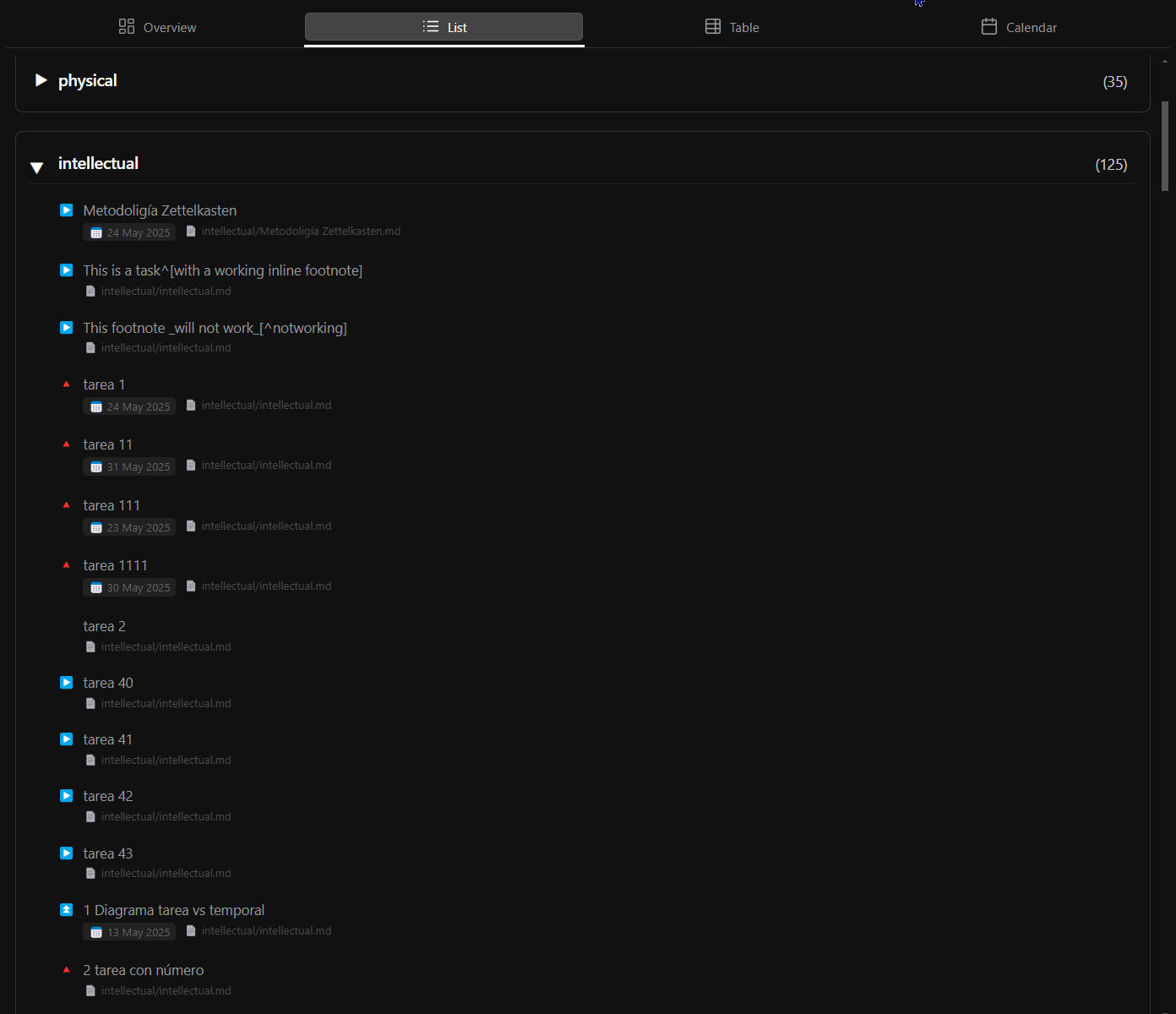 |
| Table View | 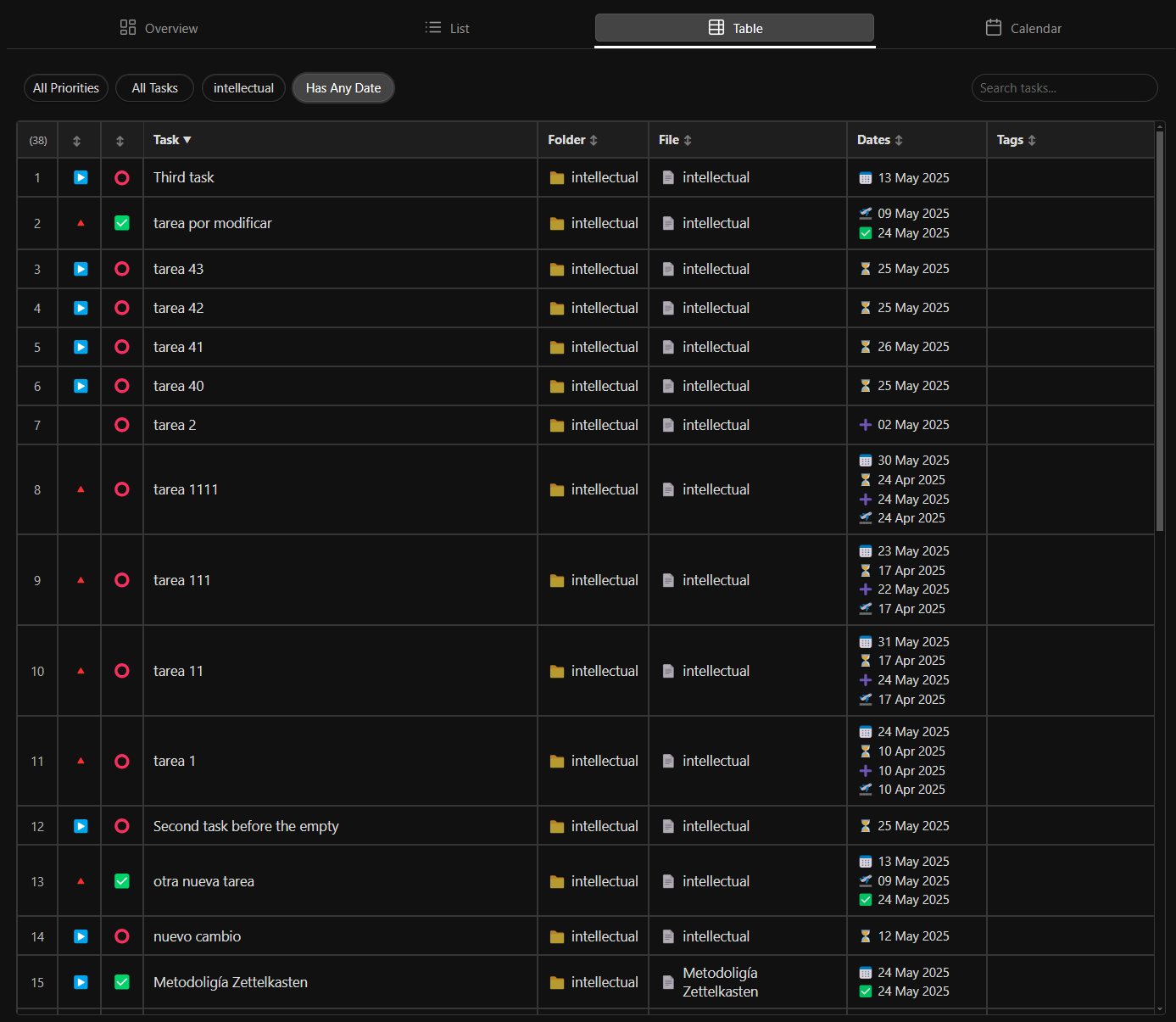 |
| Month Calendar | 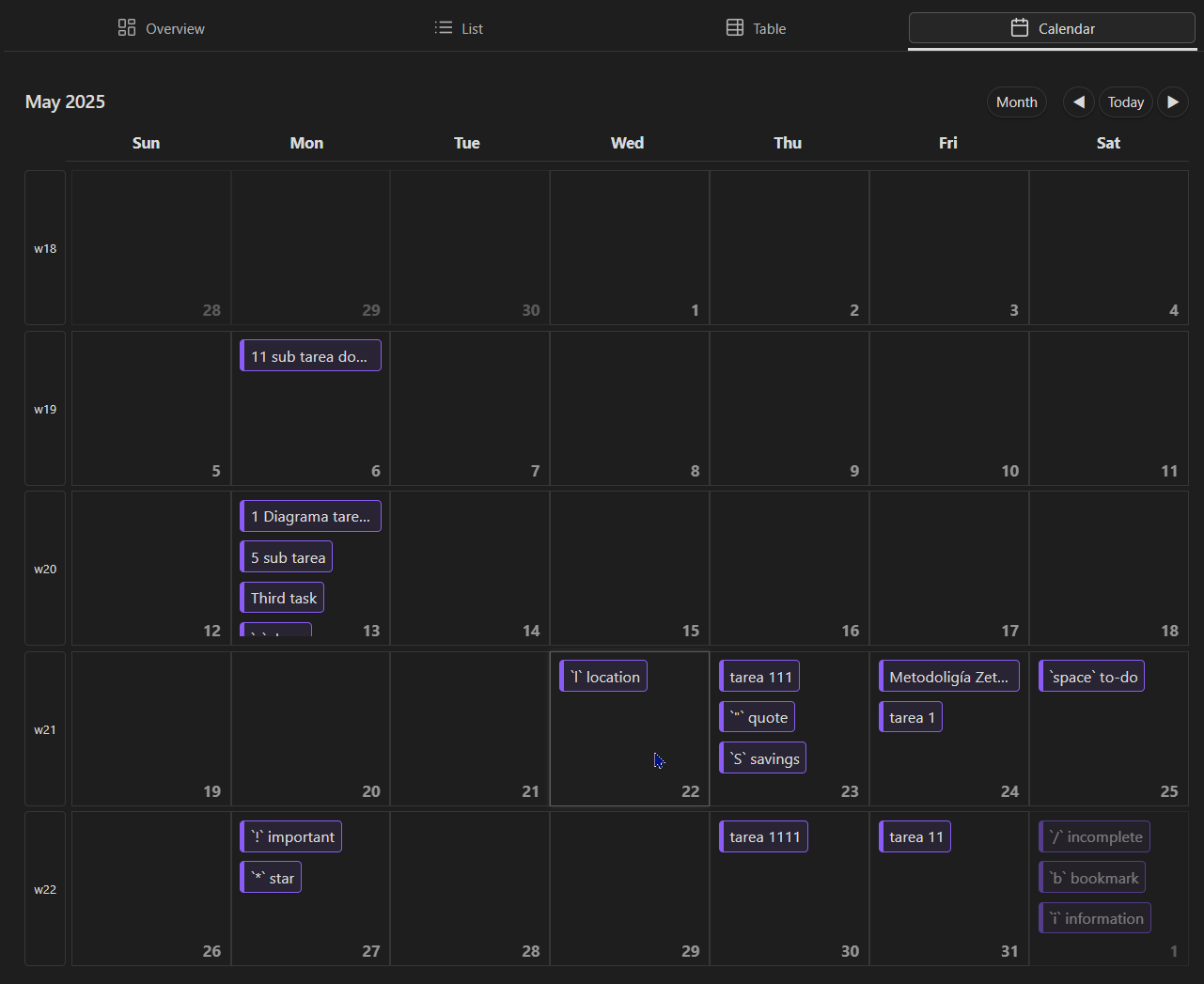 |
| Week Calendar | 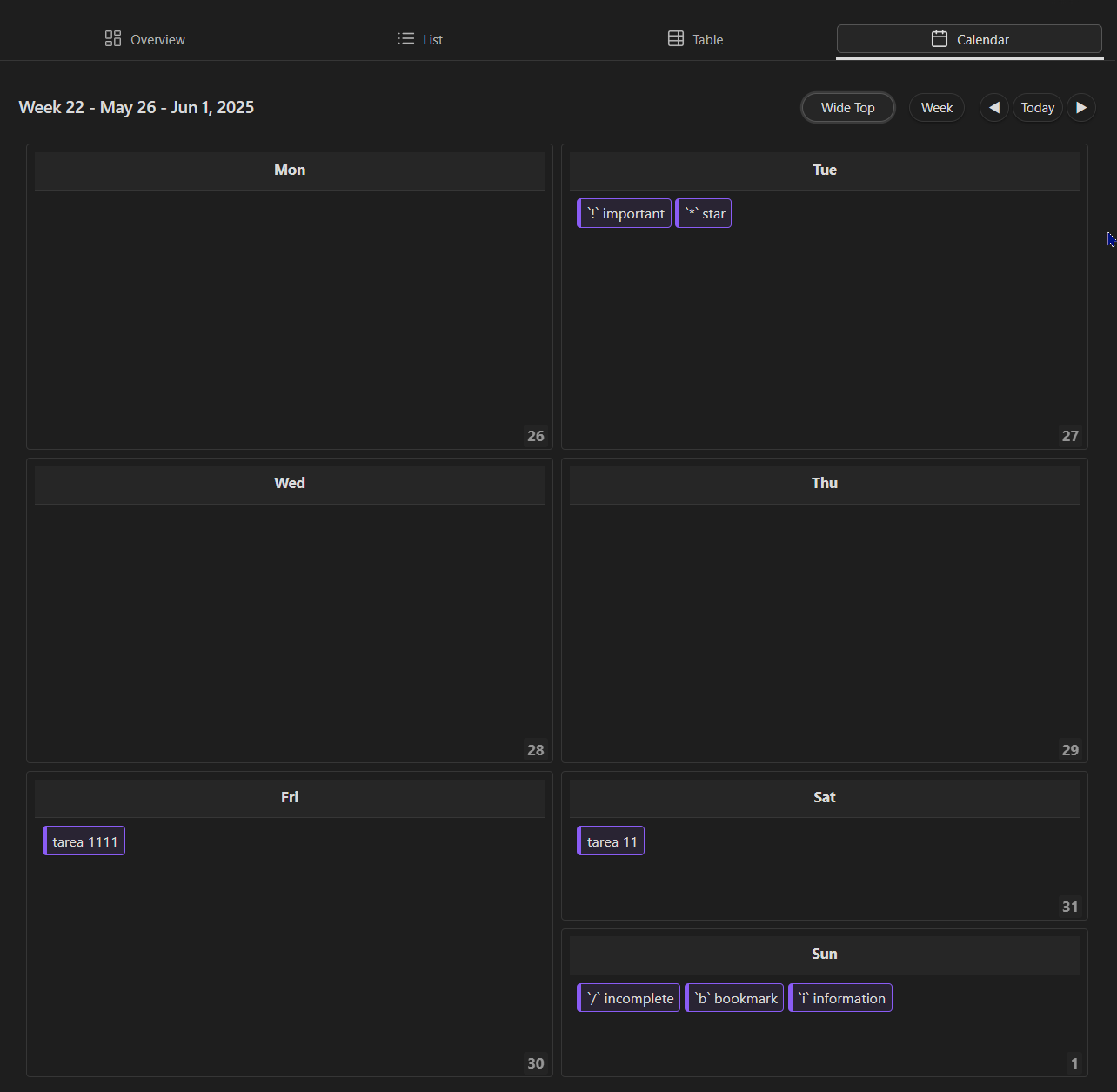 |
| Day View | 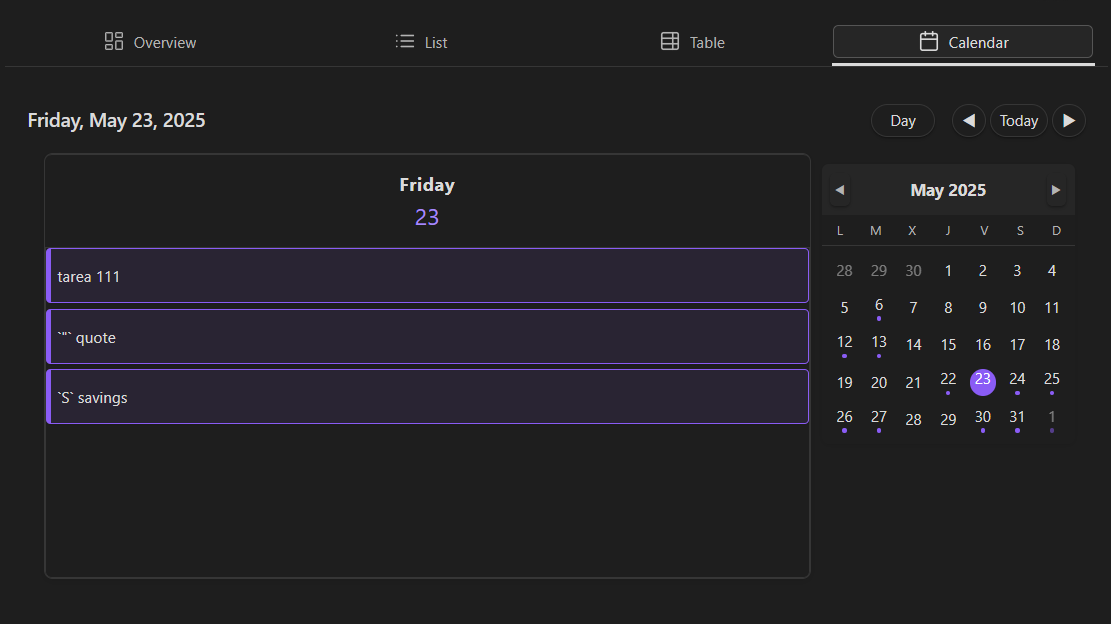 |
| View | Screenshot |
|---|---|
| Habit Dashboard | 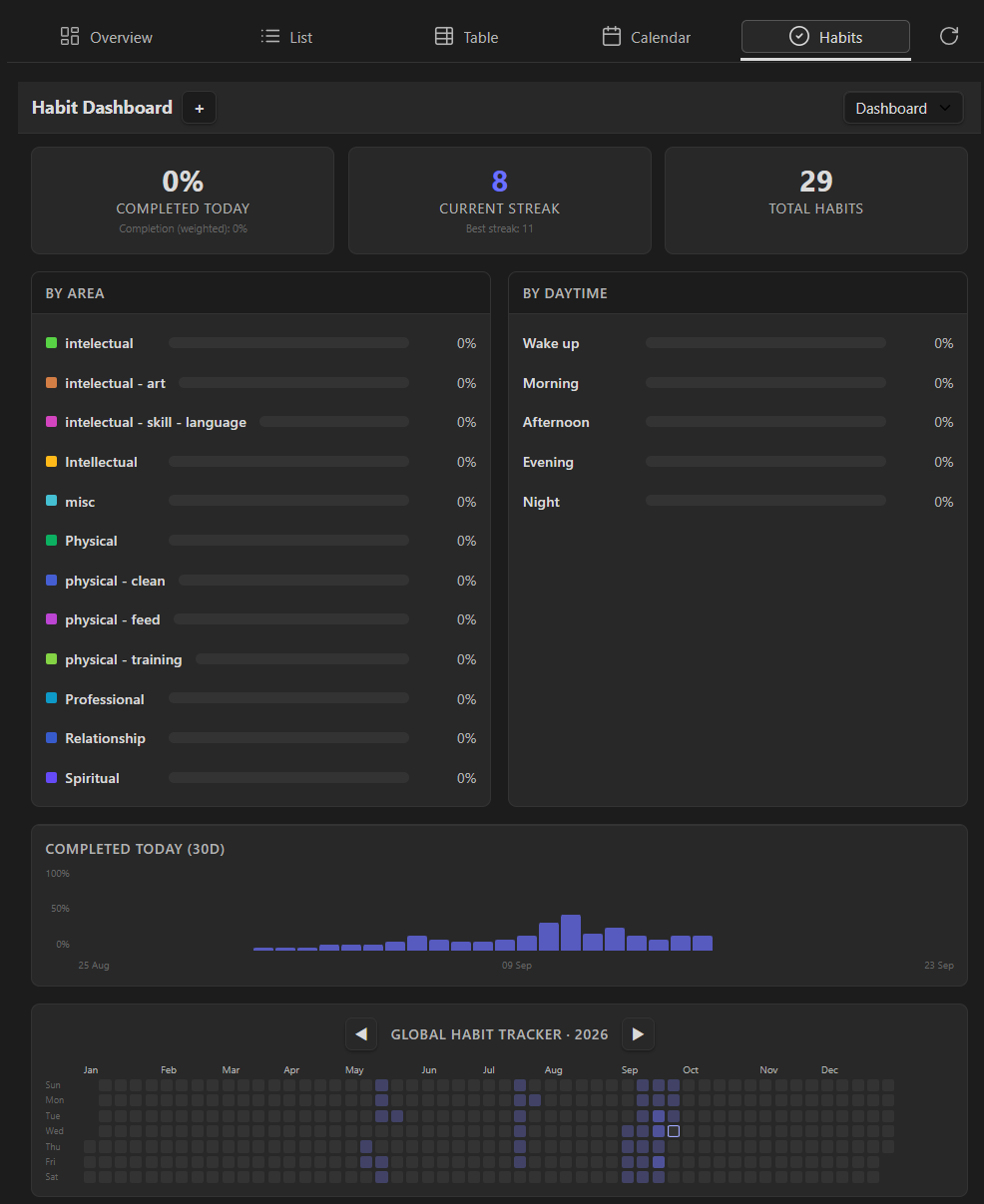 |
| Daily Routine | 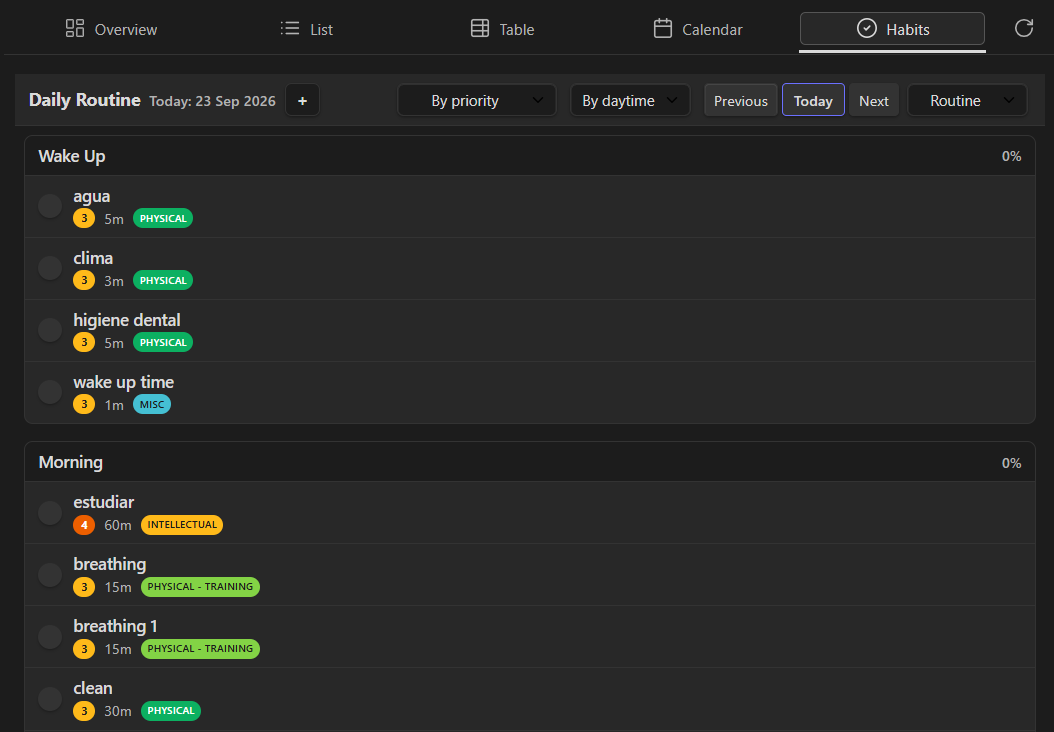 |
| Habit Grid | 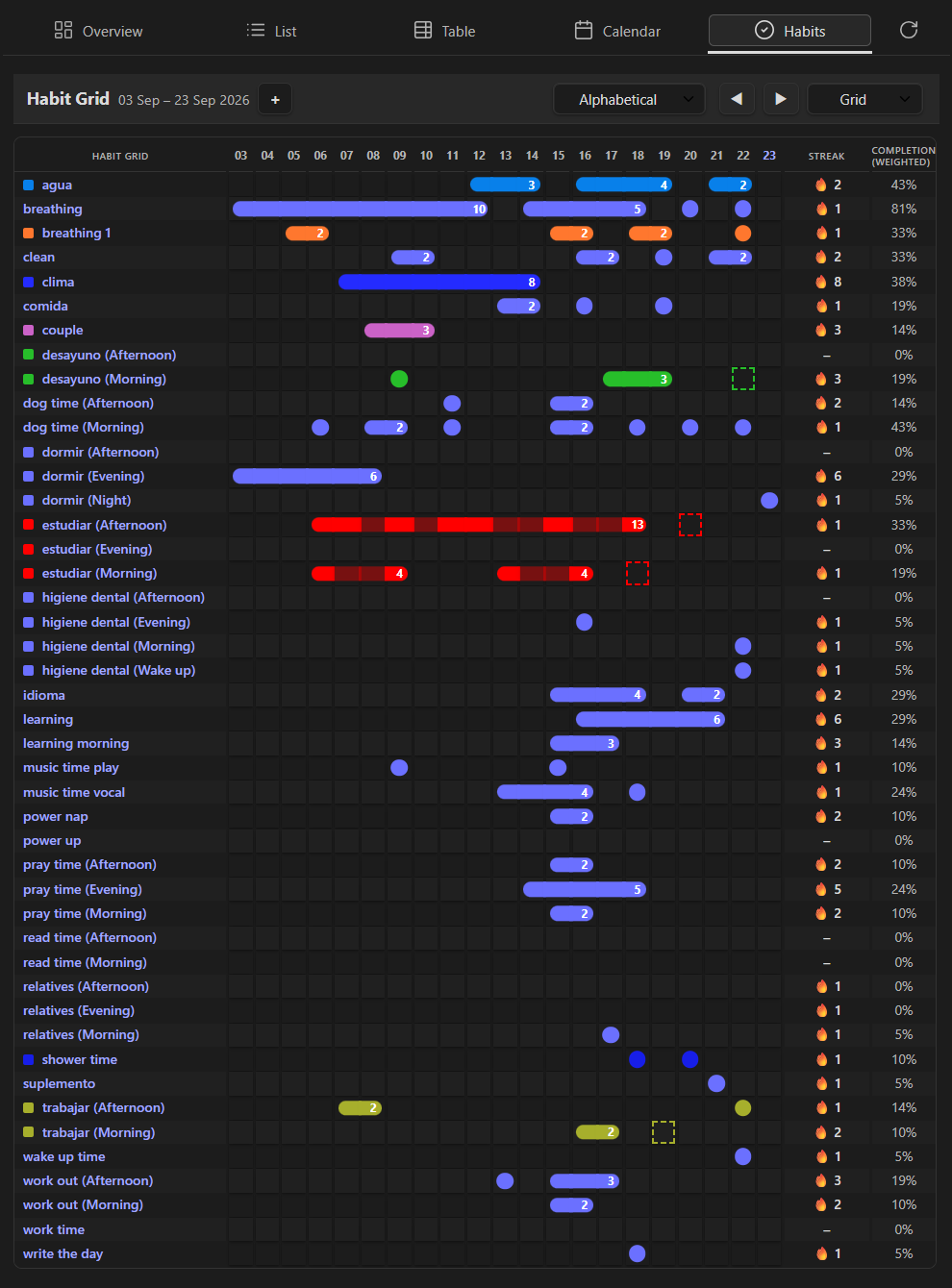 |
| Habit List | 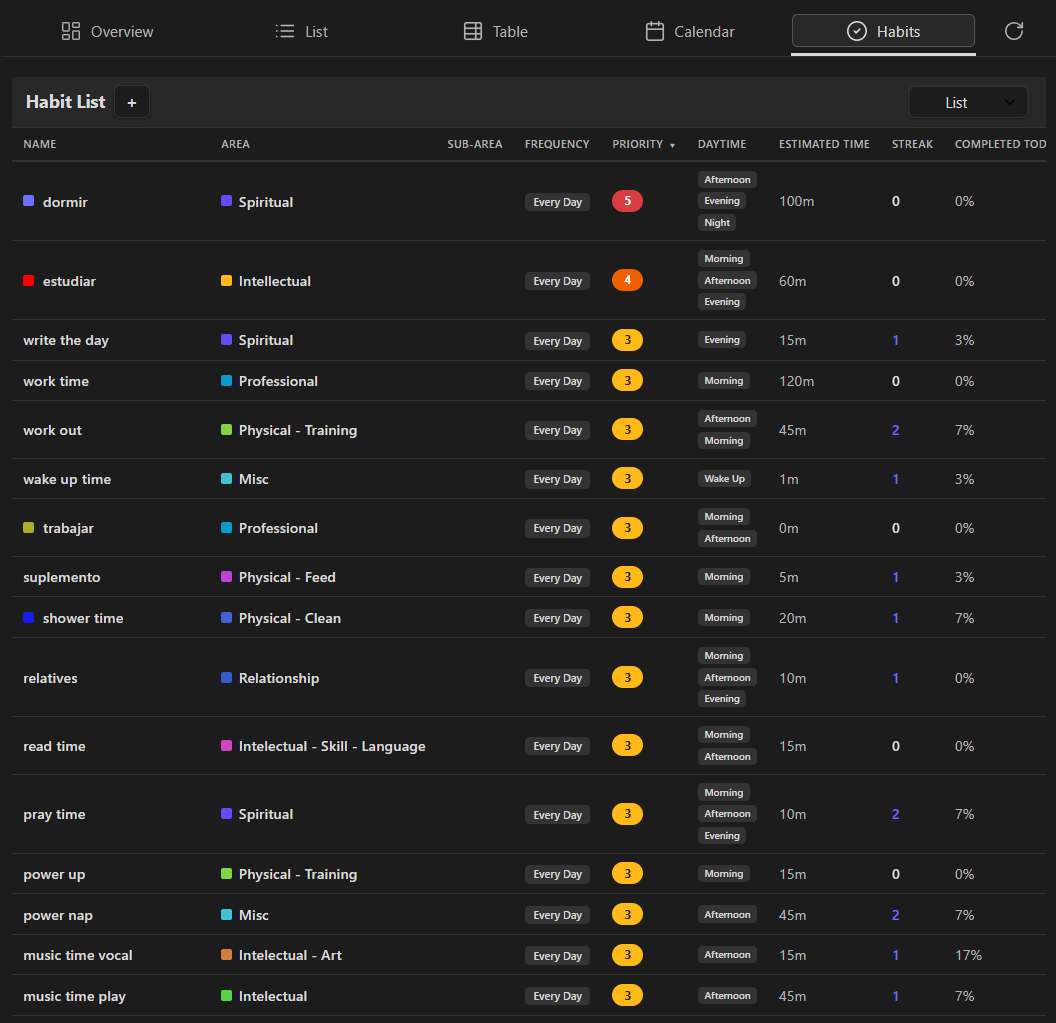 |
📥 Installation
From Obsidian Community Plugins (Recommended)
- Open Obsidian Settings
- Navigate to Community Plugins and disable Safe Mode
- Click Browse and search for "Agenda"
- Click Install and then Enable
Manual Installation
- Download the latest release from the releases page
- Extract the zip file to your vault's
.obsidian/plugins/obsidian-agenda/folder - Verify the following files are present:
main.jsstyles.cssmanifest.json
- Enable the plugin in Obsidian Settings → Community Plugins
Requirements:
- Obsidian v0.13.0 or higher
- No additional dependencies required
🚀 Quick Start
Creating Your First Agenda View
- Click the Agenda icon in the left sidebar ribbon
- Select your preferred view type:
- Overview - Dashboard with key metrics
- List - Detailed task list
- Table - Spreadsheet view
- Calendar - Calendar visualization
- Your tasks will automatically populate from your vault
Common Actions
- Filter tasks - Use the filter panel to narrow down tasks
- Create task - Use Ctrl+P or the create button
- Edit task - Click any task to edit inline or in modal
- Sort tasks - Click column headers to sort (List and Table views)
For comprehensive guides, visit the Wiki.
🖱️ Gestures & Interactions
A quick reference of clicks, double-clicks and drags across the plugin — handy while you're getting familiar with it.
📅 Calendar Views (Day / Week / Work Week / Month / Year)
| Gesture | Where | Result |
|---|---|---|
| Click | A task pill | Opens the Edit Task modal, prefilled with that task's data |
| Double-click | A task pill | Opens the underlying note, cursor on that line |
| Click | A view-type icon button (header) | Switches to that calendar view (Day/Week/Work Week/Month/Year), keeping the current reference date |
| Click | A day cell (Month/Week/Work Week/Year) | Selects and highlights that date as the shared reference date |
| Click | A day number (Month/Week/Work Week/Year) | Jumps to the Day view for that date |
| Double-click | Empty space in a day cell | Opens Create Task prefilled with that date |
| Click | The date picker trigger (header, Month/Week/Work Week/Year) | Opens a popover to jump to any day, month or year |
| Click | A date in the date picker (popover or Day view sidebar) | Jumps to that date, updating the shared reference date |
| Drag | A task pill to another day (Month/Week/Work Week) | Reschedules the task to that day (moves whichever date anchors it: scheduled > due > start) |
| Drag | A task pill to another hour slot (Day view) | Changes the task's scheduled time, snapping to the exact half-hour (:00/:30) under the pointer |
| Drag | The bottom edge of a task block (Day view) | Resizes the task's duration in 30-minute steps (30-minute minimum) |
| Double-click | Empty space in an hour slot or the "All day" section (Day view) | Opens Create Task prefilled with that date/time |
| Click | The "All day" section header (Day view) | Expands/collapses the due/start section |
| Click | The sidebar collapse handle (Day view) | Collapses/expands the mini-calendar sidebar |
📋 List, Table & Overview
| Gesture | Where | Result |
|---|---|---|
| Click | A task row/item (List or Table view) | Opens the Edit Task modal, prefilled with that task's data |
| Double-click | A task row/item | Opens the underlying note, cursor on that line |
| Click | A column header (Table view) | Sorts by that column; click again to reverse. Sorting is also keyboard-accessible with Enter or Space |
| Hover or keyboard focus | A control or widget with a tooltip | Shows a themed tooltip with its explanatory text |
Table filters and search are remembered when you return from editing a task or switch views. Column widths adapt to the rows visible after filtering.
🔥 Habit Tracker
| Gesture | Where | Result |
|---|---|---|
| Click | A grid cell or a routine checkbox | Toggles the habit as done/not done for that day (updates instantly, then confirms the write) |
| Click | A group header (Routine view) | Collapses or expands that group; its state is remembered |
| Click | A habit's name (Grid/Weekly view) | Opens the Habit Editor |
| Double-click | A habit's name (Grid/Weekly view) | Opens the habit's underlying note |
| Click | A habit row (List/Table view) | Opens the Habit Editor |
| Double-click | A habit row (List/Table view) | Opens the habit's underlying note |
| Click | "Open note" action (Routine view) | Opens the habit's own note |
| Click | "Open related file" action (Routine/Table view) | Opens the file linked in the habit's related-files field |
| Click | A column header (Table view) | Sorts by that column |
📝 Task Format and Compatibility
Agenda Tasks works seamlessly with tasks created using the standard Obsidian checkbox format (- [ ]) and is fully compatible with the popular Obsidian Tasks plugin.
Supported Metadata
The plugin recognizes and properly handles all standard Obsidian Tasks metadata, plus its own time-of-day extensions (v1.1.4):
| Metadata | Icon | Example | Notes |
|---|---|---|---|
| Due Date | 📅 | - [ ] Task 📅 2024-12-31 |
Always a whole day |
| Scheduled Date | ⏳ | - [ ] Task ⏳ 2024-06-15 |
Only date that can carry a time/duration |
| Scheduled Time | 🕐 | - [ ] Task ⏳ 2024-06-15 🕐 14:30 |
Optional, 24h HH:mm; requires a scheduled date |
| Duration | ⏱️ | - [ ] Task ⏳ 2024-06-15 🕐 14:30 ⏱️ 90m |
Optional, minutes; requires a scheduled time (block mode) |
| Start Date | 🛫 | - [ ] Task 🛫 2024-06-01 |
Always a whole day |
| Priority | ⏬🔽🔼⏫🔺 | - [ ] Task ⏫ |
Lowest/Low/(Normal, no icon)/Medium/High/Highest |
| Recurrence | 🔁 | - [ ] Task 🔁 every day |
Natural-language recurrence |
| Depends on | ⛔ | - [ ] Task ⛔ abc123,def456 |
Comma-separated task IDs |
| On completion | 🏁 | - [ ] Task 🏁 delete |
keep or delete |
| ID | 🆔 | - [ ] Task 🆔 abc123 |
Referenced by ⛔ on other tasks |
| Tags | #tag |
- [ ] Task #project #urgent |
⏰ Scheduled time/duration and the fields above are recognized anywhere on the line, in any order — they don't need to be adjacent or in a specific sequence.
Example Task
- [ ] Complete project documentation 📅 2024-12-31 ⏫ #project #documentation
- [ ] Review pull requests ⏳ 2024-06-15 #code-review
- [ ] Team standup ⏳ 2024-06-16 🕐 09:00 ⏱️ 15m 🔁 every weekday
- [x] Submit final report 🛫 2024-06-01 ✅
⚙️ Configuration
View Settings
- Tab Visibility - Choose which views to display in the header
- Default View - Set your preferred view on plugin load
- Theme Integration - Customize colors and appearance
Calendar Settings (new in 1.1.4)
- Show Due/Start/Scheduled Dates - Independently choose which date types appear on calendar views, each with its own icon + color badge
- Show Completed Tasks - Keep completed tasks dimmed on the calendar, or hide them entirely
Filtering & Sorting
- Date Filters - Filter by today, overdue, upcoming, or custom ranges
- Priority Filters - Show tasks by priority level
- Tag Filters - Filter by task tags
- Folder Filters - Organize by file location
Advanced Options
- Keyboard Shortcuts - Customize shortcuts for common actions, including inserting a task field from the editor without opening a modal
- Widget Configuration - Personalize dashboard widgets
- Display Preferences - Adjust how tasks are displayed
- Task Modal mode - The "More fields" (advanced) section of the Create/Edit Task modal remembers whether you left it expanded or collapsed, per device
Habit Tracker Settings
- Habit Folder Path - Vault folder scanned (recursively) for habit notes
- Days to Show - Number of columns/days rendered in the Grid and history charts
- Show Streaks - Toggle streak indicators and counts
- Show daytime for single-daytime habits - Show a small localized daytime badge beside the habit name in Grid and Weekly (on by default; multi-daytime rows always show the badge)
- Default Max Gap - Default tolerance (in days) before a streak breaks
- Tab Visibility - Show/hide each habit view (Grid, Routine, Dashboard, Weekly, Table) independently
Access settings via: Obsidian Settings → Community Plugins → Agenda Tasks
📋 Changelog
Version 1.1.9 📆
- Duration-aware Day view: scheduled tasks render as half-hour-aligned blocks — connected across hours for 60+ minute tasks, half-cell for shorter ones — with overlapping tasks placed in side-by-side lanes instead of covering each other
- Resize a task's duration by dragging the bottom edge of its block in the Day view, snapping to 30-minute steps with a live duration tooltip
- Dragging a task to a new slot in the Day view now snaps to the exact half-hour under the pointer (
:00/:30) instead of preserving the original minute - Shared reference date: switching between calendar view types (Day/Week/Work Week/Month/Year) keeps the current date instead of resetting to today; the selected date is highlighted distinctly from "today" in Month/Week/Work Week/Year
- New date picker popover (Month/Week/Work Week/Year) and always-visible docked picker (Day) to jump to any day, month or year
- Clicking a day cell in Month/Week/Work Week/Year now selects and highlights it as the reference date, without interfering with the existing double-click-to-create-task gesture
- The calendar view-type dropdown was replaced with a compact row of icon buttons with tooltips
- Double-click to create a task directly in the Day view: hour slots prefill date and time, the "All day" section prefills date only
- Day view sidebar (mini-calendar) can now be collapsed
- Fixed:
TaskModalignored the pre-filled date when creating a task from a double-click in Month/Week/Work Week/Year, always defaulting to today - Fixed: a tooltip could be left orphaned in the DOM when switching calendar view types
- Fixed: the Work Week view's task click opened the note directly instead of the edit modal, inconsistent with the rest of the calendar views
Version 1.1.8 🪟
- Refined the task List view with compact rows, clearer folder hierarchy, priority cues, and a stable margin across flat/hierarchical modes
- Refined the task Table view: corrected control styling, improved filter/search layout, status and priority cues, date grouping, and responsive horizontal scrolling
- Added accessible Table sorting by keyboard, persistent search/filter/sort state, and column widths adapted to visible filtered content
- Added a reusable themed tooltip component for plugin views and task modals; expanded task-dashboard widget explanations in English, Spanish, German, French, Italian, and Portuguese
Version 1.1.7 🐛
- Habit views now wait for the initial cache load after saved settings are ready, preventing empty/partial views after startup or plugin updates
- Fixed duplicated YAML frontmatter when editing a habit by replacing the two-step
processFrontMatter+vault.processflow with one write that reconstructs a single block; existing duplicates are repaired on the next edit, preservingcompletionsandentries - Dashboard percentages by area/daytime count completed occurrences individually; a completed morning occurrence counts even if afternoon is still pending
- Grid and Weekly use the same localized daytime badge for occurrence rows;
habitShowSingleDaytimeLabelcontrols the badge for single-daytime habits (default on) - Grid and Weekly remember their last selected sort order; the Habit List status column is sortable
- Routine groups can be collapsed independently, with each group's state remembered
- Habit Grid, Weekly and List use consistent gestures: single-click opens the Habit Editor and double-click opens the underlying note
- Area palette lookup normalizes folder names (for example,
daily planmatchesdaily-plan)
Version 1.1.6 🐛
- Fixed duplicated YAML frontmatter when editing a habit by replacing the two-step
processFrontMatter+vault.processflow with one atomic write that parses, updates and reconstructs a single frontmatter block - Existing habits affected by duplicated frontmatter are normalized the next time they are edited;
completionsandentriesremain preserved - Habit Grid, Weekly and List views now use consistent gestures: single click opens the Habit Editor and double-click opens the underlying note, with click/double-click disambiguation
Version 1.1.5 🐛
- Fixed stale Habit Tracker data after editing a habit:
HabitManager.refreshCache()now parses frontmatter from the freshly read file content rather than relying on Obsidian's asynchronously refreshed metadata cache. - Made production builds portable to CI by restricting the local-vault copy step to development/watch mode.
- Added a GitHub Actions release workflow that installs dependencies from
package-lock.json, builds from the pushed version tag, validates the tag againstmanifest.json, and publishes the generated artifacts.
Version 1.1.4 ⏰
- Time-of-day scheduling:
scheduledtasks can now include a 🕐 time (HH:mm, 24h) and, when a time is set, an ⏱️ duration in minutes for block-mode tasks; both are fully optional/additive and recognized anywhere on the line, so existing notes and the Obsidian Tasks plugin keep working unchanged - New editor integration: a right-click context menu and an "Insert task field" command let you add/replace due, start, scheduled date, scheduled time, duration and priority on the current task line without leaving the editor or opening a modal
- New custom iOS-style scroll wheel picker for scheduled time, and a small modal for duration
- Calendar views gained a new Settings ▸ Calendar group to choose which date types (
due/start/scheduled) appear, each with a distinct icon + color badge; completed tasks are now dimmed (or hidden, via a setting) instead of always shown at full opacity - Day view rebuilt: a real hour-by-hour grid populated from scheduled times, plus a collapsible "All day" section for
due/start(and scheduled tasks without a time) - Drag and drop support in calendar views: drag a task to another day (Month/Week/Work Week) or another hour (Day) to reschedule it in place
- Edit tasks from the calendar: click a task to open an edit modal prefilled with all its data (single click edits, double click still opens the file)
- Task creation/edit modal redesigned: scheduled date is the default field (was due date), priority is now a one-click segmented selector, and a collapsible "More fields" section holds start date, due date, recurrence, dependencies, on-completion behavior and a custom ID
- Various small fixes: task-pill title truncation in calendar views, off-by-one when rewriting a task line in place, and parser robustness so time/duration are recognized regardless of where they appear on the line
Version 1.1.3 🧩
- New optional sub-area field for habits: a combobox populated from the 2nd/3rd-level subfolders of the chosen area (e.g.
body/salud), hidden by default via a new setting — shown below the area in the List and Routine views when enabled - Habit related files: replaced the single
relatedFilepicker with a multi-value field — add wikilinks one by one and remove them individually as removable chips - Habit description is now stored in the note body instead of the frontmatter (with backward compatibility for existing notes)
- Habit List view now sorts by name by default (was priority)
- Fixed a race condition where editing or deleting a habit made it briefly disappear from the Routine/List views until a manual reload
- Fixed a settings-loading bug where new habit settings could silently reset to their default on every reload
Version 1.1.2 🎯
- Habit
subAreareplaced byrelatedFile: link a supporting note to a habit (wikilink-aware), with the same file picker/autocomplete UX as the task modal; openable from the Table (🔗 column) and Routine views - Habit Editor: frequency dropdown and weekday checkboxes are now two-way synced (picking a preset checks the matching days; checking days updates the dropdown to the matching preset or "Custom"); blocks saving with zero days selected
- Habit Editor: Daytime and weekday checkboxes now lay out in a fixed 3-per-row grid
- Grid/Weekly views: unscheduled days sandwiched inside an active streak now render as a thin connecting line instead of breaking the pill; a habit completed on a day that's since been removed from its frequency now shows a distinct "conflict" marker (circle with red diagonal) instead of silently fading away
- Grid/Weekly views: fixed a brief flash of the wrong pill shape during the optimistic toggle-then-refresh window
- Table view now includes inactive habits with a read-only Active/Inactive column, and only responds to double-click (single click no longer opens anything)
Version 1.1.1 🔧
- Settings tab now implements the Obsidian 1.13+ declarative settings API (
getSettingDefinitions()), so plugin settings are findable via the global settings search on newer Obsidian versions; the legacydisplay()implementation is kept for older versions - Distinct workspace tab icons per main view (Overview, List, Table, Calendar, Habits) instead of a shared icon
- Various type-safety and lint cleanups across the Habit Tracker module (no unnecessary type assertions, no unsafe
anyaccess)
Version 1.1.0 🌱
- New Habit Tracker module with 5 dedicated views: Grid, Daily Routine, Dashboard, Weekly and Table
- Habit Creator modal to create/edit habits (circular time dial, priority/max-gap sliders, status switch, color picker)
- Habit area is a free-form field with vault-folder suggestions (no fixed category list)
- Configurable sort order (alphabetical, area, daytime, priority, streak, %) across Grid, Weekly and Routine
- Routine view can group habits by daytime or by area
- Dashboard now shows side-by-side area/daytime breakdowns, a 30-day history chart with axis legends, and a new GitHub-style yearly heatmap; it's the new default habit view
- Streaks rendered as merged "pill" runs on the Grid and Weekly views
Version 1.0.6
- Fix calentar weekday
Version 1.0.5 🎨
- Improved loading experience with skeleton loading (replaced spinner)
- Enhanced list view aesthetics and visual design
- Priority distinction and highlighting in list view
- New hero widget added to dashboard
- Various UI/UX improvements and polish
Version 1.0.4 ✨
- Native task creation from calendar views (add task to calendar)
- Command palette integration (Ctrl+P shortcut for task creation)
- Task reload button in toolbar
- Mouse over highlight in list view
- Alphabetical sorting in list view
- Day line indicator in month view
- Navigate to day view from year view
Version 1.0.3 🎨
- Configurable view header tabs
- Display today's date in Overview tab
- Week number display in header
Version 1.0.2 🐛
- Calendar view year view
- Various bug fixes and stability improvements
Version 1.0.1 🚀
- Enhanced compatibility with Tasks plugin dataview format
- Recursive/repeating tasks support (🔁)
- Mobile device support
Version 1.0.0 🎉
Included Features:
- Multiple task visualization views (Overview, List, Table, Calendar)
- Full compatibility with standard Obsidian task format
- Integration with Obsidian Tasks plugin metadata
- Advanced filtering, sorting, and grouping capabilities
- Customizable display options and themes
Known Limitations (at release):
- Task creation and editing requires Markdown files or Obsidian Tasks plugin
- Calendar view does not support time-of-day scheduling
- View-only functionality for most task operations
🗓️ Planned for Future Versions
- ⬜ Advanced task creation/editing UI
- ⬜ Time-of-day task scheduling
- ⬜ Custom status implementation
- ⬜ Time blocks and scheduling
- ⬜ Advanced dashboard widgets
- ⬜ Integration with external calendar services
🤝 Contributing
We welcome contributions! Whether it's bug reports, feature suggestions, or code improvements:
- Report Issues - GitHub Issues
- Submit PRs - Fork the repository and create a pull request
- Improve Translations - Help translate the plugin to more languages
Development Setup
# Clone the repository
git clone https://github.com/elias-shalom/obsidian-agenda.git
cd obsidian-agenda

# Install dependencies
npm install

# Start development
npm run dev

# Build for production
npm run build
🚀 Releasing a New Version
Releases are built by CI (.github/workflows/release.yml), not from a local machine, so the published main.js is always reproducible from the tagged source with the exact dependency versions in package-lock.json. To publish a new version:
- Bump the version (updates
package.json,manifest.jsonandversions.jsontogether):npm version 1.2.0 --no-git-tag-version - Update the README — add the new version to the News and Changelog sections.
- Commit those changes (version bump + README) to the target branch and push.
- Tag the release commit with the exact version number (no
vprefix — it must matchmanifest.json'sversionfield exactly, or the workflow's version check will fail the release):git tag 1.2.0 git push origin 1.2.0 - GitHub Actions then automatically: checks out that tag, runs
npm ci(clean install from the lockfile) +npm run build, verifies the tag matchesmanifest.json, and creates the GitHub Release withmain.js,manifest.jsonandstyles.cssattached — built entirely inside the CI runner, never uploaded by hand.
Note: the dist/**/* → local vault copy step in src/esbuild.config.mjs only runs during npm run dev (watch mode) for local testing convenience — it's skipped automatically in npm run build (used both locally and by the release workflow) so it never affects release artifacts.
💬 Support and Feedback
Getting Help
- 📖 Check the Wiki
- 🐛 Report bugs on GitHub Issues
- 💡 Suggest features via GitHub Discussions
Feedback
Your feedback helps us improve! Please share:
- Feature requests
- Bug reports
- Usage suggestions
- Translation improvements
⭐ Support Us
If you find this plugin useful, please consider:
- ⭐ Starring the GitHub repository
- 📢 Sharing it with others
- 💬 Reviewing the plugin in Obsidian Community
- 🐛 Reporting bugs and suggesting improvements on GitHub
- 🌍 Contributing translations to support more languages
📄 License
This project is licensed under the MIT License.
Made with ❤️ for the Obsidian community