
README file from
GithubActivity Tree Calendar
What it does
Obsidian makes it easy to find a note by name—but not to answer “What was I working on that day?”
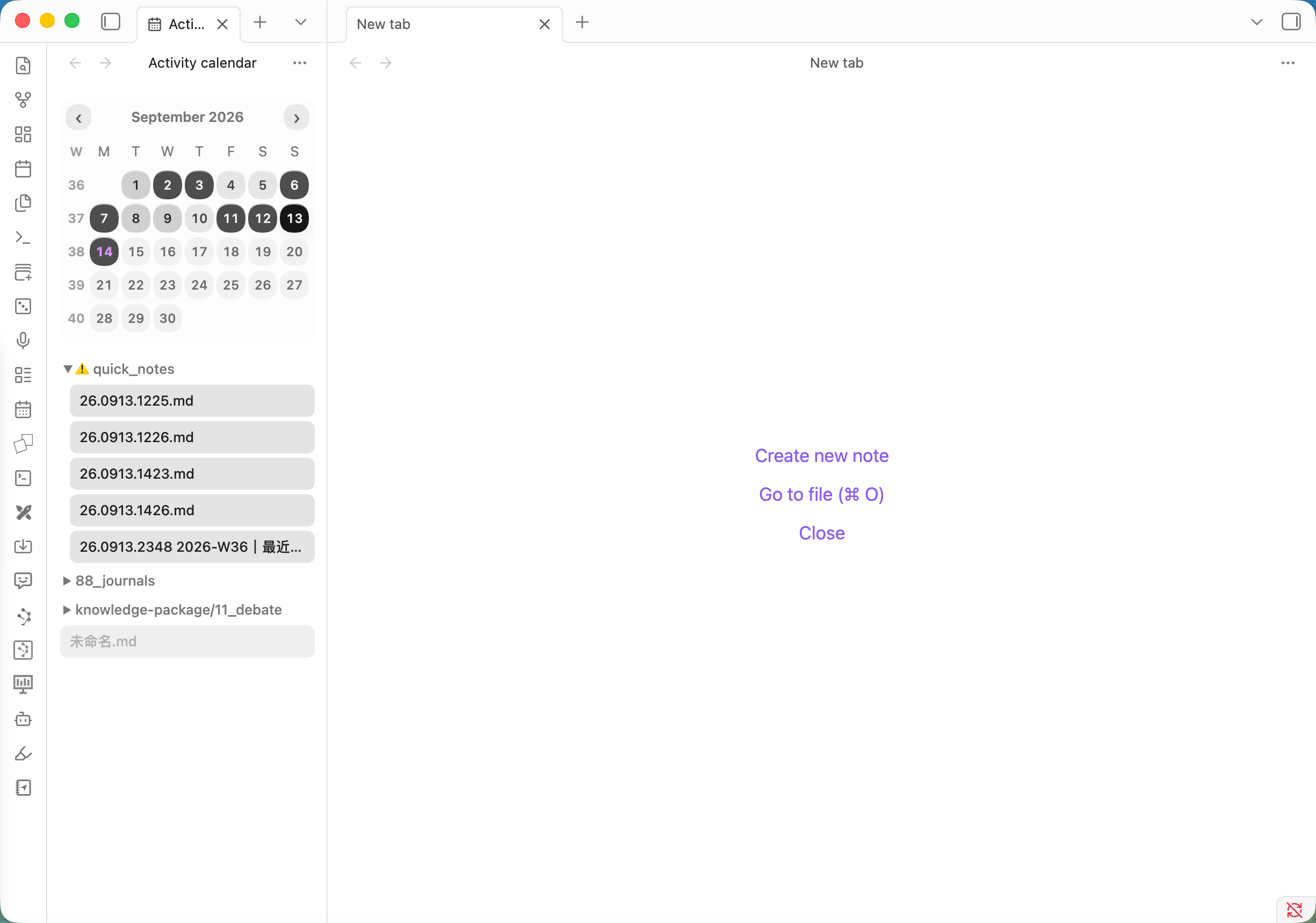
Activity Tree Calendar turns your local edit history into a monthly heatmap. Pick a date and the files you edited that day appear immediately in a compact folder tree.
| 1. Scan the month | 2. Pick a date | 3. Reopen the work |
|---|---|---|
| Darker circles reveal your active days. | One click filters the list to that day. | Select any file to open it in Obsidian. |
Why you’ll find it useful
1. Find notes by when, not what
You may forget a filename while still remembering when you worked on it—a meeting last Tuesday, a weekend trip, or a particularly productive week. Start from the date and recover the related notes without guessing search terms.
2. Busy days stay organized
Editing many notes in one day does not turn into an overwhelming flat list. Files remain grouped in a collapsible folder tree, single-child folder chains are compressed, and every note title stays separately clickable.
01_Psychology/02_Life principles
  A note I edited.md
Whether the day contains 3 notes or 30, your familiar vault structure makes them easy to browse and find.
3. See your creative rhythm across the month
The calendar shows more than isolated file timestamps. Its heat levels reveal your creative frequency across the entire month—active stretches, quieter periods, and the rhythm of returning to your notes.
The darkest shade uses a fixed threshold so the visual scale stays understandable. The default is 10 edited files, configurable from 1–100.
Core features
- Monthly activity heatmap — understand your writing rhythm at a glance.
- Day-to-file navigation — click a date to see and open every Markdown file edited that day.
- Collapsible folder tree — preserve vault structure without wasting horizontal space.
- Sidebar-first layout — responsive calendar, single-line titles, and ellipsis for narrow panes.
- Automatic localization — Chinese and English follow the current Obsidian language.
- Local-only history — no account, analytics, or network requests.
Open the calendar
- Select the calendar icon in the Obsidian ribbon; or
- Run Open activity calendar from the command palette.
Use the arrow buttons to switch months. Select a date to filter the file tree, then select a file to open it.
Opening the calendar from the ribbon or command palette always selects today and shows the current month. While the calendar stays open, it follows the new day after midnight if today was selected; browsing a historical date keeps your selection.
Settings
Open Settings → Community plugins → Activity Tree Calendar.
| Setting | Default | Purpose |
|---|---|---|
| Darkest heat threshold | 10 files | Controls how many edited files produce the strongest heat level. |
Language
The interface follows Obsidian automatically—there is no separate language switch inside the plugin.
- Chinese Obsidian → 简体中文
- English and other locales → English
This includes month formatting, weekdays, commands, settings, empty states, and accessibility labels.
Installation
From a GitHub release
- Download
main.js,manifest.json, andstyles.cssfrom the latest release. - Create
<vault>/.obsidian/plugins/activity-tree-calendar/. - Copy the three files into that folder.
- Reload Obsidian.
- Enable Activity Tree Calendar under Community plugins.
Privacy
The plugin does not make network requests. Activity history and settings stay in the local plugin data file inside your vault.
It records the paths of Markdown files when Obsidian reports create, modify, or rename events. Note contents are not copied into the activity history.
Development
Requires Node.js 18 or later.
npm install
npm run dev
Production checks:
npm run build
npm run lint
npm test
Download history
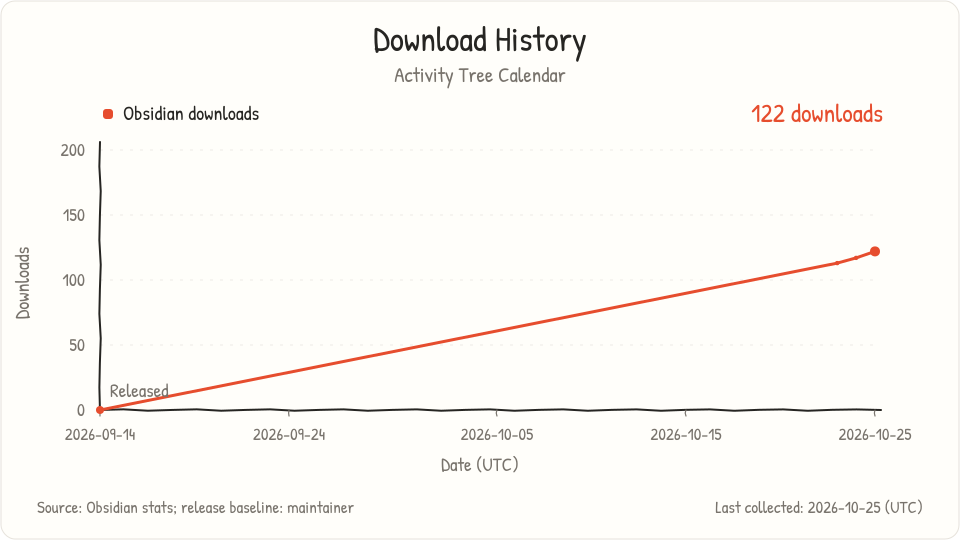
Daily snapshots of the cumulative download count in Obsidian's official statistics. Collection dates use UTC. The release baseline is 0 downloads on September 14, 2026, provided by the maintainer.